
Scan
See the newest headlines from ten Hungarian publishers in one compact list.
projects / chrome extension
Mai hírek rss puts fresh headlines from ten Hungarian publishers in one compact Chrome feed.
Scan the day, compare how different publishers cover the same story, save what you want to read, and open every article on its original website.
Opens the official Chrome Web Store listing
Sources
10 Hungarian publishers
Hírkép
Compare coverage
Reading
Popup or side panel
Account
No sign-up
Scan
See the newest headlines from ten Hungarian publishers in one compact list.
Compare
Use Hírkép to see how several publishers cover the same story.
Read
Open the article on the publisher's website when a headline is worth your time.
Why I built it
I wanted a faster way to see what Hungarian publishers were reporting without opening ten homepages.
Mai hírek rss keeps the useful part: the original headline, publisher, time, and link. You decide what deserves a click.
Included publishers
Four views
Open the extension for the full feed, focus on unread items, compare a story in Hírkép, or return to saved headlines.
01
The newest headlines from every source you have enabled.
02
A clean catch-up list of headlines you have not opened yet.
03
Similar headlines from different publishers grouped by story.
04
The short reading queue you want to come back to.
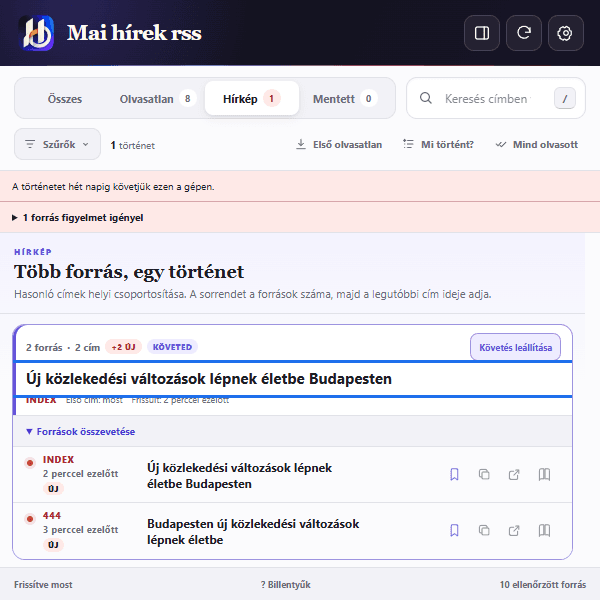
Hírkép
Hírkép groups similar headlines when at least two publishers cover the same story. Their original titles stay side by side, so the difference in emphasis is easy to spot.
Original headline from each publisher
Direct link to every article
Different angles kept side by side
Follow a grouped story for seven days
Daily use
The feature set stays around one job: scan headlines, compare coverage, keep a short queue, and open the original article when it is worth reading.
Settings
Keep all ten publishers, turn off the ones you rarely read, and put your preferred sources first. Notification timing and feed behaviour can be changed from the same settings page.
Sources
Show, hide, and reorder publishers
Keywords
Follow or mute words
Notifications
Set quiet hours and alert preferences
Backup
Export or restore your local setup
Privacy
Read markers, saved headlines, followed stories, muted words, and settings stay in the extension storage on your Chrome profile. Mai hírek rss has no user account, ads, or analytics.
Publisher feed servers still receive normal connection data when the extension checks for headlines. Chrome may sync an item when you send it to Reading List and have Chrome sync enabled.
Read the full privacy policy for details.
Get the extension
Install it from the official Chrome Web Store, then open the extension from the Chrome toolbar.
Opens the Chrome Web Store