
Microsoft OLE DB Driver for SQL Server downloads and provider names
The release tables list Microsoft installers by version and architecture, with dates and release-note links.
Last checked 11 October 2026 · Microsoft downloads
| Driver family | Version | Released | Windows installers | Release notes |
|---|---|---|---|---|
| 19.x Latest GA | 19.4.3 | October 9, 2026 | Notes for 19.4.3 | |
| 18.x Newest listed in this family | 18.7.6 | October 9, 2026 | Notes for 18.7.6 |
Older versions are listed for application compatibility and version lookup. Listing a release does not establish its current support status. Verify the downloaded package version and Microsoft signature before installation.
Previous OLE DB driver versions and downloads 31 releases
31 of 31 release records. Separate searches with a semicolon.
| Version | Released | Downloads | Release notes |
|---|---|---|---|
| 19.4.3 | October 9, 2026 | Notes for 19.4.3 | |
| 19.4.2 | May 22, 2026 | Notes for 19.4.2 | |
| 19.4.1 | May 09, 2025 | Notes for 19.4.1 | |
| 19.3.7 | September 26, 2025 | Notes for 19.3.7 | |
| 19.3.6 | September 09, 2025 | Notes for 19.3.6 | |
| 19.3.5 | July 09, 2024 | Notes for 19.3.5 | |
| 19.3.3 | April 09, 2024 | Notes for 19.3.3 | |
| 19.3.2 | October 10, 2023 | Notes for 19.3.2 | |
| 19.3.1 | June 15, 2023 | Notes for 19.3.1 | |
| 19.3.0 | February 14, 2023 | Notes for 19.3.0 | |
| 19.2.0 | October 26, 2022 | Notes for 19.2.0 | |
| 19.1.0 | August 31, 2022 | Notes for 19.1.0 | |
| 19.0.0 | February 15, 2022 | Notes for 19.0.0 | |
| 18.7.6 | October 9, 2026 | Notes for 18.7.6 | |
| 18.7.5 | May 09, 2025 | Notes for 18.7.5 | |
| 18.7.4 | July 09, 2024 | Notes for 18.7.4 | |
| 18.7.2 | April 09, 2024 | Notes for 18.7.2 | |
| 18.6.7 | October 10, 2023 | Notes for 18.6.7 | |
| 18.6.6 | June 15, 2023 | Notes for 18.6.6 | |
| 18.6.5 | December 15, 2022 | Notes for 18.6.5 | |
| 18.6.4 | August 31, 2022 | Notes for 18.6.4 | |
| 18.6.3 | December 15, 2021 | Notes for 18.6.3 | |
| 18.6.0 | June 18, 2021 | Notes for 18.6.0 | |
| 18.5.0 | December 1, 2020 | Notes for 18.5.0 | |
| 18.4.0 | May 2020 | Notes for 18.4.0 | |
| 18.3.0 | October 2019 | Notes for 18.3.0 | |
| 18.2.3 | June 2019 | Notes for 18.2.3 | |
| 18.2.2 | May 2019 | Notes for 18.2.2 | |
| 18.2.1 | February 2019 | Notes for 18.2.1 | |
| 18.1.0 | July 2018 | Notes for 18.1.0 | |
| 18.0.2 | March 2018 | Notes for 18.0.2 |
Release history from Windows release notes · Microsoft downloads. Refreshed through the scheduled SQL reference sync.
Client-driver versions are separate from Database Engine builds. The SQL Server updates reference lists engine servicing releases. Record provider changes with the application deployment using them.
| Family | Provider | Use | Download/check |
|---|---|---|---|
| 19 | MSOLEDBSQL19 | Driver 19 provider | x64/ARM64 and x86 installers |
| 18 | MSOLEDBSQL | Existing application dependency | Older releases |
| SQL Server Native Client | SQLNCLI11 / SQLNCLI | Older application inventory; plan migration | Not the current driver |
| Windows legacy provider | SQLOLEDB | Older application inventory; plan migration | Not the current driver |
Drivers 19 and 18 can coexist. MSOLEDBSQL continues selecting Driver 18, while Driver 19 uses its own provider name. Microsoft recommends the current driver for new development. The provider-generation overview describes legacy provider names.
ODBC is a separate interface with separate registration. The ODBC reference applies to ODBC drivers and DSNs. OLE DB installation and ODBC DSN creation are independent operations.
Which Windows and SQL Server versions are supported?
The driver version does not need to match the SQL Server release year. Check the exact driver build against both the client operating system and the database version in Microsoft's support matrix.
As checked on 10 October 2026, Microsoft's 19.4.2-and-later row lists Windows 11 and Windows Server 2016–2025, excluding Windows 10. The 19.3.5-and-later and 18.7.4-and-later rows list SQL Server 2016–2025 and the specified Azure SQL services, excluding SQL Server 2012 and 2014. Compatibility is assessed for the full driver release, engine lifecycle and application-vendor configuration.
Choose the OLE DB installation host and architecture
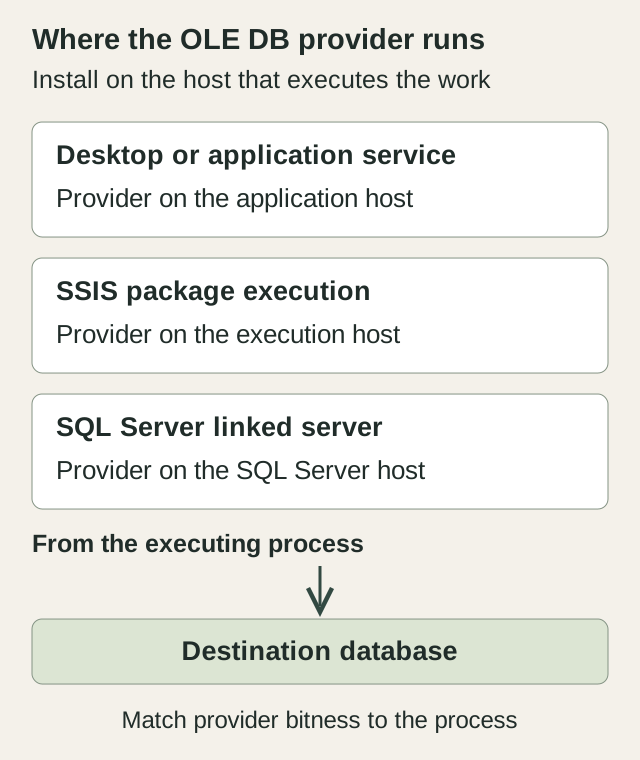
For an ordinary Windows application, that is the application host. For an SSIS package, identify where execution actually occurs and whether it uses a 32-bit or 64-bit runtime. For a SQL Server linked server, the provider runs on the SQL Server host, not the DBA's SSMS workstation.
The provider binaries must match the process architecture. Microsoft's x64 installer supplies both x64 and x86 binaries, and the current 64-bit package selects x64 or ARM64 for the host OS. Installer selection therefore requires the host and process architectures.
For Driver 19.3 and later, install the required Visual C++ Redistributable before running the driver MSI. The x64 package requires both x86 and x64 redistributables. An ARM64 deployment requires the ARM64 prerequisite; an x86 deployment requires x86. Use the requirements for the exact release and host architecture. Microsoft's installation instructions.
Offline packages include the required redistributables and signed Microsoft MSI, with recorded versions. Supported installation uses the MSI rather than a manually copied and registered DLL.
Differences between desktop and scheduled results may involve execution host, architecture or account. A scheduler can use another server or runtime, each requiring its own provider installation.
How to install the OLE DB Driver for SQL Server on Windows
Install the prerequisites first, then run the Microsoft driver MSI with administrator privileges. Installing Driver 19 alongside Driver 18 leaves existing MSOLEDBSQL consumers on Driver 18 until their configuration changes.
- Record the existing package version and provider. Check the intended build against the client OS, database version and application requirements.
- Download the Microsoft MSI and required Visual C++ Redistributables for that host. For an x64 driver installation, install both x86 and x64 redistributables.
- Run the MSI and complete license review and setup. Unattended installation requires prior license acceptance.
- Check the installed version, reopen the application or connection manager, and select the intended provider.
- Test from the actual execution host and account. Keep the old configuration available until the application checks pass.
msiexec /i "C:\Packages\msoledbsql.msi" /qn /norestart IACCEPTMSOLEDBSQLLICENSETERMS=YES /L*v "C:\Packages\oledb-install.log"Replace the paths with your downloaded MSI and an existing writable log directory. IACCEPTMSOLEDBSQLLICENSETERMS=YES explicitly accepts the license; /qn hides the setup UI. Retain the installer exit result and log, and follow any restart requirement before testing. See Microsoft's installation options.
Setup failures are diagnosed from the installer log and prerequisite versions. Connection, TLS and workload tests follow successful installation.
Check the installed OLE DB driver and effective provider
Installed Apps and the PowerShell inventory report package installation. The example uses a 64-bit shell to read both registry branches. It performs no connection test or MSI repair.
$oleDbPaths = @(
    'HKLM:\SOFTWARE\Microsoft\Windows\CurrentVersion\Uninstall\*',
    'HKLM:\SOFTWARE\WOW6432Node\Microsoft\Windows\CurrentVersion\Uninstall\*'
)
Get-ItemProperty -Path $oleDbPaths -ErrorAction SilentlyContinue |
    Where-Object DisplayName -like 'Microsoft OLE DB Driver*' |
    Select-Object DisplayName, DisplayVersion, Publisher
The effective Provider= value or connection-manager selection determines which provider an application requests. Deployed settings may override the configuration stored in source control.
Microsoft's provider-specific check reads InstalledVersion under HKLM:\SOFTWARE\Microsoft\MSOLEDBSQL19 or MSOLEDBSQL, and the corresponding WOW6432Node\Microsoft branch. See the installation-check instructions. Registry checks identify installed providers; application configuration identifies the requested one.
Record the full version as well as the major family. The full build identifies the servicing release and provides the baseline for upgrade comparisons.
For native applications that use provider interfaces directly, check the updated header and CLSID requirements in the major-version migration documentation. Changing a text connection string is not the whole migration when the provider identifier is compiled into the application.
Applications may continue requesting an older family after a new family is installed. Dependency inventory and migration testing precede removal. Microsoft's driver lifecycle page describes support status by release.
Use MSOLEDBSQL19 connection strings for the correct interface
OLE DB initialization uses different keyword sets depending on the API. A native application can select the Driver 19 provider and set DBPROP_INIT_PROVIDERSTRING before calling IDBInitialize::Initialize. ADO and IDataInitialize::GetDataSource instead accept an initialization string that includes the provider name. Driver 19 uses string-valued encryption modes; Driver 18 uses a Boolean encryption property.
Server=sql01.example.com;
Database=ApplicationDb;
Trusted_Connection=yes;
Encrypt=Mandatory;
TrustServerCertificate=no;Provider=MSOLEDBSQL19;
Data Source=sql01.example.com;
Initial Catalog=ApplicationDb;
Integrated Security=SSPI;
Use Encryption for Data=Mandatory;
Trust Server Certificate=False;Substitute the host and database for a Windows-integrated connection. The first example is a native provider-string value, with the provider selected separately. The second uses Provider=MSOLEDBSQL19 in an initialization string. Each API has its corresponding encryption and validation keywords. Explicit initialization properties can override provider-string values.
ADO connection string and data type compatibility
For an ADODB.Connection, also set DataTypeCompatibility=80, as required by Microsoft's ADO guidance. This maps newer data types into types ADO can consume. Test XML, date/time and large-value fields used by the application.
Provider=MSOLEDBSQL19;
Data Source=sql01.example.com;
Initial Catalog=ApplicationDb;
Integrated Security=SSPI;
DataTypeCompatibility=80;
Use Encryption for Data=Mandatory;
Trust Server Certificate=False;
DataTypeCompatibility=80 limits available features to the SQL Server 2005 feature set for ADO compatibility. It does not change database compatibility level and is not required by every native OLE DB application. See the data type compatibility rules.
The major-version differences and keyword reference specify the applicable API, property names and value types. A rejected initialization property is diagnosed before server authentication.
OLE DB Driver 18 vs 19 encryption changes
| Setting | Driver 18 | Driver 19 |
|---|---|---|
| Provider name | MSOLEDBSQL | MSOLEDBSQL19 |
| Ordinary default encryption | No / Optional; authentication and policy can change this | Mandatory |
| Native encryption property | VT_BOOL | VT_BSTR; Optional, Mandatory or Strict |
| Strict mode | Unavailable | TDS 8.0; requires a compatible endpoint, such as SQL Server 2022 or later |
Microsoft's migration reference defines these differences. Record the tested provider build and explicit encryption configuration.
Driver 19 changes the ordinary default from Optional/no to Mandatory. Selecting it can expose certificate-validation failures previously bypassed by the old connection. Provider installation does not deploy CA trust to the application host.
Validation requires a trusted issuing chain and certificate names covering the endpoint. The certificate-trust guide covers these checks. Authentication settings are investigated separately when the connection reports a login error.
A trust bypass changes certificate validation, while disabling encryption changes transport protection. Neither configures CA trust or endpoint names. Strict mode requires a compatible TDS 8.0 endpoint and uses its specified validation behavior. See Microsoft's encryption combinations.
Client registry policy can affect encryption in addition to connection properties. When effective behavior differs from the string, compare the installed build and machine policy. Machine-wide changes also affect other applications.
Microsoft's known issues and release notes identify servicing fixes relevant to older deployments. Test an applicable fixed build alongside the application requirements.
Fix OLE DB provider loading errors before login troubleshooting
Provider-not-found and class-not-registered errors occur before a connection reaches SQL Server. Check installation and registration of the requested provider on the execution host, with the matching architecture.
- Read the exact requested provider name from the deployed connection or connection manager.
- Confirm the executing computer. A remote scheduler or SQL Server linked server can use a different host from the interactive test.
- Check process architecture against the installed driver binaries and prerequisites.
- Install or repair through the supported Microsoft package on that host, then reopen the application connection and repeat the test.
A 32-bit import can fail while a 64-bit desktop connection succeeds on the same host. An SSIS package may also run on a remote server lacking the provider installed on the development workstation. Compare host, process architecture and requested provider.
Applications using several workers require consistent provider availability across eligible hosts. A partial deployment can cause intermittent failures as execution moves between workers. Retain the previous configuration during representative tests on each host.
Once the provider loads, subsequent TLS and authentication failures use the new error for diagnosis. These settings are configured separately from MSI registration. See Microsoft's troubleshooting reference.
Test SSIS, linked server and application driver upgrades
- Record the installed build, provider name, interface, sanitized connection settings and process architecture.
- Install the intended package and prerequisites on a representative nonproduction execution host.
- Select the new provider explicitly and set encryption and validation properties for that interface.
- Test connection startup, parameterized reads, representative writes, transaction rollback and error handling.
- Exercise scheduled execution, pooling and any provider-dependent import/export operations.
- Confirm the previous provider/configuration remains available for a controlled rollback before expanding deployment.
Representative tests cover data types, parameter binding, transactions and application operations as well as connection establishment. Vendor-owned applications also require a supported provider configuration.
Linked-server tests use the provider installed on the SQL Server host. Preserve the definition and authentication mapping, then validate the distributed operation under its required account. Provider-option or transaction-setting changes have consequences beyond registration and require separate assessment.
Record the error, provider and execution host. The SQL Server error reference covers server messages, while the change-planning guide covers wider dependencies. Remote upgrade support is available with application-provider responsibilities agreed separately.
OLE DB driver questions
Is the Microsoft OLE DB Driver for SQL Server deprecated?
The current Microsoft OLE DB Driver is the recommended OLE DB provider for new SQL Server applications. Older SQLNCLI/SQLNCLI11 and SQLOLEDB providers have different status; SQLOLEDB is in maintenance mode. Check Microsoft's provider policy and the driver lifecycle for the specific dependency.
Can I install this OLE DB driver on Linux or macOS?
Microsoft distributes this OLE DB driver for Windows. For a Linux or macOS client, use a supported interface such as the Microsoft ODBC Driver for SQL Server, if the application supports it. The database server's operating system does not determine the client provider's platform.