
Identify the client reporting the SQL Server certificate error
Microsoft documents the message The certificate chain was issued by an authority that is not trusted
as a certificate-validation failure during connection establishment. The surrounding message may mention login, although database authentication has not necessarily completed. See the Microsoft certificate authority troubleshooting reference.
The initial diagnostic record should include the application or SSMS version, driver family, server address, execution account and encryption settings. Workstation rebuilds, driver updates, certificate renewals and connection-name changes are relevant when establishing when the failure began.
Compare one working client with the failing client. If the same endpoint works from a managed workstation but fails from a newly deployed service host, check the service host's trust chain first. If every client fails after a certificate replacement, inspect the certificate SQL Server actually loaded.
Microsoft describes the error and related default changes in its untrusted certificate authority troubleshooting guide. Expiry, hostname mismatch and protocol errors require different checks, even when the application reports them all as SSL failures.
Why an ODBC or OLE DB upgrade exposes certificate trust errors
Newer clients commonly request encryption without an explicit opt-in. SSMS 20 and later use Mandatory encryption by default. ODBC Driver 18, OLE DB Driver 19 and Microsoft.Data.SqlClient 4 also changed encryption defaults. The server can remain untouched while a newly updated client starts validating its certificate.
A client rollback can restore an older encryption default and suppress the validation failure. Comparing the explicit encryption and trust settings of both versions determines whether the rollback changed certificate validation or resolved another compatibility issue.
The ODBC 17-to-18 migration guide covers installation and version checks. Microsoft describes the certificate error after a native-client driver migration. Certificate trust is configured through the client environment and connection settings, separately from driver installation.
Encryption options can also come from a DSN, connection string or application framework. Saved and newly created SSMS connections may use different settings. Diagnosis requires the effective configuration of the failing process.
Check the certificate chain and server hostname
| Check | What can be wrong | Where to inspect |
|---|---|---|
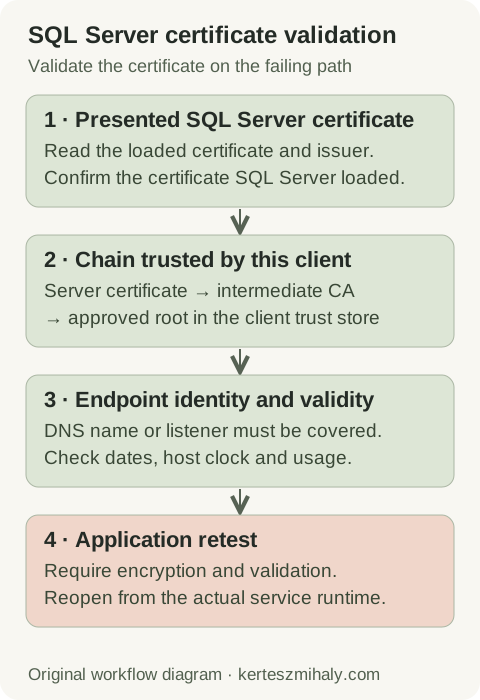
| Certificate chain | Issuing root or intermediate CA missing or untrusted | Trust configuration on the application host |
| Endpoint identity | Connection alias, IP address or listener absent from the certificate names | Connection string and certificate SAN |
| Validity | Certificate expired, not yet valid or system clock incorrect | Certificate dates and host clock |
| Server binding | SQL Server loaded a different certificate or its fallback certificate | Configuration Manager and SQL Server startup log |
The client's trusted root CA is the trust anchor. Intermediate CA certificates connect the server certificate to that root. The certificate administrator supplies the approved CA chain; the server certificate itself is not normally installed as a trusted root.
The connection name must match the certificate. A certificate for sql01.example.com does not automatically cover reports.example.com, a bare short name or an IP address. For availability groups, include the relevant replica and listener names in the certificate plan. Microsoft's SQL Server certificate requirements.
After the CA chain is trusted, a client may report a hostname mismatch. A complete validation test uses the application's configured endpoint name, because a certificate may cover one alias but not another.
Client trust and server certificate changes
When SQL Server presents the intended valid certificate and only one client lacks the CA chain, updating that client's trust store may resolve the failure without an engine restart. Reopening the application connection checks the updated trust configuration.
A missing listener or alias name requires either a certificate containing that name or a connection configuration using a covered name. Shared aliases may have other dependencies. If SQL Server presents an old certificate after renewal, check its binding and restart requirements. Record the certificate or client-setting change in the incident notes.
Install the trusted CA chain on the correct client host
On Windows, inspect the local computer certificate stores through the Certificates MMC snap-in. Check the approved root under Trusted Root Certification Authorities and any required intermediates under Intermediate Certification Authorities. Confirm the appropriate store for the application's execution context.
Windows services, scheduled tasks and interactive SSMS sessions can use different accounts and trust stores. The application test must therefore use its host, execution account and connection settings.
Deploy the approved public CA certificates through the Windows administration process. Client trust configuration does not require the SQL Server certificate's private key. A server PFX containing that key should remain on the authorized server systems.
Linux clients and application containers have their own trust configuration. Update the trust material inside the environment that loads the driver. Installing a CA certificate on the Docker host alone does not update an existing application image. Review Microsoft's ODBC encryption troubleshooting and the driver's platform-specific instructions.
A self-signed fallback certificate generally requires replacement with a certificate suitable for the deployment. Record its issuer, thumbprint, expiry, endpoint names and affected applications to support subsequent renewal.
Verify the certificate bound to SQL Server
On Windows, use SQL Server Configuration Manager to inspect the certificate selected for the instance. Compare it with the intended certificate in the local machine store. Read the startup log to determine whether SQL Server loaded that certificate or generated a fallback.
The certificate must satisfy the requirements of the installed SQL Server version, include server authentication, be within its validity period and have an accessible private key. The SQL Server service account needs the specified private-key permissions.
Follow the supported certificate import and encryption configuration procedure. Schedule the required service restart and validate connections afterward. For a failover cluster instance or availability group, check certificate availability, private-key access and endpoint names on each possible failover host.
Force Encryption controls whether clients must use encryption; it does not establish trust in the issuing CA. Enabling it can affect additional clients that lack the required trust configuration, so a server-wide change requires a client inventory and connection tests.
Database certificates used for TDE or backup encryption have different purposes from the TLS endpoint certificate. Configuring a database certificate with CREATE CERTIFICATE does not configure the engine's TLS binding.
Configure encryption without bypassing certificate validation
The following connection string illustrates required encryption and certificate validation for a Windows ODBC application using integrated authentication. Substitute the deployment's hostname, port and database. Integrated authentication must be available to the account running the process.
Driver={ODBC Driver 18 for SQL Server};
Server=tcp:sql01.example.com,1433;
Database=ApplicationDb;
Trusted_Connection=yes;
Encrypt=yes;
TrustServerCertificate=no;
Check the SSMS connection controls
SSMS 20 and later exposes Encryption and Trust server certificate in the connection dialog. The validation test uses the intended encryption mode with Trust server certificate unchecked. Older releases may place these controls elsewhere. See Microsoft's current connection dialog documentation.
Use the application's DNS name for comparison with SSMS. Release-specific behavior is listed in the SSMS release reference.
Encrypt controls encryption, while TrustServerCertificate controls the validation bypass in ordinary encryption modes. Traffic can remain encrypted while endpoint validation is disabled. Strict encryption ignores the bypass and has different requirements. Microsoft lists the ODBC encryption setting combinations.
An incident procedure may authorize a temporary validation bypass. Its removal should be included in the incident resolution, after certificate trust is repaired. Encryption modes Optional or No change encryption behavior rather than repairing the trust store.
Retest the application connection and inspect encryption
Retest with encryption required and validation enabled from each relevant application host. Include scheduled work, pooled connections and failover where applicable. Close and reopen connections as needed so the test does not reuse a session established before the change.
Inspect encryption for this SQL Server session
T-SQL · 3 lines
Run through an authorized diagnostic connection. SQL Server 2019 and earlier require VIEW SERVER STATE for this DMV; SQL Server 2022 and later require VIEW SERVER PERFORMANCE STATE. Azure SQL permissions differ.
encrypt_option reports session transport encryption, without identifying whether the client bypassed certificate validation. Interpret it together with the sanitized client settings. Local shared-memory sessions also differ from the remote TCP connection used by an application. See the Microsoft DMV reference.
Document the working configuration, certificate expiry and renewal administrator. A subsequent login or database-access failure is covered by the error 18456 guide and SQL Server error reference. Related security configuration is described in the hardening guide. A remote SQL Server health audit is available for a wider review.
SQL Server certificate trust questions
Does TrustServerCertificate=True fix the certificate chain?
In ordinary encryption modes, it bypasses certificate validation while allowing encryption. It does not install the CA chain or verify the endpoint identity. A test of the repaired chain uses validation without this bypass. Strict encryption has different requirements.
Why does SSMS connect while the application fails?
The two processes may use different drivers, hostnames, accounts or trust stores. Compare their effective settings and test from the application host under its execution account.
Does encrypt_option TRUE indicate successful certificate validation?
No. It reports encryption on an established session. The client's encryption and trust settings identify whether certificate validation was enabled.