
Find the server error log reason for SQL Server error 18456
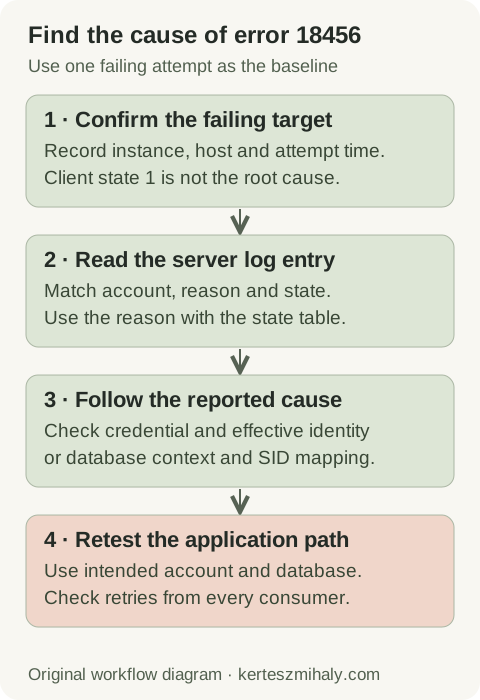
The client message can represent an incorrect password, disabled login, wrong instance, unavailable database or insufficient server access. Client state 1 omits the detailed reason because SQL Server limits information returned to an unauthenticated client.
In an authorized SSMS session, open Management → SQL Server Logs and locate the failure by timestamp. Record the reason, state, account and client address. Match the instance and time zone; retries across several hosts may produce different failures.
Microsoft lists server-side states and examples in the 18456 reference. Interpret the state with the reason text from the same entry. Shared diagnostic records should omit passwords, secret-bearing connection strings and unnecessary account details.
Error 18456 from the intended instance narrows diagnosis to authentication or database access. Certificate-chain failures require the certificate validation checks; server-not-found errors require endpoint and network checks. Record the message for each attempt when failures occur at more than one stage.
SQL Server login failed 18456 states and common causes
| State | Server-side meaning | Next check |
|---|---|---|
| 1 in the client | The client does not have the detailed failure reason | Read the corresponding server error-log entry before choosing a fix |
| 2 or 5 | User ID is not valid | Intended instance, account spelling and login existence |
| 6 | Windows login name used with SQL authentication | Authentication method in the actual client configuration |
| 7 | Disabled login and incorrect password | Disabled status and credential source; read the full reason |
| 8 | Incorrect password | Deployed secret, rotation and application overrides |
| 11 or 12 | Valid login but server access failed | Server access, denies and effective identity |
| 18 | Password must be changed | Approved password-change process and application credential update |
| 38 or 46 | Requested database could not be found | Database name, availability and login/database context |
| 58 | SQL authentication against Windows-only configuration; SID mismatch is another documented cause | Reason text, authentication mode and principal mapping |
| 126 | Requested database does not exist | Connection database and deployment target |
These states summarize common SQL Server login failures; other authentication methods and Azure services can report additional states. Interpret the state with the reason in the same server-log entry. State 8 identifies a password mismatch, but it does not distinguish a typing error from an application using an obsolete stored credential.
Retest each change through the same account and connection path, then compare the new error-log entry with the original. Changing one relevant setting at a time helps identify the cause and any temporary permissions that need removal.
Check the instance and SQL or Windows authentication mode
Compare the deployed host, instance or port, database and authentication method with the intended target. Named instances, aliases, listeners and application overrides can direct development and production connections to different instances.
Confirm instance identity and authentication mode
T-SQL · 3 lines
Run the query through an existing authorized connection. The final property is 1 for Windows-only authentication and 0 for mixed mode. The result identifies that session's instance and must be compared with the failing application's endpoint. See the SERVERPROPERTY reference.
Windows authentication uses the process's Windows identity; SQL authentication uses a SQL login and password. A domain-qualified username entered under SQL authentication still uses SQL authentication. A Windows-authenticated SSMS session uses its interactive account, which may differ from an application service account.
If the application requires SQL authentication on a Windows-only instance, confirm the requirement with the system owner. Microsoft documents that changing authentication mode requires a service restart. Ordinary application access can use a dedicated SQL login without enabling sa.
Check disabled logins, passwords and the deployed credential
Read the intended login record
T-SQL · 3 lines
Replace the placeholder with the intended account and run the query from an authorized administrator session. Principal metadata visibility depends on permissions, so a restricted session may return no row for an existing login.
Confirm why a login was disabled before enabling it. For a password mismatch, compare the configured secret reference, deployment version, rotation date and application overrides without exposing the secret. An interactive login checks the supplied password; application testing checks whether the process loaded that credential.
Long-running processes and connection pools may retain previous configuration. Apply the documented credential-reload or restart procedure, then retest. Scheduled tasks and other consumers must also reference the updated credential.
Must-change, expired and locked-out credentials require the organization's recovery procedure. Identify consumers before rotation and retain the intended password-policy protections. Document the account administrator, rotation procedure and required application permissions.
Fix default database access and login user mapping problems
A login is an instance-level identity. Database access also depends on the requested database, its availability and the relevant database principal. Check both the database explicitly requested by the application and the login's default database. A restored, renamed or offline database can break a connection without any password change.
Read the requested database status
T-SQL · 3 lines
Replace the database placeholder and run the query from an authorized session. Database visibility depends on permissions, including visibility of offline databases. An empty result can therefore require a check from a more privileged session.
If the log identifies the default database as the cause, an authorized operator can select an available database in the SSMS connection properties for diagnosis. This tests login access separately from access to the intended application database.
Login failures after a database restore
After restore or migration, compare the database user's SID with the intended server login's SID. Names alone do not establish the mapping. The supported user-to-login remapping procedure preserves the user's permissions and ownership relationships; dropping and recreating the user may remove them.
The Microsoft orphaned-user procedure explains SID-based checks and remapping. Contained database users need a different analysis because they do not depend on an ordinary server-login mapping. Establish which principal model the application uses before applying a migration repair.
For state 11 or 12, inspect server access validation, the Windows security token, server permissions and explicit denies. Database permissions are checked after instance access succeeds. Granting sysadmin can mask the original permission issue and exceeds ordinary application requirements.
Troubleshoot Windows authentication outside SSMS
Desktop sessions, application pools, Windows services and SQL Agent jobs can use different Windows identities. Compare the successful and failing execution hosts, accounts and group memberships.
NT AUTHORITY\ANONYMOUS LOGON often indicates an authentication-forwarding failure. Check Kerberos, service principal names and delegation for the application topology. The anonymous name is a diagnostic result, rather than an application identity for which to create a login.
Microsoft's authentication connectivity guide describes identity and SPN failures. Untrusted-domain and SSPI messages require those authentication checks, whereas SQL login password failures require credential checks.
Retest through the application entry point so that the connection includes any web-server double hop. Record the failing hop, account, host and timestamp for the Windows and database administrators.
Verify the 18456 fix and stop repeated login failures
Verification uses the intended application identity and database, with only the permissions required for its operation. Check successful execution and the server log over a representative retry interval. Scheduled work may need separate tests when it uses another account or configuration.
Remove temporary diagnostic permissions and document the configuration or identity change. Check recurring log failures by account and source to identify other nodes or tasks still using obsolete credentials.
For recurring login failures across services, the SQL Server health-check guide helps structure the wider instance review. SQL Server hardening covers the permission and authentication conventions that should remain after troubleshooting.
A remote SQL Server health audit is available for recurring login, service-identity or deployment issues. Relevant diagnostic inputs are the sanitized server reason, state, target instance and execution account.
SQL Server error 18456 questions
What does error 18456 state 1 mean in SSMS?
State 1 is the generic client result. The corresponding server error-log entry contains the detailed reason and state. An authorized administrator can locate it using the instance and timestamp.
Why does state 8 continue after I reset the password?
State 8 reports a password mismatch. Another application node, stored secret or scheduled task may still send the old credential. Check the deployed configuration and its reload procedure, then inspect retries from the same source.
Can a database restore cause error 18456?
Yes. The requested database may be unavailable, or its user SID may not match the intended server login. The server reason, database status and principal mapping identify the relevant condition.