
Diagnose SQL Server transaction log full error 9002
Error 9002 means the transaction log cannot accommodate the current operation. Existing space may be unavailable for reuse, or the file may be unable to grow. Physical LDF size alone does not identify which condition applies.
Record the error, timestamp, database, instance and affected operations, along with the error log and job output. Pausing nonessential batches can reduce further demand. Deleting the LDF or detaching the database removes required recovery state; an instance restart does not resolve a storage or log-retention condition.
Read the affected database's reuse wait
T-SQL · 3 lines
Replace the database name and use an authorized connection. Metadata visibility depends on permissions. log_reuse_wait_desc reflects the reuse wait at the last checkpoint. Interpret it with current space usage, transaction or replica status and incident timestamps, then sample again after the change. See the sys.databases definition.
Microsoft's 9002 troubleshooting reference distinguishes reuse waits, full volumes, file-size limits and replication or availability-group delays. Added capacity can allow writes to continue while a log-retention problem is being resolved.
Check log space usage, file growth and disk capacity
Read log usage and file settings in the affected database
T-SQL · 11 lines
The DMV combines all transaction log files in the database. It requires VIEW SERVER STATE on SQL Server 2019 and earlier, or VIEW SERVER PERFORMANCE STATE on SQL Server 2022 and later. Run diagnostics through an account authorized for these permissions. See the log-space DMV reference.
File sizes and positive max_size values use 8-KB pages; dividing by 128 converts them to MB. A max_size of 0 prevents growth. A value of -1 indicates no configured file-size cap, but disk capacity and engine limits still apply; a SQL Server log file has a 2-TB maximum. growth is a percentage when is_percent_growth is 1 and pages otherwise. A growth value of 0 disables autogrowth.
Check available capacity, quotas and other database files on the server volume containing the log. The backup destination also needs sufficient space; placing a log backup on an exhausted log volume can fail or consume the remaining capacity.
For a readable availability-group secondary, sys.database_files.physical_name can report the primary file location. Verify the actual host and local path before requesting a storage change. Keep the logical file name separate from the operating-system path. The file catalog reference documents this distinction and the size units.
Compare used MB and remaining volume capacity over a measured interval, together with the active workload. Consumption rate and the size of the next batch provide more useful capacity estimates than percentage-used alone.
Interpret log_reuse_wait_desc before choosing a fix
| Reuse wait | Investigate | Interpretation limits |
|---|---|---|
| LOG_BACKUP | Log-backup schedule, failures and usable destination | Full database backups do not replace log backups. |
| ACTIVE_TRANSACTION | Oldest active transaction, owner and rollback implications | Backups cannot release records required by an active transaction. |
| AVAILABILITY_REPLICA | Log delivery, hardening and secondary health | Additional primary storage does not resolve replica delays. |
| REPLICATION | Replication or CDC consumers and delivery failures | Feature removal changes replication or CDC configuration. |
| CHECKPOINT | Checkpoint progress and whether the wait persists | A brief wait may reflect normal checkpoint activity. |
| NOTHING | Reusable space, growth errors and demand at the failure time | Reusable space at sampling time does not describe the earlier failure. |
The transaction-log reference lists additional wait reasons. Match the value to enabled features and compare repeated samples with error and job timestamps, because reuse waits can change between checks.
Capacity expansion and repair of log retention can proceed as separate incident tasks. Record the person responsible for each change and the checks confirming that writes, backups and replicas have returned to the expected state.
Fix LOG_BACKUP waits without breaking the recovery chain
Full and bulk-logged recovery require transaction log backups; simple recovery does not support them. Check the intended recovery model, last successful backup for this database, job-step output, destination availability and retention. A successful job may have skipped an individual database.
For LOG_BACKUP, resume the configured backup process to a destination with sufficient capacity. Retain the backup as part of the recovery chain and check subsequent scheduled runs. Ad hoc backups must follow the required BACKUP syntax and permissions.
A full database backup does not substitute for transaction log backups. A copy-only log backup does not truncate the log. Backups made during the incident need a retained, usable destination to preserve recovery options.
Switching to simple recovery changes recovery options and breaks continuity of the existing log-backup strategy. Features requiring full recovery may also be affected. These consequences are described in Microsoft's recovery-model comparison.
A database without the required baseline backup needs that backup sequence established first. Failed backup messages distinguish authentication, unavailable destinations and storage exhaustion. The SQL Server backup guide describes the recovery chain.
Resolve ACTIVE_TRANSACTION and availability replica log waits
Inspect the oldest active transaction
Read-only diagnostic · oldest transaction in the affected database
T-SQL · 1 lines
Requires sysadmin or db_owner membership. Replace the database name and use existing authorized access. This reports the oldest active transaction and relevant replication information; it does not end a transaction or release log space.
DBCC OPENTRAN reports the oldest active transaction at the time of the check. Its session and start time can be matched to an application operation. An empty result describes that sample, rather than the transaction state at an earlier 9002 error.
Transaction DMVs can provide the associated session, application and operation. The oldest transaction may be abandoned or may be a legitimate large batch requiring more log capacity than expected.
Session termination requires assessment with the application administrator. Cancellation can initiate a lengthy rollback, so space and application writes may not recover immediately. Record the expected application impact and monitor rollback progress.
For AVAILABILITY_REPLICA, inspect every relevant replica's connectivity and log progress. Investigate delivery and hardening delays, suspended data movement, secondary storage and sustained workload pressure. Microsoft's availability-group 9002 guide explains why a primary may retain records while a secondary falls behind.
Availability-topology changes affect recovery protection and may require reseeding. Assess those consequences before using a topology change to release retained records. Replica progress is checked through advancing log positions and queue sizes, in addition to connection status.
For replication and CDC, collect agent errors and consumer lag before restarting components. Confirm downstream delivery and changes in the database reuse wait after recovery; an agent that restarts and fails again will continue retaining log records.
Choose log growth or shrink based on the capacity problem
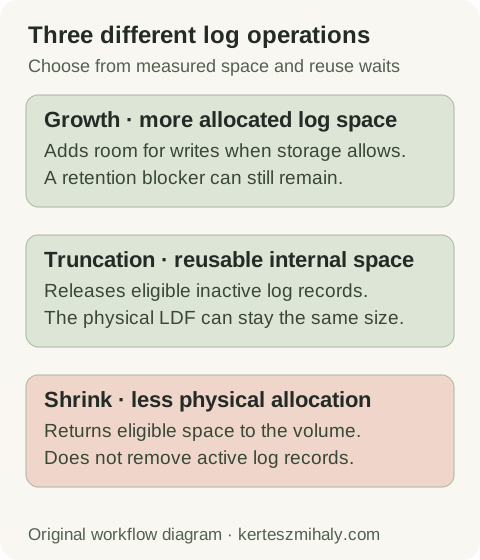
When storage is available but growth is disabled or capped, compare the configured limits with measured demand. An exhausted volume requires additional capacity or removal of files permitted by the retention policy. Database and recovery files remain subject to recovery requirements.
Growth increases allocation. Truncation makes eligible internal space reusable. Shrink returns eligible physical allocation to the operating system, but cannot remove active log records. Repeated shrink and regrowth introduces unnecessary allocation work.
After an exceptional one-off growth event, a planned shrink may be appropriate if the retained allocation substantially exceeds future requirements. Confirm the blocker is resolved, choose a workload-based target and retain growth headroom. Multiple log files do not provide the data-file proportional-fill performance benefit. Microsoft's log-size management guidance.
Choose growth increments using observed workload demand and measured allocation time. Pre-sizing for the normal peak reduces growth events; autogrowth provides additional capacity. The largest transaction and storage performance determine appropriate values for the database.
Verify log reuse and prevent another error 9002 incident
Verify application writes, required log backups, stable or declining used space and sufficient volume capacity. Sample the reuse wait again after representative batch activity. The physical LDF may remain large while its internal space is available for reuse.
Monitor backup age, failed job steps, used log MB, volume headroom and replica or consumer lag. Base capacity on measured maintenance and batch peaks. Set sampling and alert thresholds that leave time to respond before the expected workload exhausts available space.
Use the monitoring guide to make these checks repeatable. For recurring incidents involving failed backups or an untested restore plan, a remote recovery-readiness review can assess backup history, restore tests and capacity requirements.
SQL Server transaction log full questions
Can I delete the LDF file to fix error 9002?
No. The transaction log is required for database recovery. Error 9002 is resolved through log-reuse and capacity checks while retaining the database files and required backups.
Why is the log still large after a successful log backup?
A qualifying log backup can make eligible internal space reusable without reducing the LDF file size. Check used log MB and the current reuse wait. Physical size alone does not show whether writes have usable headroom.
Will another log backup fix ACTIVE_TRANSACTION?
No. Log records required by an active transaction remain retained. Identify the transaction and responsible application, then determine whether it should complete or be cancelled. Cancellation can require substantial rollback time.