

A development clone is useful if someone can change it, reset it and remove it without interrupting the real database. Several products do that by creating a writable copy that reads unchanged data from a shared image or snapshot. Backup products can expose a temporary database from a recovery point. A managed instance clone takes a different approach and provisions an independent server from a backup.
Redgate, Delphix, Windocks and Accelario make the most sense when teams need new databases regularly. Rubrik, NetApp, Veeam and Commvault are candidates when the organization already has suitable recovery points or storage. The useful comparison includes the time to prepare the base, where each copy’s writes are stored, and whether it depends on that base. Access to a sanitized test copy still needs to be decided separately from access to the original data.
SQL Server cloning tools at a glance
A shared image, a backup mount and an independently provisioned instance have different lifetimes. Use the documented dependency to decide which trial matches your environment.
| Tool | Good starting point | What the copy depends on | What to test before buying |
|---|---|---|---|
| Redgate SQL Clone | Many writable dev copies from a shared image | Image VHD share and a per-copy differencing disk on a supported Windows host | Image build, share throughput, reset and per-copy write growth |
| Perforce Delphix Continuous Data | Managed SQL Server virtual databases with refresh and points in time | Linked source history or an eligible parent VDB, with a supported target | Permissions, point-in-time selection, and preservation of any required changes |
| LangGrant Windocks Enterprise | Automated test copies on a supported Windows workflow | Prepared database image and documented host and storage setup | Image definition, library of versions, provisioning and cleanup |
| Accelario Database Virtualization | Self-service virtual databases managed centrally | Approved Golden Image, snapshots and compatible targets | Access to a masked image, on-demand refresh and retention |
| Rubrik SQL Server Live Mount | Temporary inspection of an eligible Rubrik recovery point | Protected snapshot, Rubrik storage and connectivity | Target selection, ability to query or write for that workflow, and what survives unmount |
| NetApp SnapCenter for SQL Server | Recurring storage-backed copies on supported ONTAP infrastructure | SnapCenter SQL backup and storage-backed thin clone | Target mount layout, snapshot lifetime and physical storage change |
| Veeam Explorer for Microsoft SQL Server | Short recovery or application test from a Veeam backup | Backup repository, mount server and change cache | Mount rights, write-cache capacity and retention before unpublishing |
| Commvault Instant Clone for SQL Server | Time-limited copy from a supported protected backup | Eligible backup, compatible SQL target and reservation period | Target packages, time to attach, and cleanup on expiry |
| Google Cloud SQL for SQL Server | Independent managed instance for test or recovery | New instance created from a backup in the configured Cloud SQL environment | Time to connect, independent resources, cost and ingress controls |
Redgate SQL Clone
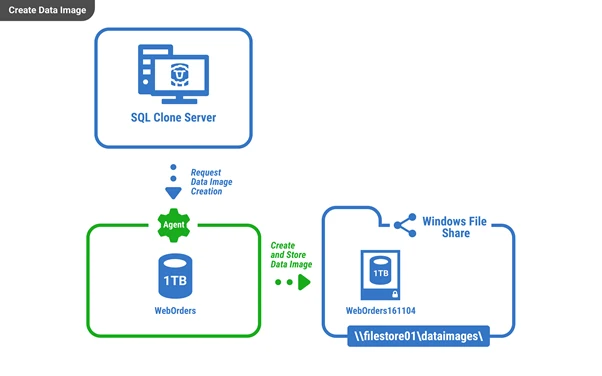
Redgate SQL Clone builds a base image from a SQL Server database or supported backup, then presents writable clones through target agents. Changes made in each copy live on a differencing disk. Reading unchanged data from the base makes it practical to provision several disposable databases from the same prepared source.
The strongest fit is a development team that needs frequent resets or several copies of a large database. The fast clone creation begins after the base image is ready. The image and its share remain dependencies while the clones exist, so the time to prepare and validate a sanitized image belongs in the comparison.
Measure image creation and clone creation as distinct operations. Redgate documents a shared image VHD plus a differencing disk for each writable database. Existing clones continue to depend on that image, so measure how many consumers and simultaneous reads the intended share supports.
Write the same amount of test data to two clones and record the actual allocated bytes of both differencing disks. Then reset one clone according to the product's supported workflow. Use the connection in the test job to confirm it points to the refreshed database and the second clone's data is still available.
- Compatibility
- SQL Clone Server and target agents on Windows. SQL Server version, backup support and file-share access must match the image requirements.
- License and trial
- Commercial. SQL Clone entitlement depends on the Redgate package.
Perforce Delphix Continuous Data
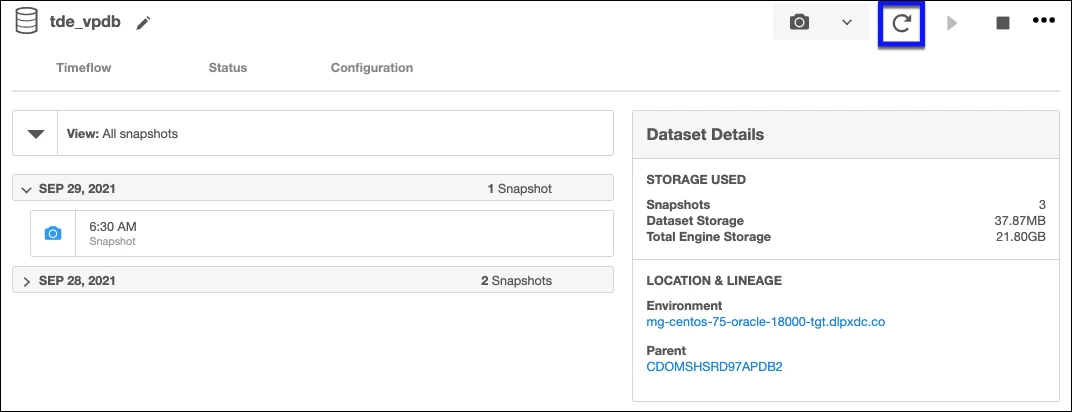
Perforce Delphix Continuous Data provisions a SQL Server virtual database from a linked data source or another supported virtual database. The linked source provides available recovery points. A team can provision from a selected point and later refresh the copy through the virtual database workflow.
Its advantage is repeatable refresh and recovery-point control for multiple SQL Server consumers. A refresh can replace local writes, which is useful for resetting a lab and important when someone expects the test changes to survive. The snapshot dependency, target setup and post-provision work determine how easily the copy can be reused.
Use a recorded source point and eligible SQL Server target for the first virtual database. Delphix documents provisioning hooks that can recreate parts of the runtime configuration. Keep the selected point and hook logs with the test so an operator can reproduce the copy.
On the second run, ask the same developer to request a refresh using the intended role. Check which source point it selects and which local writes are visible afterward. If your applications need SQL Agent jobs or CDC in the virtual database, verify those through the relevant pre- or post-start operation.
- Compatibility
- Supported SQL Server source and compatible target, with connector and refresh options documented by release.
- License and trial
- Commercial. Connector, target and masking entitlements depend on the selected Delphix products.
LangGrant Windocks Enterprise
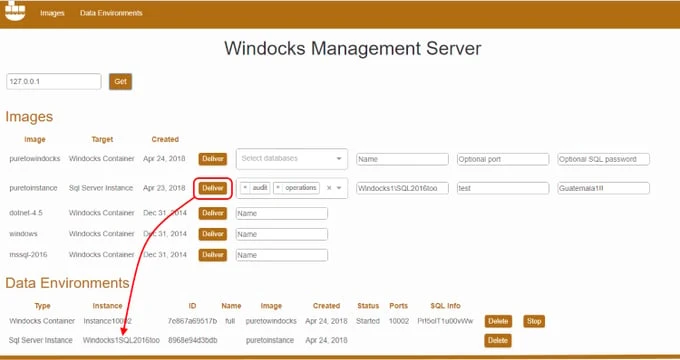
LangGrant Windocks Enterprise provisions writable SQL Server copies from an image definition and supported database files or backups. Its documented Windows workflow includes targets on SQL Server instances or in containers. A versioned image definition can keep the database setup tied to the rest of a repeatable test environment.
It suits teams that want database provisioning to follow the development or test workflow. The initial image build is separate from creating a new copy. Names, configuration and the image version also matter when a test environment is replaced or refreshed after a change in the source schema.
Treat the definition of a Windocks image as part of the test environment. Record the input database files or backups, the repeatable setup steps and the worker type the plan will use. Time the creation of the image as well as the first usable connection from a new copy.
Use one named copy from each of two image versions and verify that their data and schema match the requested versions. A pipeline should be able to tell a ready environment from one still provisioning. Have the same automation retire one copy and check how the shared image and other copies are affected.
- Compatibility
- Windocks Enterprise on a supported Windows host. SQL Server source and target versions depend on release.
- License and trial
- Cloning is an Enterprise edition feature.
Accelario Database Virtualization
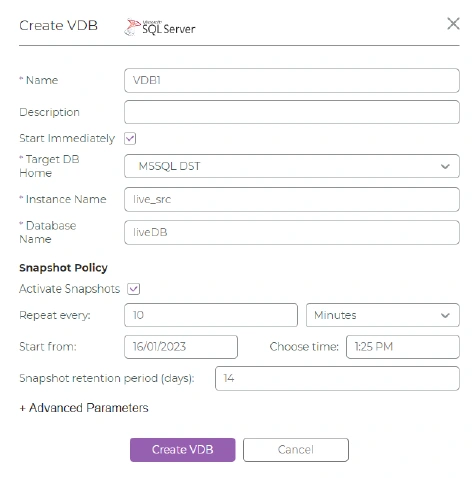
Accelario uses a prepared baseline it calls a Golden Image and supplies snapshots for provisioning virtual databases. With a supported SQL Server target, the baseline gives several project teams a defined version of the database from which they can create their own test copies.
The benefit is a repeatable provisioning workflow when the organization already manages snapshots and access centrally. Masking and clone creation have separate roles. A person allowed to provision a test environment should obtain an approved baseline, and the snapshot policy needs to account for copies that still use it.
Use a prepared Golden Image to test the common provisioning path and store it with the source date and masking rule version. Ask one developer to request a copy without access to the unmasked source. Check both the SQL contents and the access boundaries after provisioning.
Start two copies simultaneously and record the time to the first application query for each. Replace or refresh one using the supported workflow, inspect its expected seeded rows, and confirm the other copy can still serve its current test. Inspect what storage or parent resources remain after expiry.
- Compatibility
- Accelario documents SQL Server targets and supported hosts. Target version and baseline storage affect setup.
- License and trial
- Commercial. Virtualization and data masking are scoped by the purchased modules.
Rubrik SQL Server Live Mount
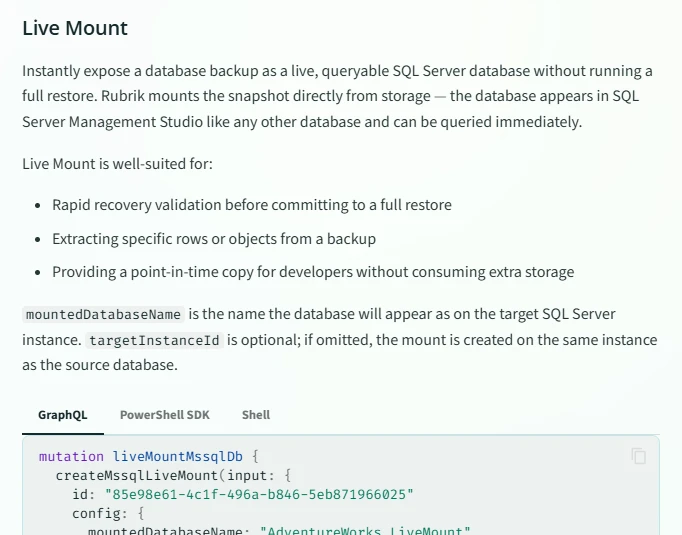
Rubrik SQL Server Live Mount makes an eligible recovery point available on a separate SQL Server target using Rubrik storage. A DBA can inspect the database at an identified point in time without first setting up a separate refresh system. This fits recovery rehearsal as well as short-lived testing.
It is strongest when the organization already protects the source in Rubrik and needs temporary access to its data. The mount depends on the storage and connection for its session. Rubrik documents exporting to a new database as a separate workflow, which matters if the result needs to stay available after the mount is removed.
Specify the target instance explicitly in the Live Mount request. The Rubrik reference describes a default that can place a mount on the source instance if the target is left unset. For a test team, choose a separate approved target and record the recovery date and job identifier.
Use a mount to check if the required tables and rows can be read from the backup. If the job depends on writes or a long-running environment, show that exact behavior in the pilot. Compare the documented export workflow when the copy needs to outlive the mount.
- Compatibility
- Eligible protected SQL Server database, supported recovery point and a compatible target instance.
- License and trial
- Commercial Rubrik platform. SQL Server workload and Live Mount entitlement depend on the deployment.
NetApp SnapCenter for SQL Server
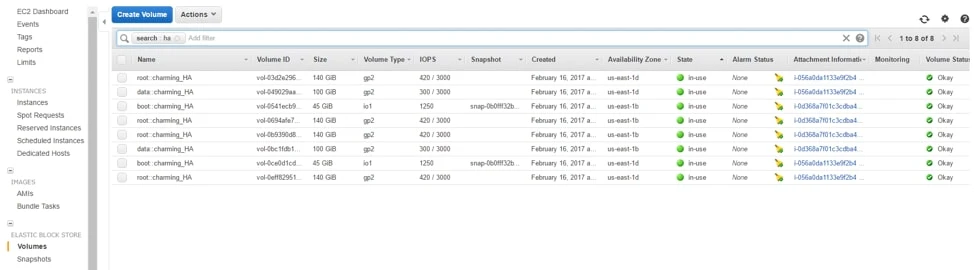
NetApp SnapCenter can use a SQL Server-aware backup as the basis for a storage-backed clone. NetApp documents the use of FlexClone to make writable test copies on supported ONTAP storage. This gives an existing storage team a way to provision dev and test databases through the same backup and snapshot arrangement.
It makes sense where NetApp already operates the storage and the SQL Server targets can use the required mount layout. Clone Lifecycle can coordinate recurring work. Its usefulness depends on target paths and the underlying storage’s rules for parent backups and clones, which remain relevant when copies need to move or be retired.
The NetApp setup combines SQL Server-aware operations with a storage-level clone on supported ONTAP. Check whether the target can mount the required volumes and how the deployment names copies from each backup. A SQL database showing as online is one milestone in that storage workflow.
Test a supported repeated refresh and observe the baseline and clone volumes. Record how the storage team identifies owned resources, which snapshot must remain available, and whether a copy can be removed cleanly when a second copy is still in use.
- Compatibility
- SnapCenter Plug-in for Microsoft SQL Server, supported NetApp storage and a compatible SQL Server clone target.
- License and trial
- NetApp software and storage integration. FlexClone eligibility depends on the deployment.
Veeam Explorer for Microsoft SQL Server
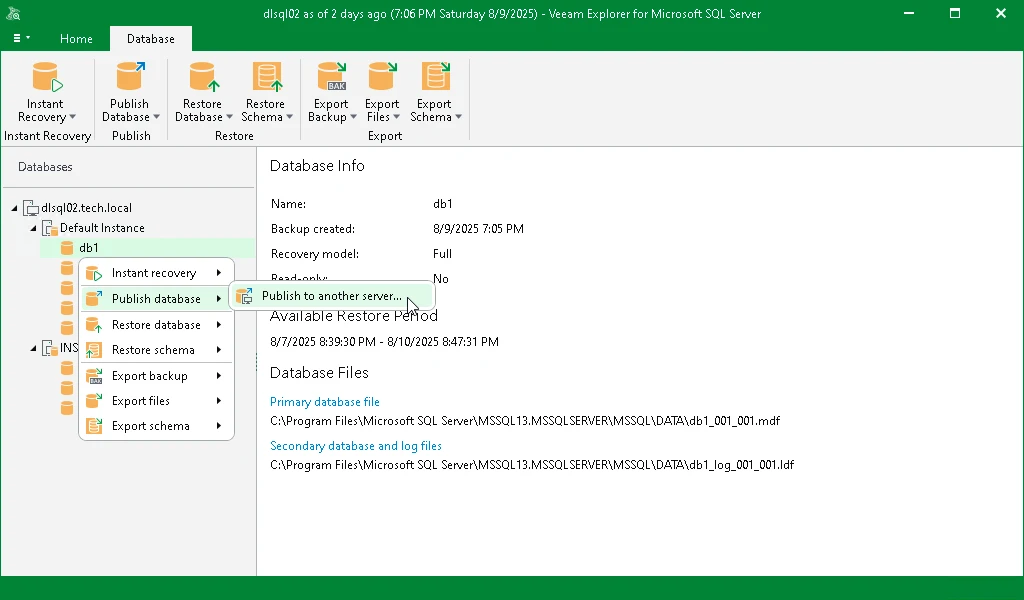
Veeam Explorer for Microsoft SQL Server can publish a database from a supported backup to an eligible target. Writes made after publishing are held in a cache on the mount server. That lets a DBA exercise a recovery point or test a change against it before committing to a permanent restore.
Data Publishing is useful for a temporary investigation or test when the backup is already in Veeam. It has a distinct lifetime from a full restore, because the mount and write cache remain part of the test. Keeping changes after the session means arranging a separate retained copy or backup before unpublishing.
The publisher documents the mount server presenting the relevant backup files to the SQL Server target. Prepare that path first and measure the change cache during a write-heavy run. Include available cache space and backup repository load when comparing with a restored copy.
Unpublishing detaches the database. If a test needs to retain changes, show how you would capture them through a supported permanent copy while the published database is available. Validate the retained copy by connecting independently after publishing has ended.
- Compatibility
- Veeam Backup & Replication, supported SQL Server backup and target, and a configured mount server.
- License and trial
- Veeam entitlement. Data Publishing depends on edition and workload support.
Commvault Instant Clone for SQL Server
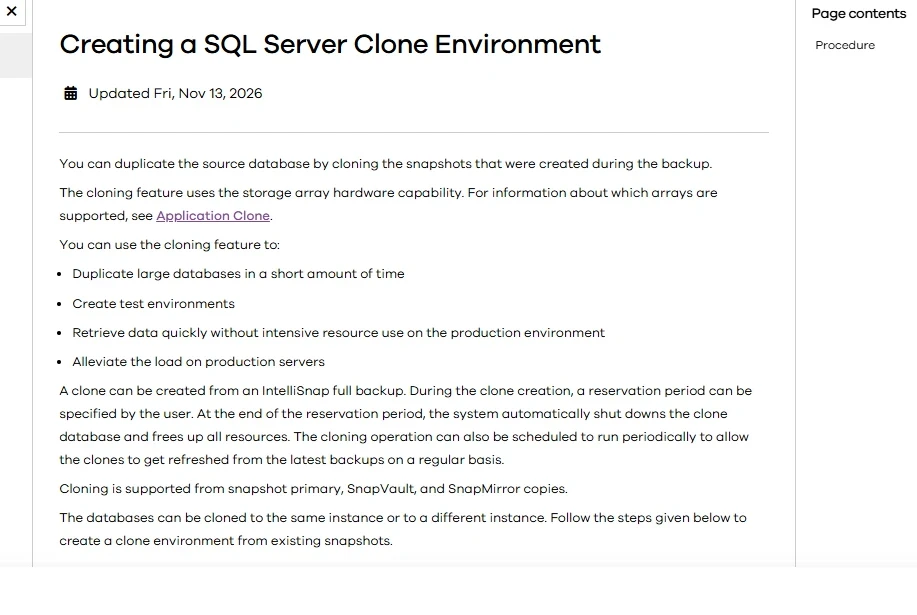
Commvault Instant Clone attaches one SQL Server database per clone from an eligible backup. The clone is allocated for a reservation period. That gives a DBA a defined window to run an integration test against protected data without asking the backup team to provision a long-lived database.
The scheduled expiry is useful for removing forgotten test environments. It also affects how long a developer can keep test changes. A persisted copy needs a separate plan before the reservation ends. Backup type and target eligibility matter, especially because the documented workflow excludes cluster clients as clone targets.
Use a documented full eligible backup and a supported client with the required SQL and MediaAgent packages. Keep the reservation long enough for the intended run. Because the workflow is per database, calculate how many requests an application with several related databases would need.
Set a short reservation for one disposable copy during the pilot. Observe when it stops accepting connections, when the allocation is released and how operators can tell the difference between expiry and a failed test. Schedule any required export before that time.
- Compatibility
- Eligible backup and clone target with the required Commvault packages. The target SQL Server must meet the documented source-version requirements.
- License and trial
- Commercial Commvault platform. Backup and Instant Clone entitlement depend on the workload.
Google Cloud SQL for SQL Server
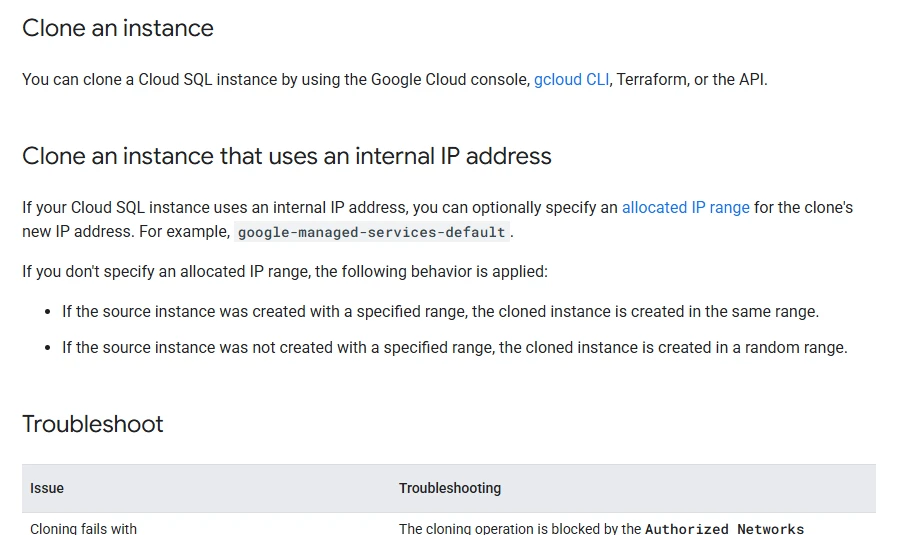
Cloud SQL for SQL Server can create an independent managed instance from a source instance. Google documents that a standard clone first creates a full backup, then uses that backup to provision the new instance. The test team gets an independent service with its own lifetime.
The fit is an isolated Cloud SQL test environment where an independent instance is worth the provisioning time and cost. Database size affects the clone duration. The copied settings and users still need to match the new environment’s access rules, and the new instance has its own address and resource costs.
Google's standard instance clone takes a full backup and provisions another independent instance. Time the interval from submission to a usable application connection, then inspect the new endpoint, copied settings and any monitoring or backups you need on that instance.
Check resource allocation and lifetime costs with the actual size and region planned for the trial. Apply test access rules and verify an insert with synthetic data. Compare resource deletion and retained backup behavior with the workflow the team needs after every run.
- Compatibility
- Cloud SQL for SQL Server source instance. Standard cloning and point-in-time recovery have distinct documented prerequisites.
- License and trial
- The new managed instance incurs its own compute, storage and backup costs.
SQL Server cloning tools by provisioning workflow
| What you need | Tools to shortlist | What to verify |
|---|---|---|
| Refresh disposable databases for multiple developers | Measure preparation, provision and reset separately. Check how many simultaneous writable copies the baseline supports. | |
| Make writable copies from an existing storage or backup platform | Verify whether the copy relies on a backup snapshot, mount service or storage array. Test teardown and retention. | |
| Create a separate managed SQL Server instance | Check the cloned instance's network access, identities, restore point and ongoing cost. |
Choose a shared image, backup mount or independent instance
A thin-copy system reuses a prepared image or snapshot. Each writable copy has its own changes. Temporary recovery mounts use protection infrastructure for the session. A managed instance clone provisions a separate service with its own resources.
Developers regularly request isolated writable copies
Use a shared baseline with two writable copies
Measure both copies while they run and reset one without interrupting the other.
A DBA needs to inspect or rehearse an existing recovery point
Use an eligible backup mount
Check the storage dependency, allowed operations, expiry and export workflow.
The whole managed test instance must have its own lifetime
Provision an independent instance
Measure full readiness, confirm access settings and track allocated resources.
- Redgate SQL Clone image and differencing disks
- Perforce provisioning a SQL Server virtual database
- LangGrant Windocks Enterprise user guide
- Accelario database virtualization
- Rubrik SQL Server Live Mount and unmount
- NetApp SQL Server thin cloning on ONTAP
- Veeam SQL Server database publishing
- Commvault Instant Clones for SQL Server
- Google Cloud SQL for SQL Server clone behavior
- Microsoft DBCC CLONEDATABASE scope
Measure readiness, independent writes and reset
Record SQL Server version, fixture data size, baseline age, worker size and storage or network layout alongside every result. Reuse the same test and readiness definition for both candidates. A row-level isolation check proves the copies behave independently in this lab, while the storage and timing measurements depend on the environment.
| Measurement | Record | Pass condition |
|---|---|---|
| Baseline preparation | Start, verified finish and allocated bytes | Baseline has only approved data and is available before clone timing begins |
| Copy A and B ready | Request and first successful test query times for each | Both return the unchanged baseline row |
| Write isolation | Counts, canary value and allocated storage before and after writes | A returns clone-a, B returns clone-b, source remains baseline |
| Reset only A | Start and end times and the selected source point | A returns baseline again, B still returns clone-b |
| Retire the copies | Remaining mounts, connections and allocated bytes | The retired copy drops out; the baseline remains available as needed |
How to compare these tools
Use the same usable baseline for each trial. Compare copy time, storage growth after writes, refresh and cleanup. Check whether the clone stays usable when the source image or backup moves. Sources checked .
Provision two writable copies and reset one of them
Create one synthetic baseline and two disposable copies. This fixture uses a canary row to verify the database behind the connection and its local writes. Collect storage usage and timing from the platform used for cloning.
Check two writable clone canaries and reset isolation
T-SQL · 30 lines
- Create an isolated SQL Server database named CloneTrialSource and run the fixture. Capture the baseline and provision CloneTrialA and CloneTrialB with the chosen tool. Run with @ApplyCanaryWrite set to 0 on each copy and check the baseline.
- In each writable copy, set @ApplyCanaryWrite to 1 and run once. Compare the two canary values, query the source and measure actual storage allocated to each copy.
- Reset A to the original baseline while B remains in use. Run the fixture with @ApplyCanaryWrite set to 0 again. A should return baseline, B should return clone-b and the source should still return baseline. Retire both disposable copies through the tool.
Conclusion
Choose a tool based on refresh frequency, how many teams need independent writes and how long each environment lives. Compare the total time to produce a safe copy, exercise it and remove it. A short provisioning time matters when it survives the same test with concurrent users.
Frequently asked questions
Can I clone a SQL Server database with DBCC CLONEDATABASE?
DBCC CLONEDATABASE makes a read-only schema copy for diagnostics, with options for statistics and Query Store data. For a writable copy with user rows, use restore, an eligible storage clone or a supported provisioning tool.
Can several SQL Server clones share the same baseline?
Yes, with tools that support virtual or storage-backed copies. They can share a baseline while tracking each copy's writes separately. Check how long to retain the baseline and how each copy behaves if its backing storage is interrupted.
What happens to local database changes after a clone refresh?
A reset or reprovision usually returns the database to the chosen baseline and discards local changes. Some tools keep bookmarks or snapshots for recovery. Verify behavior for the specific refresh operation and save any work you need first.
How do I clone production data safely for dev and test?
Prepare an approved baseline in a restricted staging environment. Test masking, application identities and network rules before allowing developer access. Confirm the same controls still apply after refresh.
When should I use a full SQL Server restore instead of a thin clone?
A full restore gives you an independent database with its own storage and makes a good baseline for capacity or load testing. A thin clone can save time and initial space when many short-lived copies share data. Measure both under your workload.
What should a SQL Server clone benchmark time separately?
Measure preparation of the approved baseline, time to the first working query for each copy, time to a representative application check, and reset time. Record which shared resources and sizes were used.