

SQL Server index maintenance includes reorganizing indexes, rebuilding them and updating statistics. These operations have different effects on the workload. Low page density can make queries read more pages, and fragmentation can matter for scans. Rebuilding also consumes CPU, I/O and log space. A routine that always rebuilds at a fixed fragmentation percentage can spend its window on indexes that make little difference to application performance.
SSMS offers native tasks and a schedule. Ola Hallengren and Minion Reindex add policies and logging in SQL Server. Products such as IDERA SQL Defrag Manager, SQL Sentry and dbWatch give a team a wider view of indexes and maintenance across instances. The comparison is which indexes each tool selects, how much work it will attempt, and how clearly it records what completed.
SQL Server index maintenance tools at a glance
Use the comparison to verify which candidates can show planned actions, apply edition-aware rules, and retain enough evidence to relate maintenance to performance.
| Tool | Good starting point | Policy and evidence to verify | Operation or license |
|---|---|---|---|
| SSMS Maintenance Plans | Native scheduled SQL Server maintenance tasks | Objects selected, SQL options and Agent job history | Built in where applicable and SQL Server Agent is available |
| Ola Hallengren IndexOptimize | Scripted rowstore and statistics policy | Pages, fragmentation levels, operation fallback, partitions, time limit and logging | Open source. Review edition, scheduler and permissions. |
| Minion Reindex | Configurable SQL Server maintenance policy | Maintenance scope, time window, policy exceptions and logs | Check current distribution and support terms |
| dbForge Index Manager | Inspect selected SQL Server indexes and generate commands | Thresholds, selections, generated SQL and result | Commercial. Verify installed edition and automation features. |
| IDERA SQL Defrag Manager | Centralized index defragmentation across SQL Server instances | Policy, scheduling, impact and per-index evidence | Commercial. Verify supported versions and operations. |
| SQL Sentry Fragmentation Manager | Inspect fragmentation and related index activity | Appropriate automation or intervention for the current edition | Requires documented SQL Sentry setup and entitlement |
| dbWatch Control Center | Fleet scope and documented index-monitoring jobs | Instance coverage, job action, maintenance window and audit logs | Commercial. Verify version and monitoring or execution workflow. |
| EMS SQL Backup for SQL Server | Combine backup and selected maintenance tasks | Exact index and stats options, recovery interaction and schedule | Commercial. Verify product tier and workload support. |
SSMS Maintenance Plans
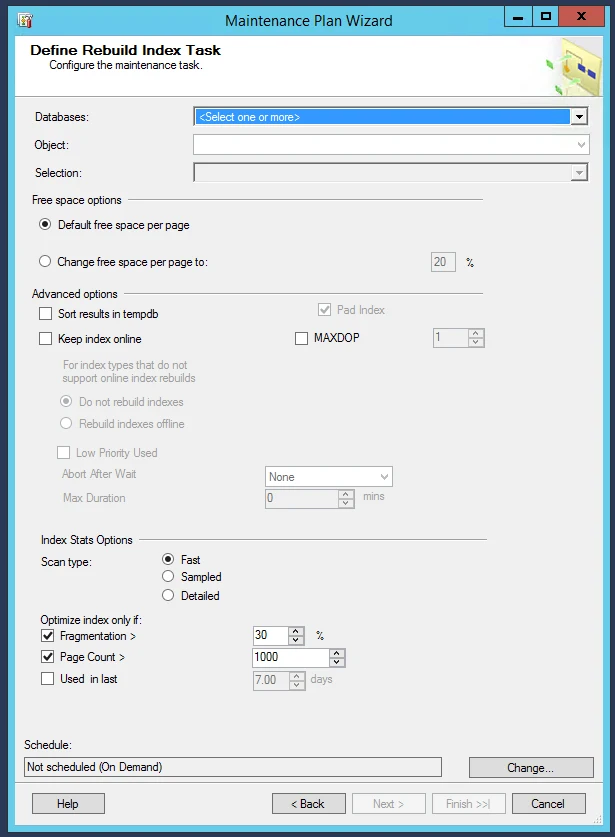
SSMS Maintenance Plans can schedule SQL Server tasks such as index reorganize, rebuild and statistics updates through SQL Server Agent. This gives a team a native graphical workflow for maintaining a small set of databases. Each task can target the databases and objects supported by its settings.
The benefit is keeping maintenance inside existing SQL Server administration. The plan still needs workload-appropriate choices about scope, timing and online options. Operation settings and task history help explain what happened, while application measurements show whether the maintenance improved a query.
Use a narrowly scoped maintenance task and inspect which SQL Server databases and objects it selects. Pair the job history with native measurements of page density, fragmentation and workload impact. Test under the scheduled identity.
Check whether the plan needs SQL Server Agent and how it behaves when a database is unavailable or outside a window. Protect the time for backups and key jobs. Use separate tasks for statistics when that better addresses the observed problem.
- Compatibility
- Supported SQL Server maintenance plans, SSMS and SQL Server Agent. Task options vary by platform and engine version.
- License and trial
- Built-in SQL Server maintenance tooling.
Ola Hallengren IndexOptimize
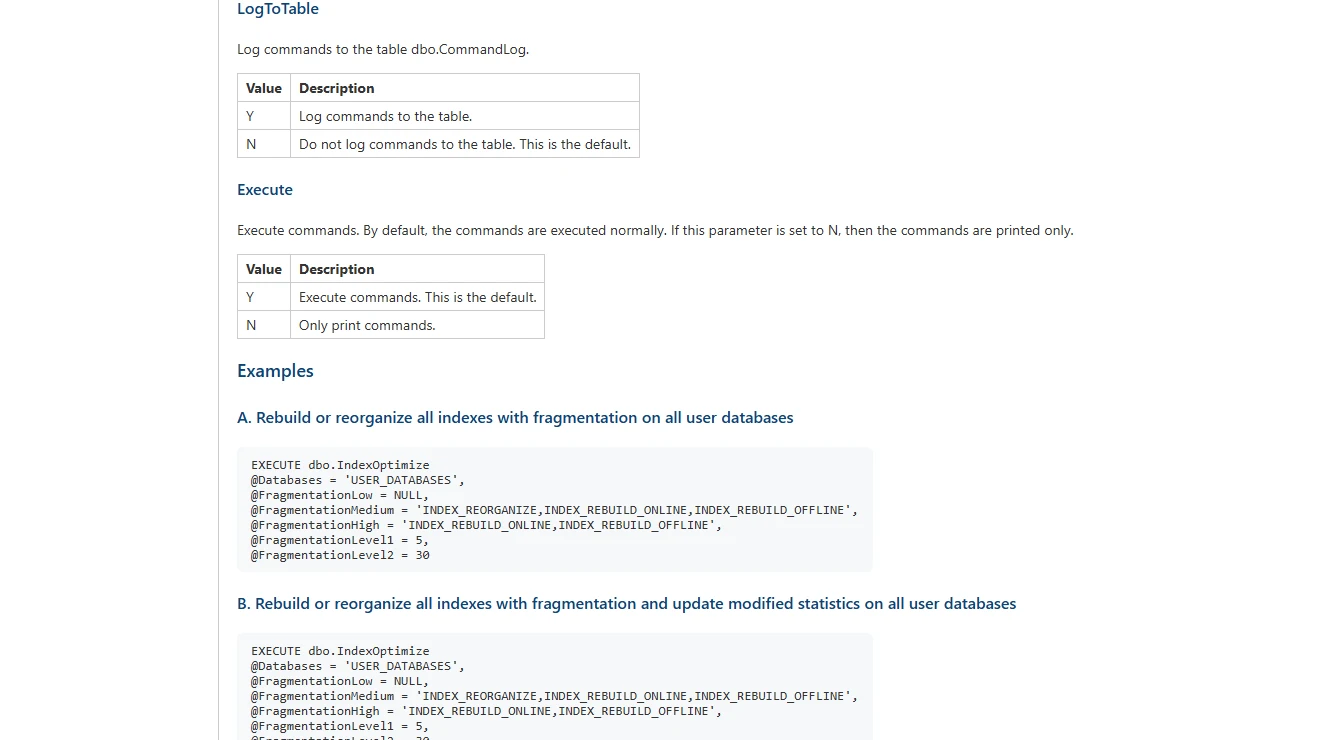
Ola Hallengren’s IndexOptimize is a T-SQL stored procedure that selects index and statistics work from configurable rules. It can choose from allowable operations, skip smaller indexes and log commands. It is useful when DBAs need to reuse a documented policy across several instances.
Its strength is control over operation order and the amount of work attempted. The TimeLimit prevents new commands after the configured limit, while a command already running may continue. The SQL Server edition and index type still determine whether an online or resumable operation is available.
IndexOptimize documents minimum page count, fragmentation groups and ordered choices for actions such as reorganize or online rebuild. Review the selected options and the chosen fallback. A configured offline fallback can have substantial effects during business hours.
Inspect the command log and verify which indexes were skipped under time and page rules. If statistics are included, record their separate scope. Run the same parameters on a populated lab before enabling the job fleet-wide.
- Compatibility
- Supported SQL Server or Azure SQL Managed Instance version. Scheduling and logging depend on the installed solution.
- License and trial
- Free SQL Server Maintenance Solution.
Minion Reindex
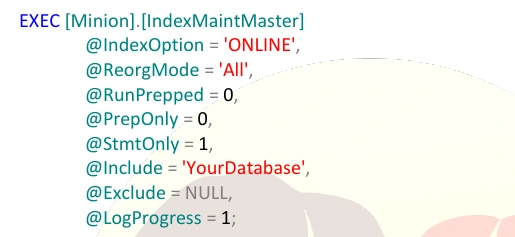
Minion Reindex provides T-SQL procedures, settings tables and SQL Server Agent jobs for recurring maintenance. It can apply different settings at database or table level and record the work performed. This is useful when large and small databases need different treatment within the same maintenance window.
It fits DBAs who want the policy to live in SQL Server and to be reviewable through its configuration and logs. Granular settings are useful when a table is expensive to maintain, but the results still depend on the chosen thresholds and compatible online operations. The team owns upgrades and job monitoring.
Use the documented configuration to set a small scope and explicit exceptions first. Check how runtime and database availability affect the SQL chosen. Compare the job output with native SQL Server measurements.
Run two policies on an otherwise comparable test index. Record job duration, affected objects and the reason for skips. Verify how the product logs attempted, completed and deferred maintenance.
- Compatibility
- Supported SQL Server with the Minion objects and Agent job configuration.
- License and trial
- Free Minion Reindex. Setup and operation remain with the DBA team.
dbForge Index Manager
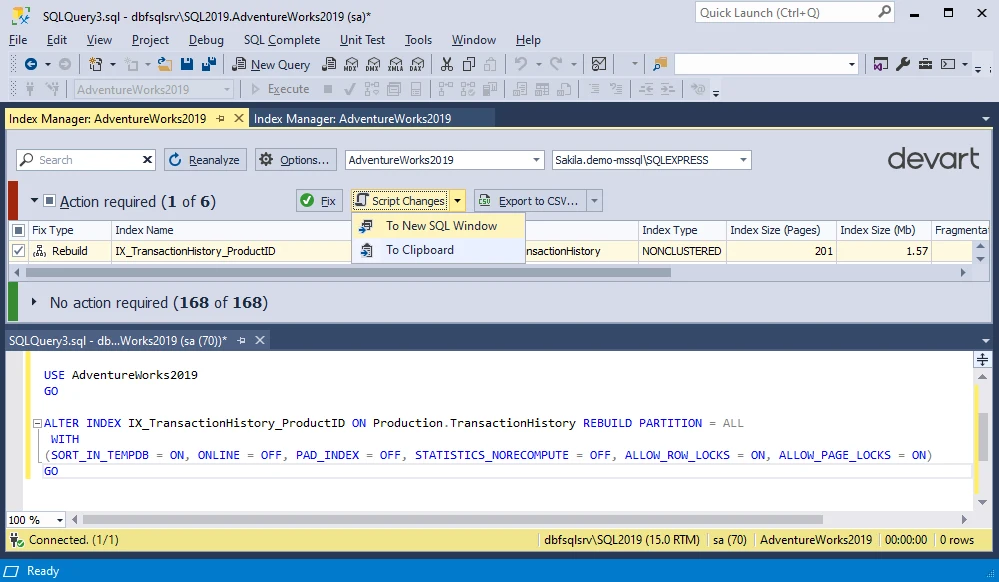
dbForge Index Manager scans SQL Server indexes, shows fragmentation and offers actions to reorganize or rebuild selected indexes. A developer or DBA can review the generated script before applying it. This is useful for targeted maintenance when an operator needs to understand what a tool proposes.
It fits hands-on review around a specific database or table. The visual selection helps narrow a repair, while thresholds and observed usage determine whether it is worth running. Repeating the same review across many instances still requires an operational workflow and a place to keep the outcome.
Use the index view to compare thresholds and concrete objects. Add a small index with high fragmentation to the pilot and check whether it can be excluded from the generated operations. Review the script before execution.
Run the selected action in a disposable copy, then collect density and reads again. Verify the licensed scheduling or command-generation workflow on the intended runner if the team plans to automate index work.
- Compatibility
- Windows dbForge product with a supported SQL Server connection.
- License and trial
- Commercial standalone or eligible bundled Devart licensing.
IDERA SQL Defrag Manager
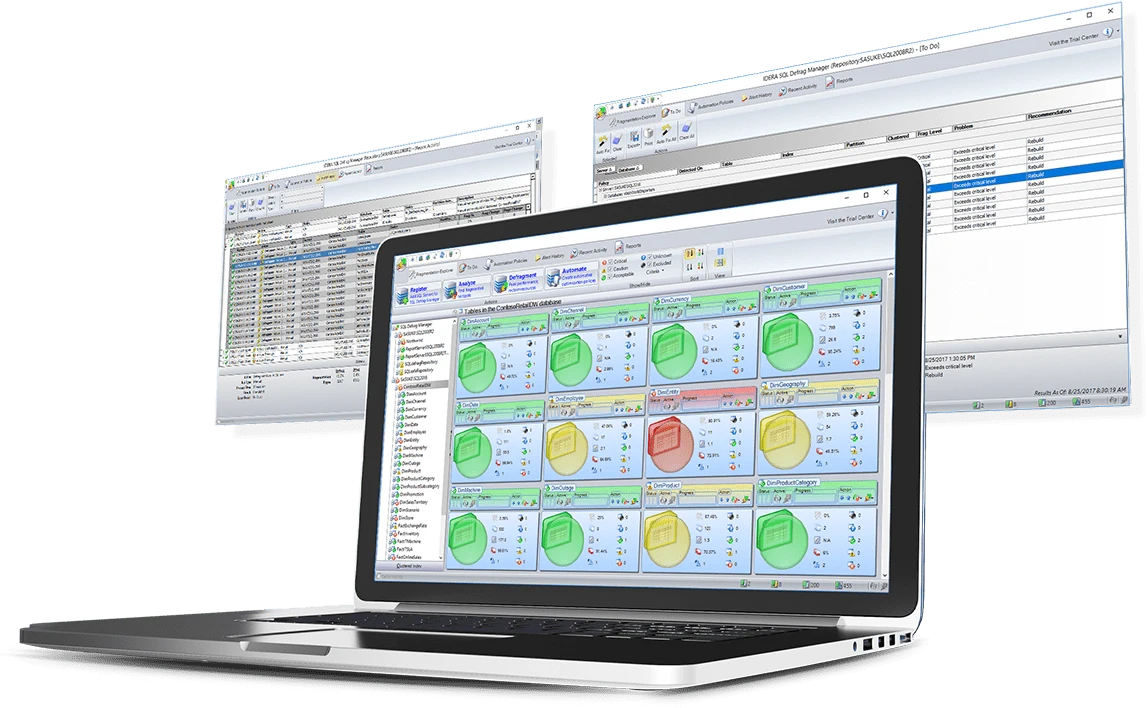
IDERA SQL Defrag Manager is intended to monitor and address SQL Server index fragmentation across multiple instances. It offers centralized policies and scheduled defragmentation. That is useful when a team wants to view and administer index work across an estate from one service.
The advantage is consistent policy management and reporting. Automatically selected work still consumes resources on the target and can compete with backups, replica redo or user queries. Supported operations, time windows and deployment permissions are part of deciding whether it fits.
Set a policy for one instance and mark an index or database as outside the test window. Inspect thresholds and support for the required online or resumable operation under the deployed SQL Server edition.
Compare the policy decision with what the runtime executed and retained. Record duration, data and log writes and maintenance overlap. Include the result for disconnected or deferred targets in an estate-level trial.
- Compatibility
- Supported SQL Server versions and IDERA monitor permissions. Online operations vary by target.
- License and trial
- Commercial IDERA product.
SolarWinds SQL Sentry Fragmentation Manager
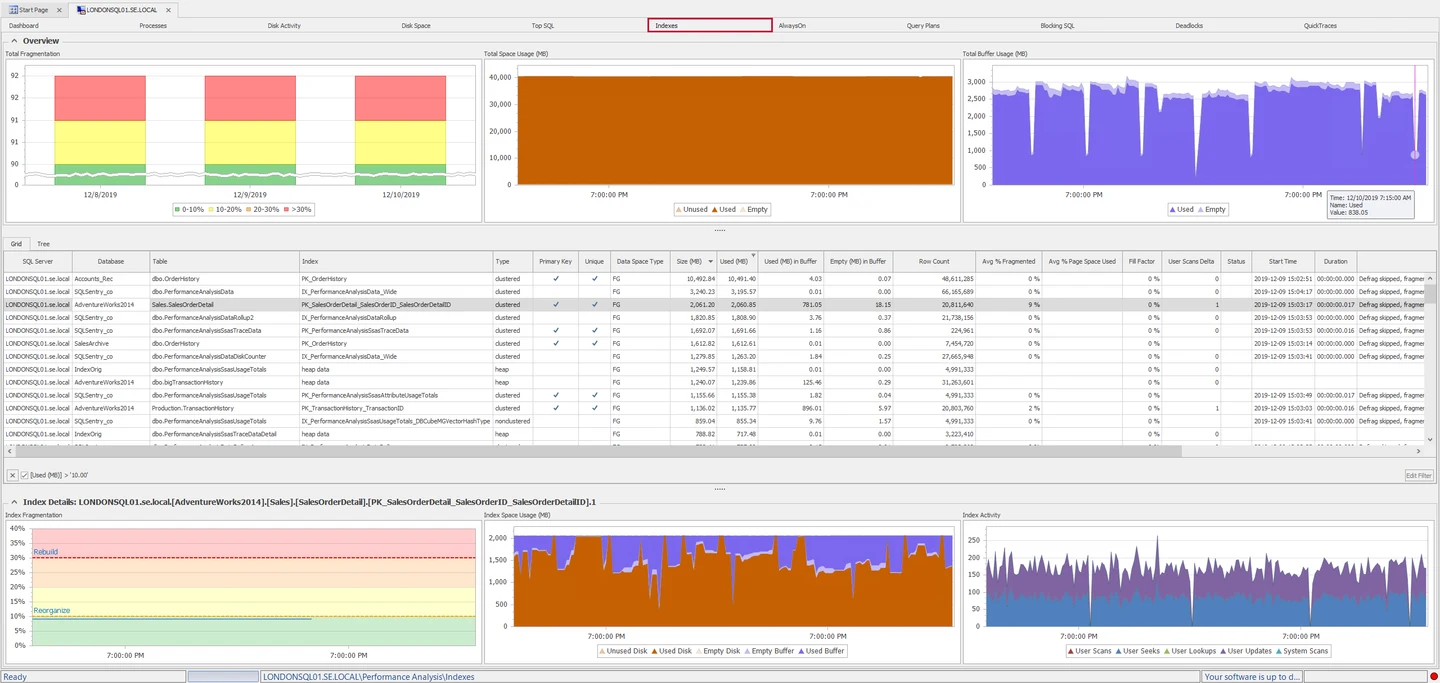
SQL Sentry Fragmentation Manager exposes index fragmentation and lets a DBA inspect indexes within its monitoring workflow. Its index views can help relate maintenance needs to the monitored database and wider server activity. This is useful for teams that already investigate SQL Server performance in SQL Sentry.
The main value is having fragmentation evidence next to other SQL Server observations. A fragmentation scan has a collection cost, and an index operation has a separate execution cost. Schedule settings and which measurements the team keeps determine how useful the history is during an investigation.
Use SQL Sentry's documented manager to inspect measured SQL Server fragmentation. Check which diagnostics and maintenance actions are available for the installed version and the intended SQL Server editions.
Test one partition and one excluded object. Save the selected observations and any proposed SQL. If your team acts from another scheduler, record what gets handed off and how each decision is verified afterward.
- Compatibility
- SQL Sentry with SQL Server monitoring and the permissions required for its index features.
- License and trial
- Commercial SQL Sentry licensing.
dbWatch Control Center
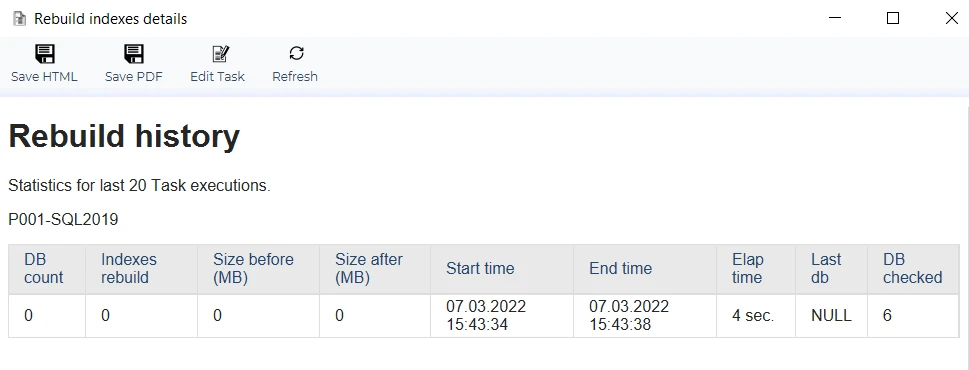
dbWatch Control Center can monitor SQL Server index usage and run configurable index-maintenance jobs. A documented rebuild job takes a table list, fragmentation criteria and parameters such as whether to continue on the next run. This fits teams that already schedule estate maintenance through dbWatch.
The comparison depends on what a configured job actually does on the target. Fill factor and online settings can affect maintenance cost and index behavior. A time budget can limit starting further work, and the monitored instance still has to support the requested operation.
Review the documented monitoring or job workflow for the installed release. Test one small index, one qualified index and an offline or unavailable lab database. A fleet view should preserve the distinction between a skip and a collection failure.
Inspect what the operator can export about actions and schedules. Verify who can trigger the SQL and how failures are recorded. Compare the result with the server-side operation and measured I/O.
- Compatibility
- dbWatch Control Center with applicable SQL Server or Azure SQL Managed Instance jobs and privileges.
- License and trial
- Commercial dbWatch licensing.
EMS SQL Backup for SQL Server
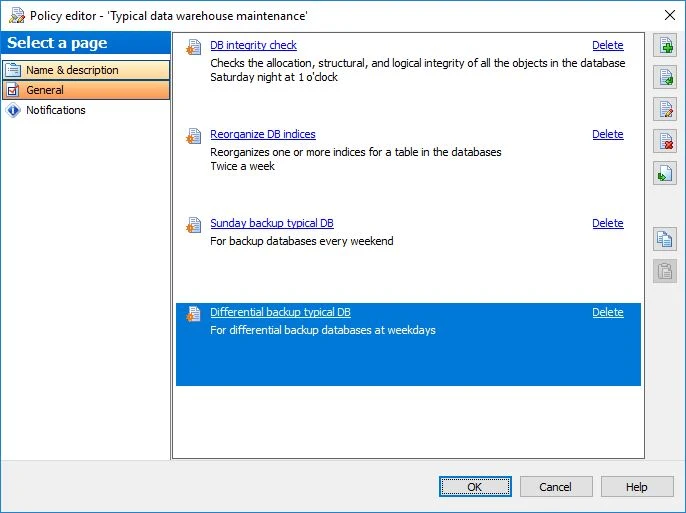
EMS SQL Backup for SQL Server includes maintenance policy templates alongside backup administration. Its console can schedule database maintenance actions such as index work through the supported policy workflow. It is useful when a team wants maintenance and backup jobs visible in the same administrative product.
The benefit is coordinating several recurring operations through one console. Index tasks still need their own scope and schedule. A rebuild can consume log and storage resources that also affect a backup window, so a joint schedule is only useful when it reflects the actual workload.
Check which SQL Server maintenance tasks are included in the EMS installation. Use separate backup and index steps to establish when each starts. Make sure the transaction log target can handle the additional activity in the maintenance window.
Confirm index and statistics behaviors on the deployed SQL Server edition and retain the job result. For a controlled failure, inspect which step ran and whether other scheduled backup or restore verification work still completes.
- Compatibility
- Supported EMS SQL Backup installation and SQL Server maintenance policy targets.
- License and trial
- Commercial EMS licensing.
Index maintenance tools by how you run the work
| What you need | Tools to shortlist | What to verify |
|---|---|---|
| Manage index and statistics jobs in T-SQL | Review object filters, fallback operations, the maintenance window and command logs. | |
| Review candidate indexes and generated commands in a GUI | Preview the target and operation. Check whether the proposed action changes fill factor or requires online rebuild support. | |
| Apply policies and audit runs across instances | Confirm exclusions, overlapping schedules, command history and what happens after a blocked or failed run. | |
| Keep index work in an existing backup maintenance schedule | Set the index step scope and schedule explicitly. Confirm that a failure appears in the policy log. |
Choose an index policy based on measured workload
Inspect leaf-level density and fragmentation on rowstore indexes, then determine whether query reads or maintenance resource use justify changing them. A canned threshold can miss a meaningful density problem or spend time on small objects.
The index is small or adds little measurable cost
Skip it under the reviewed policy
Record object scope and reason rather than silently reporting success.
Reads rose for a large index with low page density
Trial a targeted operation
Check partition, edition, online or resumable eligibility, and compare reads and density.
The operation cannot finish in the approved window
Defer or use a documented bounded workflow
Check the job's time-limit behavior, current commands and resume conditions.
- Microsoft SSMS Maintenance Plan Wizard
- Microsoft SQL Server fragmentation and page density guidance
- Microsoft SQL Server index physical stats
- Ola Hallengren IndexOptimize options
- Minion Reindex product and log options
- Devart dbForge Index Manager capabilities
- IDERA SQL Defrag Manager
- SolarWinds SQL Sentry Fragmentation Manager
- dbWatch SQL Server index monitoring
- EMS SQL Backup maintenance features
Record the planned action, executed command and maintenance cost
Use the same database copy, data volume and representative query before and after. Capture duration, logical reads, log bytes or write I/O, and density. Separate stats-only changes from index operations.
The sample illustrates one policy. A real SQL Server job needs to check the operation against edition, partition and window. Consult the job documentation to see whether a time limit prevents new work or also changes the behavior of an operation already running.
| Target | Illustrative condition | Proposed action | After the trial |
|---|---|---|---|
| Small lookup | 60 pages, density 72% | Skip on page-count minimum | Record skipped and elapsed time, with no index writes expected from this job |
| Order index | 8,200 pages, density 63% | Inspect known reads and approve targeted work | Record actual operation, before and after reads, density, duration and log usage |
| Separate warehouse partition | Large index with eligible targeted work | Test one approved partition | Check other partitions and log writes |
| Closed maintenance window | Otherwise qualifying index | Defer | Record the next window and actual job state |
| Unavailable replica database | No connection or unsupported role | Skip with explicit reason | Distinguish unavailable from a successful no-change run |
How to compare these tools
Use the same server and maintenance window. Check the actions generated, what happens to small or busy indexes, and what gets logged when an operation is skipped or fails. Sources checked .
Verify which indexes the policy will touch
The table variable models the policy choices. The second branch can read a real rowstore sample for one named disposable database and table. Neither branch performs maintenance.
Model index skip rules and inspect one SQL Server test table
T-SQL · 28 lines
- Use the model to check how small, unavailable and closed-window targets are classified. Reproduce representative indexes on a disposable database and capture leaf measurements and query reads.
- Run the candidate tool in a preview or intentionally restricted trial. Check the planned operation, supported SQL Server edition, window and target. Carry out approved work only in the disposable copy.
- Measure the actual action, duration, reads and log growth or writes. Compare before and after under the same workload and record separately if only statistics were updated.
Conclusion
Choose the tool that lets you bound the work, check what ran, and explain why the index needed maintenance. If stats are the issue, schedule the stats work directly. For an index change, compare the measured query benefit with blocking, log usage and time spent on maintenance.
Frequently asked questions
Should I rebuild SQL Server indexes every night?
Tie the schedule to workload measurements and maintenance cost. Check page density, fragmentation, actual query reads and recent index use. Some tables need little or no recurring rebuild work.
What is the difference between reorganizing and rebuilding an index?
Reorganize compacts and reorders the applicable index pages incrementally. A rebuild recreates the index. An online or resumable rebuild depends on SQL Server version, edition, operation and index support.
Does reorganizing a SQL Server index update statistics?
Reorganize leaves index statistics as they were. If statistics need refreshing, schedule a statistics update separately. Check which statistics the selected rebuild updates.
Why track page density during index maintenance?
Low page density can make a query read more pages for the same rows. Capture page count and actual logical reads when evaluating a change. Compare against workload behavior such as insert patterns and page splits.
Can index maintenance run on SQL Server Express?
SQL Server Express has T-SQL index commands. For recurring work, choose an external scheduler or client workflow because Express lacks SQL Server Agent. Check edition support for the specific operation.
How can I tell whether an index maintenance tool helped?
Compare the same query and representative load before and after. Record reads, duration and log or write volume, plus the physical metrics and exact action. Check whether statistics alone explain any improvement.