

SQL Server Agent already owns most schedules, steps and job history. The question is whether the team needs to change a job, explain a failure or coordinate work beyond one instance. SSMS covers native administration. PowerShell can make the same inventory or copy repeatable. A monitoring tool can fit better when the first question is what ran, how long it took or why it overlapped a load.
IDERA, SQL Sentry and JAMS add different kinds of central control. IDERA organizes jobs across servers, SQL Sentry can link jobs into event chains, and JAMS can schedule Agent jobs alongside other processes. Redgate Monitor, DBA Dash and SQLTreeo are useful for following execution over time. The important difference is which system owns the next run, and where an operator can see the job step that actually failed.
SQL Server Agent job tools at a glance
Separate where the job is defined from who starts it and who reports its outcome. A tool that shows a failed run may need an independent expected schedule to identify a missed start.
| Tool | Primary job | Change or scheduling scope | Pilot and license |
|---|---|---|---|
| SSMS and SQL Server Agent | Native definition, schedules, activity and history | Local jobs. MSX/TSX distributes eligible multiserver jobs | Test msdb roles, schedule, proxy and retention under existing platform terms |
| dbatools | Script job inventory and migration | Copy selected jobs to reviewed targets; scheduling remains with Agent | Open source. Verify owners, proxies, dependent objects and existing target schedules |
| IDERA SQL Enterprise Job Manager | Central job administration and visibility | Inspect supported job setup and schedule control for enrolled instances | Commercial. Test write scope, permissions and stale-instance behavior |
| SolarWinds SQL Sentry | Event calendar and supported job chains | Observe Agent events and configure supported dependencies | Commercial. Check step visibility, chain behavior and existing entitlement |
| Redgate Monitor | Investigate Agent executions alongside instance telemetry | Monitoring view and job outcome alerts. Agent owns execution. | Commercial. Verify history coverage and missed-start detection for the chosen rule |
| DBA Dash | Fleet collection and Agent Job Timeline | Collect and review history and overlaps | Open source. Test collector lag, retention and history completeness |
| SQLTreeo Job Timeline | Compare durations and overlaps in existing history | Desktop visualization over monitored job data | Check current product terms and available history before comparing time ranges |
| JAMS | Coordinate SQL jobs with wider workflows | Start supported Agent jobs via SQLAgent execution method | Commercial. Check remote runner rights, job result and schedule ownership |
SQL Server Management Studio and SQL Server Agent
SQL Server Management Studio exposes SQL Server Agent’s native job definitions and activity. A DBA can inspect steps, schedules and notifications beside the recent and next runs. It is the clearest baseline for a single instance because the definitions and the schedule are governed by Agent itself.
It is also relevant when a supported SQL Server deployment uses MSX/TSX to distribute job definitions to targets. This introduces a master-server arrangement and additional connectivity and authentication requirements. For a wider estate, each instance’s activity remains a separate view unless a central process collects it.
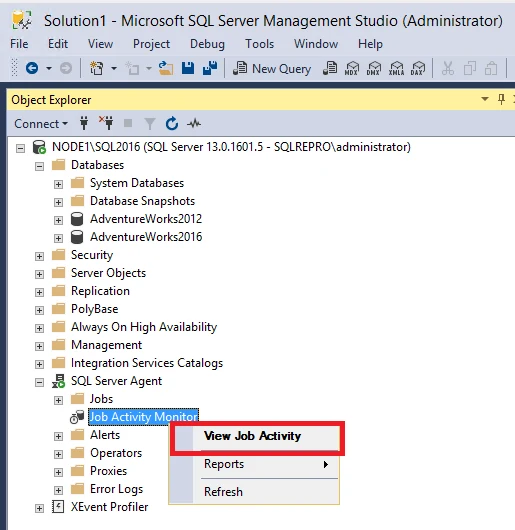
Start with Agent Job Activity Monitor to inspect current activity and review step or whole-job outcomes in history. Confirm SQLAgent roles in msdb for the actual operator. Ownership, listed jobs and the ability to run or edit them vary with the role.
For MSX and TSX, verify what is distributed by the master and which changes must be posted. Test an intended schedule on both nodes and keep required proxies and job dependencies in the runbook. Core execution remains part of the SQL Server deployment.
- Compatibility
- Windows SSMS client. Agent is available on supported SQL Server deployments and Azure SQL Managed Instance. MSX/TSX is limited to supported arrangements.
- License and trial
- SSMS is a free download. SQL Server Agent availability depends on platform and edition.
dbatools
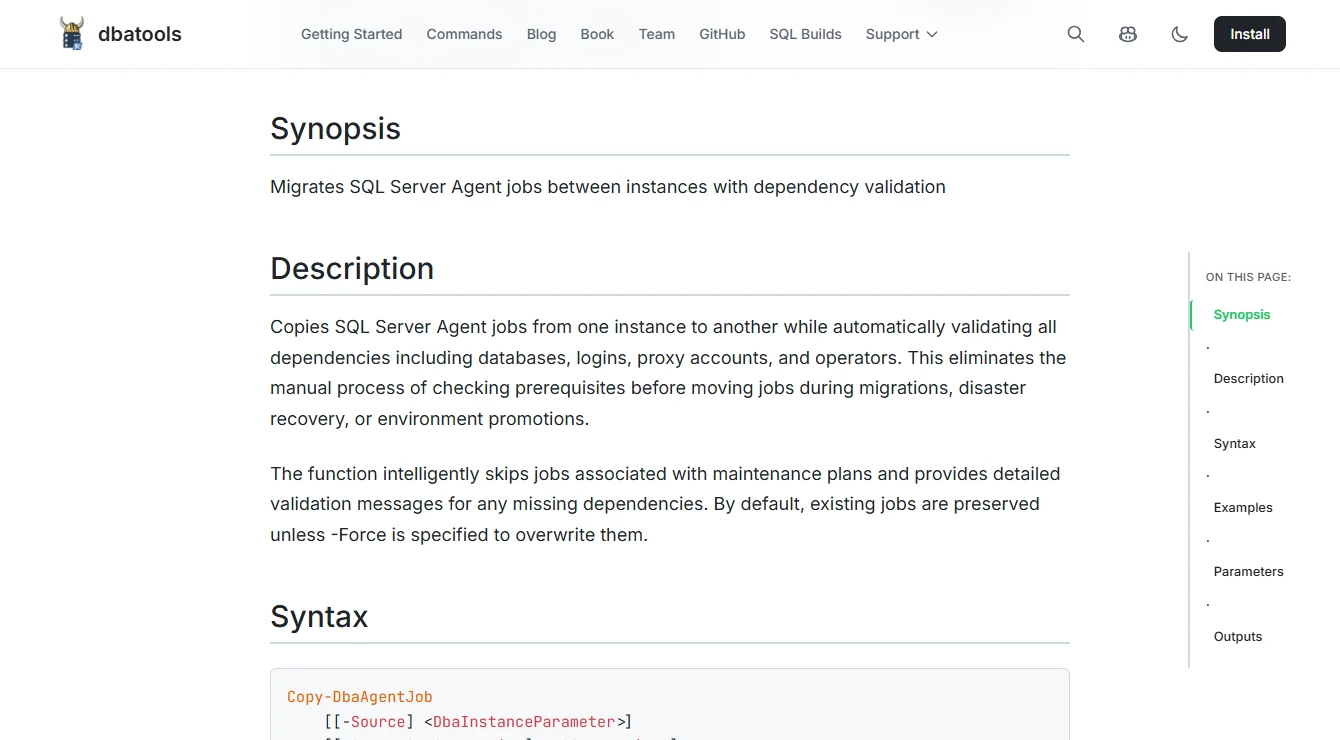
dbatools provides PowerShell commands for inspecting or moving SQL Server Agent jobs. Get-DbaAgentJob can inventory several instances from one script. Copy-DbaAgentJob can also report missing dependencies such as a database, login, proxy or operator that the job needs to run on the destination.
It fits repeatable administration and migration work, where the script should be reviewable and can be rerun. Existing same-named jobs are preserved by default, and maintenance-plan jobs are skipped. These boundaries matter when a copied schedule is expected to behave like the original after an instance move.
Export a reviewable inventory and use the copy workflow on a disposable target. Compare enabled flags, schedules, owners, steps and the databases or paths referenced in them. Order the migration so named prerequisites exist before jobs are enabled.
Run the same check after the second copy or update so you know how the command handles existing objects and whether a schedule would run twice. Keep the applied outcome with the PowerShell invocation and leave monitoring or missed-start expectations in the system that owns them.
- Compatibility
- PowerShell access to the source and target SQL Server instances. Command support depends on the database platform and permissions.
- License and trial
- Open-source PowerShell module. Script operation and maintenance remain with the DBA team.
IDERA SQL Enterprise Job Manager
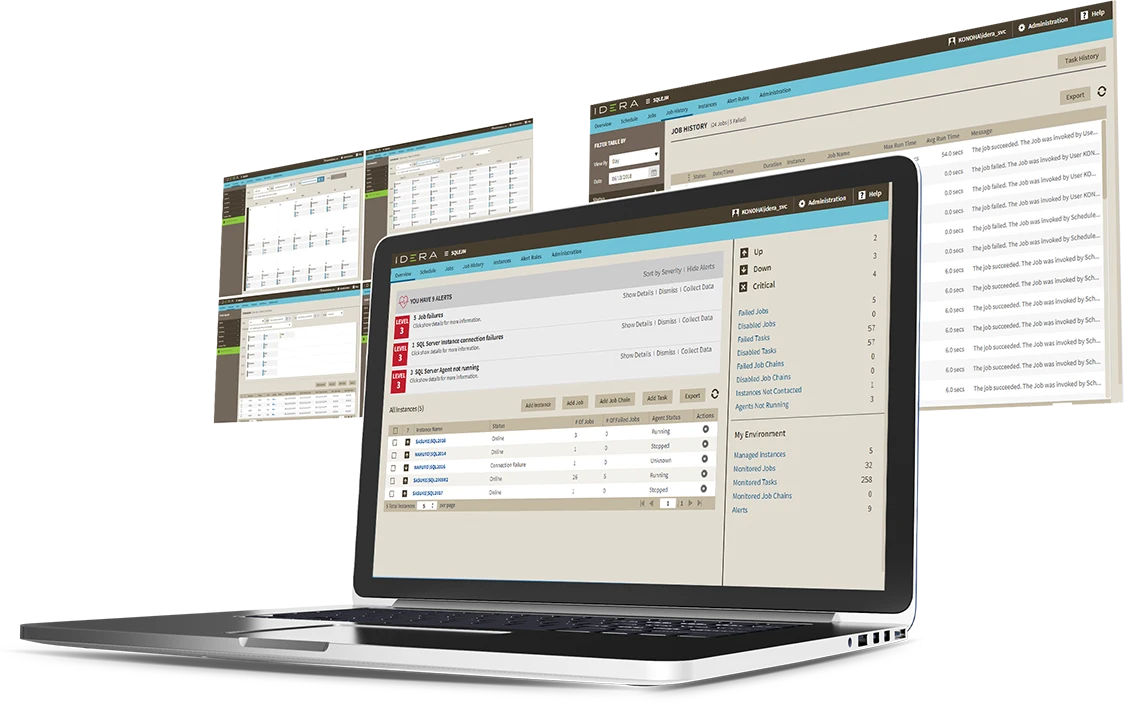
IDERA SQL Enterprise Job Manager provides a central view of scheduled and completed SQL Server Agent jobs. The published capabilities include editing and job chains across monitored servers. It is a candidate when a DBA needs more than a dashboard and expects to work on job definitions from the same service.
The advantage is central operational control for a team managing several SQL Server instances. The comparison depends on support for the actual SQL Server versions and the level of permissions given to the service. Changes made through that interface still need the same review as a job edit made on the instance.
List jobs independently from Agent and compare the results with the central console for the same instances. Exercise a planned change with a test role. Capture whether changes apply directly to the Agent job, how they are recorded, and how a disconnected server appears.
Test both schedule administration and operational alerting. Disable a schedule deliberately in the lab and see whether the console displays a disabled state, a change event or a missed expectation. Agree which signal your operations team will act on.
- Compatibility
- SQL Server Agent on supported platforms. Engine and product release coverage depend on the published support matrix.
- License and trial
- Commercial. Edition and support terms vary by installation.
SolarWinds SQL Sentry
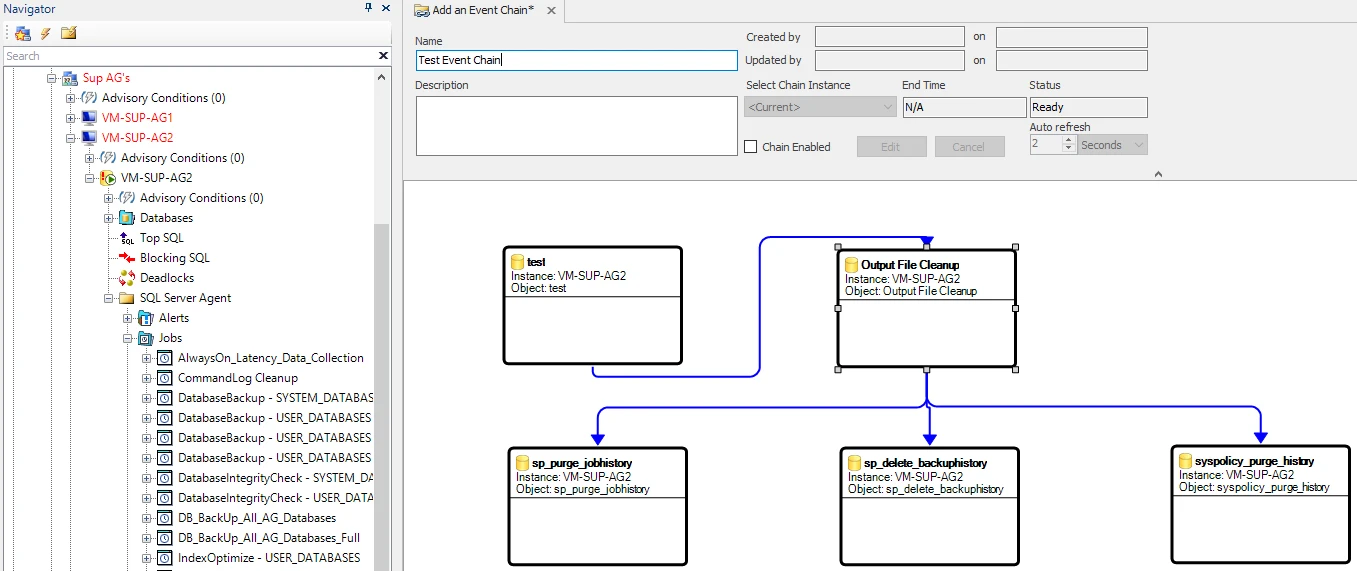
SolarWinds SQL Sentry can show scheduled events on a calendar and link jobs through Event Chains. A chain can use the result of a prior event to determine if a downstream job should run, even across servers. That helps when work that looks separate in each Agent history is part of one dependency.
It is useful when job ordering and cross-server execution need to be investigated together. The calendar can show when a lead job started and which downstream jobs were eligible afterward. Responsibility for scheduling and failure handling depends on how the chain relates to each job’s own schedule.
Open the event calendar for the relevant SQL Server Agent source and compare it with timestamps in msdb. Verify whether the current view represents a completed event or a projected start. This matters when investigating an empty slot versus a failed step.
Try a chain whose upstream job fails before a dependent job can start. Inspect the event conditions and distinguish the dependent job being skipped from failing at its own server. Include a manual retry so the chain owner knows whether it also triggers downstream work.
- Compatibility
- SQL Server Agent jobs and other supported event sources collected by SQL Sentry. Deployment requirements follow the support matrix.
- License and trial
- Commercial SQL Sentry licensing.
Redgate Monitor
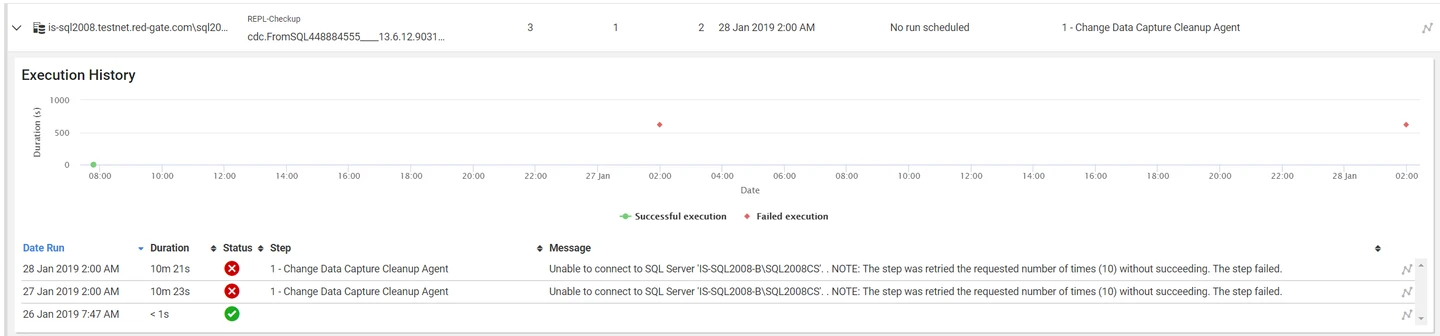
Redgate Monitor brings SQL Server job executions into its monitoring workflow. The Jobs view shows timing and outcomes, with details such as steps and recorded failure messages. That is useful after a failed backup or late load when the DBA is already looking at instance health in the same tool.
Its strongest fit is investigation and ongoing monitoring. Jobs remain attached to their native scheduler, and different SQL Server topologies can change what Monitor can collect. SQL Server Agent and Azure Elastic Jobs also have different operating models, so coverage for one should be evaluated on its own terms.
Start from the Jobs page to match the failure with timing and other symptoms on the instance. Confirm which monitored SQL Server estates and jobs feed the view and what level of history it retains. Native Agent remains the source for the job definition.
A failed Agent job and an expected job that did not start require different checks. Configure the exact notification used by the team, then exercise both paths. Verify retention and how the alert looks when it reaches the on-call channel.
- Compatibility
- Monitored SQL Server deployments. Contained availability-group job visibility depends on supported version and setup.
- License and trial
- Commercial. Job views are part of Redgate Monitor’s SQL Server monitoring workflow.
DBA Dash
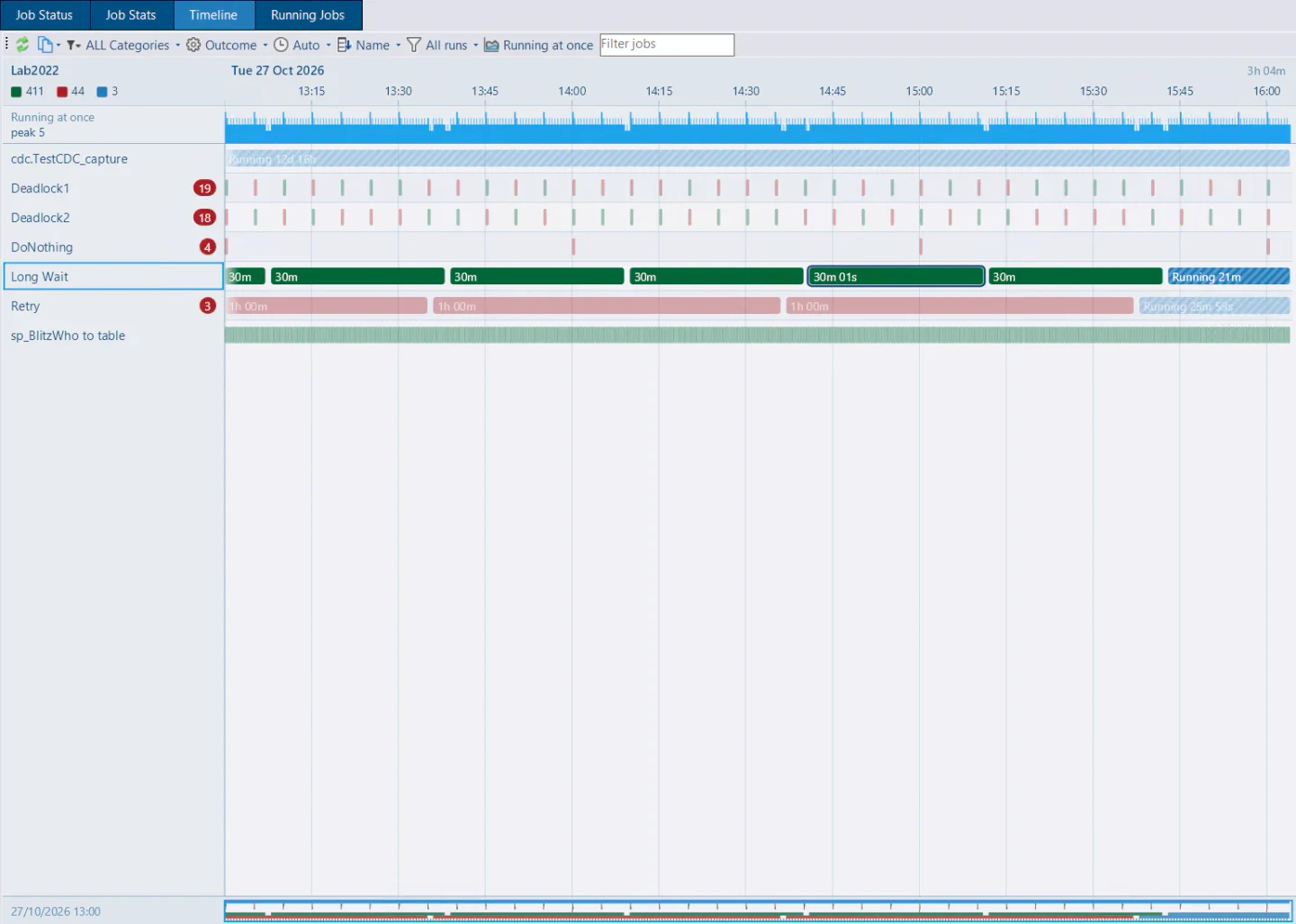
DBA Dash collects SQL Server data into a repository and presents Agent Job Timeline for runs and overlaps. A central timeline can show when backups, maintenance and loads were active at the same time. Collected step history can add detail about outcomes and retries.
It suits a DBA who can operate the collector and wants a practical view across instances. Findings depend on how much source history is retained and collected. The timeline is useful for identifying when a schedule may need attention while changes still happen through the native scheduler or administrative tooling.
Use the collector's Agent Job Timeline to compare overlapping runs between instances. Record collection lag and local history limits before interpreting an empty interval. A central plot shows collected records, so the timing of collection affects what it can prove.
With a short-lived test job, compare the completed step and summary records with the central view. Disable the schedule for the next expected time and check whether you need to pair the timeline with an external calendar to raise a missed-run alert.
- Compatibility
- Agent Job Timeline was introduced in DBA Dash 4.23.0. Requires SQL Server collection and a DBA Dash repository.
- License and trial
- Open source. Collector operation, storage and retention are managed by the team.
SQLTreeo Job Timeline
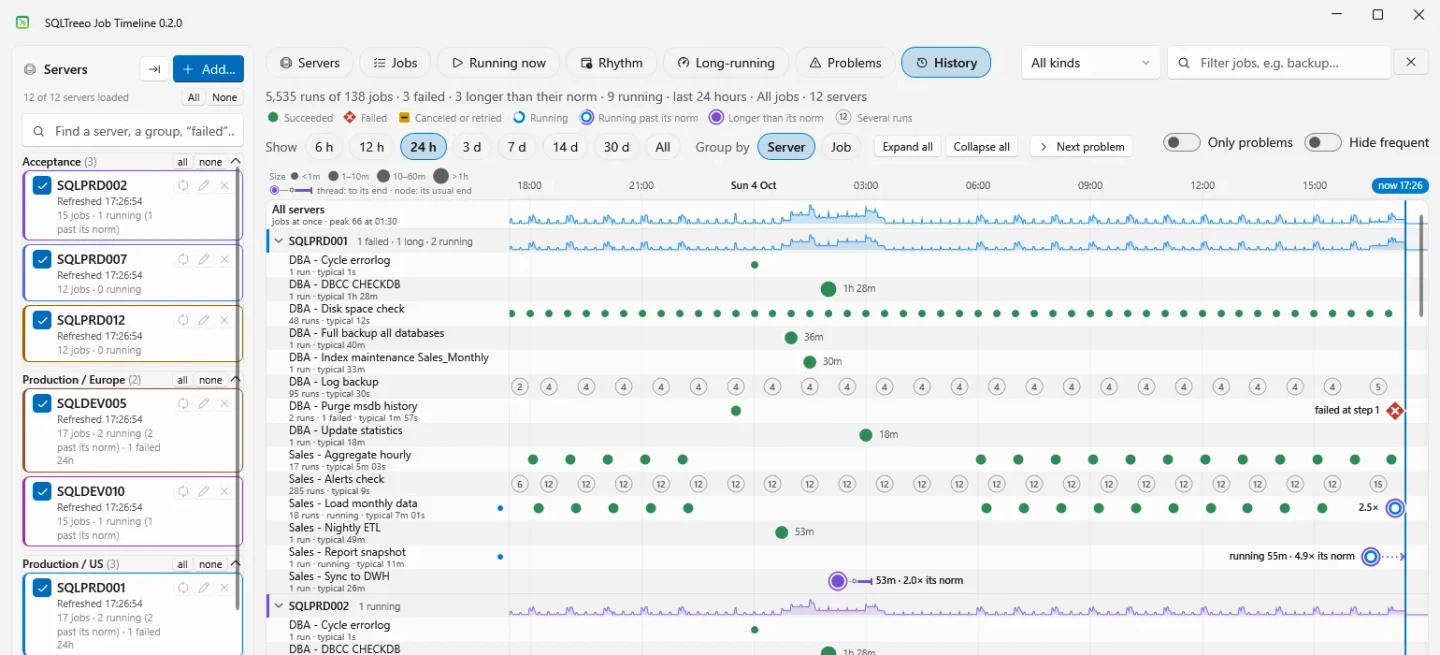
SQLTreeo Job Timeline is a desktop application for making SQL Server Agent history easier to read. It shows individual runs and a Rhythm view that puts expected schedules and observed activity on one axis. That is useful for finding late or missing runs as well as jobs that collide.
It is a good fit when a DBA wants to explain schedule behavior from existing Agent data. Its long-run comparison uses a job’s own successful history. Frequent jobs can be filtered from overlap analysis, so the picture depends on both the available history and the view’s settings.
Use the timeline view to inspect why runs overlap or drift from their usual duration. First match job identity and time range with the native history. Confirm whether the view presents the scheduled time, actual start, or both for that job.
Try the same time range on a server with history already trimmed. Compare a short manual run and a long scheduled one. The result tells you whether available history and the product's view are enough for the review you need to do.
- Compatibility
- Windows desktop with read permissions for the relevant SQL Server Agent metadata. Availability-group coverage can require additional access.
- License and trial
- Commercial desktop software with a trial.
JAMS
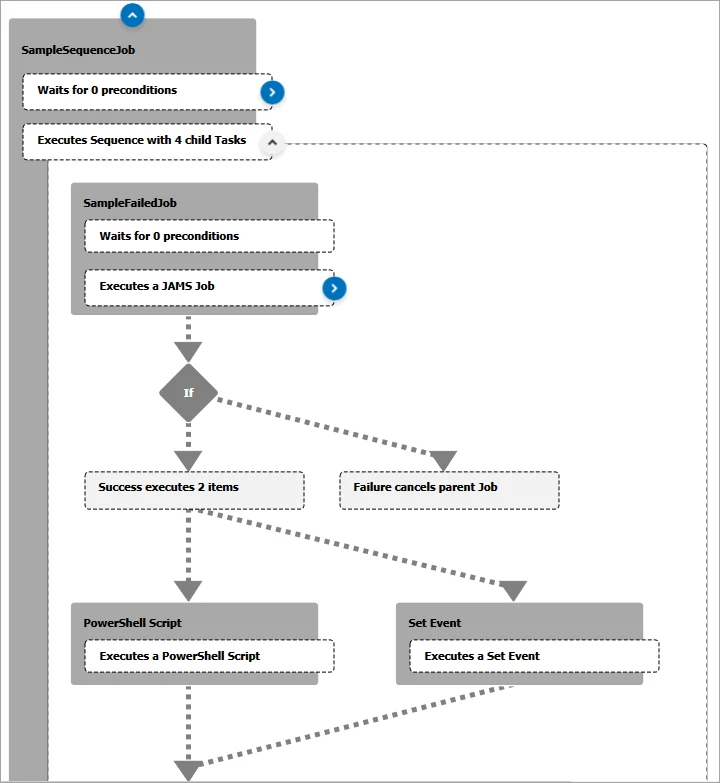
JAMS can schedule an existing SQL Server Agent job through its SQLAgent execution method. The benefit is the wider workflow. A job can run after another system’s work, and its execution can participate in the scheduler’s dependencies and notifications.
It fits organizations that already coordinate work through an enterprise scheduler. The scheduler can report when it submitted the job and the overall result. Native Agent history remains the more detailed record for individual SQL Server job steps. The configured connection and submission permissions are part of the operational design.
Use a JAMS entry to invoke a preexisting Agent job and test the credential that carries out the call. Attach a dependency on a non-SQL step so the trial proves the workflow reaches beyond Agent. Keep the job definition and execution evidence available in SQL Server.
Decide which system owns the schedule. If JAMS starts this job, account for an existing Agent schedule for the same workload so both triggers do not contend. Test an upstream timeout and a failed Agent job separately and compare the statuses JAMS exposes.
- Compatibility
- JAMS with a supported SQL Server connection and permission to submit the selected Agent job.
- License and trial
- Commercial workload automation. Scheduler and connector terms depend on the deployment.
SQL Server Agent tools by job management task
| What you need | Tools to shortlist | What to verify |
|---|---|---|
| Edit a job or copy definitions to another instance | Compare the steps, owner, enabled schedules and dependencies after the copy. | |
| See failures and overlapping runs across servers | Find the failed step and tell two same-named jobs apart by instance. | |
| Investigate a missing native run or an unmet scheduler dependency | Withhold an upstream task and check whether the tool can distinguish a missed start from a failed execution. Verify notification support separately. | |
| Run a chain across instances | Fail the first job deliberately and confirm which downstream tasks start. |
Choose who owns the SQL Agent job and its schedule
Every operational comparison starts with the native job definition, schedule and security context. Inventory the owner, server role, proxy where applicable, target database, upstream dependency and who can start it. Keep a monitoring account and a job-editing account scoped to their duties.
Keep jobs consistent and move them to another instance
Manage definitions through Agent or automation
Compare saved jobs, credentials, schedules and dependencies before enabling the copy.
Know which jobs failed or missed their start
Combine activity and history with expected slots
Check collector timing, metadata access and retention before calling a run missed.
Start jobs only after other services finish
Evaluate central orchestration
Assign schedule ownership and test the Agent result seen by the scheduler.
- Microsoft SQL Server Agent Job Activity Monitor
- Microsoft SQL Server Agent database roles
- Microsoft Agent multiserver setup
- dbatools Copy-DbaAgentJob
- IDERA SQL Enterprise Job Manager
- SolarWinds SQL Sentry Agent event sources
- Redgate Monitor Jobs
- DBA Dash Agent Job Timeline
- SQLTreeo Job Timeline
- JAMS SQLAgent execution and management
Read a missed start, failed step and successful rerun
A job history summary uses step_id 0. A step failure has its own history row. SQL Server may add history after a step completes, so check current activity and the collector before issuing an absence alert. Set the allowed start window in the same time zone used to report the Agent history.
The sample uses a five-minute start window. A manual rerun at 02:17 fixes the work for that date, while the failed scheduled run remains in the record.
| Scheduled slot | Actual timeline | Native evidence | Interpretation |
|---|---|---|---|
| Day 1 at 02:00 | Normal start and completion | A success summary and associated steps | Expected start occurred |
| Day 2 at 02:00 | No start through 02:05 | No completed run in the fixture window | Report a miss only after checking active runs, history and collection |
| Day 3 at 02:00 | Step 2 fails | Step failure and failed job summary | Start occurred; investigate the step |
| Day 3 at 02:17 | Operator reruns successfully | Separate successful job summary | Recovery succeeded. Keep the original failure and delay visible. |
How to compare these tools
Create one failed job, one missed schedule and one job that finishes without its expected output. Check which case the tool detects and what the person on call can see. Sources checked .
Test a missed start, one failed step and a rerun
Use the SQL fixture to compare a known schedule with completed job records. It models retained msdb history without adding or changing any actual SQL Server Agent jobs.
Distinguish missing, failed and recovered Agent job runs
T-SQL · 33 lines
- Run the fixture and keep the three slot results plus the later rerun. The fixture models a completed history capture after all three windows.
- In a disposable SQL Server Agent job, allow one successful schedule, disable or miss a second start, then force a third run to fail. Rerun it manually after the allowance. Compare native history and activity before checking the monitoring tool.
- Verify that the candidate keeps the expected slot and the original failed step alongside the rerun. Check whether retained history and observability differ after the collector is offline.
Conclusion
Pick the smallest toolset that can show the job’s expected start, its actual step history and its output. Test job copies and downstream reruns before giving a new scheduler control over overnight work.
Frequently asked questions
What is the best way to manage SQL Agent jobs across multiple servers?
Use dbatools for repeatable job copies and inventory. A central history view such as DBA Dash, SQLTreeo Job Timeline or Redgate Monitor helps an operator review results. Choose an orchestration tool when one job must wait for another across servers.
Can SQL Server Agent itself manage jobs on multiple servers?
Yes. On supported SQL Server installations, multiserver administration downloads jobs from an Agent master server to enlisted target servers. Azure SQL Managed Instance supports many Agent features and excludes this MSX/TSX feature.
Why is a missed SQL Agent job different from a failed job?
A failed run leaves execution evidence. A job that never started has no new outcome row, so detecting it requires an expected schedule or completion time and an independent check against actual runs.
What should I check after copying a SQL Agent job?
Check the owner, database, proxies, operators, schedules and external paths. Run the job under its intended identity on the destination and compare its output before enabling the schedule.
Can a central scheduler run an existing SQL Server Agent job?
Yes. JAMS documents a SQLAgent execution method for submitting an existing job. Confirm the scheduler connection rights, effective SQL Agent step identity, downstream failure behavior and ownership of recurring starts.
Which SQL Server Agent history rows describe the whole job?
Rows with step_id 0 record whole-job outcomes. Step rows give individual results. Correlate both with job activity and the expected start window before declaring a missed or failed run.