

A visual SQL builder makes it easier to see the tables, joins and filters that make up a query. Some builders are part of SQL Server-specific tools and can turn a supported T-SQL statement back into a diagram. Others emphasize constructing a new SELECT in a client that also supports other engines. The SQL pane matters because the diagram can present choices that are easy to miss in the output.
The trade-off shows up once a query uses details such as nested subqueries, CTEs or SQL Server-specific syntax. A builder can be useful for exploring a new schema and still need an editor for a hand-written query. Readers who plan to edit an existing statement visually should compare how the tool handles that exact statement and what happens to the SQL when the diagram changes.
Visual SQL query builders for SQL Server at a glance
Start with a live SQL Server connection and verify the query and the results. A canvas can be helpful for drawing joins, but the final T-SQL determines which rows survive.
| Tool | Good starting point | What to try | Host or edition |
|---|---|---|---|
| SSMS Query and View Designer | Native SQL Server views and SELECT queries | Review diagram, criteria and generated SQL panes | Windows SSMS on supported systems; free |
| dbForge Query Builder for SQL Server | SQL Server-specific graphical query authoring | Set outer join, conditions and grouping and review the SQL | Commercial desktop tool; verify standalone or Studio entitlement |
| DBeaver Visual Query Builder | Draw a query in a multi-engine environment | Join controls and generated SQL under a SQL Server data source | DBeaver documents Lite, Enterprise and Ultimate |
| Quest Toad for SQL Server | Build queries in an existing SQL Server toolset | Check diagram, query output and supported SQL Server version | Windows; verify Quest's Visual Query Builder edition |
| Aqua Data Studio | Graphical authoring across database engines | Add tables and predicates and save the SQL for SQL Server | Commercial. Check host and supported version. |
| Navicat for SQL Server | Visual query authoring and database editing | Review generated SQL, saved query and grouping behavior | Commercial desktop. Verify operating system and edition. |
| DbVisualizer Pro | Build diagrams and SQL in a JDBC client | Outer joins, generated T-SQL and data context | Pro required for graphical query builder |
| FlySpeed SQL Query | Desktop SQL Server browsing and query building | Visual editing, query parameters and SQL round-trip | Check Windows and available licenses for export and saved work |
Microsoft SSMS Query and View Designer
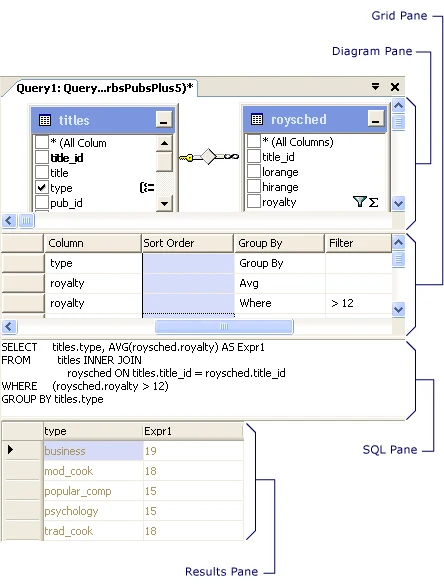
The SSMS Query and View Designer presents supported SQL Server queries through diagram, criteria, SQL and results panes. It can help a developer see table joins and filters while creating a view or editing a suitable query. The SQL pane makes the generated statement visible as changes are made.
It is a useful baseline when a team already uses SSMS and wants to build straightforward joins without adding another client. More elaborate T-SQL can fall outside the visual designer’s model. The text editor is still useful when a statement relies on SQL Server syntax that the designer cannot preserve visually.
Open the documented Query and View Designer against the disposable SQL Server database. Add the two tables, use the diagram pane to select the join, and inspect the SQL and criteria panes before running the result.
Run the two versions of the fixture with different predicate placement. Save the resulting SQL with the report requirement. Use ordinary T-SQL for syntax the designer cannot keep on its canvas after editing.
- Compatibility
- Supported Windows SSMS and a SQL Server connection with access to the query objects.
- License and trial
- Free Microsoft client.
dbForge Query Builder for SQL Server
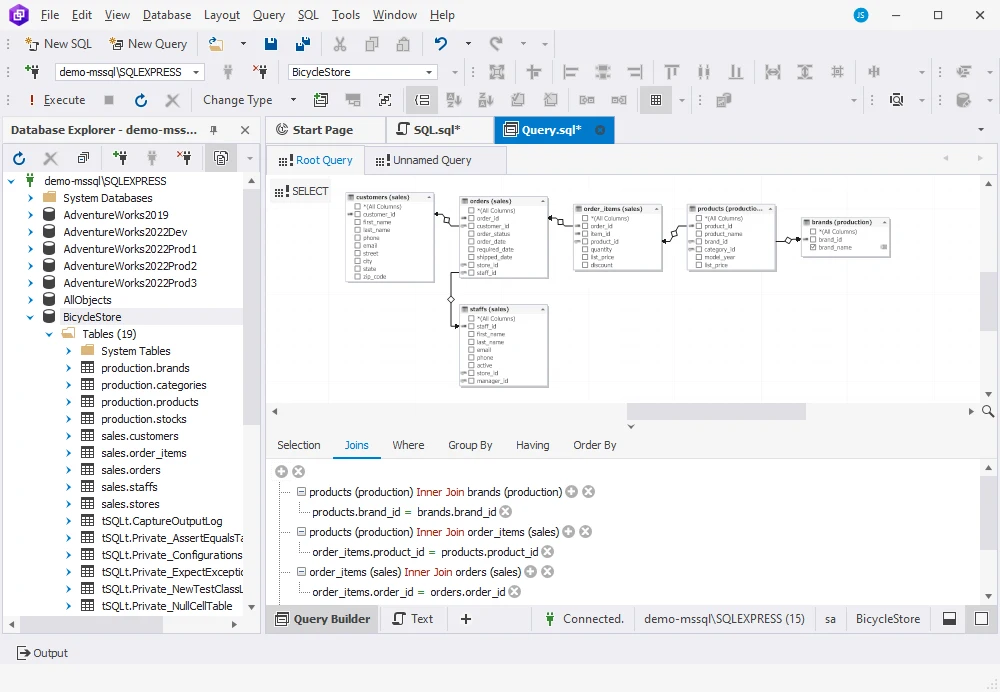
dbForge Query Builder for SQL Server supports building several types of T-SQL statements through a diagram and can visualize supported statement text. It suits a developer who wants to move between joins and filters on a diagram and the generated SQL text in a SQL Server-focused client.
The ability to read existing text back into a diagram is useful for reviewing unfamiliar statements. Parser coverage still matters for unusual T-SQL and complex queries. Editing a data-changing statement visually carries the same need to review joins and filters as writing it by hand.
Start with live SQL Server metadata and attach the orders table on the optional side of the join. Add the status and date predicates one at a time. Inspect the generated T-SQL to see which expression contains each predicate.
Try changing the SQL in the editor and opening the graphical representation again. Save the version that preserves the report behavior. Check the standalone or Studio edition and host where the team will actually run it.
- Compatibility
- Windows Devart tool for supported SQL Server connections. Also available in eligible dbForge Studio editions.
- License and trial
- Commercial Query Builder or an eligible bundled edition.
DBeaver Lite, Enterprise and Ultimate
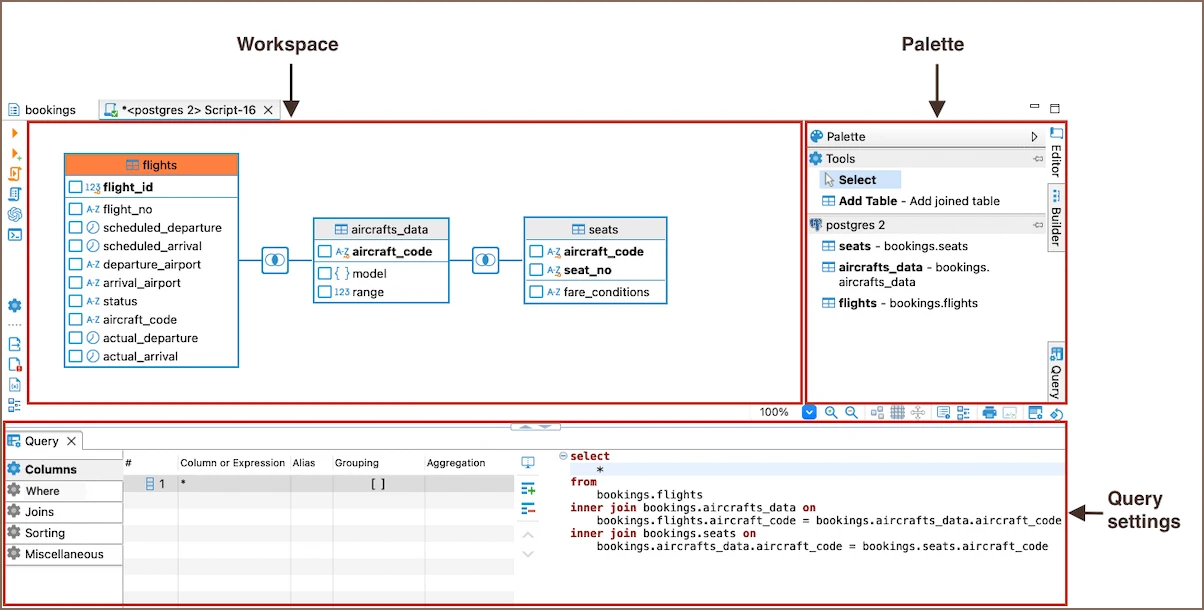
DBeaver’s Visual Query Builder uses a diagram for tables, joins and criteria and presents SQL the user can inspect. SQL Server connectivity comes through the database driver. It is useful when a team wants similar query construction across databases without making the rest of the client specific to SQL Server.
It fits common data exploration and query construction. The capability to represent hand-written or engine-specific SQL depends on the particular statement and client version. The builder and the JDBC connection each contribute to what can be inferred about tables and relationships.
Use a DBeaver edition that includes the visual builder. Check the documented joins controls and make sure the SQL Server driver's selected database and schema match the diagram. Use the same input set in both a SQL editor and the canvas.
Try adding a second condition to the outer join. Inspect where the builder placed it and whether the query can be edited and reopened without losing it. Record the exact application and driver versions.
- Compatibility
- DBeaver desktop with a supported SQL Server driver.
- License and trial
- Commercial visual query builder in applicable Lite, Enterprise and Ultimate editions.
Quest Toad for SQL Server
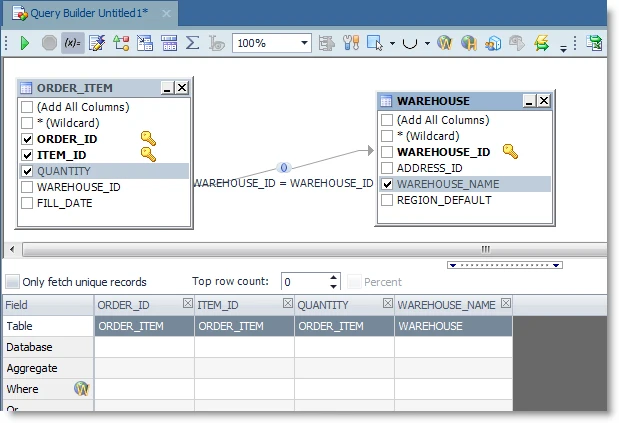
Quest Toad for SQL Server includes Query Builder for visually assembling queries from database objects. The graphical view is useful in a Windows SQL Server workflow when someone needs to understand joins and preview the SQL before using it in an editor or report.
It fits teams that already use Toad for database development and want the query design tools in the same client. Edition and release coverage matter. SQL written with more advanced features may need to be maintained in the editor even when the basic structure is easy to see in a diagram.
Check the edition that includes the query workflow before running the test. Add the test tables and check the generated grouping expression. Save the exact T-SQL in a format another operator can review.
Test the existing reports your team will edit most often. Use the unambiguous fixture with no qualifying order to verify result behavior. Check the licensed desktop version and target SQL Server first.
- Compatibility
- Windows Toad for SQL Server with a compatible target connection.
- License and trial
- Commercial Toad licensing. Tool availability depends on the edition.
Aqua Data Studio
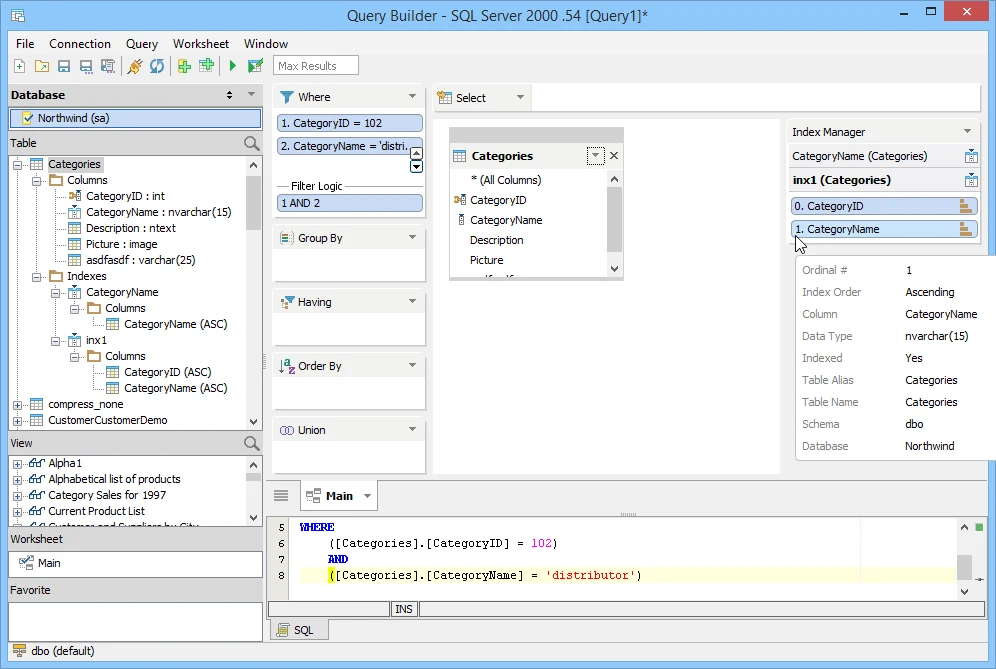
Aqua Data Studio Visual Query Builder lets users combine clauses such as joins and filters through a graphical interface. It also supports SQL Server object browsing and query execution. It is a good fit for mixed-engine teams who want to assemble and view the generated SQL within one client.
Its common interface helps when an analyst moves between database platforms. The target engine still determines what the resulting statement supports and how it executes. It is useful to distinguish the SQL the builder can construct from all the SQL Server statements the text editor can run.
Select the SQL Server context before making the graph. Create a query from the two tables and review the generated syntax before applying an aggregate. Use the query editor to preserve explicit predicate placement.
Try adding an exclusion in a published report copy and compare the output to the expected rows. Save both the generated file and the product version so you can recreate it on a teammate's workstation.
- Compatibility
- Windows, macOS and Linux Aqua Data Studio client with supported SQL Server connectivity.
- License and trial
- Commercial desktop tooling.
Navicat for SQL Server
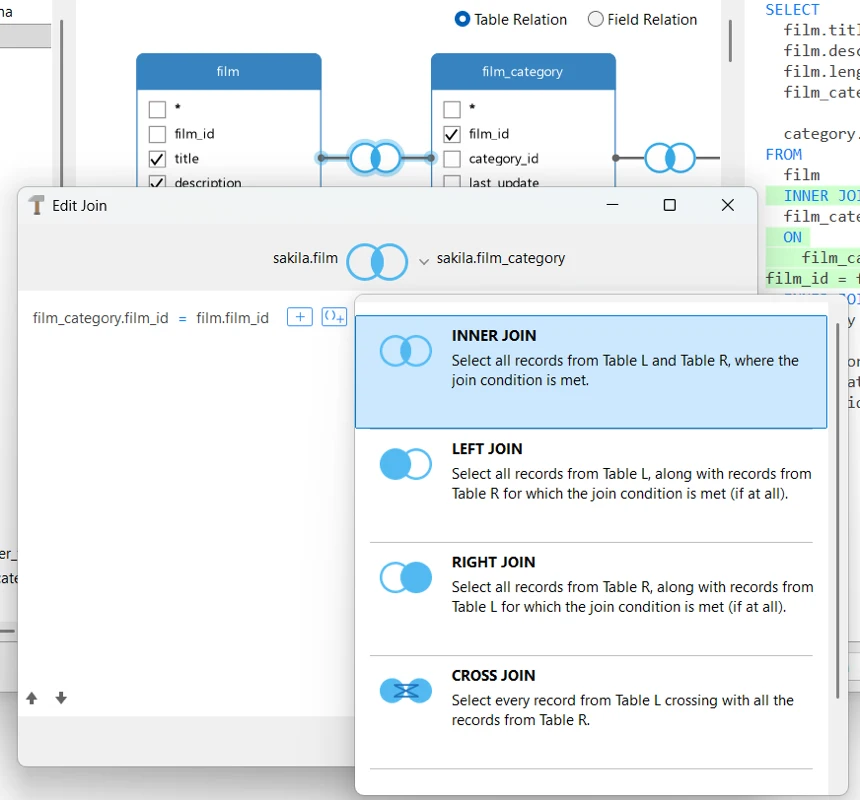
Navicat for SQL Server includes a visual query workflow beside its editor and data browser. A developer can assemble a query from tables and conditions and then inspect the SQL. The single-engine client is useful when the team wants visual query design alongside ordinary SQL Server data work.
It is a candidate when the graphical workflow is a regular part of an analyst’s or developer’s day. The host and edition matrix affect which tools are present. Engine-specific syntax can require editing the generated SQL in the query editor.
Build the tables and left join using the SQL Server edition. Inspect the generated aliases and actual date predicate. Try the optional-side filter in the join and in the result criteria to compare the scope visibly.
Use a read-only login for the report and verify that the results and generated SQL can be saved or exported in the installed edition. Check whether manual SQL changes survive reopening in the builder.
- Compatibility
- Navicat for SQL Server on the supported desktop platform and edition.
- License and trial
- Commercial. Visual features vary by license and platform.
DbVisualizer Pro
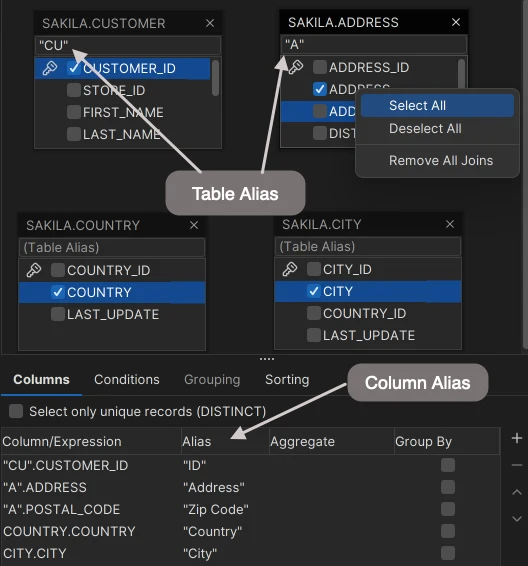
DbVisualizer Pro Query Builder can construct queries graphically and make the generated SQL available for editing. The client uses JDBC to connect to SQL Server, so a mixed-engine team can use a similar query-building and data browsing workflow in one desktop tool.
It fits people who want point-and-click selection and an editable SQL result. A diagram depends on the objects and relationships DbVisualizer can see through the connection. Relationships defined only in application code need an explicit join in the diagram.
DbVisualizer documents its graphical query builder in Pro. Use the SQL Server driver with the intended database and inspect how the diagram represents the optional side. Compare the generated SQL before execution.
Export the resulting query and apply the expected date and order-status predicates. Verify the displayed row counts and whether both predicate placements remain accessible from the builder. Retain the final query even if the graph is incomplete.
- Compatibility
- Cross-platform DbVisualizer with a supported SQL Server JDBC driver.
- License and trial
- Commercial Pro edition for the documented graphical builder.
FlySpeed SQL Query
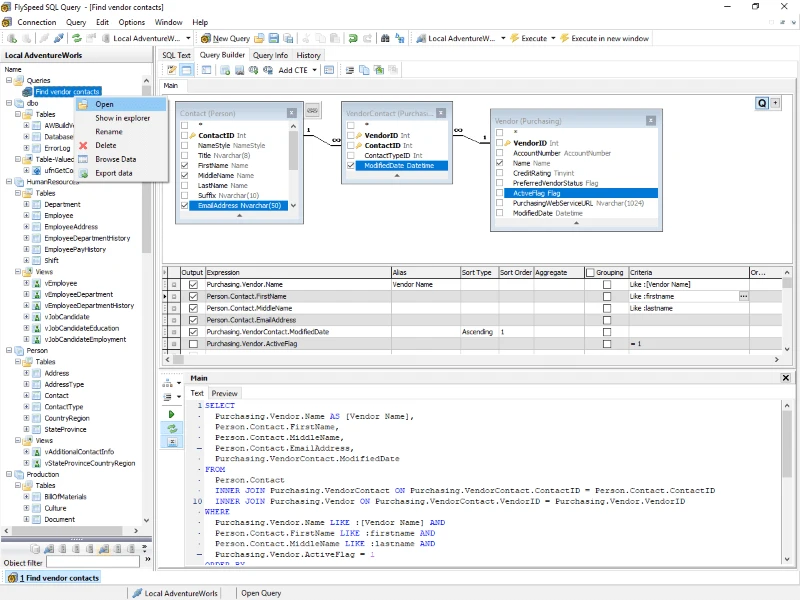
FlySpeed SQL Query packages a visual query builder, an editor and results tools in a database client. The vendor lists support for Microsoft SQL Server syntax and several other engines. It is useful for analysts who spend much of their time constructing and exporting ad hoc queries.
Its strongest case is everyday query building and result handling. A particular T-SQL construct can still depend on how the visual parser represents it. Export and other convenience features depend on the selected license, so a team that needs scheduled or shared work should assess those separately.
Test SQL Server graphical editing under the version and license you plan to use. Enter the two conditions independently and check SQL Server date interpretation and grouping. Save the candidate query and selected connection information separately.
Reopen a T-SQL version that was edited by hand and inspect the available graphical representation. Compare the output to the original rows and use the text as the artifact to review when advanced syntax affects the result.
- Compatibility
- Windows desktop client with a supported SQL Server connection.
- License and trial
- Free and paid usage options. Export and other features follow edition terms.
Visual SQL query builders by job
| What you need | Tools to shortlist | What to verify |
|---|---|---|
| Build a query in your existing SQL Server client | Open a SELECT in the designer, adjust one column and check how the SQL changes. | |
| Build joins across database clients and operating systems | Verify SQL Server support and the client edition, then compare the result against a known query. | |
| Review SQL and diagram views of an existing query | Load an existing query with an outer join and verify the predicates, aliases and output before saving it. |
Choose a visual tool that exposes the generated SQL
Use the diagram to locate tables and relationships. Read the generated query before sharing it, especially when the report is meant to include customers without a matching order.
One native SQL Server query or view
Start with SSMS Query and View Designer
Check live metadata, the query text and the result under the intended account.
Repeat report construction across databases
Trial a paid visual builder in the actual SQL Server context
Check aliases, joins, row filters, grouping and save or export support.
A query uses advanced T-SQL
Keep the reviewed SQL file
Use the canvas for supported pieces and verify that manual edits survive round-trip.
- Microsoft SSMS Query and View Designer
- Devart Query Builder for SQL Server
- DBeaver Visual Query Builder editions and join controls
- Quest Toad for SQL Server edition matrix
- Aqua Data Studio Visual Query Builder
- Navicat for SQL Server capabilities
- DbVisualizer graphical query builder Pro requirement
- FlySpeed SQL Query features and SQL Server support
Compare a filter on the join with a filter on the result
The report asks for every East customer and a count of qualifying paid orders. An order must be Paid and dated on or after November 1. Put both order predicates in the ON clause to preserve unmatched customer rows. Put the East filter on the customer in WHERE.
In the alternative query both predicates on the optional side are in WHERE. They reject rows without a qualifying order, changing the result. COUNT(o.OrderId) counts matching orders, including zero for a retained customer.
| Customer | Fixture data | Filters in ON | Filters in WHERE |
|---|---|---|---|
| 101 | One paid November order and one pending November order | 1 | 1 |
| 102 | One paid October order | 0 | Absent |
| 103 | No orders | 0 | Absent |
| 104 | West customer with one paid order | Filtered out | Filtered out |
How to compare these tools
Build a left join with a filter on the optional table. Compare the rows and generated SQL before and after reopening the query in the diagram. Sources checked .
Rebuild a report that keeps customers with no orders
Create the graph's two input tables in an isolated SQL Server database named VisualQueryTrial. The sample shows the SQL representations for the two predicate locations. Check the generated SQL and expected rows in each candidate tool.
Compare LEFT JOIN predicate placement using the same rows
T-SQL · 30 lines
- Run setup once. Draw a left join from customer to order and add the customer-region condition. Add order-status and date filters and check where the builder emits them.
- Run the two final SELECT statements independently. The required report contains customers 101, 102 and 103 with counts 1, 0 and 0. Inspect which SQL form produces that result.
- Save the query. Try loading it back into the graphical editor, then compare its SQL and rows. Record any change in the ON and WHERE conditions.
Conclusion
Pick the builder that produces SQL the team can read and maintain. Build the same report in the tools you already own first. Verify the join direction, predicate placement and output rows before making a purchase.
Frequently asked questions
Does SSMS have a visual SQL query builder?
Yes. SQL Server Management Studio includes Query and View Designer. In a query editor, highlight the statement and choose Design Query in Editor. Review the Diagram, Criteria and SQL panes.
Which visual SQL query builder is best for SQL Server?
SSMS Query Designer is a starting point for existing SSMS users. dbForge provides a standalone SQL Server designer. DBeaver, DbVisualizer, Aqua Data Studio and Navicat are options if you want a separate desktop client.
Why did a LEFT JOIN lose customers with no orders?
A WHERE predicate on an order column can filter out the row whose order values are NULL. To keep customers with no matching orders in a date range, put that date condition in the LEFT JOIN condition.
Can a visual query builder edit any existing T-SQL statement?
Round-trip support depends on the product and the statement. Test the exact CTEs, UNIONs, joins or SQL Server expressions your team uses. Keep a reviewed SQL file as the source you can always run in a text editor.
Can I use a visual query builder with a read-only SQL Server login?
Yes, when the login has access to the objects and metadata it needs and SELECT on the data you query. View creation, result editing and scripts that change data require additional rights.
How can I tell whether a visual builder preserved an outer join's intended result?
Check where the tool wrote predicates for the optional side and run a fixture with an unmatched record. Verify that the generated T-SQL preserves the expected row and counts the matching order identifier.