

Static analysis can help a developer while editing T-SQL, flag a problem when a SQL project builds, or stop a migration before it reaches a target. Those jobs start from different inputs. An editor add-in sees the current script and connection context. A SQL project sees database definitions and references. A repository scanner sees committed files, while a migration reviewer can evaluate the statements headed for an environment.
The useful comparison is which problem reaches the right person at the right time. Editor rules can catch risky or confusing code before it becomes a pull request. A build or deployment check gives the team a consistent result when people use different editors. Formatting, schema reference checking and operational rules such as requiring a filter on an update also need different information from the tool.
T-SQL static analysis tools at a glance
Set the dialect or project target and enable the rules you actually need. Compare rule IDs and failure behavior on the same fixture.
| Tool | What it reads | Where to run it | Rule and license check |
|---|---|---|---|
| Redgate SQL Prompt | T-SQL in the supported editor, or eligible file automation | Designer feedback and licensed bulk operations | Verify active profile, host and Toolbelt entitlement for bulk analysis |
| dbForge SQL Complete Enterprise | T-SQL in SSMS or supported Visual Studio | Configured analyzer in the editor | Enterprise analyzer; verify rule availability and evidence outside the editor |
| SQL Enlight | Configured SQL files, objects or projects | IDE, standalone checks or documented CLI | Commercial; check CLI license and warning severity |
| Microsoft SQL Database Projects | Versioned schema objects with a target and references | `.sqlproj` build with code analysis enabled | Verify target platform and rule severity; persist build evidence |
| SonarQube Server | T-SQL files included in the configured analysis scope | Scanner and quality gate | Check current T-SQL entitlement and configured file inclusion |
| Visual Expert | Scanned SQL Server code and mapped objects | Inspection report and configured rule set | Commercial; confirm project coverage, review output and automation |
| SQLFluff | Files using the `tsql` dialect and selected templater | CLI, pre-commit or editor integration | Open source. Pin config and inspect parse errors and rule results. |
| Bytebase SQL Review | Change proposed for a selected SQL Server target | Database change review and policy workflow | Check SQL Server rule support, plan and deployment route |
Redgate SQL Prompt
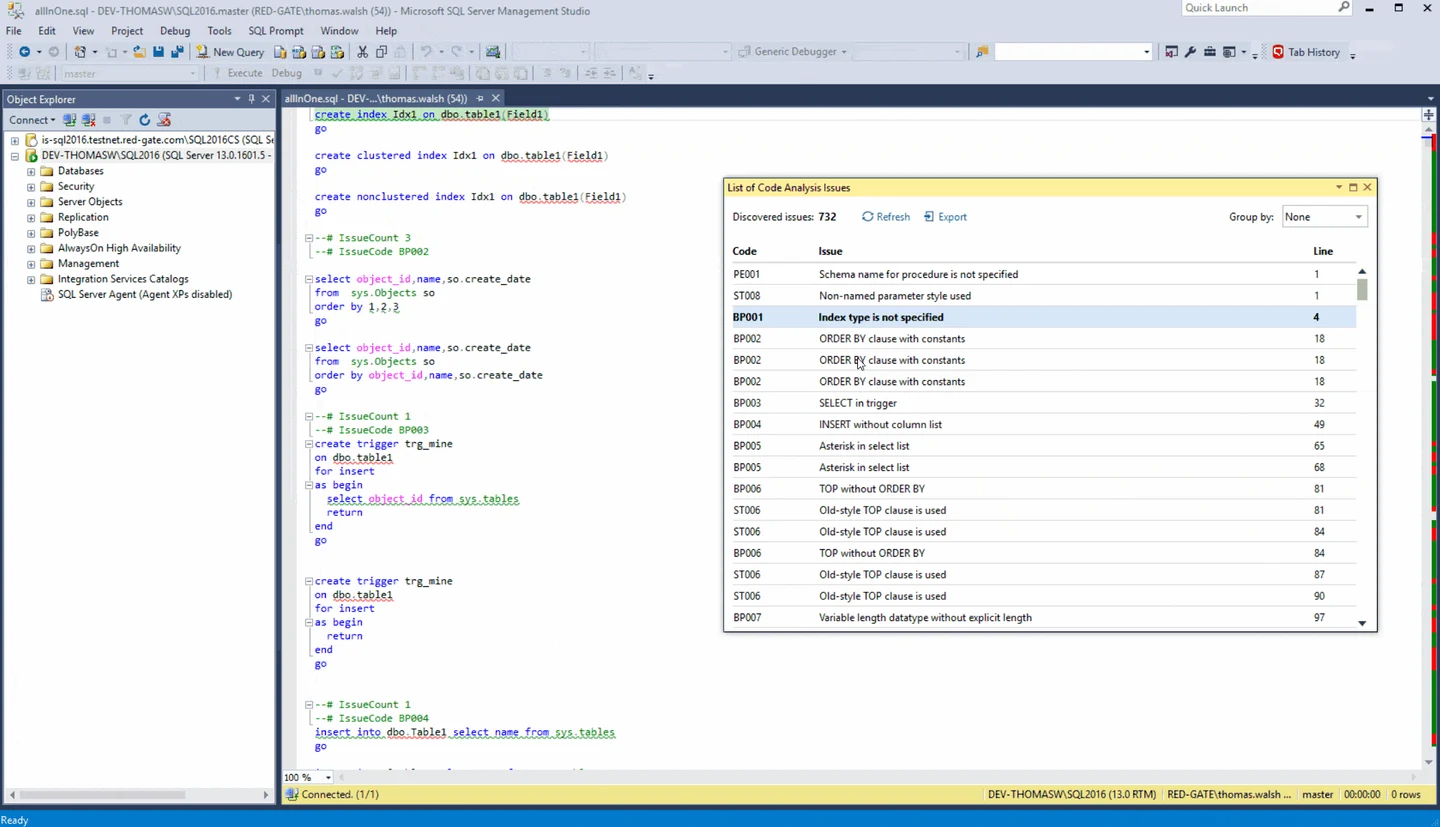
Redgate SQL Prompt applies static rules while a developer writes or reviews T-SQL in a supported editor. The issues list shows the code location and groups repeated findings by rule. It is useful when an SSMS user wants to catch a risky expression or an ambiguous pattern during the normal editing workflow.
It suits a team that already uses SQL Prompt for completion and formatting and wants analysis in the same place. A shared rule configuration helps people see similar findings. An editor issue list guides the author, while enforcing a pass or fail for every commit requires a separate documented automation path.
Turn on the team's intended code-analysis settings and review the actual rule identifiers shown in the editor. Try a stored procedure using SELECT * and a routine that reads @@IDENTITY, then record which configuration produced the findings.
Compare bulk operations only when the installed license includes them. Re-run the fixture with the same analysis choices and compare the output with the editor. When a rule is disabled, document the reason and the scope in which that setting applies.
- Compatibility
- Supported Windows SSMS and Visual Studio versions. Analysis features depend on the host and installed SQL Prompt version.
- License and trial
- Commercial. Automation and bulk operations have separate entitlement requirements.
dbForge SQL Complete Enterprise
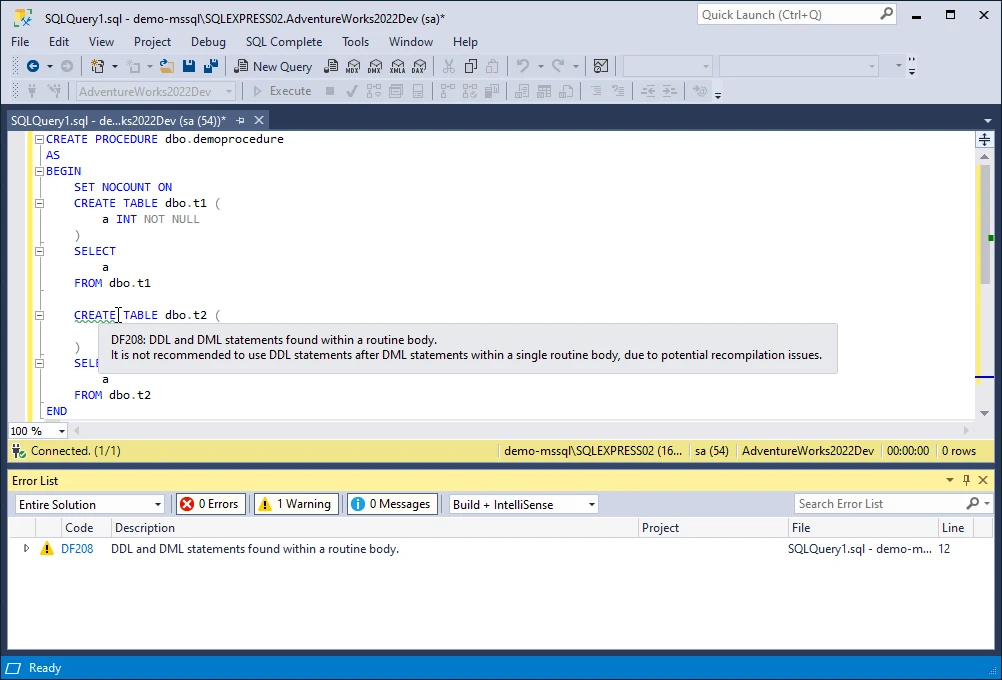
dbForge SQL Complete Enterprise includes T-SQL Code Analyzer. It marks findings in an open SQL document and lets developers choose enabled rules through profiles. That is useful when a developer wants rule feedback next to the same completion, formatting and snippets used to write the query.
The Enterprise add-in fits teams that primarily review T-SQL inside the editor and want to manage the rules they see. The rule profile determines what gets flagged. Devart documents command-line formatting separately, so a team that needs automated analysis has to assess which rules are available through its actual build workflow.
Use the Enterprise analyzer profile that would be distributed with your setup. Record each active inspection and the procedure or statement it points to. A warning raised before execution is a separate feature from T-SQL static analysis.
Evaluate the same valid SQL Server query and check whether any finding is a real issue or a parser limitation. If enforcement in CI is required, verify the supported path and entitlement, or cover the rule with another configured runner.
- Compatibility
- Supported SQL Complete hosts and versions on Windows. Analyzer availability depends on the edition.
- License and trial
- Commercial. T-SQL Code Analyzer is an Enterprise feature.
SQL Enlight
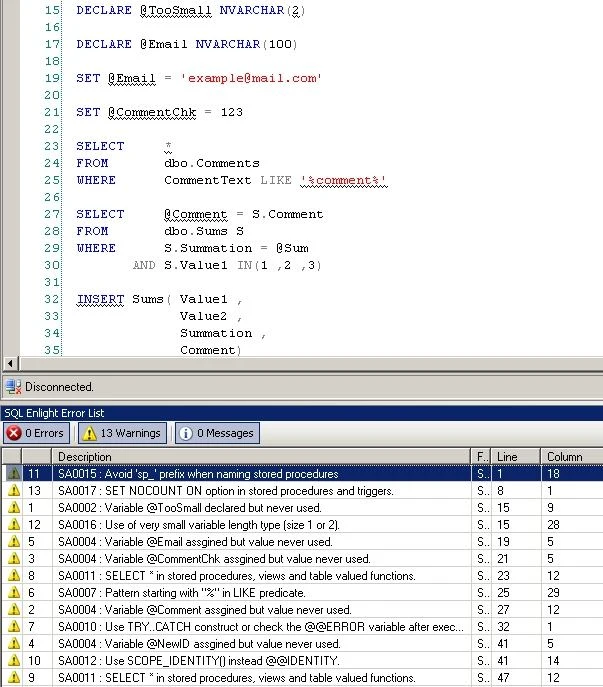
SQL Enlight can analyze T-SQL files or connected SQL Server objects with configurable rules. Its AnalyzeFiles CLI produces a report for source files and can use a target database or captured analysis context where supported. It is relevant when the team wants the same code-review questions to reach developers and automation.
Its explicit analysis context is useful for scripts that refer to objects elsewhere in the database. The result still depends on the metadata and files included in the run, as well as the enabled rules. A report built against an incomplete context can have a different meaning from one run against a representative schema.
Apply a narrow set of rules to one procedure and inspect the file, source line and severity each finding uses. Confirm whether the selected input is a live object, a file or a reviewed project. Use the mode the team will run every day.
Run the documented CLI with the checked-in configuration and capture its result and process status. Try a local exception for an accepted edge case and see whether the suppression affects any unrelated files.
- Compatibility
- SQL Enlight desktop integrations and Windows command line. Some rules benefit from database context.
- License and trial
- Commercial. Command-line use follows the applicable license terms.
Microsoft SQL Database Projects code analysis
Microsoft SQL Database Projects can analyze stored T-SQL during a build. The schema project brings model validation and optional code analysis together, so a build can surface unresolved definitions as well as selected design or naming issues. This is useful when database objects are already maintained as project source.
It fits projects that produce a DACPAC and want a common baseline across contributors. Separation between references and design rules matters. The build can only resolve the objects modeled or referenced, and a database script that executes outside that project needs another review step.
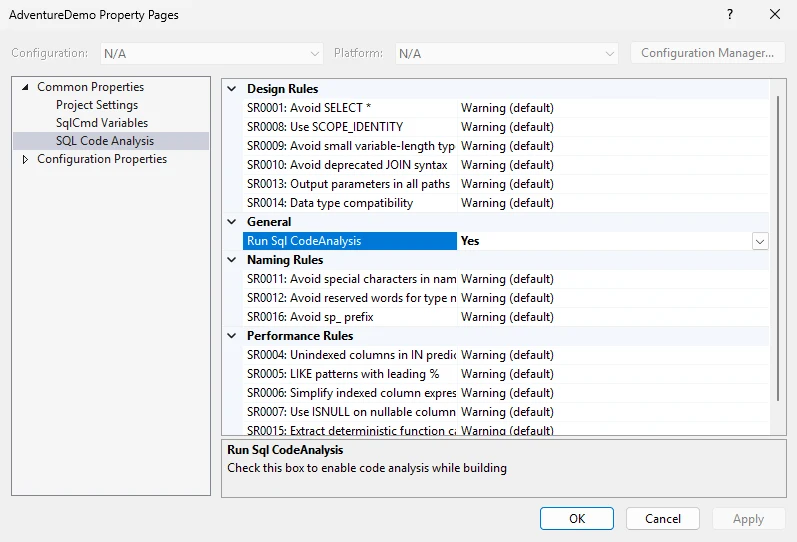
Enable RunSqlCodeAnalysis in the project, select the actual SQL Server target and include required schema references. The build can identify syntax and reference issues as well as enabled design rules. Preserve each class of result in the CI output.
Check the sample for Microsoft's SR0001, SR0008 and SR0013 under a profile that enables them. Record how rules are promoted to errors in that project. Distinguish a project build policy from a live deployment safety check.
- Compatibility
- Supported SQL Database Projects toolchain and target platform. Analysis is configured in the project.
- License and trial
- Free Microsoft project tooling. The project owns its rule configuration and build setup.
SonarQube Server
SonarQube Server can scan T-SQL source files and apply a central quality profile. Findings appear with the other languages in a repository. That makes it useful when a release team already relies on SonarQube’s review flow and wants database changes to be visible there as well.
Its strongest case is consistent reporting across repositories and pull requests. The scanner needs to recognize the extensions used for T-SQL, especially where `.sql` also identifies another dialect. A quality gate reflects the enabled rules and configured conditions, so runtime permissions and execution behavior still need separate evidence.
Set T-SQL analysis scope and file suffixes for the repository. Check the scanner log to confirm that the intended SQL Server definitions were analyzed. Review the licensed T-SQL capabilities and quality profile before trusting a green result.
Evaluate how findings reach a pull request or quality gate in your SonarQube setup. Introduce one deliberate rule violation and one allowed exception. Confirm that the selected new-code or overall threshold matches the buying requirement.
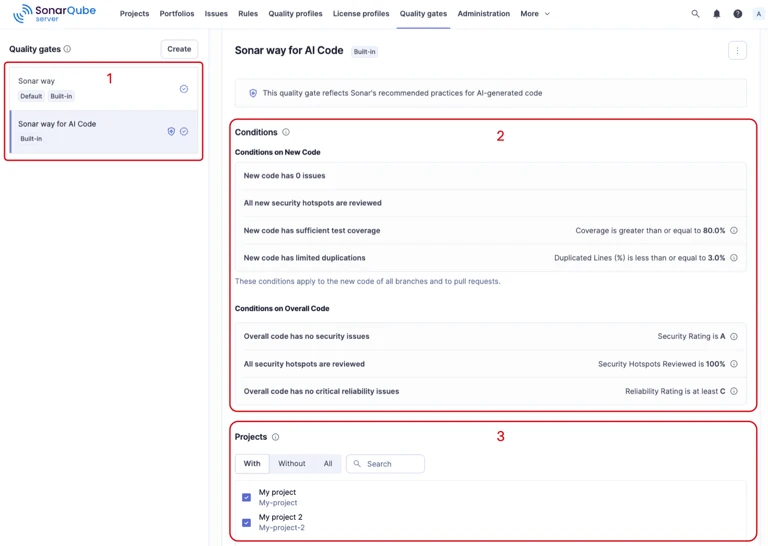
- Compatibility
- SonarQube Server scanner with files assigned to the T-SQL analyzer.
- License and trial
- Commercial. SonarSource documents T-SQL analysis from Developer Edition.
Visual Expert for SQL Server
Visual Expert provides T-SQL code inspection and impact analysis for SQL Server objects. The rule findings can be viewed alongside references between procedures, functions and tables. It is useful when a DBA is maintaining a large database and wants to understand the effect of changing existing code as well as spotting a style issue.
Its advantage is seeing each routine alongside the database objects it uses. Findings depend on which database objects and application sources were collected. Dynamic SQL and indirect references can leave gaps, so a dependency view is a starting point for confirming the affected paths.
Build a Visual Expert project that includes the SQL Server procedures and tables needed for analysis. The inspection workflow documents selecting rules. Save the active rule list beside an exported result so reviewers can identify what it covered.
Try the risky procedure and a valid SQL Server-specific query in the same analysis. Open the finding's context and verify the source dependencies. Check which reporting and external runner options are available for the licensed edition.
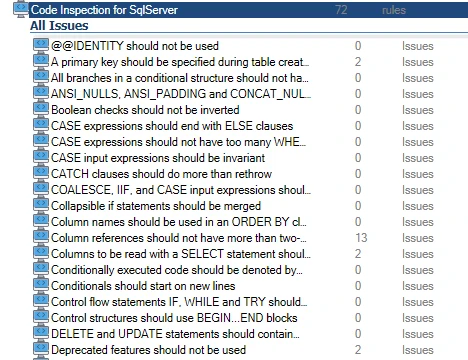
- Compatibility
- Visual Expert for SQL Server with access to the source or SQL Server metadata needed for an analysis project.
- License and trial
- Commercial product. Analysis scope depends on the configured project and license.
SQLFluff
SQLFluff lints SQL files with a configured dialect and rules, and it can fix supported layout and style findings. The T-SQL dialect makes it useful for repositories that want consistent editor and CI output without connecting to a production database to review ordinary formatting.
It fits a team whose first need is a reproducible source-file policy. Its parser and templater determine whether a script can be analyzed. Testing against representative data still determines whether a statement is safe and behaves as expected.
Set `dialect = tsql` and choose the actual templater used to produce SQL files. The documented AM04 rule can flag an unknown projection shape such as a wildcard in a supported context. Check which SQL Server-specific concerns require a different rule or tool.
Use the same pinned version and settings from an editor and a CLI run. Retain explicit format and process status with the output. Separate syntax or templater problems from rule violations before adding a blocking CI check.
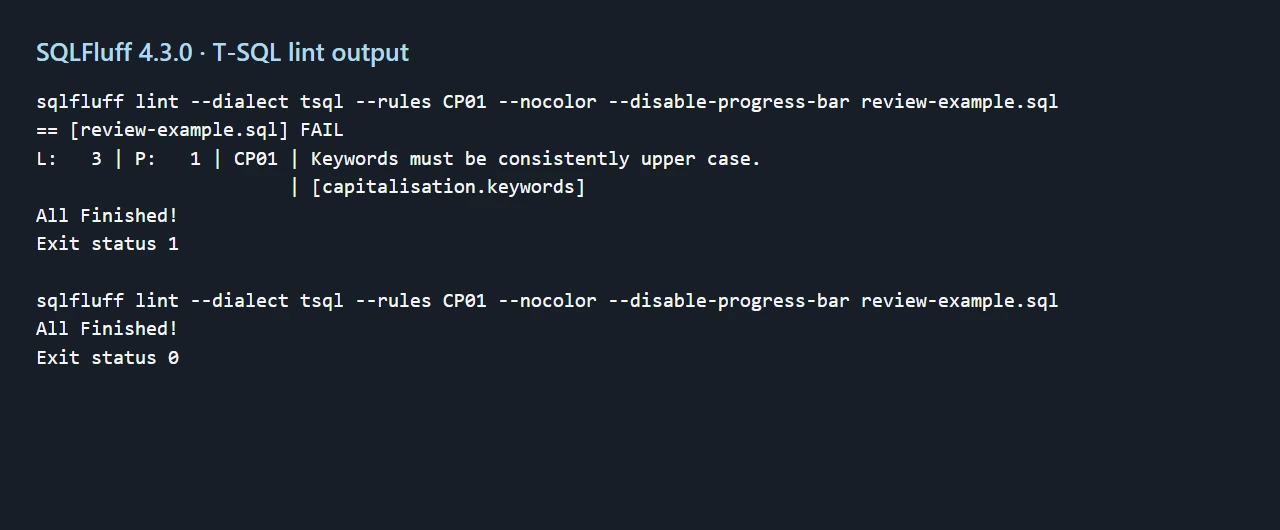
- Compatibility
- Python-based CLI and optional editor extensions. Select the T-SQL dialect for SQL Server source.
- License and trial
- Free and open source. The team maintains the installed version and rules.
Bytebase SQL Review
Bytebase checks SQL changes as part of a database change workflow. It is useful when a SQL Server migration needs a validation result and a recorded approval before execution. The review policy can surface rule violations next to the request and environment receiving the change.
It fits teams that want enforcement at the point where SQL is proposed for deployment. Rule coverage varies by database engine and policy version. Visibility also depends on routing changes through Bytebase, so the team needs to account for privileged changes made directly on the target.
Run the test through the SQL Server change-review route that operators use. Check the product's documented SQL Server support, then enable only rules available for that engine and plan. Verify that the exact proposed change reaches review.
Record whether a finding warns or blocks when the change is submitted. Test presenting an updated script after review so the result applies to the current content. Test a documented and approved emergency workflow independently of routine policy.
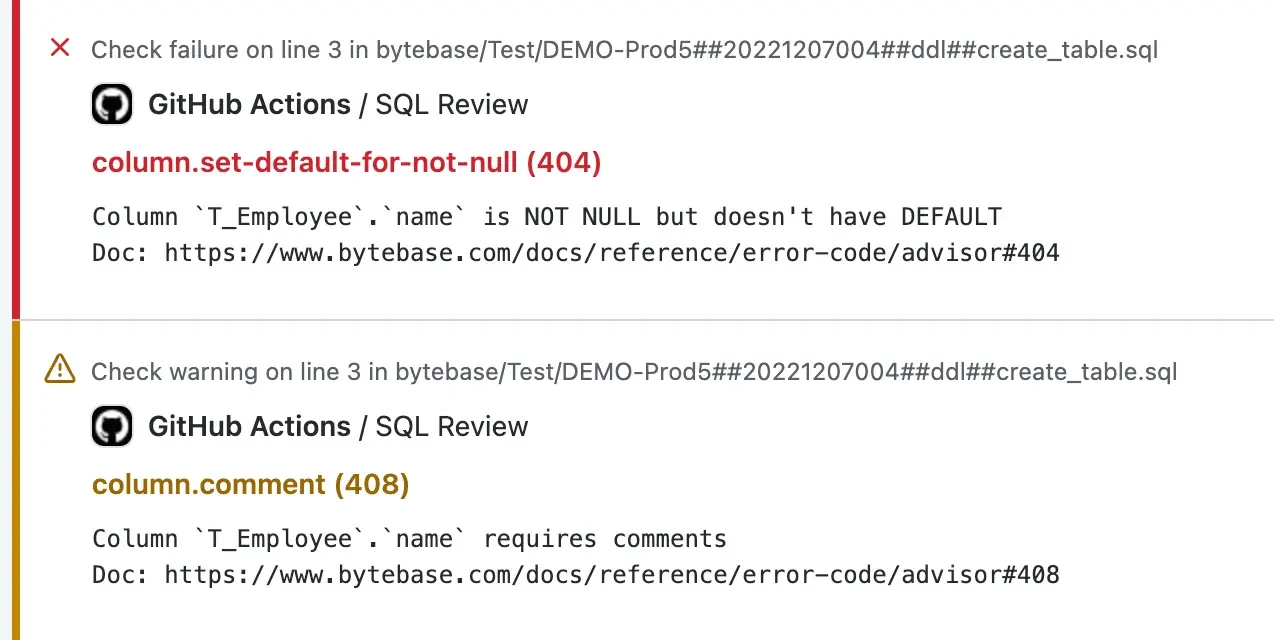
- Compatibility
- Bytebase with a supported SQL Server connection. SQL review rules vary by engine.
- License and trial
- Free and paid plans. Governance capabilities depend on the plan.
T-SQL review tools by where you run them
| What you need | Tools to shortlist | What to verify |
|---|---|---|
| Review a procedure in SSMS | Find the rule ID, line and severity. See whether diagnostics run as you type or on request. | |
| Require a repeatable check for changed SQL files | Verify the path scanned and confirm that a seeded issue fails the CI job when the rule is configured to block. | |
| Validate a schema project or inspect legacy dependencies | Build the .sqlproj and check object references. If you need impact analysis, trace a known dependency from the procedure to its callers. | |
| Inspect a migration before it reaches SQL Server | Run the rules applicable to your target and inspect any missing schema context. Record findings against the script you intend to run. |
Choose where T-SQL findings should be actionable
An editor, a build and a database change review look at different inputs. Use a durable report and a controlled failure whenever a rule is meant to block promotion.
While a developer writes SQL
Use an editor analyzer
Keep the active rule profile and inspect a deliberately flagged statement.
During a pull request or database project build
Use a reproducible scanner or project analyzer
Pin the dialect, dependencies and configuration, and test exit behavior.
When someone submits SQL for deployment
Use a database change gate
Bind the finding and approval to the actual SQL submitted for the target.
Use three seeded issues and one valid edge case
The rule IDs below come from Microsoft or SQLFluff documentation. Other products can name, classify and enable the same concern differently. Use the comparison to record actual evidence under the installed profile.
Compare editor output, build output and deployment review independently. A valid TOP ordered query is included to detect an unexpected dialect or parsing problem. The sample is intended for analysis in a disposable project.
| Seed | Why it matters | Rule or expected behavior |
|---|---|---|
| SELECT * in a procedure | Changes in table shape can change the output contract. | Microsoft SR0001. Check SQLFluff AM04 when that rule is applicable to the output shape. |
| @@IDENTITY after INSERT | A trigger can produce an identity in a different scope. | Microsoft SR0008. Check which alternative tools detect this independently. |
| Conditional output assignment | The caller may receive a value it passed in on an unassigned path. | Microsoft SR0013 when project analysis recognizes the conditional path. |
| TOP (1) with ORDER BY | Valid SQL Server syntax and predictable ordering for a unique ID. | Should parse using the appropriate T-SQL dialect or SQL project target. |
| Controlled CI failure | Policy needs more than a visual warning. | Check file, rule ID, severity and actual runner status. |
How to compare these tools
Run each tool against the same procedure and changed SQL file. Check which rules catch a real defect, which block CI, and how to suppress a justified exception without hiding unrelated findings. Sources checked .
Run one code review with known issues
Use an offline SQL project or lint workspace. Add a disposable table definition for dbo.ReviewTrialEntry with EntryId int IDENTITY(1,1) NOT NULL PRIMARY KEY and Amount decimal(10,2) NOT NULL, then add this procedure as a separate SQL file.
Inspect a T-SQL procedure with three seeded review issues
T-SQL · 25 lines
- Enable the intended rules and run the editor analysis. Save the profile, tool version and observed findings. The procedure intentionally has three issues.
- Run the CLI or project build on the same source. Verify the documented design findings your selected rules cover. Check that the valid TOP statement parses.
- When the change is meant to block a deployment, submit the test file to an isolated review workflow and verify its actual warning or rejection and the evidence saved for the reviewer.
Conclusion
Choose the check that can see the problem. An editor warning helps the person writing the procedure. A repository check keeps that rule consistent across contributors. Use the SQL project build for schema references and a target-aware review for changes that depend on the destination. Measure a failed run and a fixed run before making the pipeline check required.
Frequently asked questions
What is the best static analysis tool for T-SQL?
SQL Prompt and SQL Complete fit SSMS review. SQLFluff fits a repeatable file-based lint check, and SQL Database Projects validates object references during builds. Use SQL Enlight, Visual Expert, SonarQube or Bytebase when their rule, scope and reporting features fit the workflow.
Does SonarQube analyze SQL Server .sql files?
SonarQube Server supports T-SQL starting in Developer edition. By default its T-SQL analyzer uses the .tsql suffix and PL/SQL uses .sql. Adjust the file suffixes for your project and confirm from scanner output that the intended files were classified and analyzed.
Can SQLFluff lint T-SQL in CI?
Yes. Select the tsql dialect and pin the SQLFluff version. Check the lint exit code and inspect parser results on representative files, including any SQLCMD or generated SQL used by your application.
Will a SQL Database Projects build catch every risky migration?
A build can validate project objects, syntax and configured code rules. Review the actual deployment script and test it against a representative target when changes can affect existing data, permissions, locks or compatibility.
How do I introduce SQL review on a legacy repository?
Run the checks in reporting mode first. Confirm that the files are analyzed, agree on a small set of blocking rules, and test what happens when new code violates one. Document exceptions for specific code locations and review them periodically.
Why do T-SQL linters flag different issues on the same file?
Their models differ. A file parser sees statements and formatting. A project analyzer can see resolved objects and target rules. A deployment workflow can apply policy to the actual proposed change. Record the configured rule IDs and inputs when you compare.
Related guides
- Compare tools for capturing and analyzing SQL Server execution plans
- Compare AI SQL assistants for writing and reviewing T-SQL
- Compare approval gates and deployment policy for SQL Server
- Compare SQL Prompt and SQL Complete for SSMS editing
- Set up T-SQL linting and projects in VS Code
- Compare SQL Server deployment tools for CI/CD
- Add unit tests for SQL Server procedures