

Testing a stored procedure can mean checking its logic in isolation or checking it against a real application schema. tSQLt supports isolated tests inside SQL Server, where a test can substitute a dependency and make an assertion in T-SQL. Desktop add-ins make those tests easier to discover and run. Generated tests can help identify code branches that existing cases never exercise.
T-TEST is a smaller T-SQL framework, while Pester and Testcontainers put more of the work outside the database. Pester can assert what a SQL call returns from a PowerShell test. Testcontainers gives an application test its own SQL Server instance. These workflows complement one another when the goal is to cover procedure logic, deployed constraints and application behavior.
SQL Server unit testing tools at a glance
Some products implement assertions in SQL Server. Editors help discover and run them. An external runner or disposable database can support either workflow.
| Tool | Role | Isolation and setup | Check in CI |
|---|---|---|---|
| tSQLt | Database assertion and test framework | Install supported tSQLt and its CLR. Fake dependent objects within tests. | Named tests and failure status from the command-line runner |
| Redgate SQL Test | SSMS interface for tSQLt tests | Commercial editor plus compatible tSQLt on the server | Use the underlying framework workflow and verify its failure result |
| dbForge Unit Test | SSMS tooling for supported tSQLt workflows | Commercial; configure the target database and tSQLt prerequisites | Run the test procedures through a supported CI path |
| SQL Enlight Test Explorer | Editor for discovering existing tSQLt tests | Commercial; guide requires tSQLt already installed | Confirm the same named test in CI and the explorer |
| UnitAutogen | Generate tSQLt tests for supported routines | Review generated tests. Runtime depends on tSQLt for execution. | Confirm asserted behaviors and how the generated tests fail |
| T-TEST | Pure T-SQL test framework | Open-source project; verify supported versions and the applicable isolation options. | Check runner semantics, failure propagation and output format |
| Pester with PowerShell | Script-level assertions around SQL Server execution | Open source. Own connection, fixture and cleanup in the test or harness. | Use native test reporting and verify a failed result changes pipeline status |
| Testcontainers for .NET | Provision an isolated SQL Server instance | Open source. Compatible container runtime and SQL Server image required. | Run assertions in a test framework and preserve its results and setup errors |
tSQLt
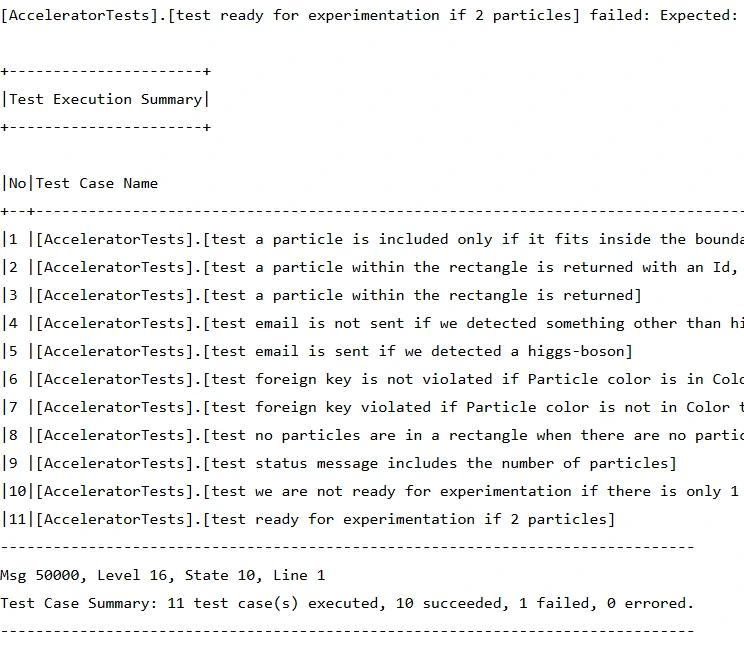
tSQLt lets developers write SQL Server unit tests as stored procedures and organize them into test classes. FakeTable and SpyProcedure can isolate table and procedure dependencies, and tests run inside a transaction that is rolled back. This makes it practical to reproduce an edge case without rebuilding the whole test database for each run.
It is strongest when the business logic is in T-SQL and the team wants the assertions to live beside that code. An isolated fake can leave out constraints or behavior the real tables enforce. Tests of permissions, constraints and application transactions therefore need the actual schema as well.
Use a test class to group database tests, with explicit assertions on the routine under test. tSQLt documents running tests in transactions and provides FakeTable so the routine can read a controlled dependency. A separate test can verify real constraints and integration behavior.
Follow the current tSQLt installation instructions for the test server, including its CLR requirements and certificate setup. Rehearse a named failing test through the real CI invocation. Confirm the runner recognizes the framework error and reports the failed case.
- Compatibility
- Supported SQL Server development database and the documented tSQLt CLR setup for the installed version.
- License and trial
- Open-source testing framework.
Redgate SQL Test
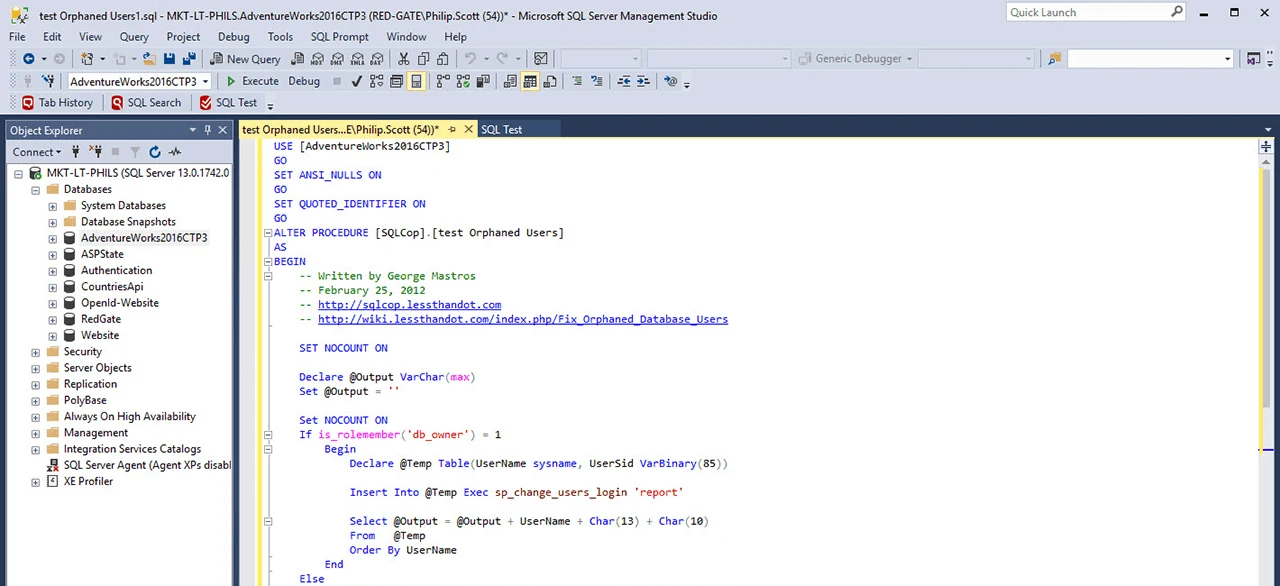
Redgate SQL Test puts a tSQLt test runner in SQL Server Management Studio. Developers can see and run existing test classes alongside the database work they already do in SSMS. The product also includes example tests and documents SQL Cover integration for inspecting how much code a test exercises.
This is useful for a team that already uses SSMS and wants a graphical workflow around existing tSQLt cases. The add-in and SSMS build have to work together. The release notes and compatibility guidance for SSMS 22.3 illustrate why that matters when database workstations are upgraded.
Use the SQL Test interface to discover and run existing tSQLt test classes during development. Check the supported SSMS and SQL Server versions before rolling it out. Use the same test definition for both the editor and the build runner.
Run a passing and failing test in the editor, then execute each through CI. Compare the reported test names and error. This tests the commercial interface's fit and the underlying framework's workflow separately.
- Compatibility
- Windows SSMS add-in. Redgate’s requirements include SQL Server 2025 and SSMS 22, subject to the add-in release.
- License and trial
- Commercial standalone subscription or an eligible SQL Toolbelt Essentials plan.
dbForge Unit Test for SQL Server
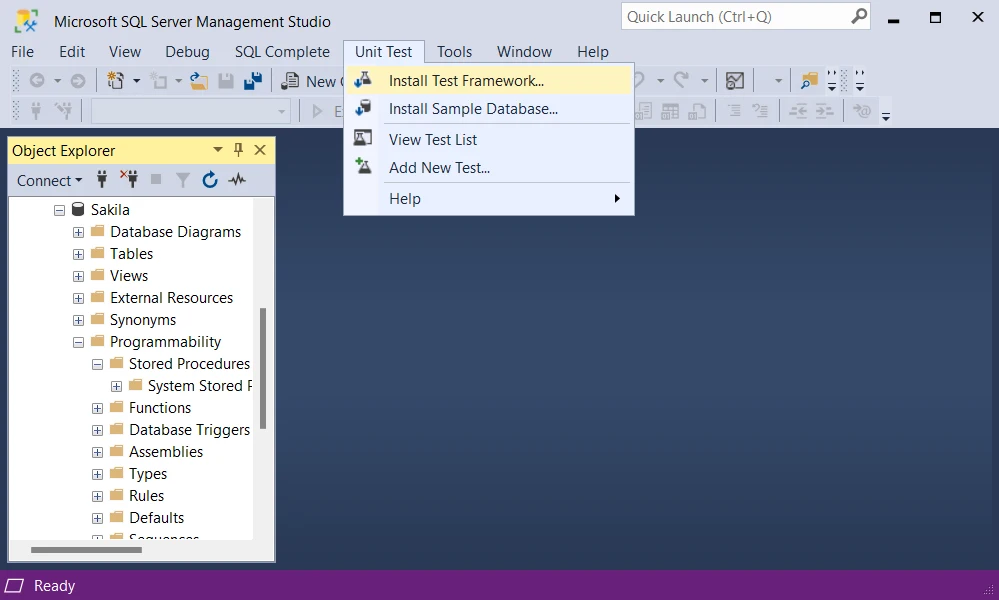
dbForge Unit Test for SQL Server organizes tSQLt cases in the Test List Manager. A developer can open test definitions, run a class or suite and inspect the result without leaving SSMS. The documented command-line workflow can also save a test report for an automated run.
It fits teams that want a visual runner in development and recorded output in CI. Those uses have separate requirements. A build needs to distinguish a passed suite from an invocation that ran no expected cases, and it needs an outcome that the pipeline can report when a test fails.
Set up a dedicated SQL Server database with the test framework version expected by the installed add-in. Use the SSMS flow to discover the test procedures and rerun a narrowed failure. Check what your edition includes if the team already has a dbForge bundle.
Run the named procedure through CI and compare the result with what the add-in displays. Review the disposable database's setup credentials and test data. Version the actual test definitions so the workflow can run from a clean checkout.
- Compatibility
- Windows SSMS. Devart’s release history documents SQL Server 2025 and SSMS 22 support.
- License and trial
- Commercial Devart add-in. Automated use depends on the applicable license.
SQL Enlight Test Explorer
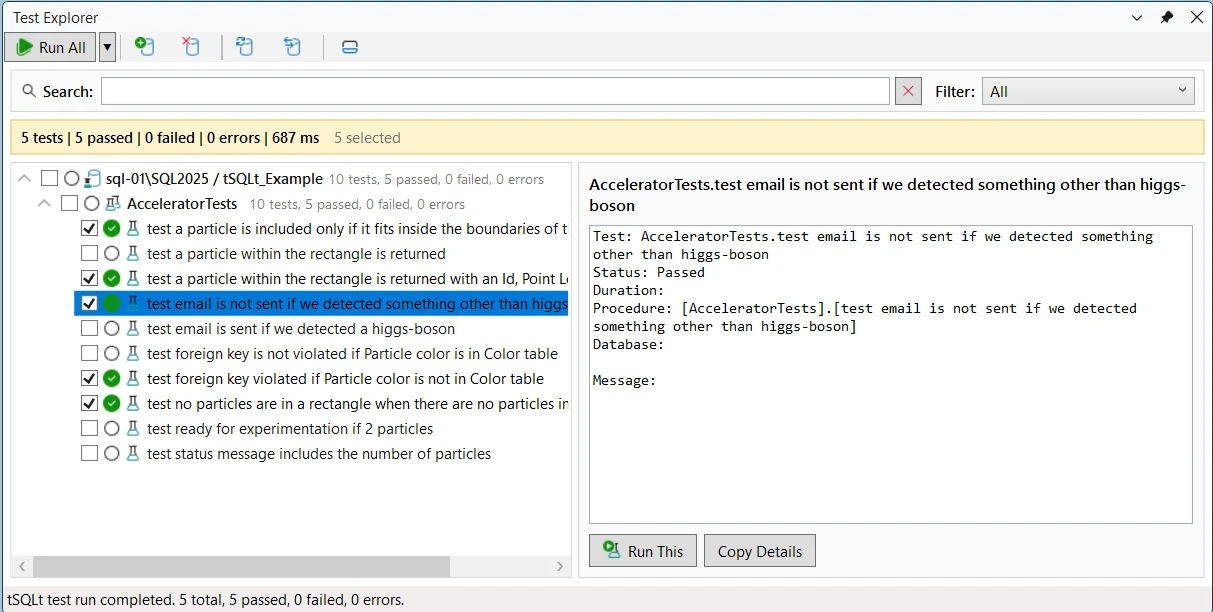
SQL Enlight Test Explorer discovers existing tSQLt cases and groups them by database and class in SSMS or Visual Studio. Filters and result details help a developer focus on failing cases. It is useful when SQL Enlight is already the place the team reviews T-SQL.
The explorer is an interface over the installed framework, so database readiness still includes tSQLt setup. Its command-line tools can support a separate build workflow within the documented terms. Testing the editor experience and automating an expected test suite are distinct parts of the product decision.
SQL Enlight's Test Explorer documentation says the database needs an existing tSQLt installation. Confirm discovery after installing the approved framework package and connecting to a scoped target. Point the pane to the test database for the same schema version used in CI.
Exercise discovery after adding a new test and after changing permissions. Then run the actual CI command without relying on the editor. The two acceptance checks establish whether the tools show the same failure against the same stored procedure.
- Compatibility
- Supported SSMS or Visual Studio with SQL Enlight. The target database needs an existing tSQLt installation.
- License and trial
- Commercial SQL Enlight tooling. IDE and runner terms depend on the license.
UnitAutogen for SQL Server
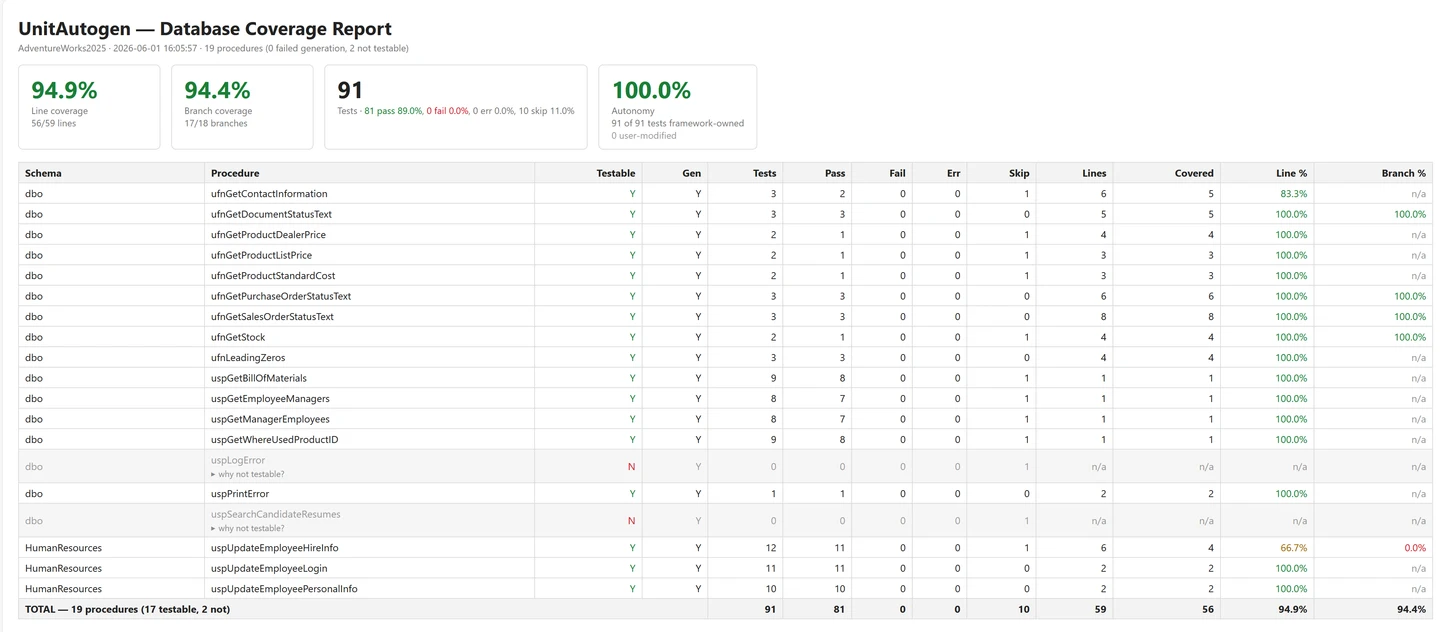
UnitAutogen inspects SQL Server stored procedures and can generate tSQLt tests and coverage artifacts. That is useful when an established database has routines with several branches and few existing cases. The generated examples can give developers a place to begin reviewing what different inputs exercise.
It is a beta project and fits exploratory work where the team will read the generated fixture and assertion code. A covered branch shows that code ran. A meaningful assertion still has to evaluate the behavior the application expects, which requires domain knowledge the generator may lack.
Generate tests for a small stored procedure with readable branches. Review each input and expected value before adding the output to your test suite. The generated file is useful when its assertion describes behavior the team can explain and maintain.
Seed a deliberate deviation in one tested branch and confirm that a generated assertion detects it. Group the generated files with the schema change and run them using the configured tSQLt runner. Check which branches still need handwritten coverage.

- Compatibility
- The project documents SQL Server 2017 and later with a compatible tSQLt installation.
- License and trial
- Open-source beta under AGPL-3.0.
T-TEST
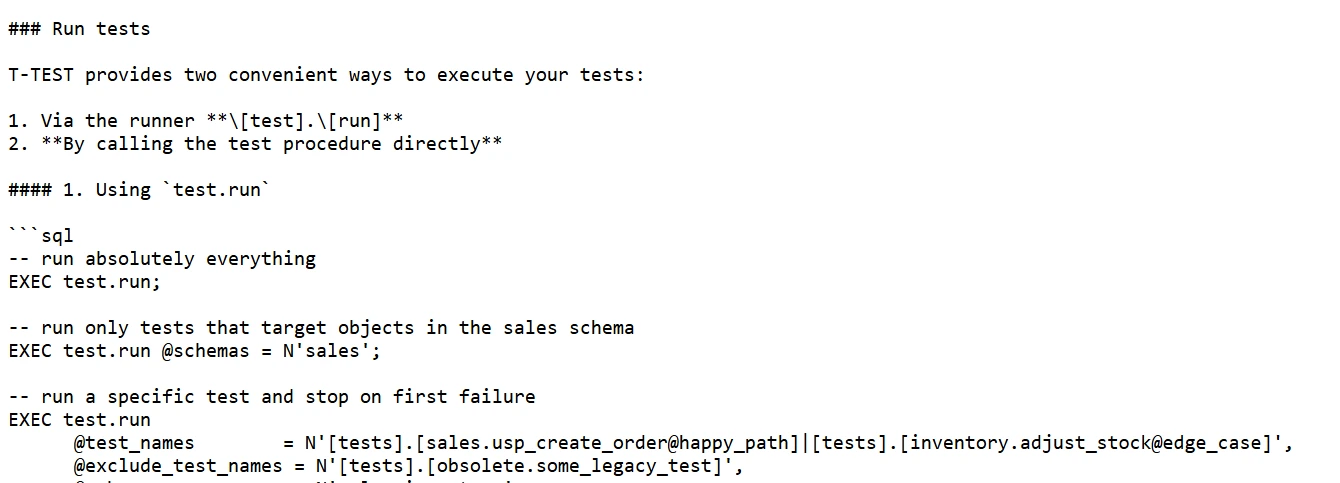
T-TEST is a lightweight T-SQL test framework with a runner and helpers for scalar values and result comparisons. It can run discovered procedures together or work with a filtered set. The pure T-SQL implementation is useful when a test database cannot enable CLR.
It fits a team that wants a small database-level test runner and is willing to own its fixtures and cleanup. The project covers a different set of conveniences from tSQLt. Its value is in straightforward assertions that can be run through the team’s existing CI SQL connection.
T-TEST is a small pure T-SQL project. Start with a representative procedure and inspect the supported assertion, setup and transaction options of the release you intend to install. Record the SQL Server features your version requires.
Use a deliberate assertion failure, then a separate setup error, to test how CI distinguishes the two. Re-run against a freshly provisioned test database and inspect any leftover fixtures. Document the result format and runner adapter for the team.
- Compatibility
- SQL Server database that supports the project’s documented T-SQL features. CLR is unnecessary for the framework.
- License and trial
- Open source under the MIT license.
Pester with SQL Server PowerShell
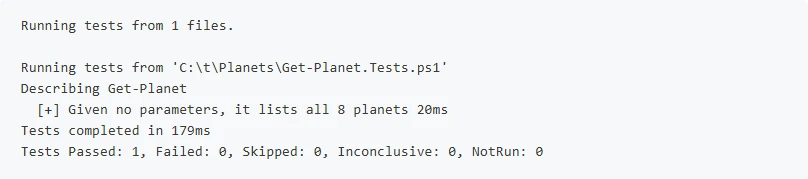
Pester is a PowerShell test runner that can assert values returned by a SQL Server command or check an expected error. This suits a DBA team that already deploys databases through PowerShell and wants tests around the queries and scripts it operates.
The benefit is combining SQL checks with the same runner used for other automation. Pester can emit test results for CI. Database connection, fixture setup and cleanup remain the test author’s responsibility. A mocked PowerShell command answers a different question from an integration test against an actual instance.
Use Pester to express both connection setup and assertions on SQL Server result values in PowerShell. Reuse the normal database access path for a stored procedure and parameterize the lab connection. Treat cleanup as part of the fixture.
Configure the CI result format and verify a mismatch fails the pipeline, then try an unreachable SQL Server endpoint as a setup case. Preserve the result artifact so a reviewer can tell the difference between a connection problem and a failing business rule.
- Compatibility
- PowerShell, Pester and a supported SQL Server connection such as Invoke-Sqlcmd.
- License and trial
- Open-source test runner. The SQL Server fixture and client are separate dependencies.
Testcontainers for .NET SQL Server module
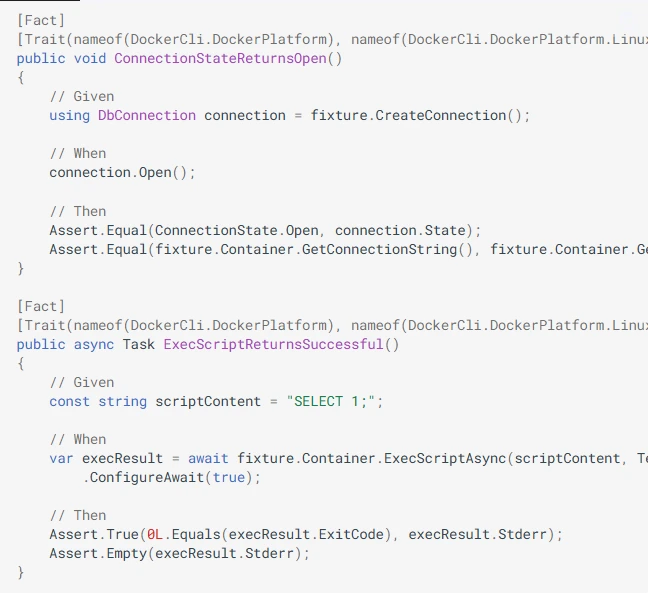
The Testcontainers for .NET SQL Server module creates a SQL Server container and supplies connection details to the test suite. This makes it practical to deploy a real schema and test application reads, writes or transactions on an isolated database. The test runner and the application code work with an actual SQL Server process.
It fits integration tests where a real provider and database behavior matter. Each isolated instance still needs its schema, permissions and data. Container version, host architecture and initialization time affect how reproducibly the same tests run on developer machines and build agents.
The SQL Server module provisions the database engine for tests. Set the SQL Server image, readiness check and schema migration explicitly. Combine that environment with tSQLt or application assertions, depending on the boundary under test.
Measure startup separately from actual test execution. Run a failing assertion after SQL Server is ready, then force a provisioning failure on a different run. Verify cleanup, distinct failure messages and the stored CI test result.
- Compatibility
- Docker-compatible runtime, .NET and a supported host for the SQL Server Linux container image.
- License and trial
- Open-source test infrastructure. SQL Server image and edition terms apply.
SQL Server testing tools by workflow
| What you need | Tools to shortlist | What to verify |
|---|---|---|
| Isolate a stored procedure inside SQL Server | Decide how to isolate dependencies, then verify the result and the expected error. | |
| Discover and run tSQLt tests from a desktop client | Run a failing test from the selected class and open its output and SQL source. | |
| Find missed branches in existing stored procedures | Review the report beside a business assertion and confirm the invalid result actually fails a test. | |
| Run SQL Server tests as part of an application or PowerShell build | Run against an isolated target and verify the bad assertion fails CI and leaves a readable report. |
Choose where T-SQL tests and assertions should run
Use database-owned assertions for procedure logic that benefits from a faked dependency. Use the application harness when the main question is whether a client, deployed database and connection behave together. SSDT also documents a database unit-test workflow with connection and permissions settings.
A stored procedure with a controlled dependency
Use a database assertion framework
Use the framework's isolation features and verify a specific procedure result.
The team wants test discovery in the editor
Use a compatible test explorer
Keep the database test definition and verify it through the CI runner too.
A real client must use a freshly deployed SQL database
Use a disposable instance and client assertions
Confirm the engine is ready, apply the schema and verify the application path.
- tSQLt current installation process
- tSQLt FakeTable isolation
- Redgate SQL Test requirements
- Devart dbForge Unit Test for SQL Server setup
- SQL Enlight Test Explorer
- UnitAutogen project and sample
- T-TEST pure T-SQL project
- Pester CI test result output
- Testcontainers for .NET SQL Server module
- Microsoft SQL Server database unit tests in SSDT
Prove that a failing SQL Server test reaches CI
For tSQLt, the sample fakes a price table, calls the real procedure and asserts the discounted result. Run the same test twice with controlled expectations. A successful compilation or connection does not tell you whether the assertion can make the build fail.
Use a runner that treats SQL Server errors as failures. With sqlcmd, check the documented -b option and the returned exit code. Preserve the test summary so a developer can distinguish a bad expectation from a missing dependency or connection failure.
| Run | Inputs | Expected result | What CI should report |
|---|---|---|---|
| Good assertion | 60.00 price and 15.00 discount; expect 45.00 | Actual equals expected | Named test passes and the runner exits successfully |
| Deliberate assertion failure | Same fake data; expect 44.00 | Expected and actual differ | Named test fails and build receives a failing status |
| Setup failure | Missing tSQLt or database unavailable | No meaningful assertion result | Identify a setup or connection error separately |
| Cleanup | Test transaction completes | Original price table persists after fake | Check that the test's inserted row did not remain |
How to compare these tools
Run the same isolated procedure test and one real-database test. Introduce a failure and check that CI reports the failed test and stops the build. Sources checked .
Isolate one procedure and make a test fail in CI
Install tSQLt using its current instructions on a disposable test server and create a database named TSqlUnitTrial with the framework. Run the fixture once with its default expected value, then rerun it with @RehearseFailure set to 1 to prove that the runner propagates a failure.
Run a passing and deliberately failing tSQLt assertion
T-SQL · 48 lines
- Run the fixture with @RehearseFailure = 0. The fake table has a price of 60.00 and a discount of 15.00. Confirm that the test reports a result of 45.00 and that no fake row remains.
- Run the same file with @RehearseFailure = 1. Check the test identifies the intended assertion mismatch. For a sqlcmd build step, use -b and inspect the process status.
- Capture the named test outcome, runtime and setup log in CI. Run a separate fixture-setup failure in the sandbox so the report distinguishes an assertion mismatch from an unavailable database or framework.
Conclusion
Start with the runner that fits where your team writes SQL. Prove isolation with a small procedure test and verify the real constraints and permissions in a separate run. Keep an intentional failure in the acceptance drill so you know the pipeline can stop a bad deployment.
Frequently asked questions
What is the best way to unit test a stored procedure in SQL Server?
tSQLt is a starting point for T-SQL tests with dependency replacement and rollback. Write one test per business behavior and compare actual results or side effects with the expected outcome. Use a separate test for behavior that depends on the real schema.
Are Redgate SQL Test and dbForge Unit Test different test frameworks?
Both use tSQLt as the SQL Server test engine. Their SSMS interfaces, supported host versions, tooling for execution and report workflows differ. Check which one works with the tSQLt version and deployment you use.
Can I run SQL Server unit tests without enabling CLR?
T-TEST is a pure T-SQL option for running stored-procedure assertions. A PowerShell or .NET harness can also execute SQL and check results on a disposable database. Standard tSQLt uses a CLR assembly and documents its server preparation.
Does Testcontainers replace tSQLt?
Testcontainers starts a real SQL Server instance for a test run. You can deploy and execute tSQLt on that instance or use a .NET runner to exercise the procedures directly.
How do I know the SQL Server unit tests can fail CI?
Introduce a deliberate failed assertion, run the same command as the pipeline and confirm a failing job status and a useful report. Restore the expected value and check the job passes with the intended test count.
How can I tell a failed T-SQL assertion from a test setup error?
Record the framework's named result and the process status. An assertion failure reports a mismatch after the fixture runs. A connection or setup failure may stop before a test starts.