

Test data generators can make values for an existing SQL Server schema or produce fixtures the development team loads itself. The first approach can read types and relationships from the database, which is useful for parent and child tables. File and code generators give the test author more control over individual cases. They also leave the loading order, validation and cleanup to the test setup.
Redgate, dbForge and EMS are useful when SQL Server is already the source of the schema. IRI, DATPROF and DTM fit jobs that need saved rules and repeated runs. Mockaroo and Bogus can generate smaller fixtures for a particular test. A useful comparison considers how each tool handles required fields, keys and edge cases, and whether the same test can get the same data again.
SQL Server data generators at a glance
Check parent keys, uniqueness, repeatability and the actual output. Use a synthetic sample before giving a generator access to a shared test database.
| Tool | Starting point | Output path | Repeatability and ownership |
|---|---|---|---|
| Redgate SQL Data Generator | SQL Server schema and configured column generators | Populate selected SQL tables | Commercial Windows tooling; documented seeds and command line |
| dbForge Data Generator | SQL Server schema and per-column configuration | Generated data through the selected deployment or script workflow | Commercial; random-by-seed mode and project settings |
| EMS Data Generator | SQL Server tables, related keys and saved template | Generate and load linked data using the configured profile | Commercial; template command line and repeatability check |
| IRI RowGen | File layouts or relational metadata and rules | Generated rows or SQL load workflow | Commercial; versioned rules and explicit repeatability validation |
| DATPROF Privacy Generate | Configured SQL Server dataset and selected generators | Populate supported test data through a managed workflow | Commercial; check data project and matching key assignments |
| DTM Data Generator | Connection and saved generation project | Database generation by project | Commercial; documented console mode and return codes |
| Mockaroo | Configured schemas and optional reference datasets | File or API output, then load to SQL Server | Hosted plans; check limits, saved schemas and reproducibility |
| Bogus for .NET | Application object definitions, rules and local seeds | Application objects inserted by your .NET code or exported | Open source; .NET team owns relationships, writes and runner |
Redgate SQL Data Generator
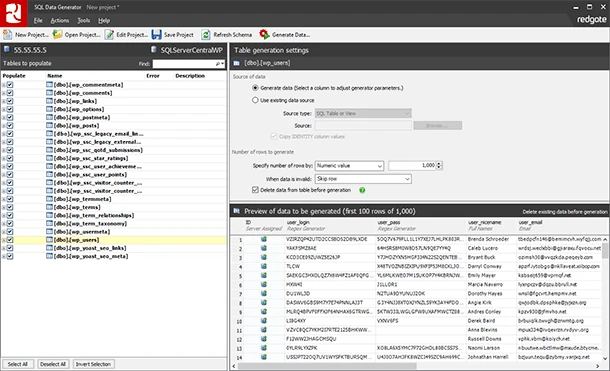
Redgate SQL Data Generator reads SQL Server column types and constraints and assigns appropriate generators. Its foreign-key generator can keep related values together, including documented handling for composite keys. This is useful when a test database needs enough connected rows to behave like the application’s schema.
The product fits teams that want repeatable fixtures from saved configuration in the desktop client or on the command line. Constraints still define the limits of generation. Redgate documents restrictions around certain self-referential keys and dependency cycles, which matter when the schema cannot be populated in a simple parent-first order.
Use the schema-aware setup to map your parent and child tables, then record the rule for shared customer keys and uniqueness. Redgate describes seeded generation and command-line execution. Keep the generation project beside the schema version that it expects.
Use a fresh database for each run and inspect the same key and columns with the same parameters. Verify that the chosen seed yields consistent values under the installed version. For large test data sets, measure the time to generate and load separately.
- Compatibility
- Windows utility. Redgate lists SQL Server 2014–2025 and supported hosted SQL Server and Azure SQL Database targets.
- License and trial
- Commercial as a standalone subscription or through an eligible SQL Toolbelt plan.
dbForge Data Generator for SQL Server
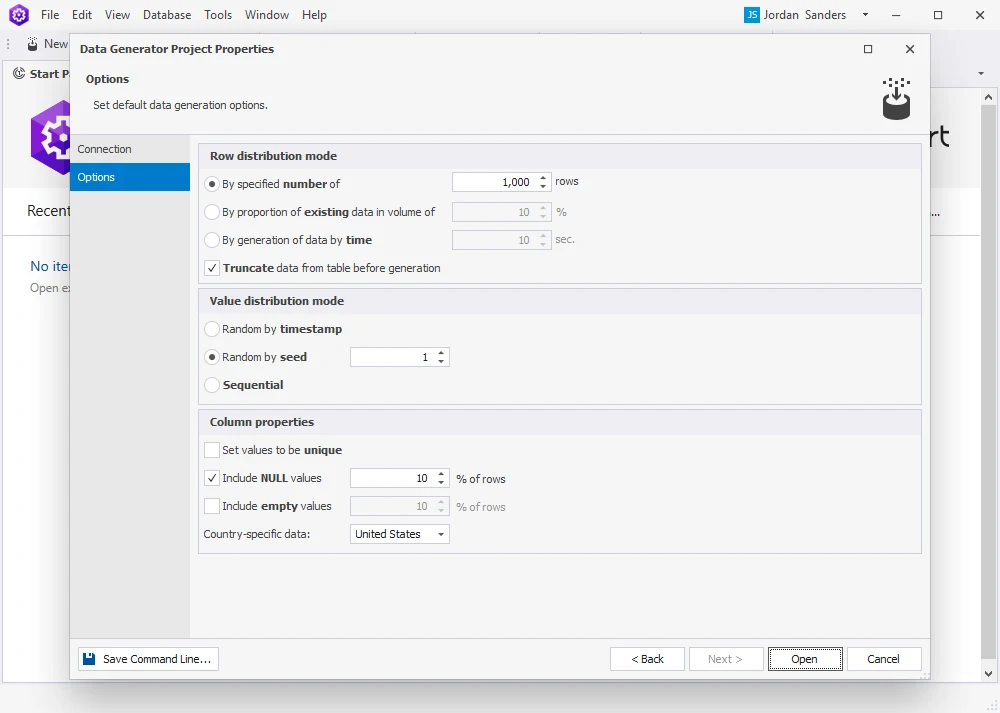
dbForge Data Generator builds a project around SQL Server tables, with options for row count, ranges, nulls and distribution. Its Random by seed setting can reproduce the same generated value set for a column. The workflow can use foreign-key metadata and produce SQL for review before a load.
It is useful when testers need an application-shaped dataset and want to adjust the distribution of specific columns. A repeatable seed helps exercise the same case again. The script and project settings also matter on a populated target because table-clearing options and destination state can change the result.
Devart documents a random-by-seed setting for generating the same collection of values for a column. Select fixed seeds for the fields your assertions depend on. Record the starting state and treat dependent tables as a separate integrity check.
Check the action that loads data into the database for your product edition. Produce a small trial with duplicate candidates and a shared parent key, then verify that the resulting rows respect the schema. Keep the useful rules for required boundary values with the project.
- Compatibility
- Windows utility. Devart lists SQL Server 2025, SQL Server on Linux and selected hosted and Azure deployments.
- License and trial
- Commercial. Also available in eligible dbForge Studio editions.
EMS Data Generator for SQL Server
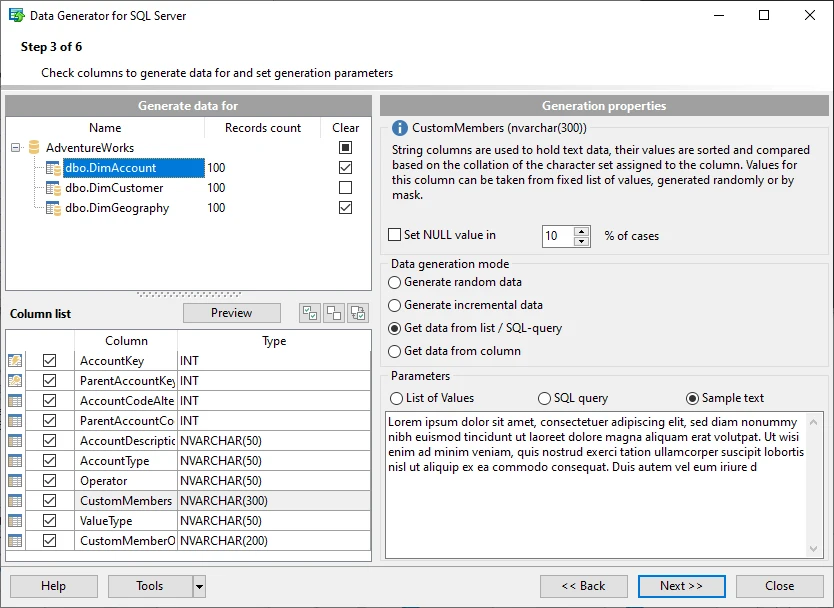
EMS Data Generator for SQL Server uses a wizard to define which tables get rows and how values are generated. It documents linked-table integrity, previews and support for using SQL query results as a source list. That lets a DBA derive realistic reference values from an approved source.
The product is useful for a focused set of tables that must be populated repeatedly. A saved configuration can move the same generation rules into a console run, while an insert script is useful for review. Reuse depends on the assumptions made about keys and lookup values in the second target.
EMS publishes automatic referential-integrity handling for linked tables and a command line that uses a saved template. Start from the customer table and order table together. Confirm what happens when a child rule uses an existing or newly generated parent.
Run the same template on two empty targets with the same version of the tool. Compare business values by key and inspect the order counts per customer. If exact values differ, decide whether the test calls for a fixed input or a repeatable distribution.
- Compatibility
- Windows utility for SQL Server. Supported target releases and connection drivers vary by product version.
- License and trial
- Commercial product with a trial.
IRI RowGen
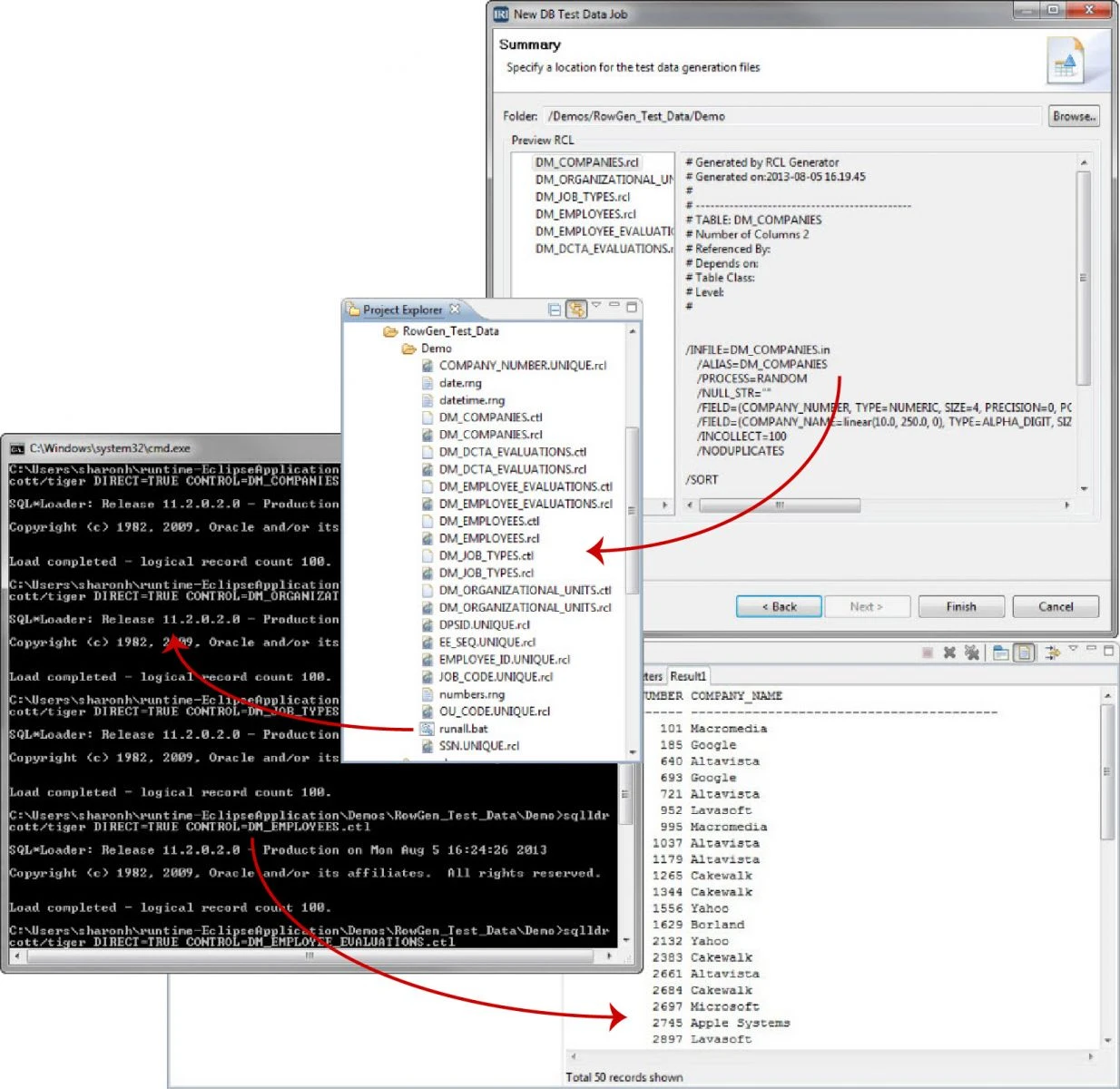
IRI RowGen uses schema metadata and generation rules to produce test records and the scripts needed to load them. The documented database workflow can create flat files for a SQL Server load. That gives an engineer separate artifacts for generating and applying a large test dataset.
It fits a batch workflow whose outputs should be retained for comparison or replay. The generated files give the DBA a stable input to load again. The database connection, load scripts and dependency order are still part of the operational setup, especially when the same data must move to another environment.
Define which records are needed as files and which need direct database loading. Treat the configured layouts and generation rules as the repeatable input. Include constraints and edge values in the SQL Server tables you use to accept the result.
Reconcile the generated keys across both files or database tables. When using a custom seed or value set, rerun the project at the intended size and retain the settings. Measure generation time, loading time and storage separately.
- Compatibility
- IRI Workbench and RowGen with supported database interfaces. SQL Server is a documented target.
- License and trial
- Commercial RowGen or a licensed IRI platform package.
DATPROF Privacy Generate
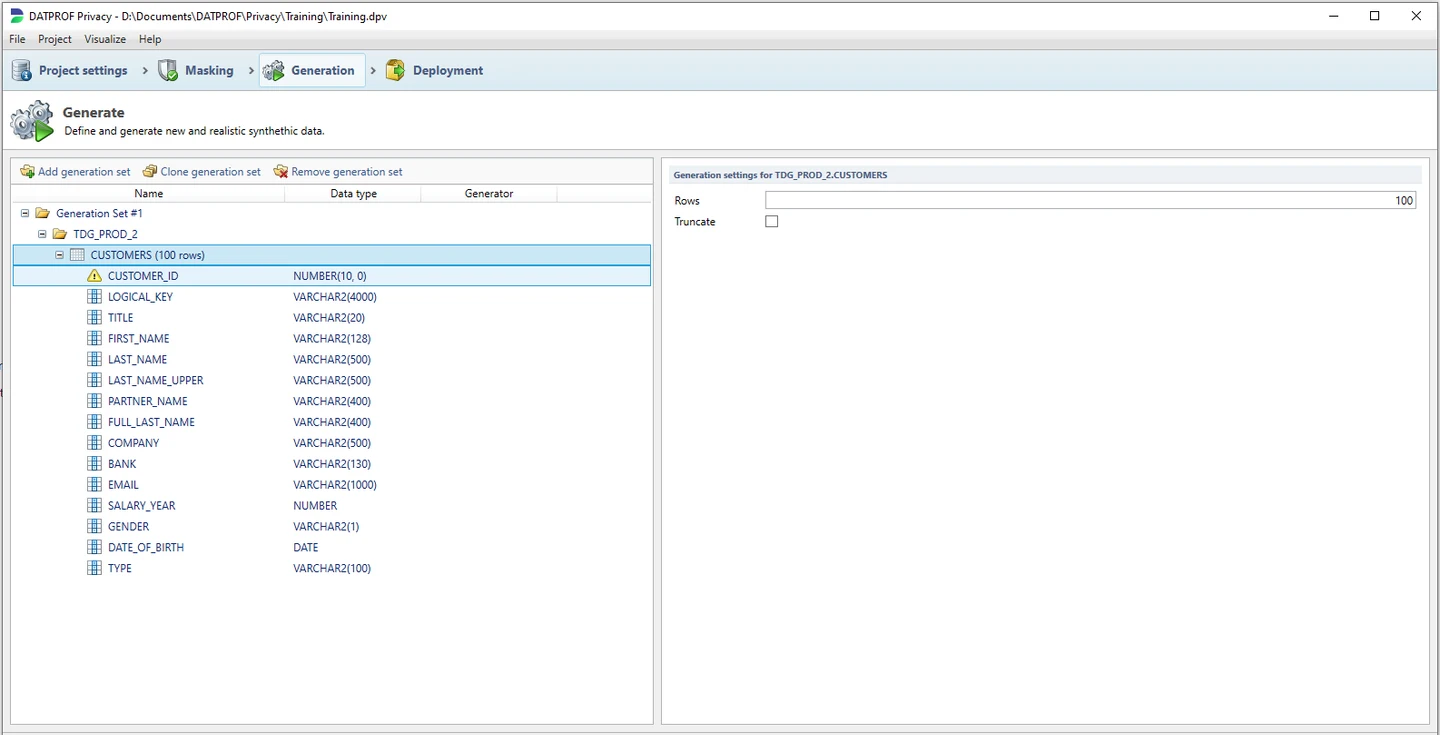
DATPROF Privacy Generate organizes data generation into sets that control the tables, fields and number of new rows. Its rules can combine generated values with SQL expressions or multi-column source lists. That is useful when a test needs related values or several deliberate mixtures of ordinary and boundary cases.
It fits a team that wants to base generation on a reusable configuration inside its wider data workflow. Previewing the generated set helps assess it, but recurring execution is also a deployment decision. DATPROF packages Runtime separately and documents which projects can run through it.
Use the documented generation rules for a managed test dataset when the source or schema is already part of a Privacy project. Decide whether each field needs a generated value or a rule that maintains a relationship. Verify the database constraint after every load.
Test two target datasets separately and confirm the second run preserves the expected lookup and repeatability properties. If you're starting with real data, use the masking and generation controls you need for each field and keep the original restricted.
- Compatibility
- DATPROF Privacy supports SQL Server. Schema and execution options depend on the deployment and product version.
- License and trial
- Commercial DATPROF Privacy. DATPROF Runtime is a separate product.
DTM Data Generator
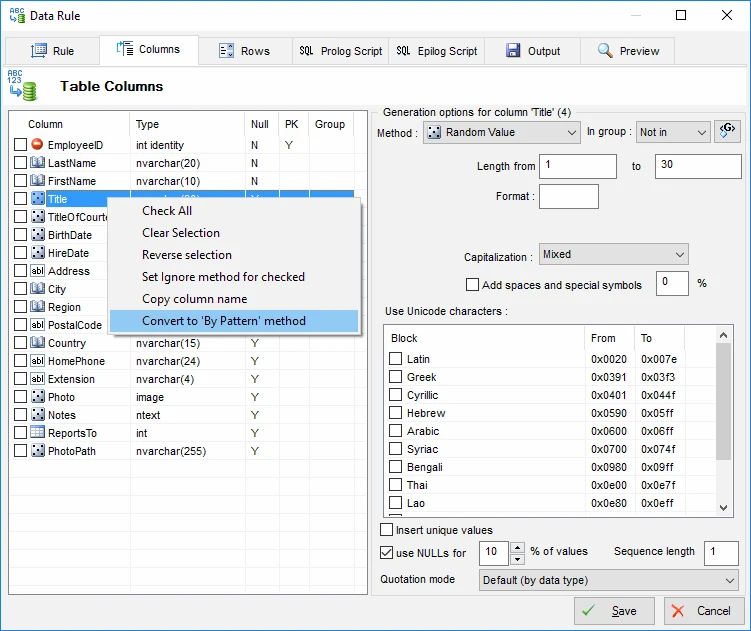
DTM Data Generator can analyze SQL Server table relationships, apply rules to columns and produce SQL or file output. A saved project can generate data again through the console workflow in supported editions. This is useful for smaller synthetic refreshes that need defined field rules and a repeatable loading step.
It is a candidate when a DBA wants to own a simple scheduled fixture job. The command-line status can distinguish a clean load from one that completed with rejected rows. That distinction matters because the data generator can finish while a downstream test still has fewer rows than expected.
DTM documents console execution for a prepared project and lists distinct return codes. Test the profile file and explicit connection configuration before automating writes. Include a missing project or unavailable target in the CI rehearsal.
After a successful return, run your own SQL acceptance queries. Validate unique emails and linked order rows on an empty target. Retain the inputs, tool build and profile used so a failed test can be reproduced.
- Compatibility
- Windows desktop with a supported SQL Server driver and connection.
- License and trial
- Commercial. Console execution requires a Professional or Enterprise edition.
Mockaroo
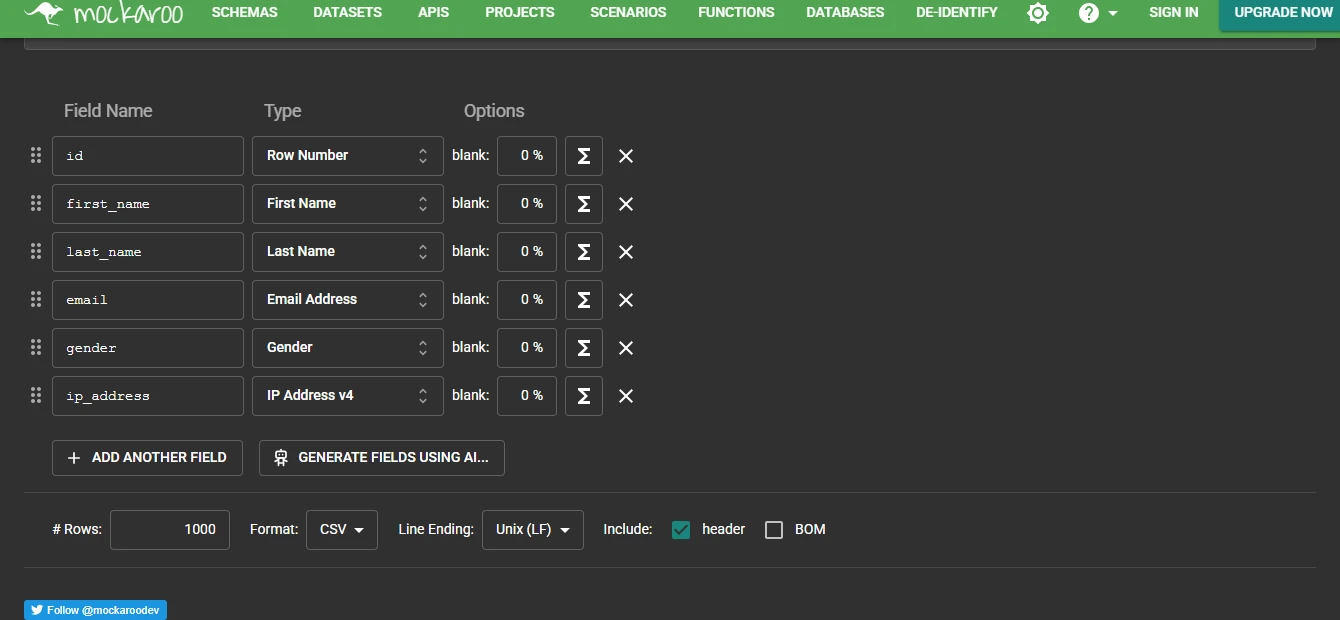
Mockaroo is a web and API generator that can export synthetic data in formats such as CSV. It lets an author describe fields and use dataset values, which can help build a parent file and a child file that refer to the same IDs. It is practical when the test needs a few data files and does not need direct access to SQL Server.
It is a good fit for quick fixtures that can live beside a test case. The generated files need a separate SQL Server import with the right encoding, types and dependency order. Saving the actual fixture is useful when two runs need to replay the same rows even if generation settings change later.
Define the customers before generating orders, then supply an allowed pool of customer keys in the chosen file or API workflow. Hosted generation produces data to load. SQL Server enforces the foreign key when the files are inserted in dependency order.
Review the output and plan limits against the required test volume. Keep approved synthetic reference values and a saved schema definition. If a CI test needs exact input, store a known file or verify the generation options before changing it each run.
- Compatibility
- Web and API generation. SQL Server import is a separate step.
- License and trial
- Free and paid service plans with generation limits.
Bogus for .NET
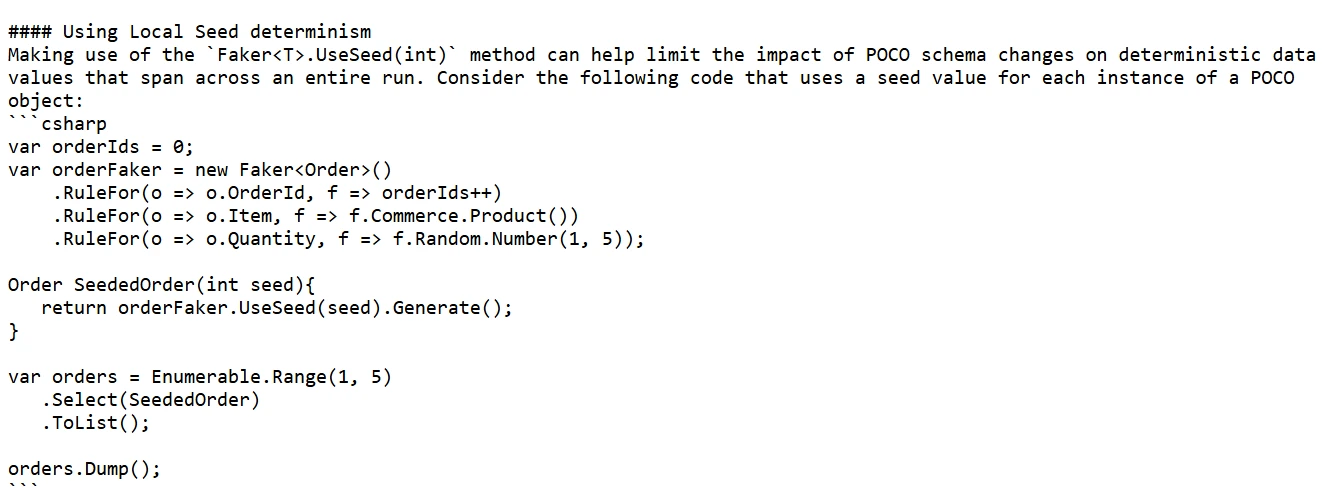
Bogus is a .NET library for generating synthetic values directly in test code. A developer can use local seeds and a fixed date reference to keep object data predictable, then load those objects through the application’s SQL Server access layer. That gives the test suite control over the specific relationships and inputs it exercises.
It fits an application whose fixtures belong in code review alongside its tests. Package updates or changes in the order of rules can affect generated values. The test fixture also owns primary keys, insert order and database cleanup, which are usually handled by a schema-aware desktop generator.
Bogus documents local UseSeed rules for deterministic instances. Generate the parent objects first and draw the child keys from that collection. Use the same local seed and pin the library and rules for any tests that assert exact values.
The application owns loading SQL Server, including insertion order, transactions and cleanup. Capture the generated inputs or summarize the resulting tables when a CI test fails. A result using new rules may be reproducible while still differing from a previous library version.
- Compatibility
- .NET library. SQL Server writes use EF Core or another supported data access path.
- License and trial
- Open-source core library. The project owns the loading code and test runtime.
SQL Server test data generators by workflow
| What you need | Tools to shortlist | What to verify |
|---|---|---|
| Populate linked SQL Server tables from a schema | Make the tool load a composite foreign key and verify both columns reference the same parent. | |
| Define and rerun a larger generation project | Save the project, load the same schema twice and check row counts, data distributions and load errors. | |
| Review the output before writing to SQL Server | Inspect the generated SQL or CSV for type conversions and identifiers, then load it into a scratch database. | |
| Keep test fixtures alongside .NET application code | Pin the generator version and seed, set a fixed clock and check one generated fixture in CI. |
Choose a SQL Server data generator by where the rules live
Put relationship and reproducibility requirements in the trial. A tool can generate plausible names but still produce keys, dates or skew that are wrong for the tests you intend to run.
The team starts with SQL Server tables and constraints
Choose a database-aware generator
Test schema import, parent-child matching, exact values and a controlled database load.
Test data enters via files or an ingest API
Generate files or API responses
Keep a stable reference list, validate the shape and load parents before children.
Application engineers own a .NET fixture
Use code with explicit seeds and relationships
Review the rules with the tests and verify the final SQL data after insertion.
Validate foreign keys, repeatability and skew
Create two empty databases with the same schema. Use the same tool build, rules, seed and row counts. Compare the rows by stable primary keys. If the goal is representative load testing, compare the value distribution as well as the data integrity.
The fixture uses a unique email and a real foreign key to catch a common mistake. Retain a deterministic key mapping for stable tests. For performance exercises, also decide which customers receive many orders and where amount and date boundary cases appear.
| Requirement | Test shape | Check |
|---|---|---|
| Required counts | 3 customers and 5 orders per run | Count both tables before comparing |
| Uniqueness | Email unique per database | No duplicate email values. Check constraints after bulk imports. |
| Valid links | Every order belongs to one created customer | Zero orders without a matching parent |
| Representative values | At least two statuses and one customer with several orders | Compare grouped counts and amount range by status |
| Repeatability | Two targets from the same version and seed | Compare expected fields by key, including rows present on only one side |
How to compare these tools
Generate the same parent and child tables twice under fixed conditions. Compare keys, value distributions and repeatability. Include generator version, source lists and destination state in the record. Sources checked .
Load the same linked test dataset twice
Run the schema fixture in two empty disposable databases named TestDataTrialA and TestDataTrialB. Generate the same customer and order shape twice, using fixed settings where the product supports them. Inspect the tables on both targets before reusing the generator in CI.
Create and inspect a related synthetic test data schema
T-SQL · 36 lines
- Create the two disposable databases on the same lab system. Run the fixture in each with @CreateFixture = 1. Save the generator settings and produce 3 customers and 5 orders in each target.
- Run the fixture in each with @CreateFixture = 0. Check row counts, zero orphan orders and a useful range of statuses and amounts. Include an explicit boundary that your tests need.
- Export both tables in primary-key order and compare the values or use EXCEPT in both directions. Keep a versioned input dataset if the tool offers only distribution-level reproducibility.
Conclusion
Choose a generator that fits the way your team populates SQL Server. Prove that a new database gets the intended rows, trusted relationships and reproducible fixtures. Save the project or source code next to the schema version it expects.
Frequently asked questions
What is the best SQL Server test data generator for a database with foreign keys?
Start with a schema-aware generator such as Redgate SQL Data Generator, dbForge Data Generator or EMS Data Generator for SQL Server. Try the real composite keys, lookup rows and dependency order before choosing one.
What is the difference between synthetic data generation and data masking?
Synthetic generation fills an empty or existing test schema using configured rules. Masking transforms values in an existing dataset. Either workflow can preserve relationships when the relevant keys, constraints and value rules are handled.
Can I reproduce the exact same SQL Server test data?
For tools that expose a fixed seed, pin the generator version and keep all inputs, row order and time settings stable. Use a clean target to avoid variations from identity allocation and existing rows. Compare outputs to prove repeatability.
Can a SQL Server data generator run in CI?
Yes. Several tools run saved projects from a command line. A .NET project can also generate fixtures with Bogus and load them through EF Core. Give the job a disposable database target and make rejected rows fail the build.
How do I detect bad foreign keys after a bulk load?
Check for orphaned child rows and run DBCC CHECKCONSTRAINTS. When loading with BULK INSERT, use CHECK_CONSTRAINTS if the load must enforce foreign key and check constraints. Inspect the catalog afterward to confirm the expected constraints are trusted.
How do I keep generated SQL Server test data stable when a library changes?
Pin the generator version, schema, rules and seed. Compare rows by key during the upgrade. Save a reviewed input file when the test needs the exact same records across generator versions.