
sqlcmd Go vs ODBC features and compatibility
Microsoft provides two implementations with the same command name. sqlcmd (Go) uses the go-mssqldb driver and is available as a standalone tool. sqlcmd (ODBC) uses Microsoft's ODBC driver and command-line utilities. Both have cross-platform distributions, but their flags and behavior are not identical.
Existing automation should retain its recorded implementation until migration is tested. New installations are selected for the operating system and required authentication methods. Recording the executable path prevents another installed implementation from changing scheduled behavior through PATH resolution.
| Choice | What to verify |
|---|---|
| Go implementation | Standalone version, compatibility flags and any modern context/subcommands |
| ODBC implementation | Command-line utility version, installed ODBC driver and platform requirements |
| Existing automation | Resolved executable path, supported switches, authentication and process exit status |
Go's modern query and context commands use a different interface from classic -S, -Q and -i syntax. The Microsoft utility reference describes implementation differences and platform-specific options.
Install sqlcmd on Windows, macOS or Linux and check PATH
Microsoft's download and installation page lists the packages for each implementation. Go routes include Windows package managers, Homebrew and release assets. Installed versions may differ from the latest upstream release when package-manager updates lag.
ODBC utilities have separate driver prerequisites. On Linux, follow the current distribution-specific command-line-tools instructions; a tools package is different from installing the database engine. For the driver layer, use the ODBC installation and architecture guide.
Get-Command sqlcmd -All -ErrorAction SilentlyContinue |
Select-Object Name, Source, Versioncommand -v sqlcmd
type -a sqlcmdRun executable lookup in the job's execution environment. PATH can differ between interactive users, service accounts, containers and scheduled runners. An empty result means the current shell cannot resolve the command, although it may be installed elsewhere.
Inspect the located executable's help output. Go provides --version, modern-command help with --help and compatibility help with -?. ODBC also uses -?, but does not necessarily accept Go's version switch. Quote '-?' in a shell that treats the question mark as a wildcard. See Microsoft's implementation identification guide.
Record the executable's full path or immutable runner image, package version and driver dependency. Updates require connection and failure-path testing as well as confirmation that the runner still invokes the intended binary.
Connect with sqlcmd authentication and encryption settings
The one-line example uses Go sqlcmd and its documented -N true syntax. Substitute the hostname, port, database and login. With no command-line password or password environment variable, SQL authentication uses an interactive prompt.
sqlcmd -S "tcp:sql01.example.com,51433" -d "AppDb" -U "reader_login" -N true -b -Q "SELECT SERVERPROPERTY('ServerName') AS server_name, DB_NAME() AS database_name, ORIGINAL_LOGIN() AS login_name;"Encryption syntax depends on the executable version. Microsoft documents -N true for Go and -No, -Nm and -Ns in its SQL Server 2025 utility reference. Earlier ODBC utilities have different syntax and defaults. The installed client's help and release documentation determine which options apply.
-C trusts the server certificate without the usual validation in applicable modes. Encryption and endpoint validation are separate settings. The certificate diagnosis guide covers CA trust and hostname errors with validation retained.
A Windows trusted connection using -E requires the runner's identity to have server access. Microsoft Entra options depend on implementation, platform and authentication method. The Entra authentication guide describes these requirements; interactive MFA and unattended authentication use different workflows.
A password passed with -P can appear in command history or job definitions. Unattended SQL authentication should use the runner's secret-injection mechanism. SQLCMDPASSWORD avoids the command-line argument but remains accessible in the process environment, which also requires protection.
Run SQL files with sqlcmd, GO and scripting variables
-Q executes a statement and exits. -i reads an input SQL file, and -o writes client output. A context query can verify the endpoint and identity before executing application work.
sqlcmd -S "tcp:sql01.example.com,51433" -d "AppDb" -U "reader_login" -N true -b -i "context-check.sql" -o "context-check.log"Input and output paths are resolved by the client process. A BACKUP destination in a SQL statement is resolved by the database engine or its configured storage. Access to a local SQL input file therefore does not establish engine access to a backup destination.
GO is a client batch separator, not a T-SQL statement. Put it on its own line in a script that needs separate batches. A normal application driver cannot submit an entire GO-separated file as one SQL command. Local variables also do not survive across batches.
:r includes another file, with relative paths resolved from the startup directory. A recorded working directory or controlled absolute paths makes file selection repeatable. Included files are part of the script revision being deployed. See the Microsoft command reference.
Variables such as -v, :setvar and $(Name) perform text substitution rather than SQL parameter binding. Deployment identifiers require controlled values; untrusted data requires a parameterized interface. Microsoft describes variable precedence, platform support and quoting.
Handle sqlcmd errors and propagate exit codes to the scheduler
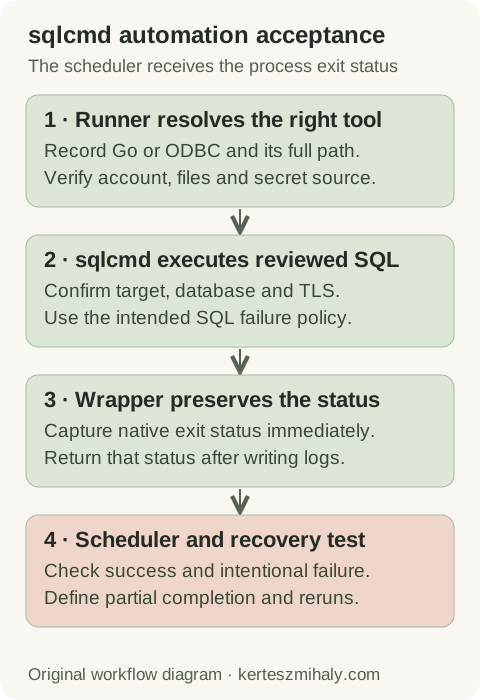
-b returns a nonzero process status for qualifying server errors above severity 10. -V sets the severity threshold, so a higher value excludes additional errors from process failure. Output-message filtering is configured separately.
The PowerShell example invokes Go sqlcmd under a provisioned Windows identity and returns its status to the caller. The account needs access to the reviewed SQL input file. Execute the wrapper as a separate script process, because exit terminates that process.
$sqlcmdExe = "C:\Tools\sqlcmd\sqlcmd.exe"
if (-not (Test-Path -LiteralPath $sqlcmdExe -PathType Leaf)) {
    Write-Error "The approved sqlcmd executable is missing."
    exit 1
}
try {
    & $sqlcmdExe -S "tcp:sql01.example.com,51433" -d "AppDb" -E -N true -b -i "C:\Jobs\reviewed.sql" -o "C:\Jobs\run.log"
    $sqlcmdExit = $LASTEXITCODE
} catch {
    Write-Error "Could not execute sqlcmd; check the runner configuration."
    exit 1
}
if ($sqlcmdExit -ne 0) {
    Write-Error "sqlcmd failed; review the protected run log."
    exit $sqlcmdExit
}
exit 0
Substitute the verified executable path. Capture the native status before another command replaces it. A logging stage in a pipeline can change the status observed by the caller, so failure-path testing includes the wrapper. PowerShell documents LASTEXITCODE and terminating invocation errors.
Return sqlcmd failures from a Bash runner
The Bash example uses Go sqlcmd with SQL authentication. The runner supplies SQLCMDPASSWORD through its secret mechanism before invocation, avoiding an interactive prompt. Substitute the executable, file paths and endpoint. Run the wrapper as a separate process because exit terminates it.
sqlcmd_exe="/approved/path/sqlcmd"
if [ ! -x "$sqlcmd_exe" ]; then
    printf '%s\n' 'The approved sqlcmd executable is unavailable.' >&2
    exit 1
fi
if [ -z "${SQLCMDPASSWORD:-}" ]; then
    printf '%s\n' 'The runner SQL credential was not provisioned.' >&2
    exit 1
fi
"$sqlcmd_exe" -S "tcp:sql01.example.com,51433" -d "AppDb" -U "runner_login" -N true -b -i "/approved/jobs/reviewed.sql" -o "/approved/logs/run.log"
sqlcmd_status=$?
exit "$sqlcmd_status"
Capture $? immediately after sqlcmd. A pipeline ending in tee can return the logging command's status unless pipeline failure handling is configured. Concurrent runs require separate protected result files. See the Bash pipeline status rules.
A SQL TRY/CATCH that records an error and completes normally can return success to the client. When failure must propagate, the CATCH block needs the intended transaction handling and error rethrow. Microsoft describes this in the THROW reference.
Disposable test only · intentional failure for the automation pilot
T-SQL · 1 lines
Use a disposable test target for the intentional error. Verify a nonzero sqlcmd result, failure propagation through the wrapper and a failed scheduler run. A successful read and a connection failure provide separate tests of success and connection-error handling.
Fix sqlcmd command, connection and script errors
“Command not found” is executable resolution. “Unknown flag” points to the selected implementation or syntax. A network timeout needs the endpoint and transport checks; a server response of 18456 needs the login reason and state. Diagnose the first failed stage.
Interactive and scheduled execution may differ in account, PATH, working directory, secret injection, file permissions and parameters. Compare a sanitized invocation and protected output from each environment. File access is checked under the runner's operating-system identity.
Text output requires testing against its consumer. Column separators do not provide CSV escaping, and display-width settings may truncate values. Representative nulls, delimiters, line breaks and Unicode test the intended exchange format.
Use a separate protected log destination per concurrent run. Output-file settings can overwrite existing files. Record the run identifier, start and end times, and exit status independently of query results.
Set and test login and query timeouts for the selected implementation. After a timeout, check committed work and active executions before retrying a write operation. Concurrent scheduling requires an operation designed for overlap.
Document sqlcmd jobs, logs and rerun behavior
The job record includes executable and version, endpoint, identity, TLS settings, input revision, working directory, output location and expected status. Write operations also require transaction, partial-completion and rerun procedures. A nonzero exit status does not indicate whether previous statements committed.
The Agent job guide covers command-step identities and recovery. Monitoring includes missed runs and expected output alongside exit status. A remote SQL Server health audit is available for recurring scheduling or recovery issues.
sqlcmd installation and automation questions
Is sqlcmd the same as Invoke-Sqlcmd or SSMS SQLCMD mode?
No. sqlcmd is an executable, Invoke-Sqlcmd is a PowerShell cmdlet, and SSMS SQLCMD mode is an editor feature. Options and status handling depend on the tool invoked. See the Invoke-Sqlcmd reference.
Why does my scheduler show success after a SQL error?
SQL error handling, sqlcmd's failure threshold or the wrapper may suppress a nonzero result. Catch blocks and logging pipelines are common points to inspect. An intentional error in a disposable environment tests the complete status path.
Does sqlcmd -C repair a certificate trust error?
In applicable modes, it bypasses normal certificate validation. CA-chain or hostname repairs are separate configuration changes. The final connection test uses the selected implementation's encryption options with validation enabled.