
Identify the stage behind SQL Server connection errors
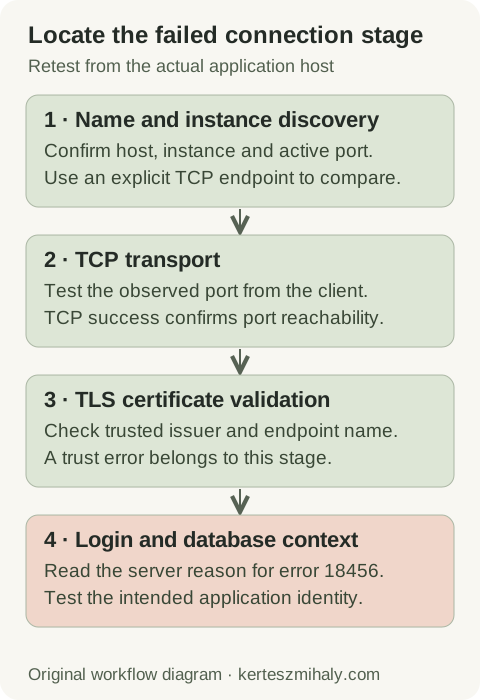
A connection passes through name resolution, instance discovery where needed, transport, TLS negotiation and authentication. The application may wrap the original failure in a generic timeout. Capture the complete provider message and inner error, target name, client host, driver, time and whether the failure is constant or intermittent.
| Message | Useful starting point | Interpretation |
|---|---|---|
| Error 26: locating server/instance | Instance spelling, discovery and actual endpoint | The failure occurs during discovery, before SQL credential validation. |
| Provider error 40: cannot open connection | Provider plus inner error, service and transport | The provider name alone does not determine the required transport. |
| Error 53: network path not found | Name, endpoint and path reachability | The intended instance may use a different TCP port. |
| Certificate validation failure | Client trust and connection-name match | TCP reachability and TLS validation are separate checks. |
| Login failed 18456 | Matching server log reason and state | The connection has reached authentication or database access. |
Microsoft's connectivity overview describes these categories. Certificate-validation errors are covered by the certificate guide, and rejected logins by the 18456 guide. Retain the error from each test to track the stage reached.
If the application reports that its OLE DB provider is missing or not registered, check the OLE DB installation host, provider name and process architecture before running network tests. A process must load its provider before it can open a SQL Server connection.
Record the last working deployment and subsequent client, service, VPN, DNS, firewall or configuration changes. Their timestamps help identify relevant comparisons; correlation alone does not establish the cause.
Check the SQL Server instance service and TCP listening port
SSMS is a client application and does not install the Database Engine. The connection requires the SQL Server host, instance and port. localhost refers to the client's computer or container network namespace.
On Windows, SQL Server Configuration Manager identifies Database Engine services and protocol settings. Check the intended service's status and any startup error. SQL Server Browser is a separate discovery service and can run while the Database Engine is stopped.
SQL Server startup-log entries report the active listening addresses and ports. Configured values may differ from the active listener until a required restart. TCP 1433 is common for a default instance but is configurable; named instances can use other ports.
tcp:sql01.example.com,51433SQL Server connection syntax separates the host and port with a comma. Substitute the intended hostname and observed port in the example. Explicit TCP and port selection removes instance discovery from the test while retaining DNS, TLS and authentication.
For availability groups, distinguish the application listener from physical replica names. A replica connection tests that replica; listener routing and failover require tests through the application endpoint. Containers require the externally published port.
Compare local TCP access with the failing remote connection
Where practical, test locally on the SQL Server host using an authorized account. Shared memory can work while TCP is unavailable. Force TCP with the server's certificate-compatible DNS name and observed port, then repeat from the failing application host. Using a loopback address can introduce a different certificate-name or listener-binding result.
Comparisons should use the same authentication method and requested database. Record account differences when an administrator's Windows-authenticated session is compared with an application's SQL-authenticated session.
| Result | Narrow the next check to |
|---|---|
| Local shared memory works; local TCP fails | TCP protocol, listening address/port and startup errors |
| Local TCP works; remote TCP fails | Remote resolution, route, host/network firewall and source restrictions |
| Remote explicit port works; named instance fails | Discovery, Browser, UDP path or stale alias |
| Client tool works; application fails on the same host | Effective configuration, driver, runtime identity and application-specific network context |
These comparisons follow the Microsoft network and instance troubleshooting procedure. They identify the failing stage and the protocol requiring attention. Final verification uses the original application connection.
Test SQL Server DNS and TCP access from the application host
Resolve-DnsName -Name 'sql01.example.com'
Test-NetConnection -ComputerName 'sql01.example.com' -Port 51433 -InformationLevel Detailed
Replace the placeholders and run the commands from the failing host and network context. They query DNS and attempt a TCP connection without logging in or changing firewall rules. Inspect the resolved address, source interface and TcpTestSucceeded.
The Test-NetConnection reference describes the output. Success confirms a TCP connection to the returned address and port. Identifying the SQL instance, validating its certificate and authenticating the application require subsequent checks.
Ping tests ICMP rather than the SQL Server TCP port. Different network policies can allow one and block the other, so SQL connectivity is tested using the application's transport.
Different results for an IP address and DNS name can indicate DNS records, cached resolution, aliases or IPv4/IPv6 routing differences. An IP-based SQL connection can also change certificate-name validation. The application test uses its configured certificate-compatible hostname.
Compare failed and successful client hosts when the problem affects only one subnet or application node. Preserve the resolved address and time with each result. Intermittent DNS answers or a route that changes with VPN state can otherwise look like an intermittent database failure.
Containers may use DNS resolvers, routes and policies different from those of the host. Collect the address and connection result from the application runtime as well as the host. Diagnosis can remain limited to the configured endpoint.
Fix error 26 instance discovery and SQL Server Browser problems
On Windows, SQL Server Browser answers instance-discovery requests on UDP 1434. The database connection then uses the TCP port returned for that instance. Browser does not carry the application's SQL queries, and allowing UDP 1434 does not automatically allow the database TCP port.
If server\instance fails while the correct explicit TCP port works, check the instance name, Browser status and discovery path. Test-NetConnection -Port 1434 tests TCP, so it does not validate Browser's UDP response. Use an appropriate UDP-aware diagnostic with the network owner when discovery is the suspected branch.
A static port explicitly configured in the client removes the discovery requirement for that connection. Changing from dynamic ports requires updates to all consumers. Microsoft describes the Browser behavior and connection requirements.
Client aliases and DSNs can redirect connections to another host, port or protocol. Inspect the settings used by the failing driver and process architecture, because different applications may use separate configurations.
Review firewall, listener and connection string changes
If TCP is disabled on the intended Windows instance, enable it through Configuration Manager and schedule the required Database Engine restart. Review listening-address and port settings together. Changing a service's network protocol affects its clients, so record the old values and the validation window. Microsoft protocol configuration instructions.
A firewall rule should allow the observed database port for the required source hosts or networks and profile. Check the server firewall and intervening network controls. Microsoft's Database Engine firewall guide describes port-based access.
An incorrect endpoint requires a deployed configuration change and the application's reload procedure. After transport succeeds, TLS or authentication messages identify the next diagnostic step. Login timeout and validation settings do not change endpoint selection.
Capture intermittent failures at the time they happen
For failures that come and go, preserve a failed attempt and a nearby successful attempt from the same application node. Compare the resolved address, source network, target port and full inner error. Check whether failures align with failover, VPN changes or a deployment before changing a listener or timeout. Microsoft intermittent connectivity guidance.
For intermittent failures, compare timestamps from the application, network controls and server log. Label samples collected during a failure separately from those collected while access was working. A successful probe between failures describes only that interval.
Verify the application connection after fixing errors 26, 40 or 53
Final verification uses the application host, runtime account, driver, server name and database. Check a representative operation and reconnection. Clustered or listener-based deployments also require the failover tests appropriate to the change.
The diagnostic handoff records the complete error, first failure time, endpoint, active listener, client host, DNS/TCP results, setting changed and final application result. These details let network, Windows and SQL Server administrators compare the same attempts.
The ODBC driver guide and OLE DB guide cover client versions and architecture. A remote SQL Server health audit is available for recurring configuration issues.
SQL Server connection error questions
Does error 40 mean I must enable Named Pipes?
No. Error 40 identifies a failed connection attempt. The complete provider and inner error, together with the configured transport, determine whether the failure concerns Named Pipes, TCP or another stage.
Is opening TCP 1433 enough for a named instance?
Only when the intended instance listens on TCP 1433. Named-instance discovery may also require SQL Server Browser on UDP 1434. An explicit TCP hostname and active port bypasses that discovery step.
Why does Test-NetConnection succeed while SQL Server still fails?
It establishes TCP reachability to an address and port. The service may still reject TLS validation, authentication or database context. Use the complete application error to choose the next stage.