

An approval gate controls who can release a change. A SQL policy check controls which statements or schema differences the release can include. A pipeline can wait for a person to approve a deployment while knowing very little about the SQL that will run. A database-aware tool can inspect that SQL or model and produce evidence the approver can use.
Azure Pipelines, GitHub Actions, GitLab and Octopus are useful for controlling access to a production stage. Liquibase, Flyway and Bytebase add checks specific to database changes, and DBmaestro combines release orchestration with database governance. The strongest workflow connects the approval to the same script or deployment plan that will execute, with a clear record of the target and the result.
SQL Server deployment approval tools at a glance
Human approval, policy checks and privilege boundaries can come from different tools. Test how they work together in the exact plan and repository you deploy from.
| Tool | Where the control lives | What reviewers or checks see | Key requirement to test |
|---|---|---|---|
| Azure Pipelines | Approvals and checks attached to protected resources | Pipeline artifact, environment and associated checks | Protect the environment or service connection and verify bypass rights |
| GitHub Actions environments | Deployment protection rules and environment secrets | Job, deployment, branch or associated build evidence | Required reviewers vary by plan and repo visibility. Verify self-approval and bypass settings. |
| GitLab protected environments | Deployment approvals under eligible tiers | Deployment status and required approvals | Premium or Ultimate. Verify protected jobs, variables and roles. |
| Octopus Deploy | Manual intervention step in the database deployment | Plan or generated SQL attached to the release workflow | Test release step order and how workers obtain database credentials |
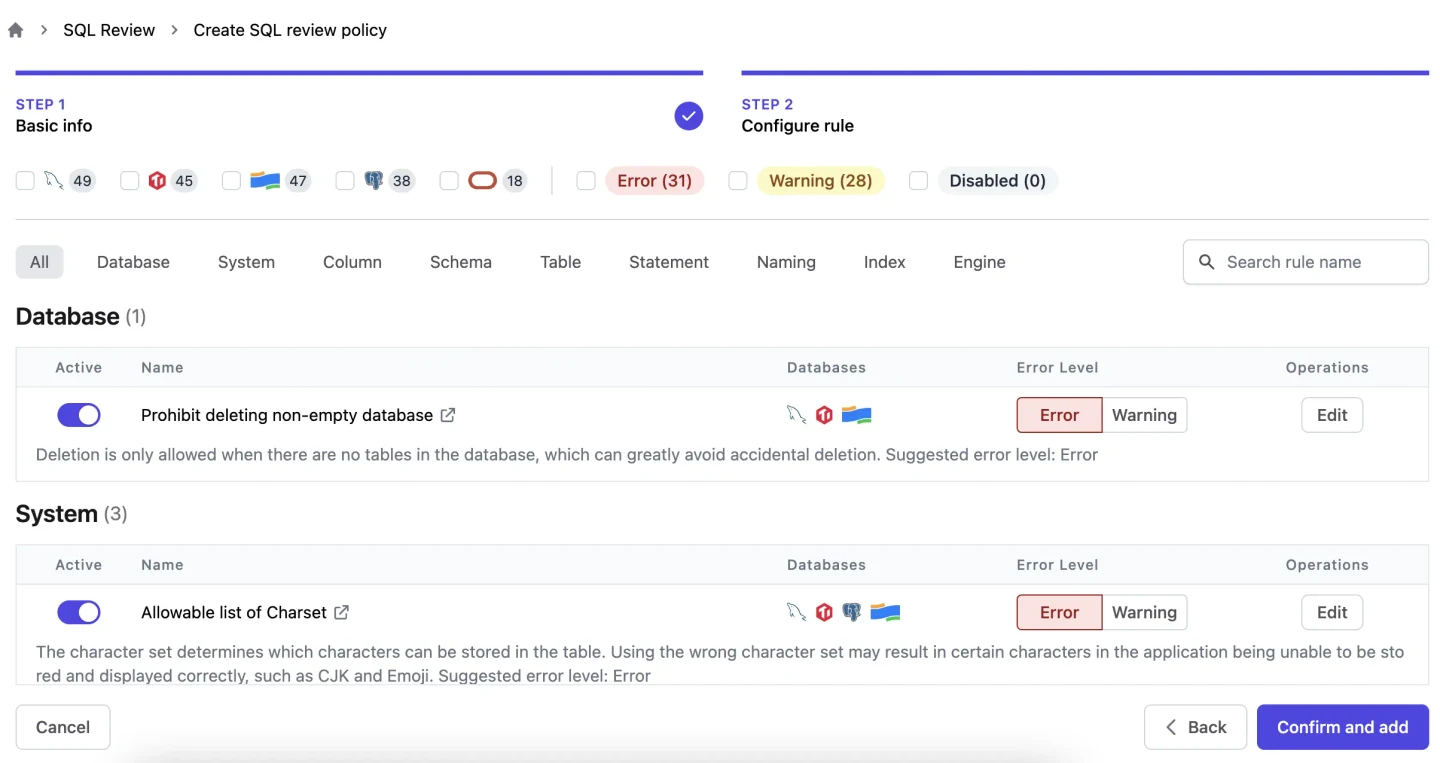
| Bytebase | Database change request and applicable policy | Submitted SQL, review and deployment evidence | Verify supported SQL Server rule, policy and audit features in the plan |
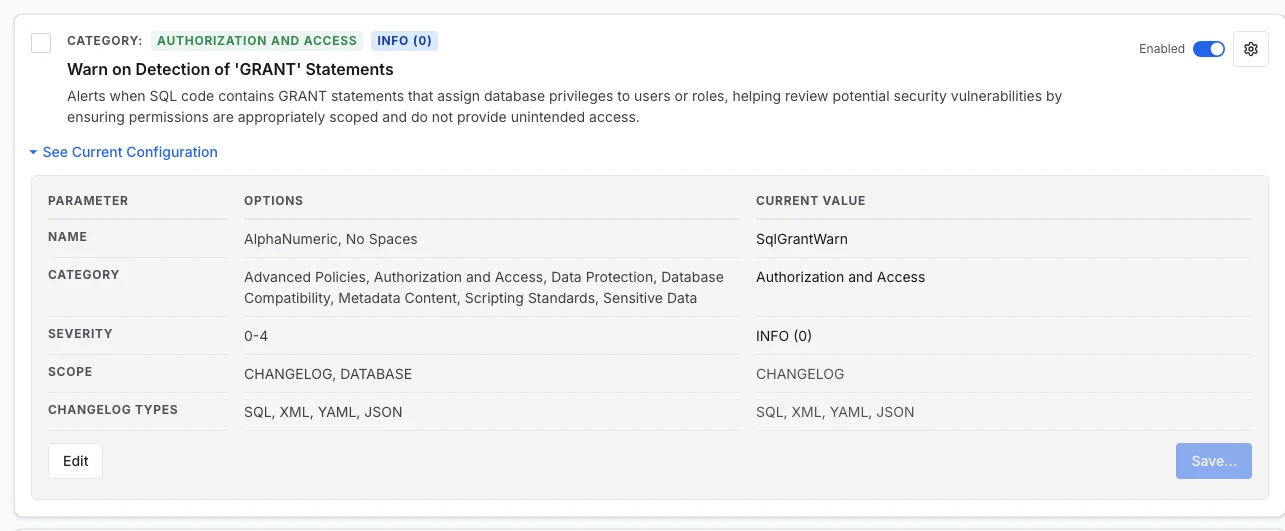
| Liquibase Secure | Policy check stage before changing a database | Configured changelog or database checks and result | Policy outcome needs an enforced workflow and separately controlled deployment access |
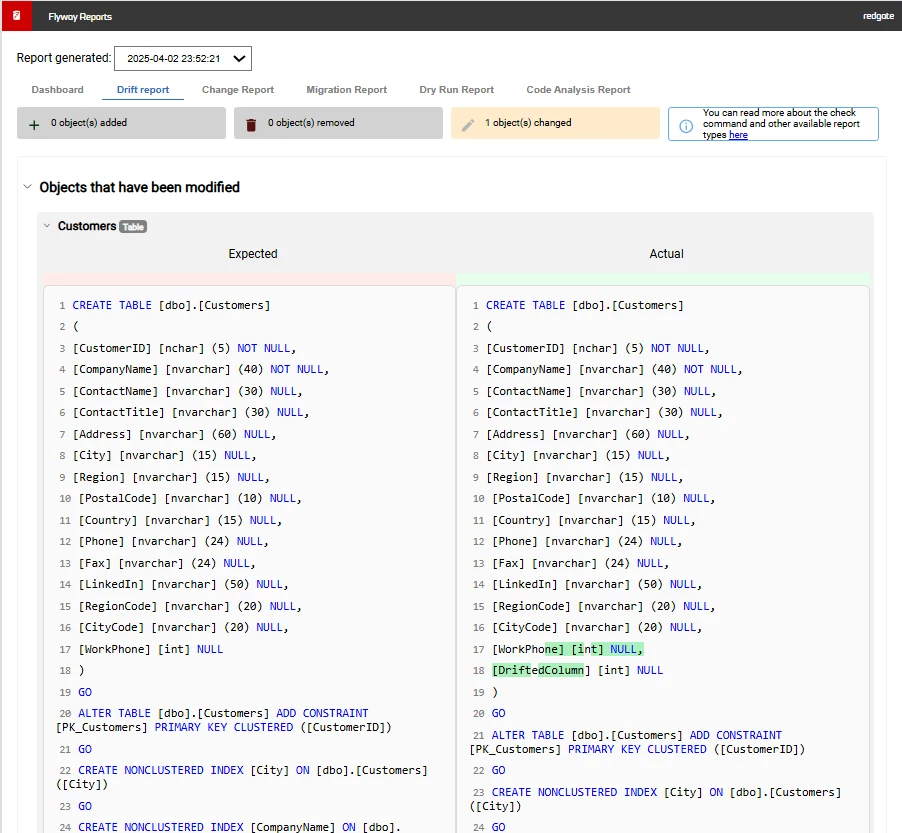
| Flyway Enterprise | Migration analysis and drift evidence before approval | Dry-run script, pending-change or drift report where licensed | Check exact edition, report artifact and outer approval or runner policy |
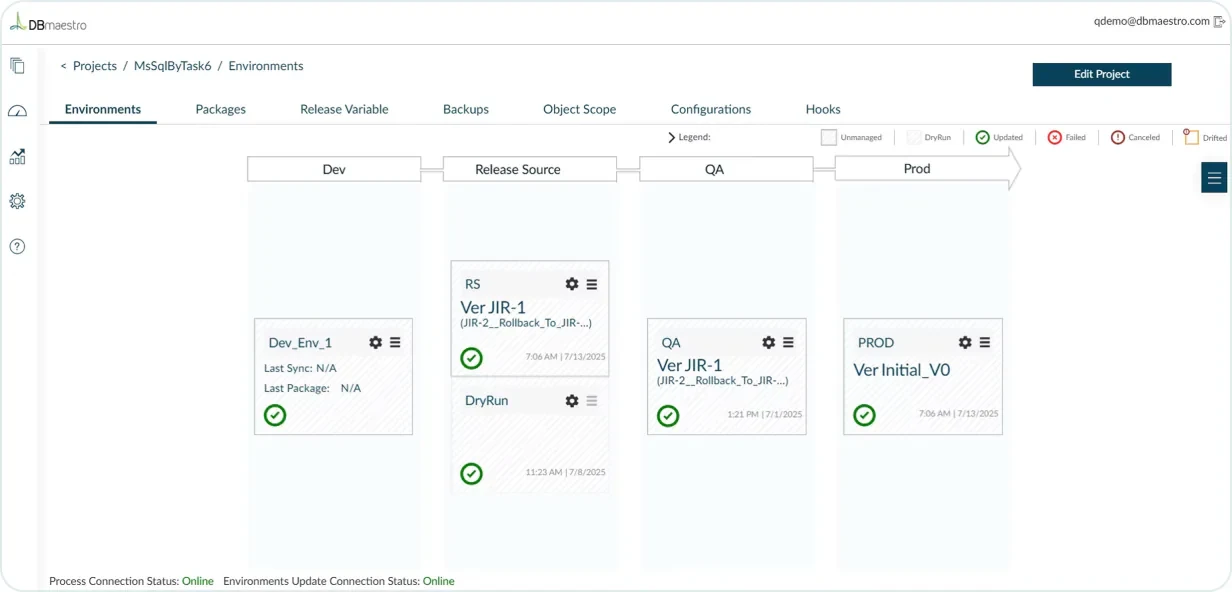
| DBmaestro | Database release automation and governance workflow | Review artifacts and governed deployment records | Verify SQL Server support, exact approvals, role scope and report export |
Azure Pipelines
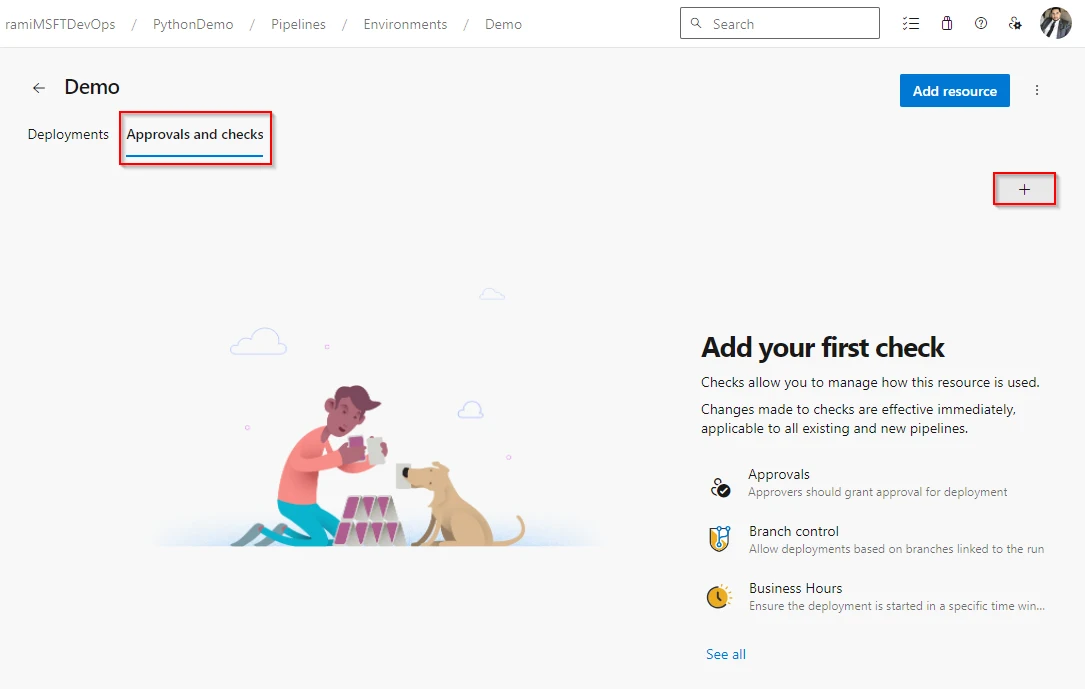
Azure Pipelines environments and other protected resources can require approvals and checks before a stage starts. Resource owners configure them outside pipeline YAML. That is useful when the team that owns production access needs to keep control even as application developers modify their build and release definitions.
It fits an existing Azure DevOps workflow with a tested SQL deployment job. Approving use of the resource provides a clear boundary. The pipeline still has to produce a SQL artifact or deployment preview that reviewers can inspect, and the agent and service connection need network access and target permissions.
Configure approvals on the appropriate protected resource. Save the report and exact build artifacts against the pipeline run. Test with a user who can edit YAML and a separate approver who controls the environment or service connection.
Run one approval and one rejection against a disposable database. Verify the release identity is unavailable to the rejected deployment and check which administrators can bypass the gate. Preserve the bypass record in the review evidence.
- Compatibility
- Azure DevOps with an eligible protected resource and a runner that can reach the SQL Server target.
- License and trial
- Azure DevOps plan and runner costs apply. SQL deployment tooling has its own requirements.
GitHub Actions environments
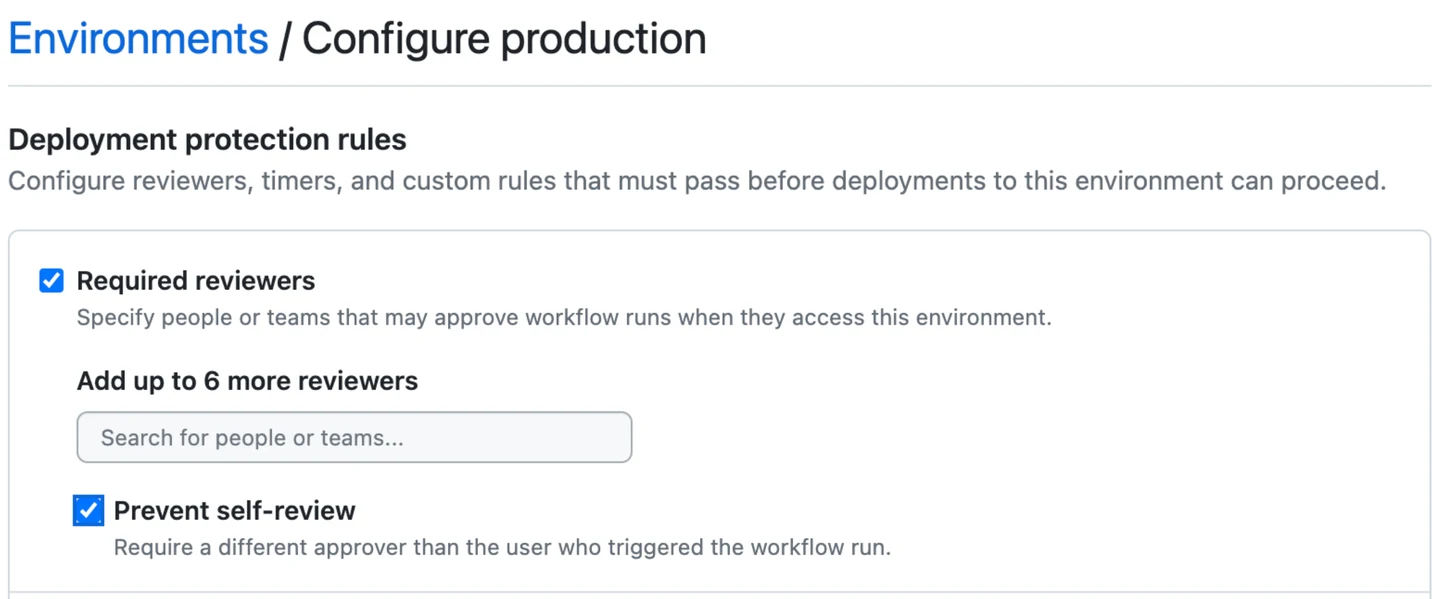
GitHub Actions environments can stop a protected job until a required reviewer approves it and restrict access to environment secrets until the protection rules pass. The environment can also restrict branches. This is useful when SQL Server releases already originate in an application or database repository on GitHub.
The strongest case is sharing approval and deployment history with the repository that produced the change. Which rules can be used depends on repository visibility and plan. The workflow needs a safe way to distribute the candidate SQL, and any direct database login still follows its own permissions.
Use an environment for the deployment job and verify the plan and repository support required reviewers. Protect the environment secret or credential path, then test prevention of self-review and relevant rules for eligible branches.
Test a workflow that omits the environment and confirm it cannot reach the production credential in your lab design. Review the approval and run ID together with the artifact hash. Check whether administrators can bypass the configured protection.
- Compatibility
- GitHub Actions, an eligible environment and a SQL Server-capable runner or deployment service.
- License and trial
- Plan and repository visibility determine protection features. Required reviewers on private repositories have stricter plan requirements.
GitLab protected environments
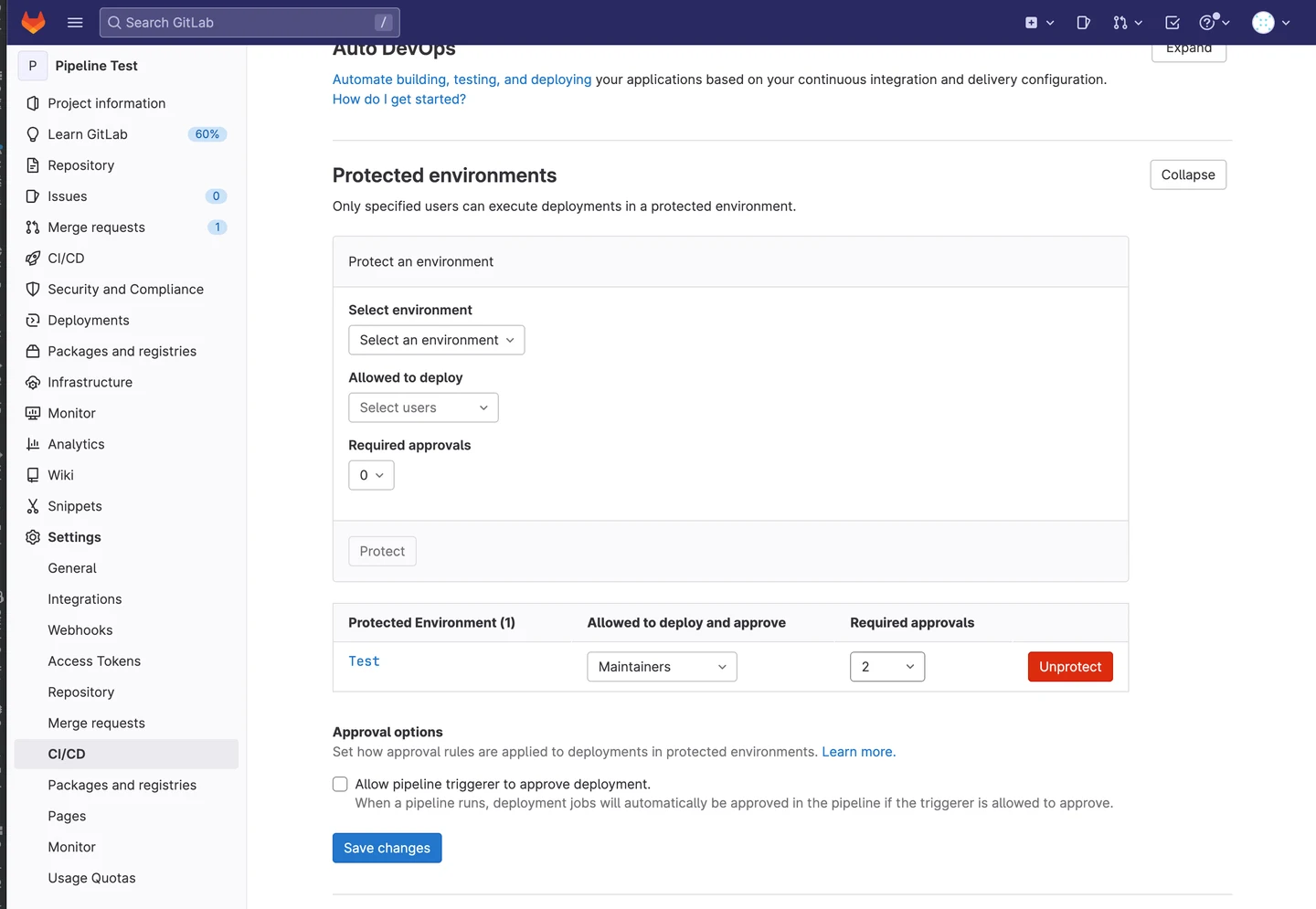
GitLab deployment approvals can require designated users or groups to approve a deployment to a protected environment. Its environment controls also govern who can deploy there. This is useful when the group approves database release work in the same place it reviews application pipelines.
It suits a release process that explicitly separates review from execution. GitLab documents a manual start after deployment approval, so approval and job completion are distinct events. The pipeline still has to keep the selected SQL script or package tied to that specific deployment.
Use a protected environment on an eligible tier and verify which users may approve versus deploy. Link the deployment job to the reviewed app and schema artifact. Test the behavior of a rejected job and a change that needs another review.
Check the same protected variables and runner roles on a delayed or manually retried job. Capture the exact target and job ID. When several approval rules apply, verify how the selected users contribute to the required totals.
- Compatibility
- GitLab CI/CD with protected environments and a runner that can reach SQL Server.
- License and trial
- Protected environment and deployment approval features depend on the GitLab tier.
Octopus Deploy
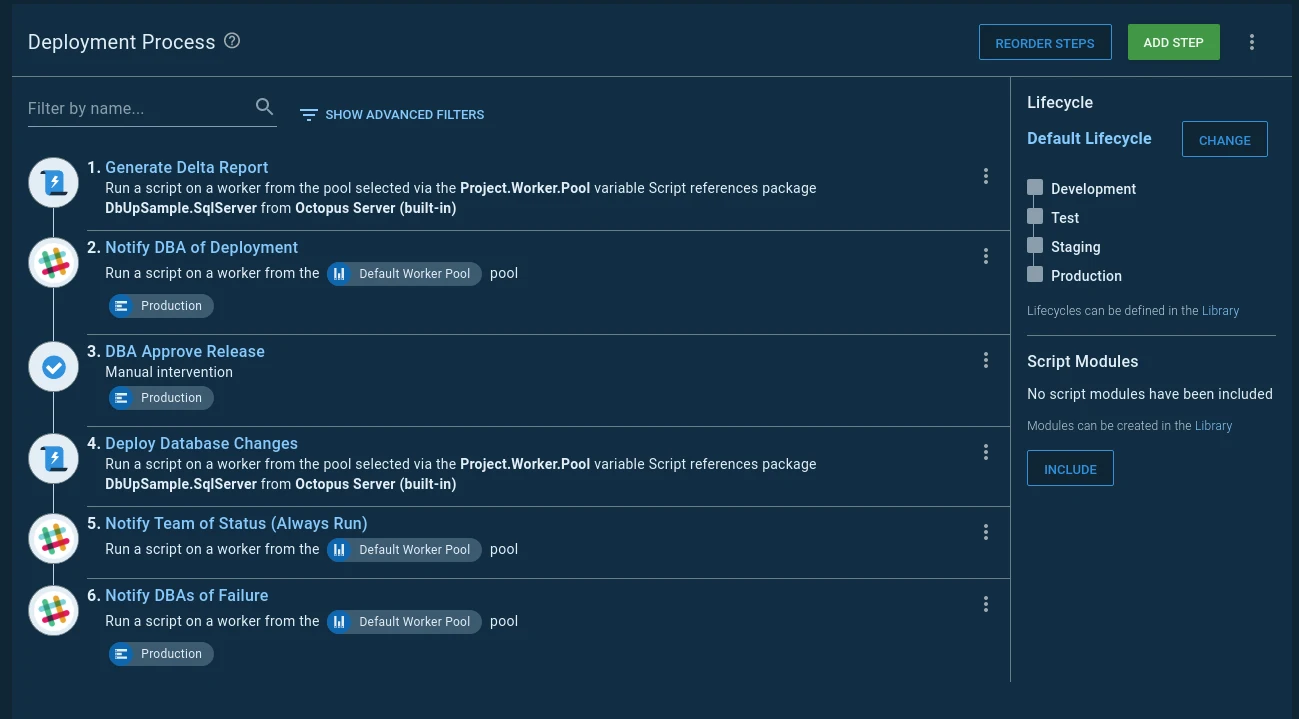
Octopus Deploy can put manual approval and intervention steps into a database deployment process. The deployment can first generate pending changes and then pause while someone reviews the artifact. This is useful for teams that already coordinate application and database releases in the same environment model.
Its advantage is placing a human decision within a wider run of jobs and preserving the deployment evidence. A meaningful approval requires the generated SQL to be the same script the next step will execute. Connections, run permissions and rollback procedures still belong to the deployment design.
Attach the planned SQL and target to the release before the manual intervention step. In a lab, have the approver inspect the pending database change while a worker prepares to deploy only after approval.
Compare packages and SQL on rerun. Check that a rejected step cannot later change the database under the same release identity. Record the operator, worker and outcome with the associated deployment evidence.
- Compatibility
- Octopus Deploy with workers and a supported SQL Server deployment tool or script.
- License and trial
- Commercial Octopus terms and any database tool licenses apply.
Bytebase
Bytebase manages SQL Server schema changes through a request or Git workflow with SQL review and approval. The tool can connect the submitted DDL with the environment and later rollout, which is useful when several teams make changes to shared databases.
It fits companies that want database ownership and review rules expressed in the release service. The rules available for SQL Server depend on the product and version. The service also needs its own controlled execution identity, and separate access paths can bypass its record of proposed changes.
Use a submitted SQL Server change to evaluate the review path for the exact engine and edition. Choose a rule that the test can deliberately violate and confirm that the result appears with the request and target.
Try an updated request after approval and inspect how the workflow ties the approval to the current SQL. Check migration records and database evidence together. Test whether users with ordinary accounts can bypass the approved route in your lab.
- Compatibility
- Bytebase deployment with access to supported SQL Server targets. Approval and SQL rule coverage depend on configuration.
- License and trial
- Free and paid plans. Governance and approval features vary by plan.
Liquibase Secure
Liquibase Secure policy checks look at SQL, changesets or changelogs and can assign severities that influence the command’s exit code. That gives a build a way to stop on an applicable rule, such as a prohibited operation, before it runs the deployment step.
It is strongest when the team already uses Liquibase and wants the migration itself to be evaluated consistently. A report can be combined with a manual approval through the pipeline. The build must treat the chosen severity as a failure, and reviewers still need context about the target and the intended data changes.
Start with the documented checks run command and the configured policy and scope. Make a rule report a violation in the lab, then check the process status against the pipeline stage that consumes it.
Keep a human approval and production identity gate where needed. Save the exact changelog and any generated SQL with the result. Re-run the checks when the proposed changes or target assumptions change.
- Compatibility
- Liquibase Secure with supported SQL Server connectivity and applicable rule types.
- License and trial
- Commercial Liquibase Secure. Policy and automation features depend on the license.
Redgate Flyway Enterprise
Redgate Flyway Check can produce a deployment preview and inspect changes or drift on supported SQL Server workflows. The report gives reviewers evidence about expected changes before the migration runs. It is useful when the same tool already owns migration history and validation.
It fits teams that want the release decision to include the target’s observed schema state. Dry-run, change and drift checks have different inputs and product entitlements. The pipeline must also decide which report result blocks deployment and how to ensure that the approved inputs are used during execution.
Flyway documents different editions for dry-run, change reporting and drift checks. Generate the relevant report for a fixed migration directory and test destination, then attach it to an adjacent approval workflow.
Compare the reviewed artifacts with the release runner's input, including configuration. Change a migration in the lab after the review and confirm that the pipeline revalidates or rejects it before invoking an account with DDL permission.
- Compatibility
- Flyway with a supported SQL Server driver and the credentials or comparison database required by the chosen checks.
- License and trial
- Paid Flyway editions for advanced checks. Drift checking is documented for Enterprise.
DBmaestro Database Release Automation
DBmaestro’s Database Release Automation platform combines database validation, release orchestration and documented governance workflows. It is relevant to organizations that want a dedicated service to carry a database change through review, deployment and a recorded result.
Its strongest case is a wider governance rollout across teams and environments, where maintaining consistent release controls is part of the project. Validation and rollback coverage depend on the database and the changes. A rollback step for schema changes can still require deliberate recovery work for affected data.
Use the applicable SQL Server-supported workflow to evaluate how requests, approvals and deployments are connected. Test the roles that own release definitions, reviews and production execution separately.
Rehearse a modified approved deployment in the lab and capture the recorded change and final SQL Server evidence. Export the workflow records if the organization must retain them independently of a vendor dashboard.
- Compatibility
- Supported SQL Server versions, integration paths and target access follow DBmaestro’s deployment requirements.
- License and trial
- Commercial enterprise licensing and deployment.
SQL Server deployment gates by job
| What you need | Tools to shortlist | What to verify |
|---|---|---|
| Pause a deployment until an authorized person approves | Run with a separate reviewer account. Confirm the database write job stays blocked before approval and after rejection. | |
| Reject a change based on automated SQL checks | Seed one policy violation or out-of-band change and inspect exactly what stops the rollout. | |
| Show the reviewer what is about to run | Bind the reviewed script or report to the exact release, target and artifact digest. | |
| Route approvals by target environment or risk | Test the approval rules and check which actors and decisions the history records. |
Put the gate in front of the privileged deployment step
A reviewer needs the target and the proposed change. A deployment identity needs a controlled authorization path. Bind both to the CI or deployment record so the release can show what was approved and what ran.
Release the privileged identity only after review
Protect the environment or connection
Verify runner access and test what happens when a job omits the protected resource.
Check rules against the proposed migration
Run checks before approval
Attach findings and exit status to the exact reviewed SQL or package.
Generate deployment from an approved state model
Verify the DACPAC plan against the target
Review a script or report and require a fresh decision if material plan or target state changes.
- Azure Pipelines approvals and checks
- GitHub Actions environments and protection-rule availability
- GitLab protected environment deployment approvals
- Octopus database deployment manual approvals
- Bytebase SQL Server database change support
- Liquibase Secure checks run
- Liquibase policy check exit code severity
- Flyway check licensing and output
- DBmaestro Database DevOps FAQ
- Microsoft SqlPackage DeployReport and DriftReport
Rehearse approval, rejection, modification and a bypass attempt
Record the commit, artifact hash, target, approved options, reviewer, runner and resulting SQL Server evidence. When a DACPAC deployment regenerates a plan, verify the effective plan or repeat approval if the target drift changes what will run.
Use separate lab actors for approval and deployment, including any self-hosted worker identity. Have the ordinary author attempt the test DDL through the documented lab exercise and confirm access is denied. Verify the emergency path separately where one is configured.
| Case | Expected gate outcome | Evidence to preserve |
|---|---|---|
| Approved unchanged script | Deploy with a controlled identity | Approved hash, job ID and the new target column |
| Reviewer rejects | No privileged deployment | Decision and unchanged target schema |
| Script or options changed after approval | Revalidate and submit for review | Artifact comparison and second approval if needed |
| Direct SQL attempt by the author | SQL Server denies the unauthorized DDL | Database permissions and test result |
| Target drift changes a DACPAC plan | Review the changed plan before applying | Earlier and regenerated reports plus the approved target |
How to compare these tools
Submit a safe change and a forbidden change through the same pipeline. Check that the reviewer can inspect the exact SQL, only authorized users can approve it, and direct or repeated deployments cannot bypass the gate. Sources checked .
Test whether the gate blocks an actual SQL Server deployment
The fixture models the expected result from a plan-hash check and controlled identity. It never runs the example DDL. Repeat the scenarios in a disposable workflow and verify the database state after each one.
Model approval, identity and exact SQL artifact checks
T-SQL · 26 lines
- In the lab, approve an unchanged script and compare target schema with the approved artifact. Attach the reviewer, run ID and target to the evidence.
- Reject the same plan in a separate run and modify an approved script in another run. Verify the gate's result, protected credentials and resulting SQL Server schema.
- Check the author's database permissions and an authorized attempt to use an alternate lab route. Run a separate DACPAC plan comparison after an intentional target change.
Conclusion
Keep the review decision, the exact SQL to be run and the target database tied to the same release. Use a gated environment to control when deployment runs. Use SQL checks for drift and change policy. Run the reject path at least once and verify in the database that the change never reached it.
Frequently asked questions
What is a SQL Server deployment approval gate?
It is a control that prevents a release step from running until a reviewer or an automated check allows it to proceed. A useful gate records the release, target database and decision, and the deployment job acts on that result.
Can I approve a DACPAC deployment in Azure Pipelines?
Yes. Use an environment or protected resource approval for the deployment stage. Generate a target-specific SqlPackage Script or DeployReport for reviewers. The built-in Evaluate artifact check currently supports container images, so validate the DACPAC or SQL with a separate step.
Do GitHub Actions required reviewers work in private repositories?
GitHub documents required reviewers in public repositories under Free, Pro and Team. Use an Enterprise plan for native required reviewers on a private repository and verify availability on your GitHub deployment.
What should a DBA review before approving SQL Server deployment?
Review the target database, exact SQL or deployment plan, change scope and data impact. Confirm the approved artifact and current target match the reviewer’s inputs. Check locks, recovery options and application compatibility where the change depends on them.
Can an automated SQL policy replace manual approval?
A policy can block the patterns or conditions it is configured to check. Assign a human reviewer when the decision also depends on business timing, data impact, recovery readiness or exceptions. Test both controls if the release needs both.
Why can an approved DACPAC produce different deployment SQL later?
DacFx can calculate deployment actions from the package, configuration and target schema. If the options or target drift changes the effective plan, compare the new plan and repeat approval when required.