

A Hyper-V backup can capture a virtual machine so it starts again, and guest processing can coordinate a more useful recovery point with SQL Server. On Windows guests this often involves Volume Shadow Copy Service and the SQL Server writer. The outcome depends on what the guest reported during the job and how the product handles a failed application-consistent attempt.
Application consistency and point-in-time database recovery are separate capabilities. A VM snapshot can provide a consistent starting point, while restoring an arbitrary time usually needs SQL Server log backups. The useful comparison is whether the team can identify the consistency level of a completed job, how transaction logs are managed and which database or VM restore the product actually supports.
Application-aware Hyper-V backup tools for SQL Server at a glance
This comparison covers Windows SQL Server guests on Hyper-V. Verify which mode the job actually achieved as well as the requested configuration.
| Tool | Protection path | Application evidence | Key trial check |
|---|---|---|---|
| Veeam Backup & Replication | Hyper-V VM backup with documented guest processing | Guest and SQL Server processing state | VSS fallback and configured SQL log handling |
| NAKIVO Backup & Replication | Hyper-V application-aware mode | Guest requirements and job result | Application-mode failure, retry or fallback behavior |
| Hornetsecurity VM Backup | Supported Hyper-V VM backup settings | Selected guest consistency and job records | Document the guest settings and recovered SQL service |
| Microsoft System Center Data Protection Manager | Hyper-V VM protection in DPM | Supported application-consistent paths and warnings | Compare VM and workload recovery requirements |
| Commvault Virtual Server Agent for Hyper-V | Selected VM application or crash consistency | Reported VSA consistency level | Which SQL log or Agent functions are in this deployment |
| Acronis Cyber Protect | Supported application-aware protection for Windows guests | Protection plan and application recognition | Supported combinations and observable SQL-aware status |
| BDRShield for Microsoft Hyper-V | Configured Hyper-V backup and application handling | Guest mode and job details for the tested release | Record actual SQL restore dependencies and policy |
| Druva Data Security Cloud | Configured Hyper-V virtual machine protection | Supported VM consistency and protection results | Confirm SQL guest mode plus SQL-specific recovery if required |
Veeam Backup & Replication
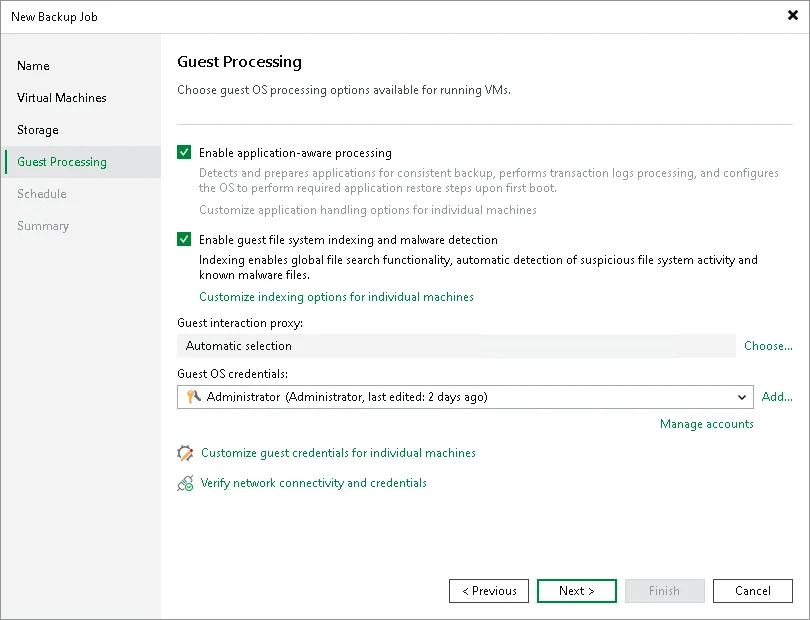
Veeam Backup & Replication can use application-aware processing for supported Hyper-V guests and configure SQL Server transaction log handling. That is useful when the same backup platform needs to protect a SQL Server VM and support database recovery from eligible backups.
Its value depends on what guest processing and log policy the operator selected. A successful VM backup can have a different consistency level if application-aware processing fails and the job permits continuation. The team also needs to identify which software owns the SQL log chain.
Set the documented guest processing policy for the actual Hyper-V job. Keep the VSS success or failure details and configured action for guest processing failure beside the reported job result.
Review how SQL transaction logs are handled in the protected VM, especially if native or another scheduled log backup already owns the chain. Recover the VM in an isolated network and query the marker.
- Compatibility
- Veeam with supported Hyper-V and Windows SQL Server guest processing and recovery configuration.
- License and trial
- Commercial Veeam licensing.
NAKIVO Backup & Replication
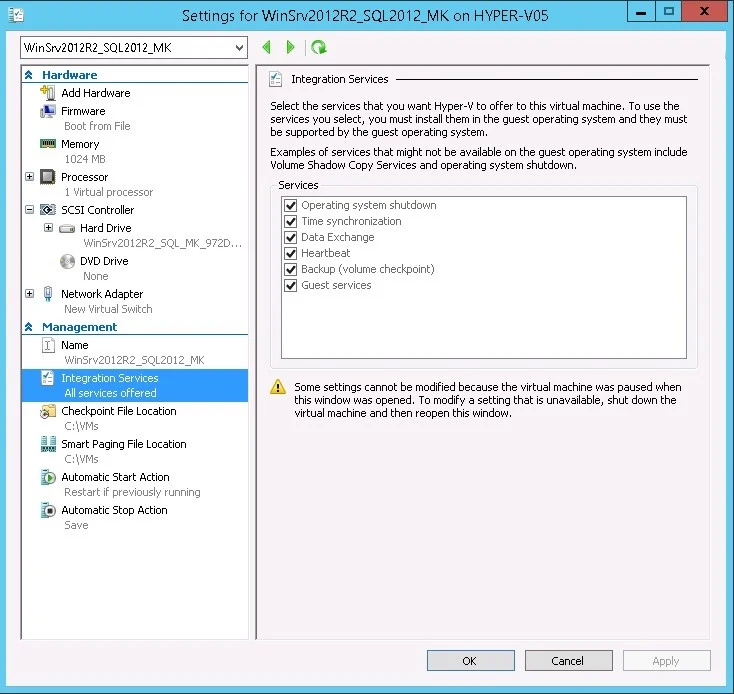
NAKIVO Backup & Replication offers application-aware handling for supported Hyper-V VMs using Windows VSS. That can help a team capture a SQL Server guest in a state suitable for application recovery, alongside the VM configuration and disks protected by the job.
It fits teams that want guest processing in a Hyper-V backup workflow. VSS, integration services and SQL Server writer health influence the result. The chosen application-awareness mode determines how a job handles guest-processing failures, and database log recovery needs its own supported setup.
Confirm the Hyper-V application-aware prerequisites for the exact host and Windows guest. Test the successful condition and one controlled guest-processing failure on the same disposable lab architecture.
Open the VM backup history and record which consistency state and warnings the job retains. Compare SQL readiness and marker data after independent recovery.
- Compatibility
- NAKIVO with a supported Hyper-V host, Windows guest and VSS integration.
- License and trial
- Commercial NAKIVO license.
Hornetsecurity VM Backup
Hornetsecurity VM Backup offers an application-consistent backup mode for eligible Hyper-V guests and documents Microsoft SQL Server as a relevant workload. It is useful for a team that wants guest-aware quiescing as part of the same operation that protects its virtual machines.
The resulting database state depends on the guest VSS services and the job settings. Hornetsecurity documents transaction log considerations separately. A team should establish which workflow manages log truncation and whether a VM restore point meets its SQL Server recovery needs.
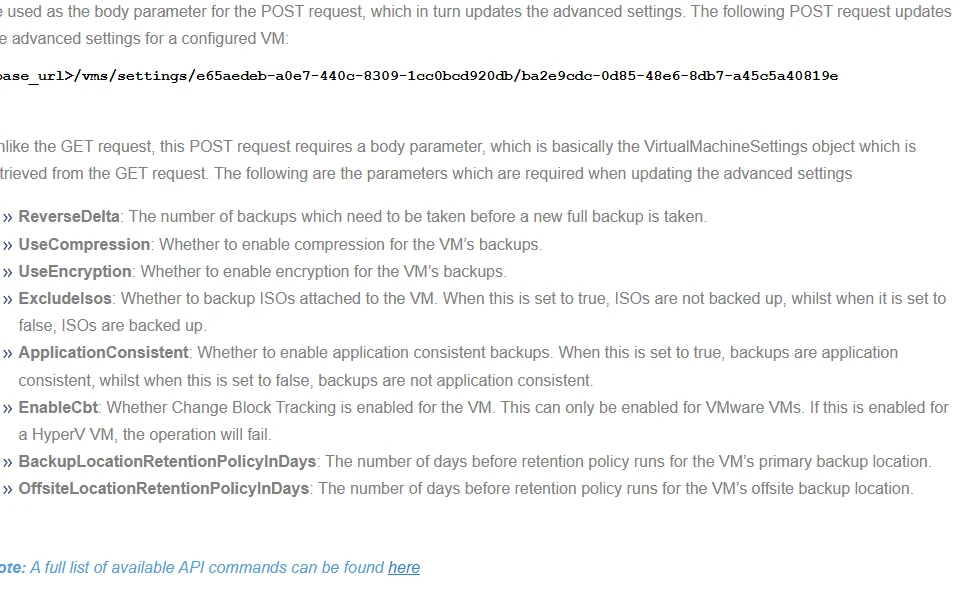
Review the current Hyper-V VM advanced settings and determine which options apply to the Windows SQL Server guest. Save the actual selection alongside the product version and job evidence.
Check host and guest diagnostic logs when expected application processing fails. Record which consistency level the recovered item represents and verify the SQL database with the synthetic fixture.
- Compatibility
- Supported Hornetsecurity VM Backup and Hyper-V guest with the applicable VSS configuration.
- License and trial
- Commercial product and edition terms.
Microsoft System Center Data Protection Manager
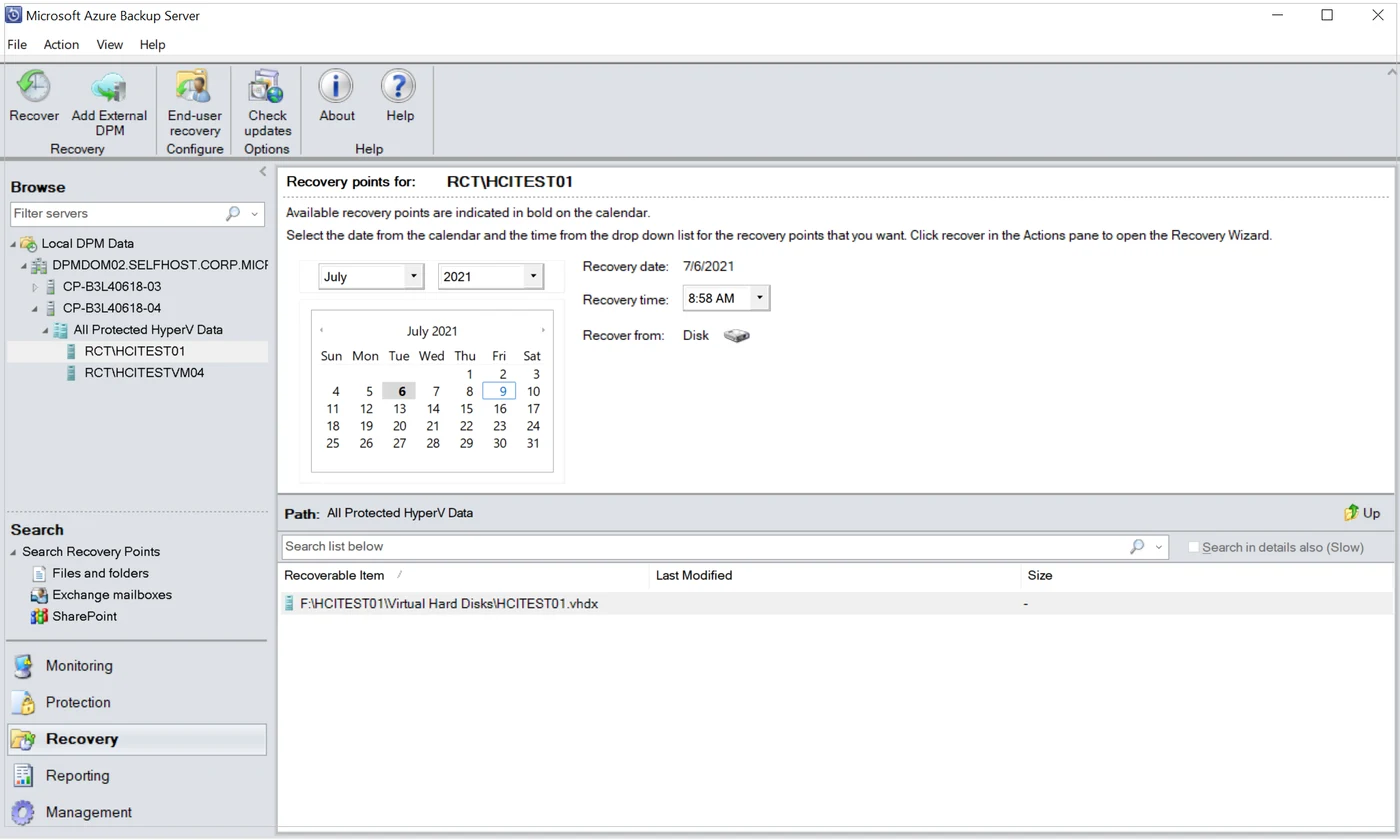
Microsoft System Center Data Protection Manager can protect Hyper-V VMs and also provides a separate SQL Server workload backup path. This is useful when an organization wants to use its existing Microsoft management infrastructure and choose the recovery granularity each protected system needs.
Host-level protection can recover a VM or supported files. Workload protection supplies a different route for database-level recovery. The edition, host and storage support matrix and VSS prerequisites determine which options are available in the installed DPM deployment.
Verify the DPM deployment's supported Hyper-V backup behavior and SQL guest role. Compare the VM-level protection group and the SQL workload requirements if a granular database or log point is needed.
Recover the configured protected object to the intended lab and run the SQL marker query. Save DPM outcome, observed guest consistency and access to any separate SQL backups required by policy.
- Compatibility
- DPM with a supported Hyper-V and Windows guest configuration or a supported SQL Server workload agent.
- License and trial
- System Center and applicable SQL Server licensing.
Commvault Virtual Server Agent for Hyper-V
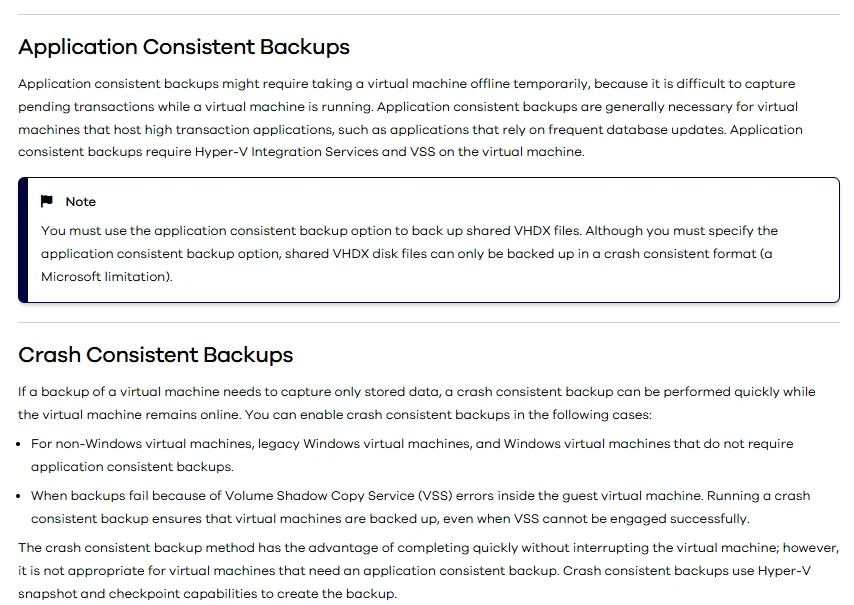
Commvault’s Virtual Server Agent can protect Hyper-V virtual machines using documented application-consistent or crash-consistent settings. This fits organizations that centrally manage Hyper-V protection and need to decide how each SQL Server guest is quiesced during backup.
The useful boundary is between the VM backup captured by the Virtual Server Agent and granular SQL Server recovery through the relevant workload tooling. Checkpoint behavior and guest state affect the consistency level. The chosen configuration must support the database and VM restore paths the team expects.
Use the documented Hyper-V VSA consistency mode for the exact deployment. Identify which guest or SQL components the workflow invokes and how the resulting state appears in the job.
If the SQL Server Agent or another SQL protection path supplies database or log recovery, record it separately. Confirm the VM policy and SQL log chain with an isolated restore test.
- Compatibility
- Commvault with supported Hyper-V Virtual Server Agent and appropriate guest processing.
- License and trial
- Commercial Commvault licensing.
Acronis Cyber Protect
Acronis Cyber Protect can apply application-aware backup to supported virtual machines. Its guest processing can protect SQL Server application data through the documented workflow. This is useful when the organization uses Acronis for VMs and wants the database workload represented in the backup.
Its strength is including application information in the wider VM protection operation. Guest access, supported SQL Server versions and the recovery workflow depend on the selected Acronis components. SQL Server log policy and object-level recovery need evaluation separately from a successful machine backup.
Verify application-aware support for the edition, backup mode and Hyper-V guest before expecting SQL-specific handling. Keep the selected protection policy and guest identity with the backup record.
Run one lab backup with active SQL Writer and one approved failure case. Compare whether the result makes application-state degradation explicit and whether recovered data passes the SQL proof.

- Compatibility
- Supported Acronis Cyber Protect deployment and compatible Hyper-V guest configuration.
- License and trial
- Commercial Acronis license.
BDRShield for Microsoft Hyper-V
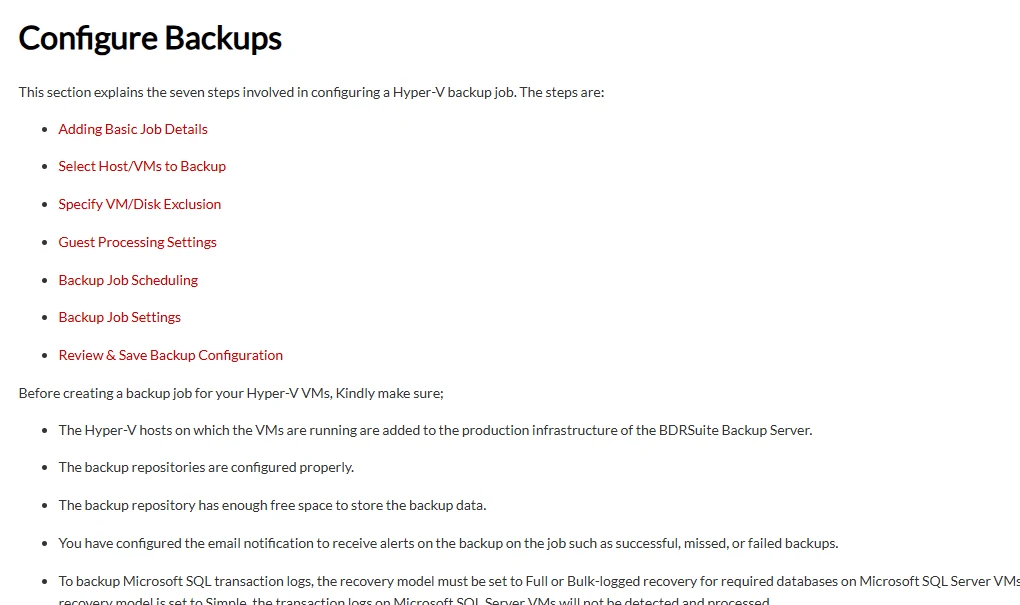
BDRShield provides Hyper-V backup and application-aware options through its documented protection workflow. It also documents separate SQL Server database backups. This is useful for teams that want both VM protection and a way to cover database requirements with the same vendor.
Its value depends on how the product is configured for the actual Windows guest. VSS and application settings determine whether the VM backup is consistent. Database backups and log management have their own job settings, which matter when recovery needs a particular time or database.
Review guest-aware configuration for the BDRShield Hyper-V release in the trial. Record the supported SQL Server and guest types before selecting options for workload protection.
Capture the backup result and recover to a supported isolated destination. Inspect the Windows and SQL guest logs and compare the observed consistency and database state with the stated policy.
- Compatibility
- BDRShield with a supported Hyper-V setup and applicable Windows guest and SQL Server components.
- License and trial
- Commercial BDRShield licensing.
Druva Data Security Cloud
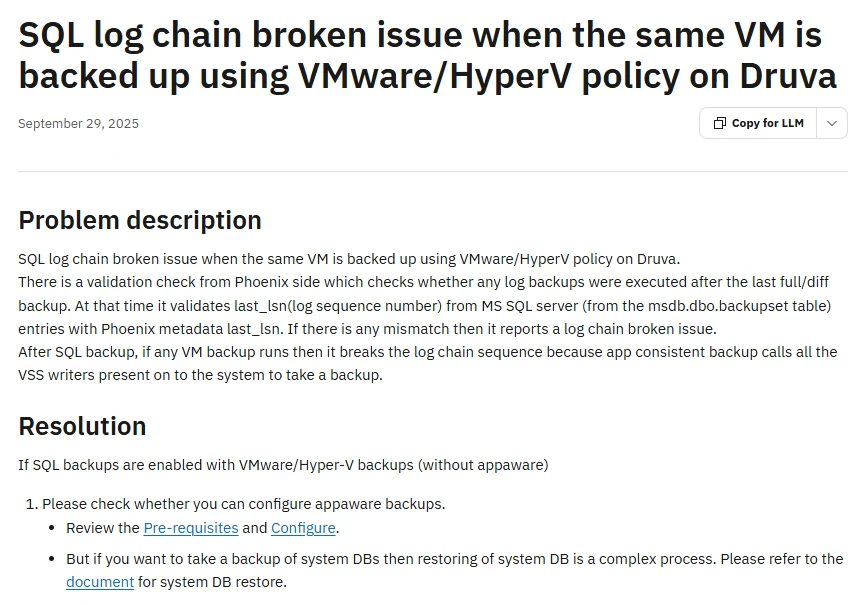
Druva Data Security Cloud protects supported Hyper-V virtual machines through its Hybrid Workloads configuration. It can manage VM protection policies separately from its SQL Server workload protection. This is useful when the team wants Hyper-V recovery and its SQL database policy managed in the same service.
VM protection details depend on the selected host, VM and policy. Guest consistency and the SQL Server recovery range need to be verified for the deployed configuration. A VM restore and a database or log-based recovery are distinct results.
Check the actual Hyper-V platform and configured consistency controls using the current documentation. Identify whether your desired SQL database, VM or log recovery method requires another supported workflow.
Use the selected policy against a disposable guest and measure recovery to a safe network. Record matched source and target identity and which SQL backup artifacts complement the VM recovery.
- Compatibility
- Supported Druva Hyper-V configuration and SQL Server workload setup where required.
- License and trial
- Commercial Druva subscription.
Choose the Hyper-V and SQL Server recovery path
| What you need | Tools to shortlist | What to verify |
|---|---|---|
| Pair Hyper-V protection with a documented SQL restore workflow | Identify the SQL workload policy, log owner and restore granularity for the installed edition. | |
| Run application-consistent Hyper-V VM backups | Verify guest prerequisites, job consistency status and behavior when application processing fails. | |
| Manage Hyper-V and SQL Server backup policies through a cloud platform | Check the two policies together and verify that the active log chain remains restorable. |
Check SQL Writer participation and the job's fallback policy
A Windows VSS requester can coordinate with SQL Server through SQL Writer. Verify whether the selected job actually requests that participation and whether the guest writer was healthy. A crash-consistent result can still recover transactions at startup. Use the recorded job and writer evidence to distinguish the achieved backup mode.
Document which workflow owns transaction log backups and any expected truncation behavior. Confirm copy backup, workload processing and application log handling in the exact product and avoid comparing a full VM recovery objective directly with a database point-in-time objective.
The Windows VM and a recoverable current SQL state
Verify the guest and database recovery path
Require consistent SQL recovery evidence and inspect any fallback.
An application-consistent backup as audit evidence
Require the actual SQL Writer and job status
Record what the job reports when guest processing fails.
A specific point between SQL transactions
Verify a separate usable SQL log chain where required
Record log ownership and prove the selected database cutoff.
Recover the SQL Server guest and check committed data separately
Create a disposable HyperVAwareTrial database in a Windows guest. The fixture records marker 1 before a backup and holds marker 2 in a short uncommitted transaction. Run the approved lab backup while the transaction is open and record its actual backup point. If the hold expires first, repeat the lab capture separately.
Recover to an isolated network and check the markers. Marker 1 should remain and marker 2 should be absent. This validates the observed transaction state. Use the corresponding SQL Writer and product job records to verify whether the backup was application-aware.
| Layer | Record | Expected trial result |
|---|---|---|
| Job consistency | Requested mode and actual guest processing outcome | Application-aware success or an explicit fallback/failure state |
| Windows and SQL Writer | Relevant event times, writer status and database scope | Writer participation when required by policy |
| Recovery data | SQL-ready restored guest and marker check | Committed row present and uncommitted row absent |
| Log ownership | Configured owner and available SQL log files | Recovery method can reach its intended point |
How to compare these tools
Run a Hyper-V backup under SQL Server load and inspect the application-consistency status. Recover the VM in isolation and test the documented database restore path with the exact product edition. Sources checked .
Check guest processing and SQL recovery from the same job
Use the disposable HyperVAwareTrial database in a dedicated Hyper-V test VM. Run Setup once. Run Hold from a separate fresh connection while the approved backup runs. Let the holder roll back, or close the dedicated connection if the trial is stopped. Run Check only in the independently recovered SQL guest.
Place a committed and an uncommitted marker around a Hyper-V backup
T-SQL · 34 lines
- Set up the Windows SQL Server guest and record the backup mode and log policy. Test the approved lab job with the uncommitted marker active and preserve product and writer timestamps.
- Recover the VM in the isolated lab. Confirm that SQL Server accepts the intended test connection and returns only marker 1. Record recovery time and scope of recovered logs.
- Trigger an approved guest-processing failure in the disposable environment and verify the job's policy and visible state. Restore the settings and check that the next successful application-aware run is identifiable.
Conclusion
Choose the tool that can recover the SQL Server workload at the granularity you need. Check the Hyper-V job’s actual application consistency, and name a single owner for the SQL Server log backup path. Validate that result by recovering the lab database and reading the expected data.
Frequently asked questions
What makes a Hyper-V backup application-consistent for SQL Server?
The backup process needs to coordinate the Windows guest and SQL Server at capture time. Check the documented VSS requirements and verify that the job actually reports application-consistent processing.
Does a Hyper-V application-consistent backup include SQL Server log backups?
A transaction log backup and point-in-time recovery require a documented SQL Server backup chain. Check which job takes those backups and verify the chain is usable in the intended restore workflow.
What happens if the Hyper-V SQL Server guest cannot complete VSS processing?
Behavior depends on the product and job policy. A job may fail or complete using another consistency mode. Inspect its reported result and test recovery from the selected copy.
Can I test SQL Server recovery without connecting an old VM to production?
Yes. Restore the lab VM to a separate network and verify SQL Server there. If the backup platform supports alternate database recovery, use a designated SQL Server instance and database name.
What should I check if two backup products run against the same SQL Server?
Document which workflow creates the full, differential and log backups. Check the guest log-processing options for the VM job and run a restore through the chain the recovery operator will actually use.
Does the committed marker prove that Hyper-V used SQL-aware VSS?
Use the marker result to prove the observed recovered data state. Verify the actual backup consistency mode through the job record and SQL Writer evidence.
Is a Hyper-V VM backup enough for SQL Server point-in-time recovery?
Check the backup product's supported recovery paths. An arbitrary SQL point can require separate log backup coverage and a database-level recovery workflow.