

A point-in-time restore needs a usable SQL Server backup sequence through the chosen time. The restore starts from a suitable full backup, may use a differential and then applies the transaction log backups in order. Under bulk-logged recovery, a log backup containing bulk-logged work can restrict which time inside that file is recoverable.
Veeam Explorer and the Commvault SQL Server Agent expose that recovery workflow through their own backup catalogs. Their value is making the available recovery range and destination easier to work with. Native restore and several alternatives can apply the same SQL Server principles. The comparison is which chain the product manages, what it can recover on an alternate server and how clearly it shows gaps.
Veeam vs Commvault SQL Server point-in-time restore at a glance
Check the SQL protection method first. The documented restore workflow is useful when the captured full and log backups cover the actual recovery point.
| Tool | Recovery workflow | Point selection to verify | Proof after restore |
|---|---|---|---|
| Veeam Backup & Replication with Veeam Explorer | Explorer from a supported SQL protection set | Available point-in-time state and relevant SQL log range | Destination and final balances match the cutoff |
| Commvault SQL Server Agent | SQL database point-in-time restore through Agent workflow | Typed point and selected time zone | Recovery job, effective time and final balances |
| Native SQL Server RESTORE and SSMS | Full and subsequent log restore sequence | Supported STOPAT and continuity of the log chain | Actual restored transaction state |
| Redgate SQL Backup Pro | SQL Backup Pro restore workflow | Compatible backup files and selected stop point | Correct chain and independent source marker |
| dbatools Restore-DbaDatabase | PowerShell selection and restore workflow | RestoreTime value and resolved backup chain | Exported script/output and observed target |
| Rubrik Security Cloud | SQL Server protected database recovery | Available recovery point and log retention | Supported target and original cutoff |
| Druva Data Security Cloud | SQL Server transaction log restore workflow | Recoverable time range for the SQL database | Restore operation and query results |
| Azure Backup for SQL Server on Azure VMs | Recovery Services vault SQL workload restore | Available log point and supported alternate location | Restore job and database state |
Veeam Backup & Replication with Veeam Explorer
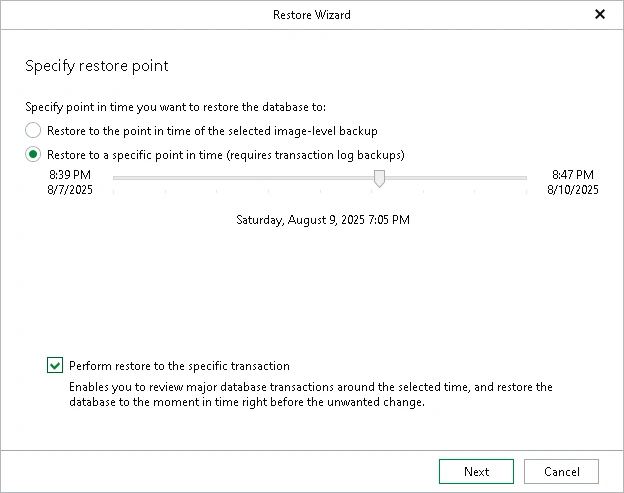
Veeam Explorer for Microsoft SQL Server can use supported application-aware restore points and transaction log backups to restore a database to a selected time. This is useful when teams protect SQL Server through Veeam and want to locate a database recovery point without rebuilding the whole VM.
Its point-in-time choices depend on the log backups available to Explorer and the supported restore method. Application-aware processing and transaction log processing need appropriate configuration. Restoring to an alternate server also depends on access to the required backup data and a compatible SQL Server target.
Open the selected source in Veeam Explorer and confirm the supported SQL backup workflow produced the log range you expect. Capture the originally displayed point, the selected cutoff and the destination.
Recover the pre-transfer point to a dedicated target and rerun the validation. Compare the result to a point after the transfer and note which backups and target account the operation actually used.
- Compatibility
- Veeam Backup & Replication and Explorer with supported SQL Server backups and an eligible restore target.
- License and trial
- Commercial Veeam licensing.
Commvault SQL Server Agent
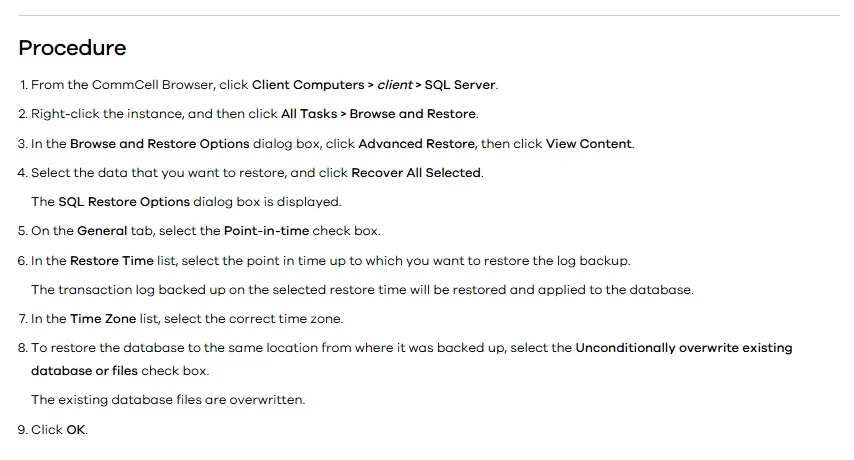
Commvault’s SQL Server Agent can restore a database to a selected point from the full, differential and transaction logs available in its catalog. Its documented out-of-place workflow can recover to another SQL Server destination. This is useful when a recovery should be validated beside the original database.
The strength is SQL Server-specific backup policy, chain selection and destination controls. Recovery still depends on continuous usable logs through the requested time. The source and destination hosts, permissions, selected copy and SQL Server versions determine which restore choices are available.
Record the options the Agent exposes for the current SQL Server deployment. The documented recovery workflow specifies a time zone, so save that selection with the exact local and UTC cutoff the source returned.
Reopen the job details and compare restored transaction state with the chosen point. Confirm supported destinations, log coverage and behavior when a deliberately incomplete lab backup chain excludes the requested point.
- Compatibility
- Commvault SQL Server Agent with a valid backup chain and supported restore target.
- License and trial
- Commercial Commvault licensing.
Native SQL Server RESTORE and SSMS
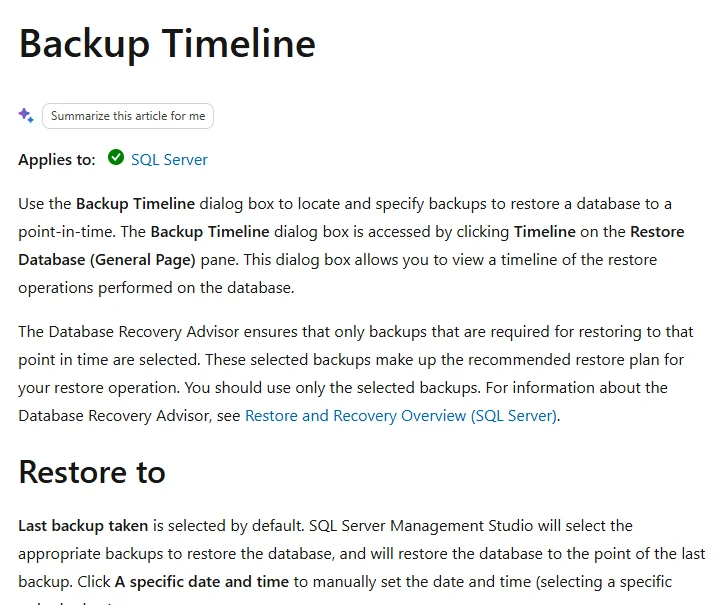
SQL Server RESTORE and SSMS can apply the backup sequence directly and use STOPAT where supported. This is useful when a DBA needs exact control over source files, log order, recovery time and destination file paths without relying on a separate backup catalog.
Its advantage is seeing the engine’s behavior directly. The DBA owns selecting the correct sequence and checking that log records cover the target. A chosen time inside a log backup can be unavailable when the backup contains bulk-logged changes under the bulk-logged recovery model.
Make sure the database recovery model and available log backups support a point between the transactions. Reconstruct the backup order and exact time value before applying logs on a fresh target.
Verify the result with queries against both the account and ledger tables. Inspect the response from a deliberately incomplete disposable backup set, and record errors separately from an earlier selected point.
- Compatibility
- Compatible SQL Server instance with access to the native backup chain and required restore permissions.
- License and trial
- Built into SQL Server.
Redgate SQL Backup Pro
Redgate SQL Backup Pro can restore its backup formats and exposes SQL Server restore options, including time-based recovery with available log backups. It is useful when the estate already schedules SQL Backup Pro jobs and wants to restore from the same managed files and tooling.
Its strength is working with the catalog, formats and scripts used for an established Redgate backup process. The restore target needs the supported Redgate components or a documented conversion path. The time picker is only useful when the available media includes the complete chain through that time.
Use the documented SQL Backup Pro RESTORE syntax for the supported release. Record which backup format you used, how the relevant chain was assembled and where the SQL backup is recovered.
Use the balance and ledger checks on the same source timeline. Capture any warnings about point selection and preserve the original restore invocation for a second operator to reproduce.
- Compatibility
- Supported SQL Backup Pro components and SQL Server backup and log media.
- License and trial
- Commercial Redgate license.
dbatools Restore-DbaDatabase
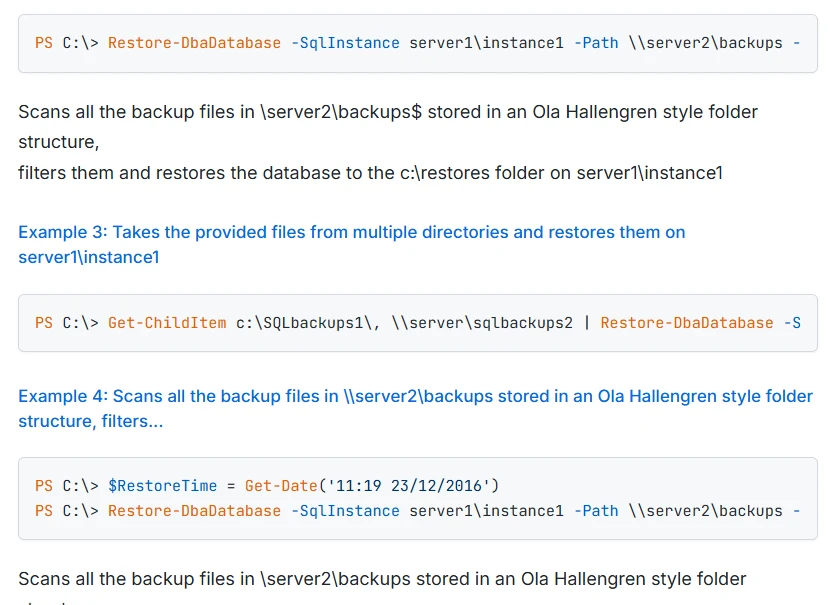
Restore-DbaDatabase can inspect compatible backup files, select a sequence and restore to a specified time. It can also generate restore scripts for review. This is useful when a DBA needs repeatable alternate-server restores from backups organized in files or supported storage.
Its value is automating the inventory and native restore workflow without hiding the rendered SQL. The restore server needs access to the media and enough resources and permission to apply it. Logs outside the searched location and a missing backup in the chain can still prevent the requested recovery.
Supply the backup location and explicit recovery time to Restore-DbaDatabase using the syntax for the installed dbatools release. Save the tool's resolved restore plan before applying it on the target.
Record the timezone context and target identity in the PowerShell output. Try an ineligible time or incomplete copy in the lab and compare whether the operation reports the coverage gap clearly.
- Compatibility
- PowerShell dbatools and compatible native SQL Server backup media and destination.
- License and trial
- Free, open-source module.
Rubrik Security Cloud
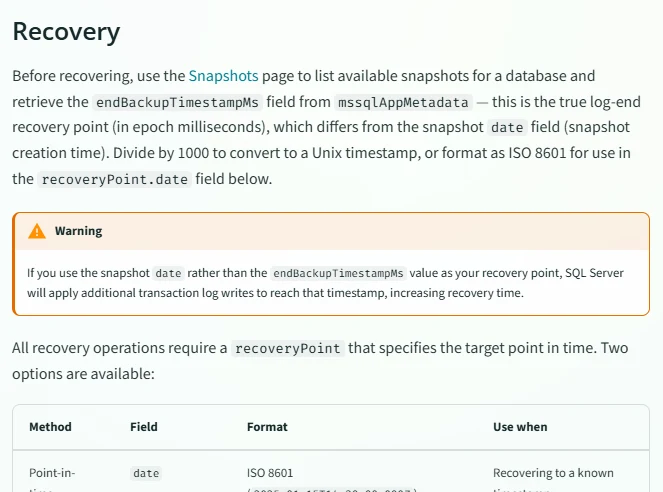
Rubrik Security Cloud can use protected SQL Server snapshots and transaction logs to select a recovery point in its supported SQL Server workflow. This is useful when the team wants to recover from the backup policy’s catalog and needs a defined time range available for the database.
Its fit depends on the policy, required logs and supported recovery destination. The individual database and application can have different recovery requirements. A range available in the UI still needs a successful restore and checks against the intended SQL Server target.
Check the SQL Server recovery operation under the intended role and select a point from the available protection history. Record where the tool obtains log coverage after the database backup.
Restore the controlled transaction boundary on the supported destination. Confirm that the requested and observed content states agree, and record what the tool reports when the point is outside its available range.
- Compatibility
- Supported Rubrik SQL Server protection and required log and snapshot coverage.
- License and trial
- Commercial Rubrik terms.
Druva Data Security Cloud
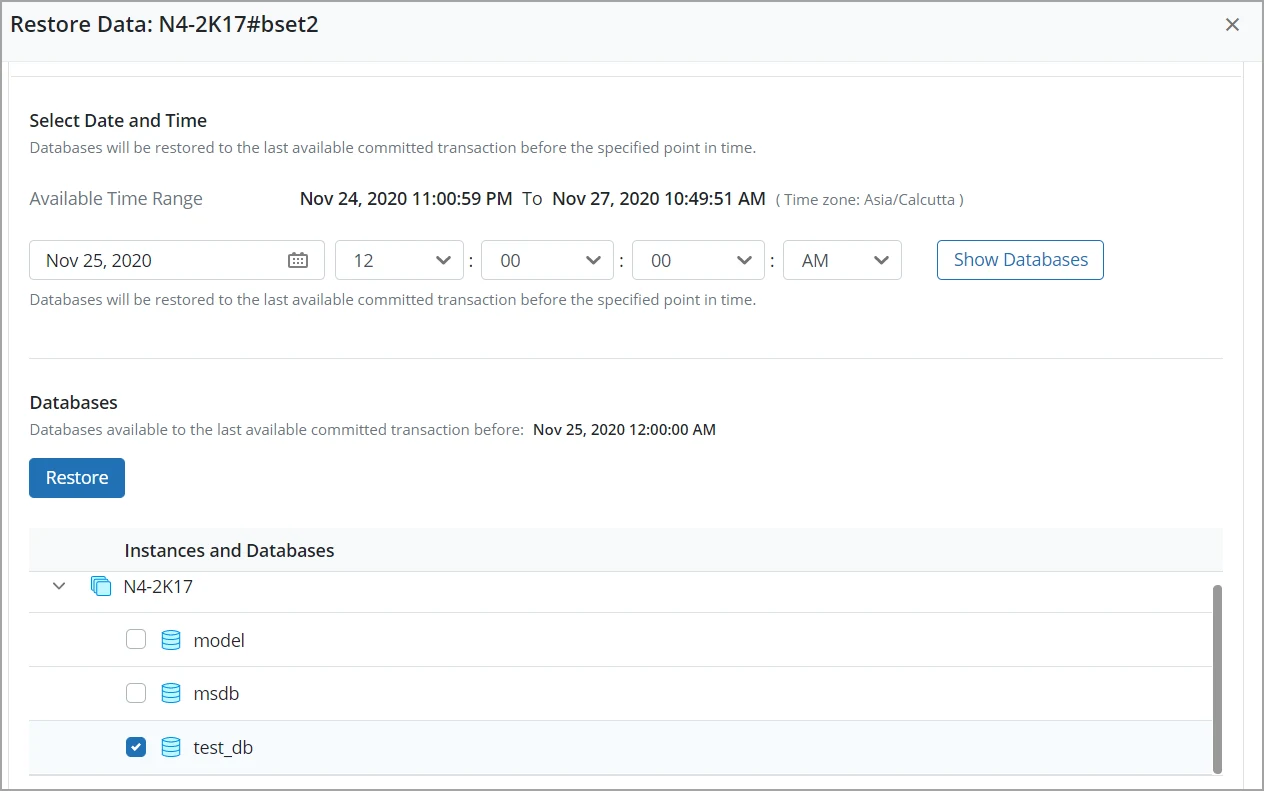
Druva supports SQL Server database recovery using retained transaction log backups. Its documented restore flow can select a time or available backup range depending on the protected data. This suits teams that centralize SQL backup and retention through Druva and want a consistent recovery path.
The restore can only use the retained chain and supported target. Endpoint access, accounts and destination compatibility matter, particularly for an out-of-place validation. The selected time is a request until the console and SQL Server report a completed restore.
Use the documented SQL Server transaction log restore path and verify the selected location and source policy. Save the boundaries of the earliest and latest available log-backed recovery points.
Request the same point used for the other runners and test the recovered balances. Compare evidence retention and what recovery rights the lab operator needed to use that point.
- Compatibility
- Druva SQL Server backup configuration with eligible source backups and a supported target.
- License and trial
- Commercial Druva service.
Azure Backup for SQL Server on Azure VMs
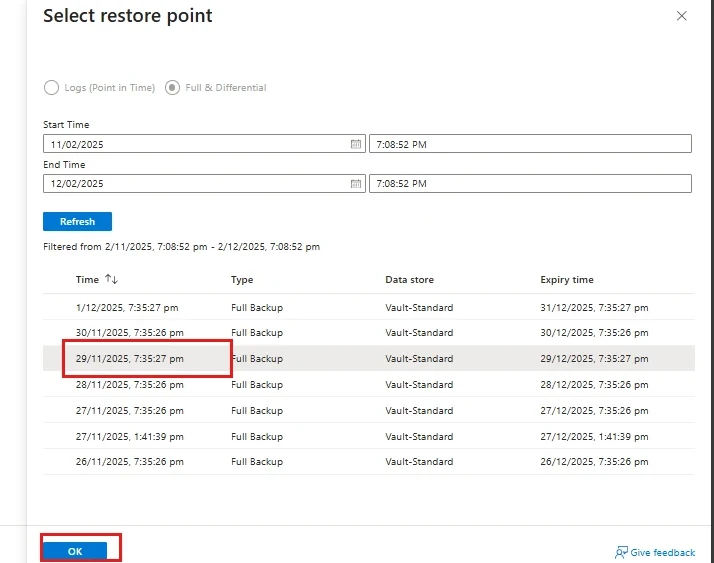
Azure Backup for SQL Server on Azure VMs can restore to a point in time when an eligible full and transaction log chain is available. Its restore workflow includes original and applicable alternate destinations. This is useful when the source and recovery process are already governed through an Azure Recovery Services vault.
Azure Backup fits supported Azure SQL Server VM configurations and registered targets. The available recovery range reflects the retained database backups, and VM readiness is separate from database recovery. Alternate destination permissions and capacity affect what the team can validate.
Use a workload-aware SQL Server recovery point for the Azure VM. Verify log backup configuration and supported alternate-location restore before testing the time value from the source database.
Open the job details and compare the selected recovery time with the actual recovered transaction. Record the vault, destination permissions and handling of points outside lab log coverage.
- Compatibility
- SQL Server on Azure VMs with supported Azure Backup policies and target registration.
- License and trial
- Azure Backup and recovery infrastructure charges apply.
What Veeam and Commvault need for a point-in-time restore
| Feature | Veeam Backup & Replication with Veeam Explorer | Commvault SQL Server Agent |
|---|---|---|
| Restore entry point | Open Veeam Explorer for Microsoft SQL Server and use the point-in-time workflow for the backup that protects the database. | Use the SQL Server Agent restore for the protected database and choose the documented point-in-time option. |
| Available log coverage | Verify how the originating job captured SQL Server logs. Check the backup and the usable period in the selected workflow. | Verify the full backup and log coverage for the selected SQL restore, including the copy that contains the required backups. |
| Time selection | Choose the desired time in the restore wizard. Record the chosen timestamp and the time zone the operator used. | Specify the required date and time. The CommCell Console procedure has a Time Zone list. Verify what the selected interface uses as its time basis. |
| Alternate instance | Select a compatible SQL Server destination and configure a different database name. Check credentials and paths before starting the job. | Select the supported destination instance for the out-of-place restore and use a different database name. Check permissions and destination paths. |
| Missing log backup | Test the request using an isolated lab copy where a required log backup is unavailable. Record the displayed range, job result and database state. | Use the same timestamp and missing log segment in an isolated restore exercise. Record whether the tool rejects the time or offers an earlier eligible point. |
Pick the restore workflow that owns the log chain
| What you need | Tools to shortlist | What to verify |
|---|---|---|
| Recover from an enterprise backup platform | Select the protected log interval, restore to another instance and verify the recovered database at the requested time. | |
| Work from SQL Server backup files directly | Confirm which full backup and log sequence the tool selects, then validate the stop time and recovered rows. | |
| Restore a SQL Server workload backed up in Azure | Use the SQL workload restore range and check the alternate target requirements. |
Confirm SQL log coverage and the restore tool's time interpretation
A point-in-time restore uses the relevant full backup and subsequent log coverage. A differential can participate when applicable. If there is a gap or the relevant SQL Server recovery model cannot support the requested point, choose an available point or correct protection before standardizing the workflow.
Save the source time and UTC offset along with the UTC timestamp. Review the product's input or display timezone. Restore to a separate target and compare the actual SQL data with the required cutoff instead of inferring the result from the job label.
The requested point is inside documented log coverage
Run Veeam and Commvault to an independent target
Use the same time and record each interface's selected timezone.
The copy has a missing interval
Verify failure handling or the offered available points
Use a disposable incomplete set and record where the intended point is unavailable.
The UI reports completion
Verify the restored transaction state
Check final balances and ledger evidence independently.
Verify a committed transfer before and after the selected restore time
The fixture starts with balances 100 and 200. After recording the first cutoff, run the Transfer branch to move 40 between them and insert one ledger row in the same transaction. Record a second cutoff after the transfer commits and obtain log coverage for both points.
Each tool should restore the same database state for the same cutoff. Run Check in the independent PitrRestoredTrial database. Use a new target or approved isolated replacement for each test. The balance total stays 300, so checking total alone would miss recovery to the wrong transaction state.
| Cutoff | Account 1 | Account 2 | Ledger |
|---|---|---|---|
| Before the transfer | 100 | 200 | No transfer row |
| After the committed transfer | 60 | 240 | One transfer row with amount 40 |
| Unavailable point | No inferred value | No inferred value | Collect the product's rejection or offered range |
How to compare these tools
Use the same full backup and log history for the two recovery workflows where possible. Compare recovery-target options, the selected restore time and the checks available after the database comes online. Sources checked .
Restore the same timestamp with and without the first log backup
Run Setup in the empty disposable PitrSourceTrial database. Take a supported full backup, then run Cutoff, Transfer and Cutoff as separate executions. Wait a few seconds between them and obtain log coverage for both points. Recover independently to PitrRestoredTrial and run Check for each restore.
Prove the restored SQL balance and ledger state at both cutoffs
T-SQL · 40 lines
- Record the full backup, selected time zone and original SQL times as returned by the sample. Verify that log backups cover the two intended points.
- Recover before and after the transfer using Veeam and Commvault or the native baseline. Run the check and retain the task ID, elapsed time, balances and ledger contents.
- Use an isolated copy without the needed interval to rehearse an unavailable point. Document what the tools report and check that no other restore is mistaken for the requested cutoff.
Conclusion
Use Veeam Explorer when Veeam owns the SQL backup and log workflow. Use the Commvault SQL Server Agent path when that protection policy owns the chain. Compare both against the same timestamp and marker rows. The exercise should tell the DBA which earlier time is recoverable when the requested point is unavailable.
Frequently asked questions
Can Veeam and Commvault restore SQL Server to a particular time?
Both document SQL Server point-in-time workflows. The available times depend on the protected database, backup method and log backups the connected restore can use.
What happens when one required SQL Server log backup is missing?
The requested target beyond that gap is unavailable from the selected chain. A tool can report an error or offer an earlier time covered by the remaining backups. Verify the rows in the database restored from the time you actually select.
Does SQL Server backup history prove the restore is possible?
It records backup activity visible to the instance. Check the backup media or vendor catalog, the recovery chain and access credentials, then restore the selected point to confirm the result.
Do you need a tail-log backup for every point-in-time restore?
SQL Server can restore a point already covered by existing log backups. A tail-log backup can capture the remaining log on the source when the database state and recovery plan allow it.
How can you compare the SQL Server restore time across tools?
Record the same calendar time with a UTC offset. Check how each operator enters that time and verify the result with a change committed just before it and another just after it.
Why can two restore jobs show the same balance total but recover different points?
The test transfers funds between accounts. Check each balance and the matching ledger row to verify whether the transfer had committed at the restored point.
How do I compare Veeam and Commvault restore times fairly?
Use the same source backup scope, comparable targets and the same data cutoff. Record prep and verification time separately from the elapsed restore job.