

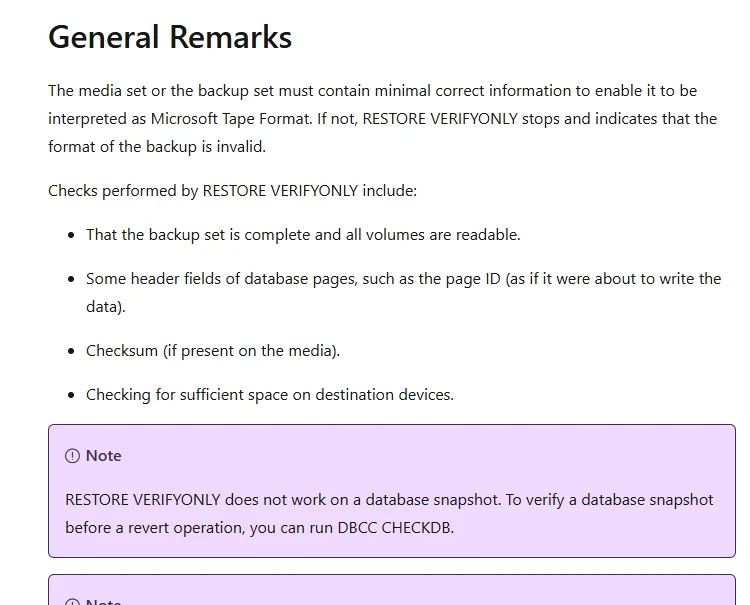
Checking that a backup file is readable and proving that a database can be recovered are different tests. RESTORE VERIFYONLY checks the backup set without restoring the database or validating its internal structure. A stronger drill restores the selected chain to an isolated target, checks database integrity and confirms that the expected data or application can be used.
Native restore gives teams control over each step. dbatools and backup vendors can automate parts of the restore and return evidence from each run. VM recovery testing can prove a separate part of the stack. A useful recurring test records the selected recovery point, time to a usable database, integrity result and whether temporary copies were cleaned up.
Tools for testing SQL Server restores at a glance
A successful test needs an explicit scope and outcome. Check which stages the tool runs and what evidence the reporting role can reopen.
| Tool | Verification path | Additional check to add | Evidence to keep |
|---|---|---|---|
| Native SQL Server restore and SQL Server Agent | Scripted alternate-target restore and validation | Application-marker rule and SQL job failure handling | Backup IDs, restore sequence and test result |
| dbatools Test-DbaLastBackup | PowerShell restore and integrity test workflow | Verify destination, cleanup defaults and application smoke test | Output status, restore duration and CHECKDB result |
| Redgate SQL Backup Pro | Scheduled restore jobs for supported backups | Run a marker check and inspect backup prerequisites | Job output, timing and target verification |
| Quest LiteSpeed for SQL Server | Supported LiteSpeed restore and checks | Recover to target with the correct media access and format | Restore job and independent SQL evidence |
| Commvault SQL Server Agent | Out-of-place database recovery | Run SQL consistency and required login checks | Exact point, target and job evidence |
| Veeam SureBackup | Supported VM recovery verification job | Verify actual SQL readiness and data queries | VM boot, test script and recovered database results |
| Rubrik SQL Live Mount | Query supported recovery data through a mounted database | Compare a full restore if independent recovery is required | Mount health and SQL data evidence |
| Azure Backup for SQL Server on Azure VMs | Workload-aware restore through an approved vault and target | Authorized consistency and application checks | Vault job completion and recovered marker |
Native SQL Server restore and SQL Server Agent
Native SQL Server restore and Agent jobs can put a representative backup chain on a separate test instance and run SQL checks against it. This is useful when a DBA wants direct control over source media, target names and what counts as a successful exercise.
The main benefit is testing the same engine behavior that an actual recovery needs. File readability checks, a completed restore and DBCC CHECKDB each supply different evidence. The team owns scheduling, capacity, measurement and reporting for the drill, including any application checks.
Use SQL Agent or your scheduler to restore backup media on a separate authorized SQL Server instance. Specify the captured point, tested version and destination paths, and collect results from the restore commands.
Run DBCC CHECKDB and a restricted marker check at the restored point. Capture failures and skip results separately and log elapsed time from initialization to usable service evidence.
- Compatibility
- Compatible SQL Server test instance with backup access, restore rights, storage and encryption keys where applicable.
- License and trial
- Built into supported SQL Server and Agent deployments.
dbatools Test-DbaLastBackup
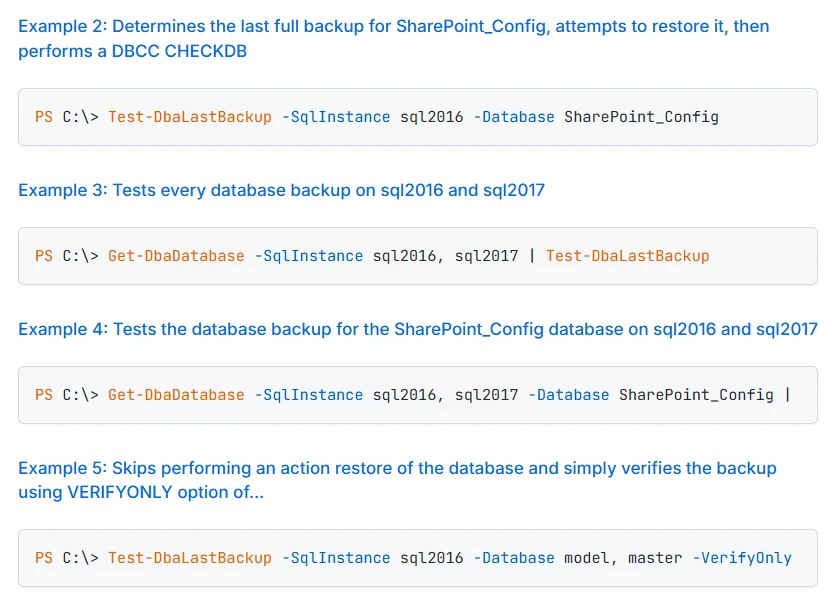
Test-DbaLastBackup restores selected latest full backups and can run DBCC CHECKDB. It supports another destination and optional file copying. This is useful when a DBA needs a scripted check across several instances and prefers to keep its output in the PowerShell workflow.
It is a practical test of access to the full backup and an integrity check on the restored result. The chosen destination needs adequate storage and file access. Recovering through a particular differential or log chain requires a test that selects that intended recovery point.
Review Test-DbaLastBackup's documented source, destination and temporary database behavior for the installed module version. Use the intended isolated destination and verify available paths, backup media and any relevant encryption material.
Save the output and inspect whether it reports a successful restore and integrity check, plus any skipped states. Add a role-specific query if the service recovery standard requires data and permissions.
- Compatibility
- PowerShell dbatools with supported SQL Server connectivity and access to backup media.
- License and trial
- Free, open-source module.
Redgate SQL Backup Pro
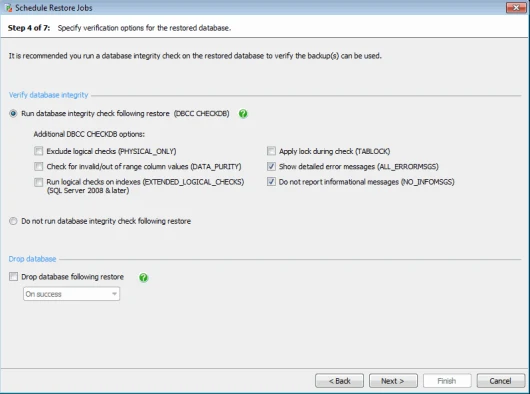
Redgate SQL Backup Pro supports scheduled restores and a documented option to run DBCC CHECKDB afterward. It can also control when the test database is dropped. This is useful when the team already takes SQL Backup Pro backups and wants recurring evidence that chosen files can be restored and checked.
Its strength is keeping restore and integrity outcomes inside the existing backup workflow. The verification options affect what was inspected, including whether logical checks were included. A scheduled restore still needs a safe target, sufficient space and an application-level check when the exercise requires one.
Schedule a SQL Backup Pro restore job with an approved on-demand run for a single lab database. Check actual backup discovery, named destination and access to required SQL Backup media.
Verify that the scheduled job stages and stays accountable for errors. Run a post-restore SQL marker check using the same intended destination and report it alongside the job result.
- Compatibility
- SQL Backup Pro with a supported target and accessible backup files.
- License and trial
- Commercial Redgate license.
Quest LiteSpeed for SQL Server
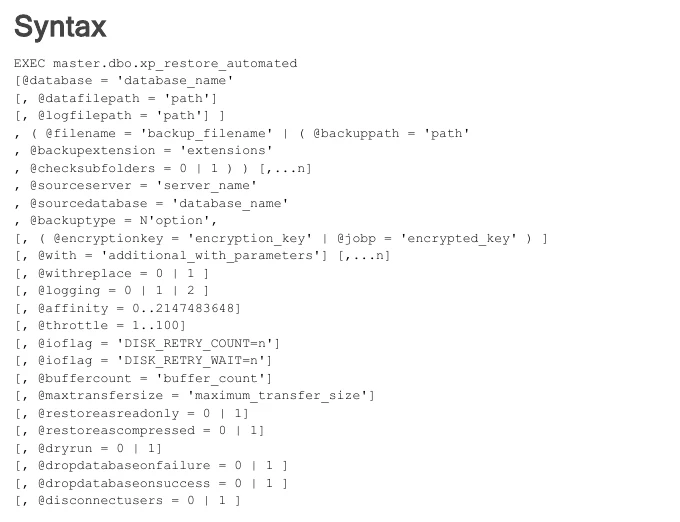
Quest LiteSpeed for SQL Server can verify its supported backup media and restore databases through its backup and restore tooling. This is useful for a team that already relies on LiteSpeed and needs to confirm that its recovery environment can read and use those backup files.
The product’s file verification and an actual test restore are separate results. A stronger drill uses a suitable destination and examines the database after restoration. Its value depends on making the LiteSpeed components, permissions and required backup files available during that drill.
Use the supported LiteSpeed backup restore path on a clean instance with the correct components. Reproduce the intended backup and restore format before embedding the job in a schedule.
Inspect native SQL consistency and customer-defined recovery checks separately from vendor media or job checks. Recover the known marker and record a controlled test failure in the same report.
- Compatibility
- Supported LiteSpeed version and compatible SQL Server test destination.
- License and trial
- Commercial Quest licensing.
Commvault SQL Server Agent
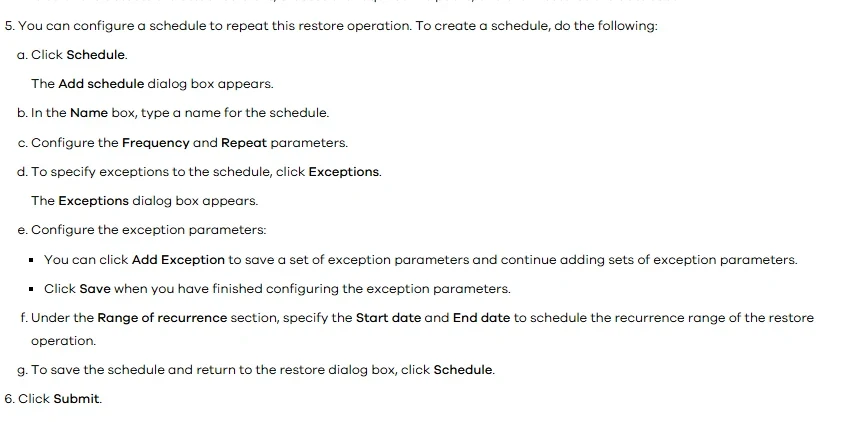
Commvault SQL Server Agent documents an out-of-place restore for supported SQL Server backups. A team can use it to build a test database on an eligible destination and validate recovery from the same backup catalog used in production. This is useful where Commvault already manages the protection workflow.
The strength is proving the catalog, selected backup copy and destination work together. A recovered database still needs suitable integrity or application checks. Permissions, target capacity and the available chain determine the scope and repeatability of the exercise.
Use an out-of-place restore supported by the deployed SQL Server Agent configuration. Confirm the target SQL version, permissions and database files in the documented workflow before scheduling a repeat.
Run a consistency check and a marker read from the isolated SQL target. Save the Agent outcome and database results with the source job and cutoff so a reviewer can reproduce them.
- Compatibility
- Commvault SQL Server Agent, valid backup media and an eligible alternate target.
- License and trial
- Commercial Commvault terms.
Veeam SureBackup
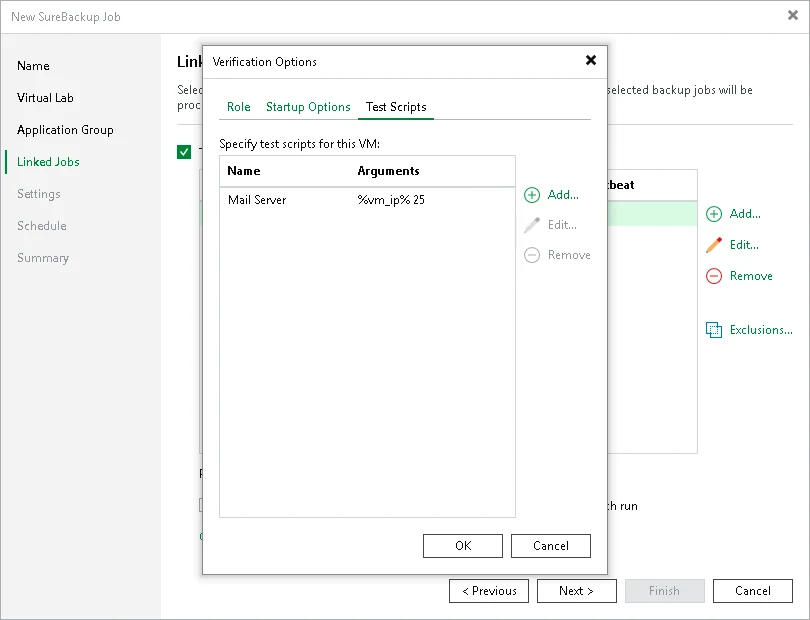
Veeam SureBackup starts eligible backed-up VMs in an isolated virtual lab and can run configured verification and application tests. It is useful for proving that a protected SQL Server VM and its dependencies can boot and expose an expected service from a selected restore point.
The result depends on the selected checks. A service responding from a restored VM supports a machine recovery claim. A separate SQL check is needed to prove database consistency or confirm a particular point within a transaction log chain.
Use a supported SureBackup verification mode to exercise the recovered VM or application workflow. Confirm which of the checks actually shut down, boot or query the test system and which network path the lab uses.
Make the SQL application check visible in the evidence. A booted VM can still have a failed database or login, so require a known query over the recovered connection where that matches the recovery objective.
- Compatibility
- Veeam SureBackup with supported virtual lab, workloads and configured tests.
- License and trial
- Commercial Veeam entitlements and lab infrastructure.
Rubrik SQL Live Mount
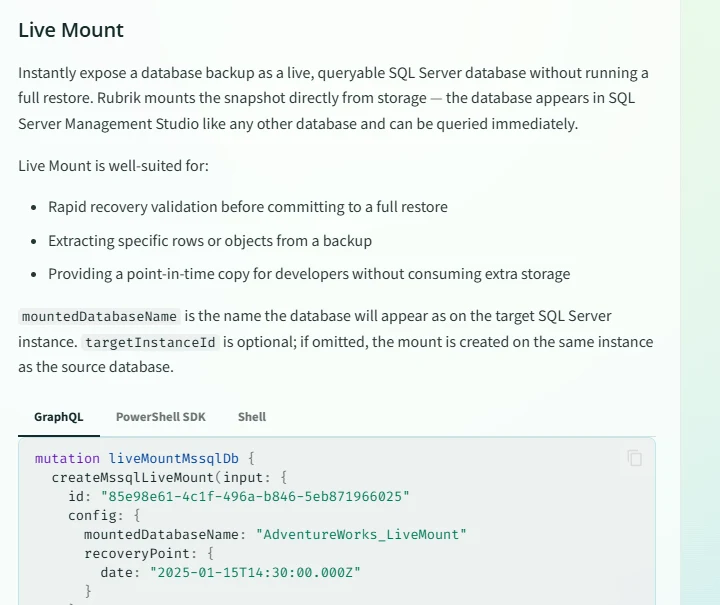
Rubrik SQL Live Mount can make a recovery point accessible to a compatible SQL Server without waiting for a traditional full copy to complete. It is useful for quickly checking whether needed tables and data are accessible and for exploring a candidate recovery point.
It can shorten a validation exercise where the mount is a supported target. A mounted database still depends on the protected storage and operating conditions of the mount. A test intended to measure a full independent restore also needs to exercise that separate copy and recovery path.
Use a supported SQL Live Mount when the lab needs fast access to historical data. Record how the mount differs from a full independent restore, including service lifetime and underlying dependencies.
Verify the expected marker under a read-only trial account. If your recovery standard requires standing up the database without the original storage path, perform that separate recovery drill and record its timing.
- Compatibility
- Rubrik SQL Live Mount with a supported backup, server and network path.
- License and trial
- Commercial Rubrik licensing.
Azure Backup for SQL Server on Azure VMs
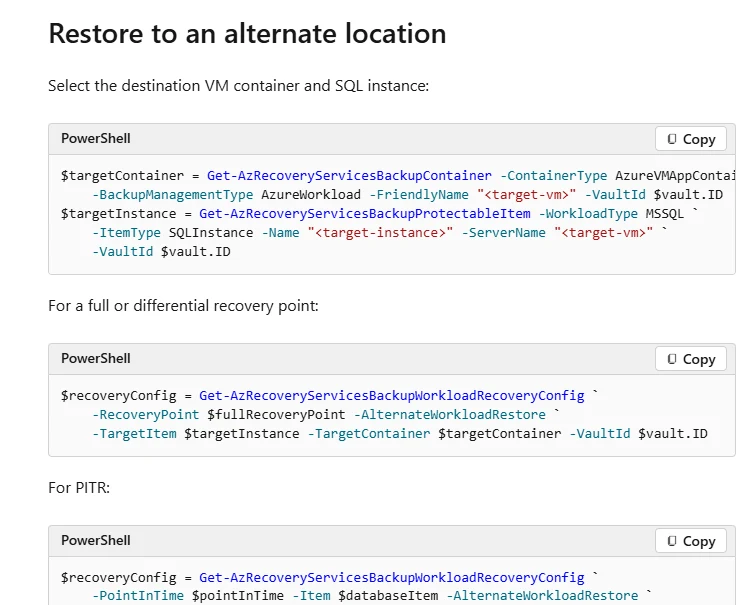
Azure Backup for SQL Server on Azure VMs supports restoring eligible databases to an alternate location or restoring the backup files. Microsoft documents PowerShell workflows as well. These options are useful for building a repeatable test that starts from the actual Azure recovery vault.
The strength is exercising vault access, selected recovery point and target registration against the same workflow used in an incident. Restore completion is one milestone. SQL integrity, application behavior and cleanup depend on what the test runs after the recovery operation.
Use the documented SQL VM recovery workflow and specify the supported alternate destination and point. Verify that the operator's Azure role and target registration work independently of production access.
Set a dedicated job check for SQL readiness and the recorded marker. Compare the exact vault job result and recovered database state, and record failures at either layer.
- Compatibility
- Supported Azure VM SQL Server workload, vault and eligible restore target or file destination.
- License and trial
- Azure Backup, storage and test infrastructure charges apply.
Choose how the restore test will run
| What you need | Tools to shortlist | What to verify |
|---|---|---|
| Restore native backup files and check the database | Restore a selected chain to a separate SQL instance, run CHECKDB and verify a known row. | |
| Schedule or script a database restore from a vendor backup | Confirm how the tool selects the backup, where the files are restored and how it reports an unsuccessful test. | |
| Validate an isolated workload or mounted recovery point | Connect to the test instance and run SQL checks against the expected database and point in time. |
Match each restore test to what it actually verifies
RESTORE VERIFYONLY performs media and backup consistency checks documented by SQL Server. It does not run a full restore or validate the recovered database's data structure. A completed recovery and DBCC CHECKDB extend that coverage. A request through the intended application identity verifies another part of recovery.
Record exact source media, recovery point, SQL target version and checks performed. When testing a VM boot or mount, add independent validation appropriate to the service or the recovery scope.
A quick preflight of a SQL backup set
Use VERIFYONLY or the appropriate vendor media check
Record exact scope and let the full restore provide deeper evidence.
A recovered database on a clean host
Restore independently and run consistency checks
Save target, point, SQL status and elapsed time.
A usable service after the recovery point
Run the intended application query
Verify expected data using the recovered identity and route.
Make a repeatable restore test fail when the recovered point is wrong
Add dbo.RestoreProofMarkers to a synthetic source with MarkerId and RecordedMarker columns. Set MarkerId 1 to proof-001 for the planned point. Restore to RestoreProofTrial and use the read-only SQL below to verify what came back. Run consistency under a separately authorized role when required.
Verify the test's failure path by changing the expected marker in the validation copy to an intentionally wrong value. Confirm the scheduler captures, records and escalates the SQL error. Record application smoke test, CHECKDB and target cleanup as separately visible outcomes.
| Stage | Evidence | Failure example |
|---|---|---|
| Media and restore | Backup set IDs, point and named target | Missing log or an incompatible restore target |
| Integrity | CHECKDB result on the restored database | Consistency check fails or is skipped |
| Data and application | Expected marker plus required login or query | Wrong restore point or unavailable role |
| Reporting and cleanup | Durable outcome and named temporary artifacts | Validation fails but report indicates success |
How to compare these tools
Schedule a restore to an isolated target, validate the resulting database and record the recovery time. Try a missing log or unavailable backup and check which failure reaches the operator. Sources checked .
Restore one copy and check a known value
Prepare the synthetic source marker before taking the test backup. Recover it to the disposable RestoreProofTrial target. Run this SQL as an authorized marker reader. Enable the optional DBCC CHECKDB line through the flag only when the same lab connection has the documented privilege and intended resource budget.
Validate a restored SQL Server marker and optionally check consistency
T-SQL · 18 lines
- Choose the point, restore destination and permissions. Keep the media check or vendor backup status and run the actual restore separately.
- Verify the marker and optional integrity result. Record the exact job times and validate a required application query via the planned client route.
- Try the intentionally wrong expected marker. Confirm failed tests are visible in the report and monitor or scheduler, then return the lab to the expected successful case.
Conclusion
Use the restore path that matches the backup you would actually recover. For native files, a SQL Server or dbatools restore makes the SQL checks explicit. For platform backups, use the documented alternate target or virtual lab. In every case, keep the selected recovery point and the consistency and data checks together.
Frequently asked questions
Is RESTORE VERIFYONLY enough to test a SQL Server backup?
RESTORE VERIFYONLY checks that a backup set is complete and readable. It does not restore the database or verify its data structure. Restore a copy, run DBCC CHECKDB and query expected data for a recovery test.
Which checks should run after a SQL Server restore?
Check that the database is online, run DBCC CHECKDB and read a known application row. Record the exact backup or recovery point and check the time to a usable database.
Can SQL Server restore tests be automated?
Yes. Schedule a native restore script, use an automation tool or run the backup platform’s restore workflow. Capture the restore result, DBCC output and application query separately so the job can surface failures.
How do you avoid overwriting production during a restore test?
Use a separately designated SQL instance or isolated virtual lab. Choose a unique destination database name and storage paths. Give the test account access only to the intended backup and recovery environment.
How often should a SQL Server restore test run?
Schedule tests against the organization’s recovery objectives and backup retention. Run a new test after changing the backup storage, SQL Server version, encryption keys or recovery credentials.
Where does RESTORE VERIFYONLY fit in a SQL Server restore test?
Use it as the documented media and backup preflight. A real restore, integrity check and application query supply separate evidence about recovered database and service behavior.
Can a test VM boot be counted as a successful SQL Server restore?
Report that the VM booted. Verify SQL Server, the restored database and expected application behavior separately if those are required recovery outcomes.