

Cross-site failover can move a database, a SQL Server instance or a virtual machine. Availability groups and log shipping work at the database level. A failover cluster instance brings the SQL Server service, system databases and user databases across together when its storage is available. VM recovery products address the server image and the surrounding network or application dependencies.
These approaches recover different things, so a successful switch has to be defined at the application level. A synchronized replica can keep more recent transactions available than a delayed restore. A VM recovery point can bring more of the server configuration with it. The right comparison includes what the application reconnects to, which committed transaction it can read, and how the team handles writes that occur during recovery.
SQL Server high availability options at a glance
Match protection to the failure domain and supported OS, SQL Server edition and target. The table describes what moves and which part of recovery still needs testing.
| Option | Protection unit | Failover path | What to verify |
|---|---|---|---|
| Always On availability groups | Selected databases and replica configuration | Native promotion according to commit and failover configuration | Listener reconnect, lag, quorum, and jobs, logins and other instance dependencies |
| SQL Server log shipping | SQL Server database and applied log chain | Manual recovery of secondary with final available logs | Backup/copy/restore lag, tail availability, connection switch and rebuild |
| SIOS DataKeeper Cluster Edition | Windows SQL Server FCI with replicated storage | WSFC moves the instance role using supported replicated volumes | Quorum, fencing, replication state, supported storage and service reconnect |
| DH2i DxEnterprise | SQL Server availability group managed by DxEnterprise | Selected DxEnterprise HA topology and supported connectivity | Check Windows or Linux variant, tunnel paths, failover and listener reachability |
| Azure Site Recovery | Eligible SQL Server VM workloads | Recovery plan, target VM and selected recovery point | Boot order, IP and DNS mapping, SQL startup, application writes and failback |
| AWS Elastic Disaster Recovery | Eligible servers and volumes | Launch recovery instances in AWS from the selected point | Test subnets and security groups, name changes, application dependencies and failback |
| Veeam Backup & Replication | Eligible VM replicas | Failover to a replica point, followed by commit, undo or failback as appropriate | Replica reachability, SQL consistency, target isolation and return path |
| HPE Zerto Software | Protected workloads grouped for recovery | Select recovery journal point and use a supported test or live workflow | Recovery-network isolation, SQL startup order and endpoint availability |
SQL Server Always On availability groups
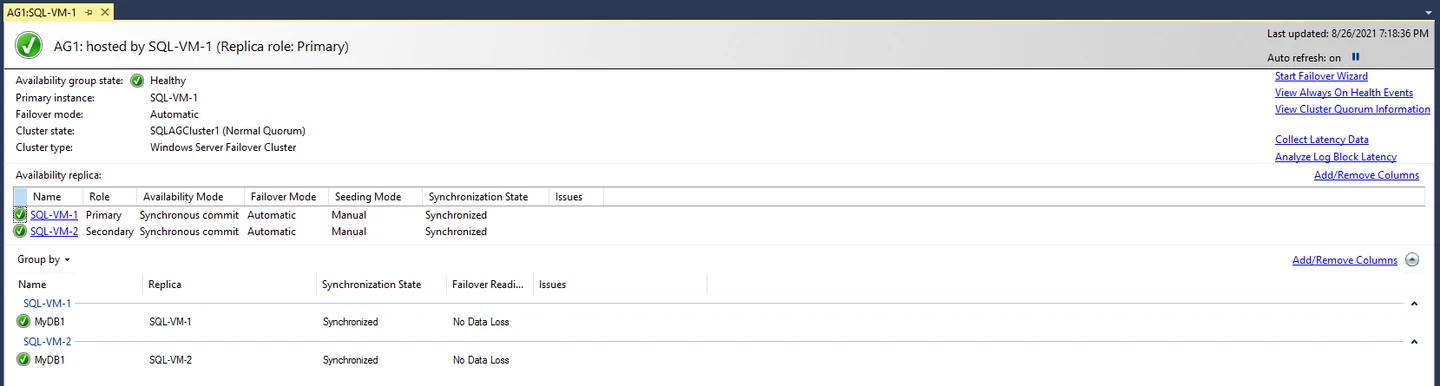
SQL Server Always On availability groups maintain database replicas and can move an application’s database role to a secondary. A synchronized secondary can participate in planned or automatic failover when the replica and clustering settings qualify. This is a strong option for applications whose availability depends on one or more databases and an accessible listener.
The unit of recovery is the group’s databases. Logins, jobs and the other instance configuration the application needs may require their own rollout. Cross-site behavior depends on replication and quorum. A forced switch to an unsynchronized replica can lose transactions, and a distributed availability group has a separate manual role-change process.
An availability group is a database-level design. For Windows, check the applicable WSFC and synchronization conditions for automatic failover. For Linux, follow the support guidance for the selected cluster manager and topology. An asynchronous or distributed recovery path can have different promotion behavior.
Validate the client against the intended listener and driver. A new primary can accept a database connection while a scheduled task or login still fails on that instance. Exercise service-account login, retry behavior and a write after a simulated loss of the original site.
- Compatibility
- SQL Server edition and clustering requirements apply. Basic availability groups in Standard edition are limited to one database and two replicas.
- License and trial
- Built into eligible SQL Server editions. Licensing depends on the selected topology.
SQL Server log shipping
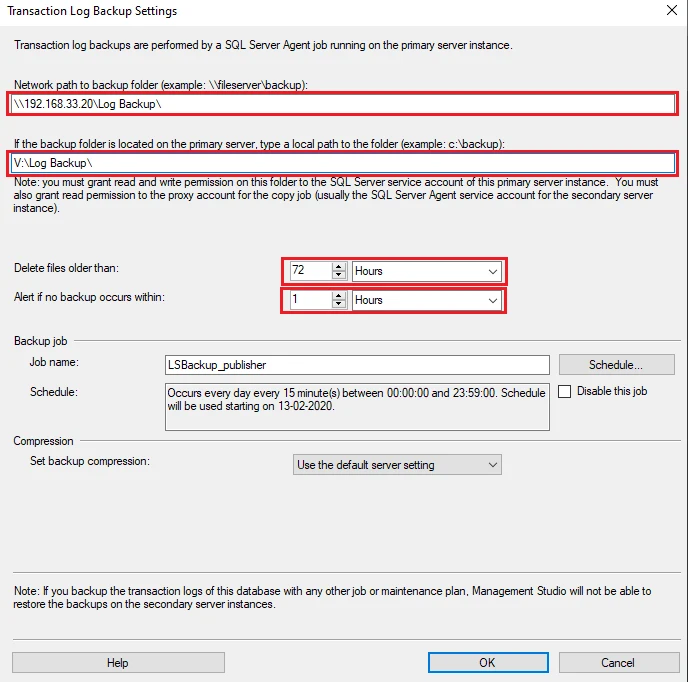
SQL Server log shipping backs up the transaction log, copies the backup files and restores them to a secondary. It is a practical warm-standby option when operations can control the cutover and prefers a backup-based workflow. A delayed restore can give the team time to investigate an unwanted change before it reaches the standby.
The last copied backup and the last applied backup describe different recovery points. A planned switch can include additional log backups and a tail-log backup where possible. The standby still needs to be recovered and the application redirected, so the DBA’s runbook is part of the recovery time.
Observe backup, copy and restore times separately. The newest produced backup may still be in transit or waiting to apply at the secondary. In a rehearsal, capture the last restored file and test whether a tail backup is possible before recovering the alternate database.
Test the client switch and re-enablement of dependent jobs explicitly. The log-shipping workflow restores a database, while logins, job schedules and external dependencies need their own plan. Rehearse reinitializing the old site or establishing a new log chain as part of returning service.
- Compatibility
- Supported SQL Server instances, Agent jobs and an accessible backup share. The source needs full or bulk-logged recovery.
- License and trial
- Built into SQL Server. Standby infrastructure and licensing still apply.
SIOS DataKeeper Cluster Edition
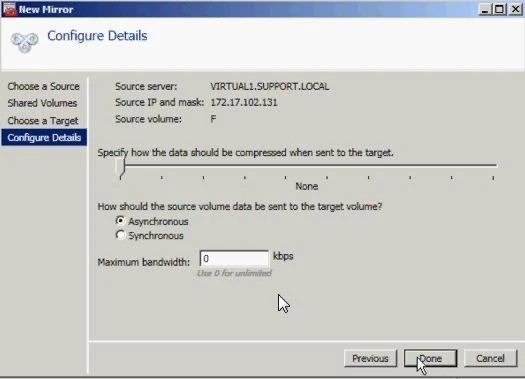
SIOS DataKeeper Cluster Edition presents replicated volumes to Windows Server Failover Clustering as cluster storage. In a SQL Server failover cluster instance, that can allow the instance to move with its system databases and user databases. It fits applications that expect to reconnect to the same SQL Server instance after a move.
Its usefulness depends on the storage and cluster topology. SIOS documents synchronous and asynchronous replication paths, while Windows quorum and the witness affect what happens when two sites lose contact. The recovered instance depends on the state of the replicated volumes and any configuration it expects outside them.
SIOS DataKeeper provides replicated storage for a Windows failover-clustering design. An FCI keeps the instance as the failover unit, with the participating nodes and volume configuration defined up front. Test both loss of the active node and loss of its storage or replication link.
Record the replication state and cluster ownership immediately before promotion. Validate quorum, service startup, the SQL network name and agent jobs afterward. Include the storage and intersite link cost in the comparison because replica placement and bandwidth affect the architecture.
- Compatibility
- Requires a supported Windows Server Failover Cluster, SQL Server FCI and DataKeeper volumes on the participating nodes.
- License and trial
- Commercial. Windows, SQL Server and cluster arrangement determine the supported deployment.
DH2i DxEnterprise
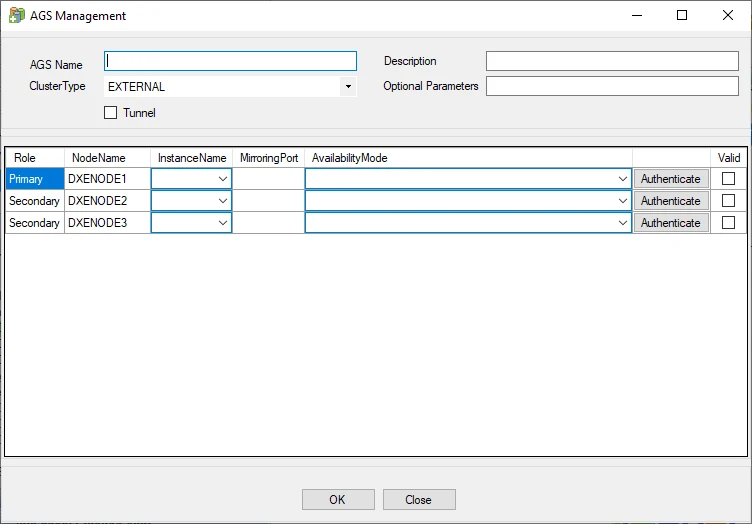
DH2i DxEnterprise can manage SQL Server availability groups using an external cluster type. The documented setup exposes replica and availability settings through DxAdmin. This is a candidate for installations where the external cluster and supported Windows or Linux arrangement fit the architecture.
Automatic failover depends on SQL Server’s replica and quorum requirements as well as the cluster manager. DH2i documents a design with three synchronous replicas or two synchronous replicas plus a configuration-only replica. A replica that holds configuration is part of quorum, while actual database recovery still depends on the state of a data replica.
Compare the DH2i deployment guide that matches your SQL Server platform, cluster members and network path. Test connections to the database separately from any cluster management or tunnel connectivity. A reachable cluster management interface does not show whether the application endpoint works.
Use a planned failover and a controlled loss-of-link scenario in the lab. Record the promotion decision, SQL Server synchronization state and client reconnect result. Check licensing for the exact SQL Server and DxEnterprise topology with the vendor.
- Compatibility
- Requires supported SQL Server availability groups and DxEnterprise nodes. External clustering prerequisites differ by configuration.
- License and trial
- Commercial cluster software alongside the applicable SQL Server deployment.
Azure Site Recovery
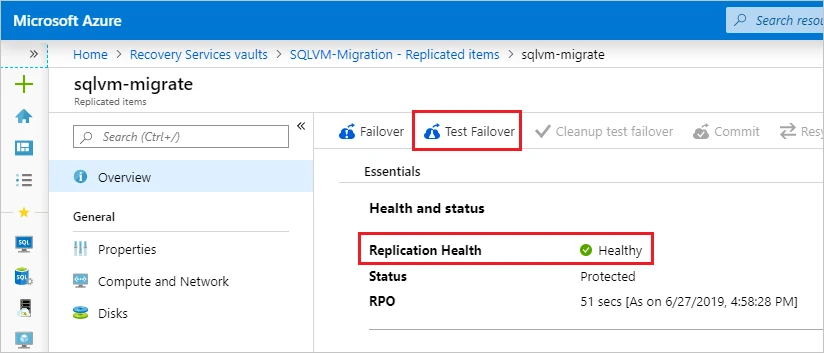
Azure Site Recovery replicates supported virtual machines and can sequence recovery through plans. A recovery plan can place SQL Server before application servers and run automation for workload steps. Microsoft documents a separate pre-action for an availability group when the recovery plan uses that architecture.
It fits an Azure recovery design that needs to bring back a workload’s machines and network dependencies. A VM ready to start and a SQL Server ready for application reads are different milestones. The chosen recovery point and the way the plan is triggered determine what the operators can actually recover.
Microsoft's SQL Server workload guide connects the database prerequisites with the Azure Site Recovery plan. Test the target virtual network and the point selected for recovery before timing SQL Server service startup. Include other VMs the application requires to finish a transaction.
Run a recovery plan test on a separate network and validate the application endpoint there. Track whether the chosen point meets the expected commit boundary in SQL Server. Compare the documented re-protect and failback workflow, including how writes will return to the primary site.
- Compatibility
- Supported VM replication path, recovery vault and target network. SQL workload and recovery-point requirements depend on topology.
- License and trial
- Azure service charges and target infrastructure costs apply.
AWS Elastic Disaster Recovery
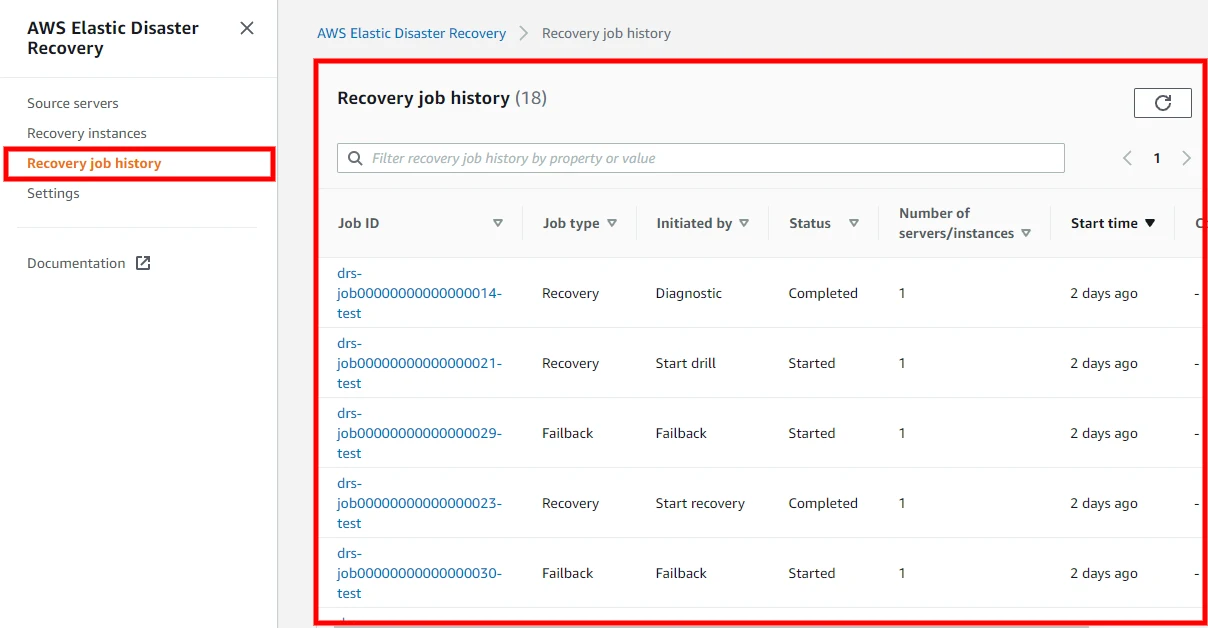
AWS Elastic Disaster Recovery replicates supported servers and launches a drill or recovery instance in EC2. Operators can choose from available recovery points and inspect replication and job status. That is useful for a company whose disaster site is AWS and whose SQL Server runs inside a larger server recovery plan.
The advantage is provisioning a recovery instance from replicated server data. SQL Server startup is part of the next phase. Drive mappings, network dependencies and Windows or SQL Server activation can affect the application even when the launch succeeds. The supported reverse workflow matters if writes move back to the primary site later.
AWS DRS recovery includes replication and the launch settings for recovery instances. Configure an isolated drill and check target instance sizing, network reachability and SQL Server service permissions before measuring the application write. Capture which recovery point the exercise used.
Keep drill timing from the application's perspective. Record recovery-instance startup and the subsequent SQL Server and application dependencies. Test the documented return or failback path separately, especially if the recovery site will accept new writes for several hours.
- Compatibility
- The source needs the AWS Replication Agent, staging resources and an eligible EC2 launch configuration.
- License and trial
- AWS service and infrastructure charges depend on the recovery deployment.
Veeam Backup & Replication
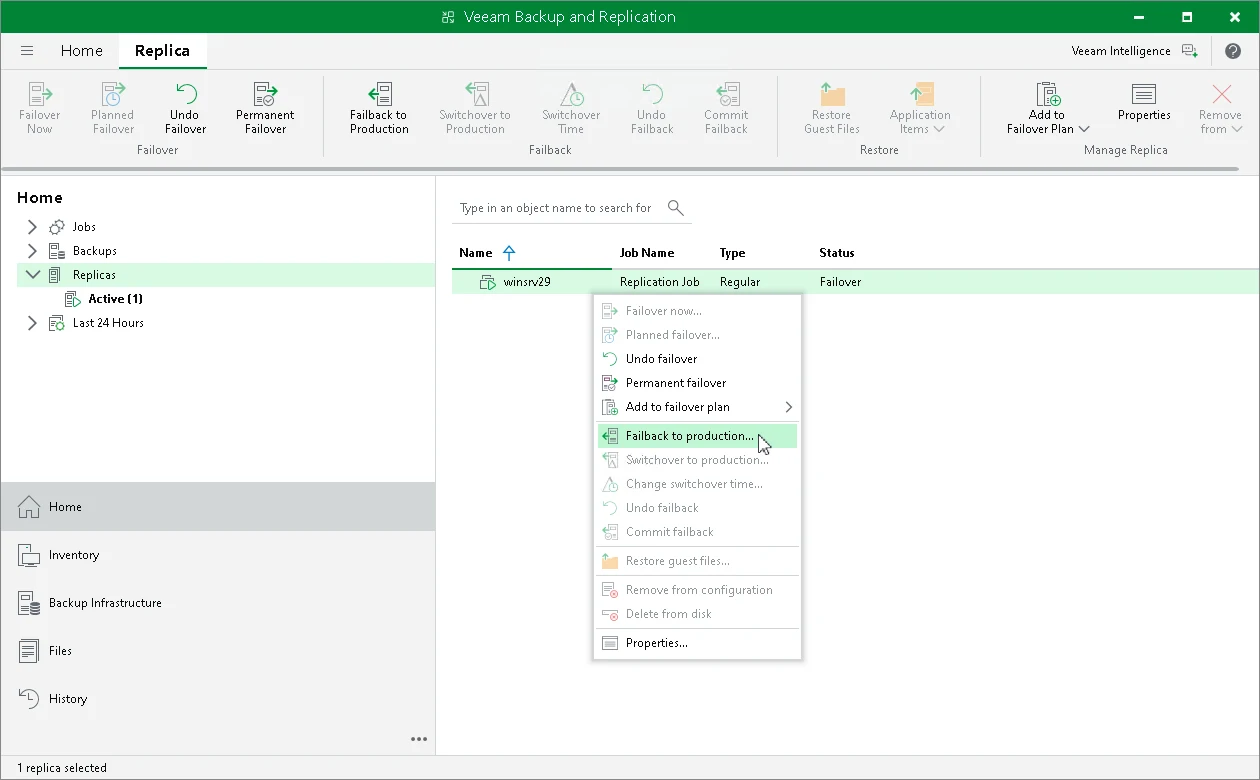
Veeam Backup & Replication documents virtual machine replica failover for VMware vSphere and Hyper-V. A planned switch can synchronize recent changes, stop the source and start its replica. This is useful when recovering the SQL Server guest environment is part of the cutover.
The distinction between planned failover, outage failover and the subsequent choice to fail back or undo is important. Failback can transfer changes made at the recovery site, while an undo can discard them. Application-aware processing and the selected recovery point affect what SQL Server sees when the replica starts.
Veeam's replica failover provides a point in time and a workflow for how to finalize or reverse the operation. Identify which configured VM workloads it protects and confirm the planned network placement before using a replica in an outage drill.
After VM startup, validate each SQL Server database and service dependency. Check authentication and the same transaction used in the original site. Confirm how expected writes during the drill affect the failback decision and whether the retained state matches the recovery point.
- Compatibility
- Supported hypervisor and replica setup. Veeam documents failover paths for VMware vSphere and Hyper-V.
- License and trial
- Commercial. Edition entitlement and recovery infrastructure determine the cost.
HPE Zerto Software
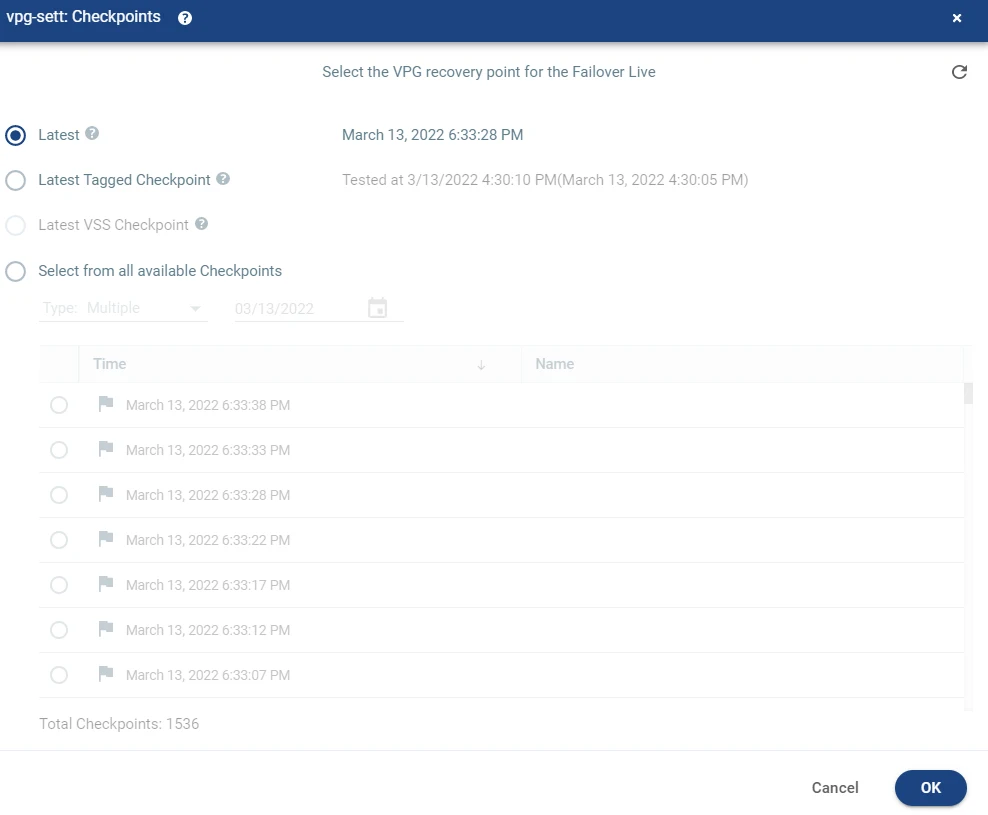
HPE Zerto protects sets of machines through a virtual protection group. A group can bring SQL Server and related services into the same recovery workflow, with test networks, checkpoints and configured boot steps. That is useful when the database can only be validated together with the application that uses it.
A checkpoint is a recovery input. The workload still needs to start and expose the expected committed data. The live failover workflow has a commit policy, and reverse protection has to fit the original site’s eventual return. The group and network design determine how useful the recovery test is before a production switch.
Use the documented recovery test workflow for the installed HPE Zerto version and hypervisor. Put all interdependent application VMs in the scope you intend to validate. Select a journal point deliberately and attach only the recovery network intended for a drill.
Compare when each VM comes up with when SQL Server can accept an application write and the other services can use it. Record missing or late transactions from the application log. Verify the failover commit and failback workflow separately from the isolated test.
- Compatibility
- Supported Zerto source and recovery sites. The cited examples use Zerto Virtual Manager for vSphere.
- License and trial
- Commercial disaster recovery software. Deployment and infrastructure costs depend on the topology.
SQL Server failover options by recovery target
| What you need | Tools to shortlist | What to verify |
|---|---|---|
| Promote a replica of the protected databases | Verify the synchronization state, quorum and client routing with a site link unavailable. | |
| Move the Windows SQL Server instance | Verify that the clustered instance, replicated volumes and client access name move together. | |
| Keep a warm standby and promote it manually | Measure the backup, copy and restore delays and test a manual client switch. | |
| Start the SQL Server VM and its dependencies in a recovery site | Check the recovery point, VM boot order, SQL startup and one application write in the target network. |
Choose the scope of SQL Server recovery
Describe the loss scenario first. A database replica, an instance-level cluster and a VM recovery plan each carry different configuration and operational dependencies. A client connection and sustained write workload belong in the test for all three.
One application database or a group of databases
Evaluate SQL Server database replication
Use availability groups or log shipping according to SQL edition, platform and outage targets.
The instance name, system databases and server jobs
Evaluate instance clustering and replicated storage
Check the FCI architecture, shared or replicated volumes, quorum and client connection.
Database and application IaaS workloads
Evaluate VM or server disaster recovery
Recover the dependency order, network identity and SQL application transaction.
- Microsoft SQL Server availability-group failover modes
- Microsoft distributed availability-group failover
- Microsoft availability groups on Linux and Pacemaker
- Microsoft SQL Server log shipping configuration
- SIOS SQL Server high availability architecture
- DH2i SQL Server availability groups with DxAdmin
- Microsoft SQL Server disaster recovery with Azure Site Recovery
- AWS Elastic Disaster Recovery preparation
- Veeam VM replica failover and failback
- HPE Zerto vSphere recovery test workflow
Measure the outage to a validated application write
Start the clock when the application loses its normal write path. Record detection, promotion, client connectivity and a committed test write. Use a separate client-side acknowledgement log to identify committed records missing from the recovered database.
The example worksheet uses synthetic UTC timestamps. The recovery interval is 450 seconds. The last surviving sampled acknowledgement was seven seconds before the outage and two later acknowledged writes are absent. Report those observations along with the sampling interval and the chosen recovery point. They describe the drill's sampled data loss.
| Stage | Example UTC time | What establishes the milestone |
|---|---|---|
| Last sampled write still present | 01:59:53 | Client acknowledgement matched to recovered row 41 |
| Two acknowledged writes missing after recovery | 01:59:57 and 01:59:59 | Client log confirms IDs 42 and 43; recovered target lacks both |
| Application write path unavailable | 02:00:00 | First failure or injected outage time from the client |
| Detected and promoted | 02:00:30 and 02:04:20 | Monitoring and cluster or VM recovery event records |
| Client reconnect | 02:06:45 | Expected endpoint opens under the application identity |
| Validated committed write | 02:07:30 | Separate post-recovery write, acknowledgement and readback |
How to compare these tools
Run the same site outage and confirm the last committed transaction the application can read. Check client routing, recovery time and how you return to the original site. Sources checked .
Measure a site outage from the application
Log successful client acknowledgements outside the protected site and compare their IDs on the recovered target. The following model shows how to compute an application recovery interval and list missing acknowledgements.
Calculate application recovery time and missing acknowledged writes
T-SQL · 24 lines
- In an isolated drill, log monotonically increasing application transaction IDs outside the protected database. Record the time the usual connection stops accepting writes.
- Recover through the intended cluster, instance or VM route. Record detection, promotion, client reconnect and a verified write. Keep application account and driver settings representative.
- Reconcile all acknowledged IDs with the new primary, including gaps in the sequence. Compare the actual times with objectives and test what happens to new writes during failback.
Conclusion
Shortlist by recovery unit first, then by measured data loss and time to the first application write. Keep a separate, tested backup and restore path. The failback drill should preserve the writes accepted while the recovery site was primary.
Frequently asked questions
What is the difference between a SQL Server availability group and VM disaster recovery?
An availability group replicates participating databases to SQL Server replicas and promotes a replica. VM disaster recovery recovers a server from replicated disks or restore points. Measure SQL startup, client routing and dependencies with either design.
Does a distributed availability group fail over automatically between sites?
Microsoft documents a manual cross-group failover. Each component availability group can have its own local failover configuration. Use the documented synchronization and role-change sequence for a planned cross-site move.
Does synchronous commit guarantee zero data loss?
A planned failover to a healthy synchronized synchronous-commit target can preserve committed transactions. Check the target’s actual synchronization state and supported failover mode at the time of the switch. Forced failover to an unsynchronized target can lose data.
How do you measure SQL Server RTO and RPO during a drill?
Time the outage until the application can resume useful work through its normal connection path. Compare the recovered transaction IDs with the acknowledged writes captured independently before the outage.
Do SQL Server jobs and logins move with the database?
For a conventional availability group or log-shipped database, prepare server logins, jobs and other instance objects separately. Contained availability groups can carry supported group-level metadata. Test connection permissions, job role checks and backup behavior on the destination.
When does a SQL Server failover drill end for application recovery time?
Use the first verified application transaction against the recovery target as the completion point. Record earlier milestones such as database promotion and reconnection so you can see where time was spent.