

SQL Server log redaction can happen before a collector forwards an event or in the receiving pipeline before the log is indexed. The placement matters. A field hidden in a dashboard may still exist in a searchable copy. A pipeline can remove a structured field, replace part of a message or hash a value when operators still need to correlate repeated occurrences.
The best choice depends on the original event shape and every destination that receives it. Multiline SQL errors, raw query text and structured attributes may need different rules. A useful test follows a representative event through normal and error handling paths and verifies that the resulting records still show the details an operator needs.
SQL Server log redaction tools at a glance
Determine which data each tool can transform on the selected path. A transformation only protects the destinations it runs before.
| Tool | Transformation location | Rule primitive | Failure or bypass to test |
|---|---|---|---|
| Datadog Observability Pipelines | Pipeline worker processing | Sensitive Data Scanner processor | Parser order, matching fields and output routes |
| Cribl Stream | Stream processing pipeline | Mask function and selected fields | Cloned events, fallback routes and backpressure storage |
| Splunk Enterprise and Splunk Cloud Platform | Supported ingest processing tier | Ingest-time anonymization configuration | Forwarder path, sourcetype and raw text |
| Elastic Elasticsearch Redact Processor | Configured Elasticsearch ingest pipeline | Redact processor | License, error routing and pipeline application |
| Azure Monitor Data Collection Rules | Supported collection transformation before target table storage | KQL transformation | Supported data route and retained source logs |
| Grafana Alloy | Loki log-processing stages | loki.process replace stages | Raw line, extracted fields and labels |
| Vector | Remap transform ahead of sinks | VRL redact function | Fallback route and unparsed event body |
| OpenTelemetry Collector Contrib | Transform processor in logs pipeline | OTTL rules for log bodies and attributes | Processor ordering and error handling |
Datadog Observability Pipelines
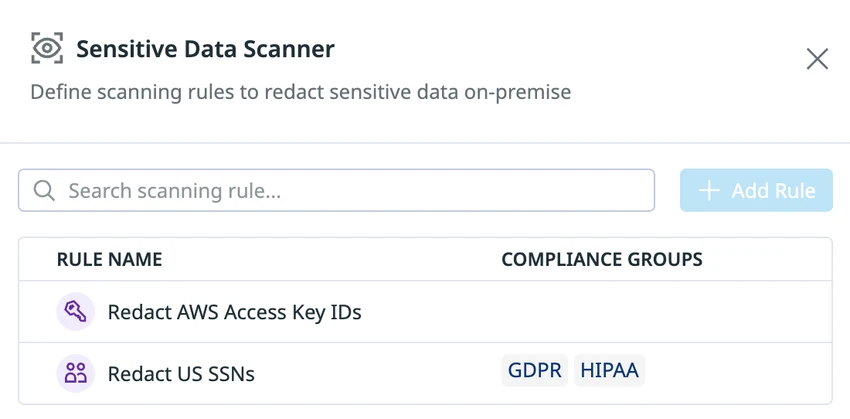
Datadog Observability Pipelines provides a Sensitive Data Scanner processor that can redact or hash matches in logs. It supports predefined and custom rules. This is useful when a team already forwards SQL Server logs through an Observability Pipelines worker and wants to transform the event before the configured destination receives it.
The benefit is placing the rule at a known point in the deployed pipeline. Other forwarders or destinations can retain a different copy. Patterns and field scope determine what the rule actually covers, especially when a SQL statement or multiline message appears in more than one field.
Decide which pipeline worker sees the SQL log event and what each processor receives after parsing. Configure a test rule on the body and relevant fields, then send the same synthetic token across all input types.
Search every normal destination and review protected fallback handling. Capture transformation counters and confirm the route cannot send the untouched event straight to a shared index during a parser failure.
- Compatibility
- Datadog Observability Pipelines worker with supported log sources and destination paths.
- License and trial
- Commercial Datadog pricing and feature terms.
Cribl Stream
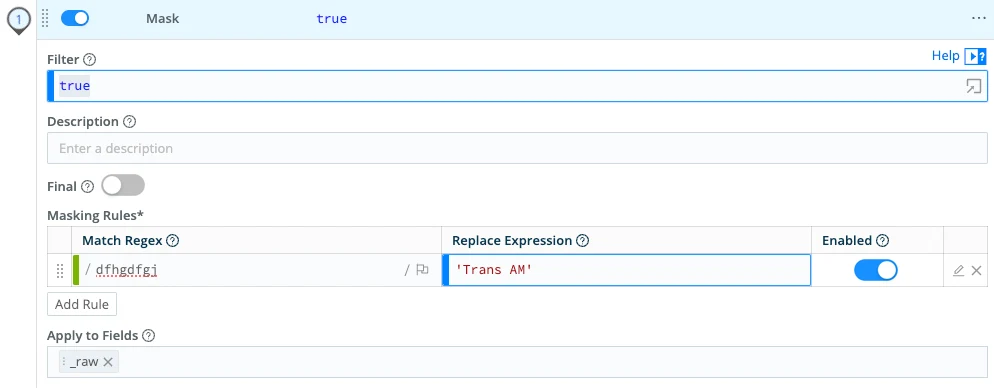
Cribl Stream’s Mask function can apply regex-based changes to selected event fields, including the raw event. This is useful when a team routes SQL Server messages to several destinations and wants shared transformations before routing or indexing.
Its strength is explicit control over what is changed and which route receives the result. A rule only covers fields and patterns it matches. The order of extraction and masking matters when a sensitive value appears in both the raw message and an extracted field.
Use a dedicated route and identify where the Mask function runs relative to parsing, duplication and destination routing. Apply the rule to the intended token-bearing fields and inspect a matching preview.
Replay the defined error case and check every sink that can receive it. Where a worker persists raw input for reliability, verify the location and access controls separately from live destination output.
- Compatibility
- Cribl Stream with a supported input and routing pipeline for SQL Server events.
- License and trial
- Commercial and applicable free product options.
Splunk Enterprise and Splunk Cloud Platform
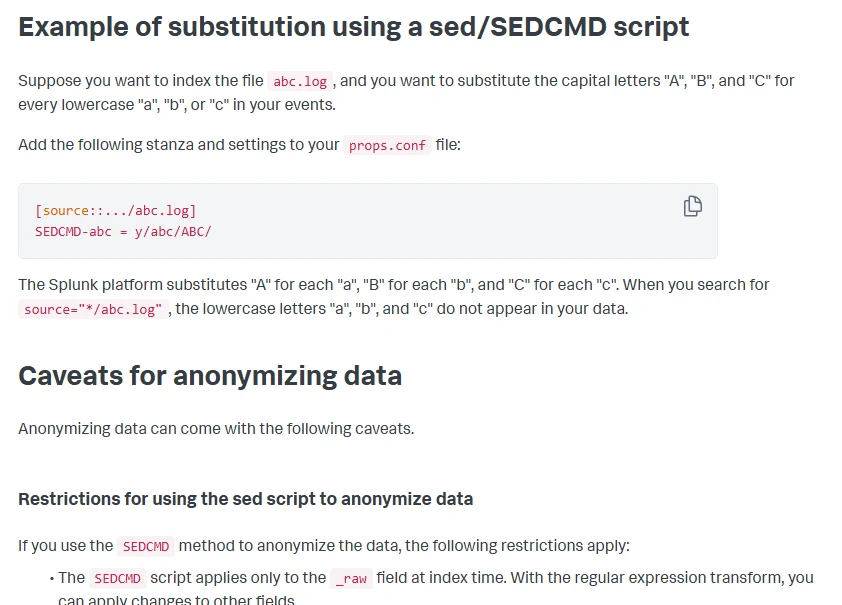
Splunk can anonymize incoming event text through supported ingestion configurations. Depending on the deployment, source transformations such as masking selected raw text can run before indexing. This is useful for a SQL Server log source already collected in Splunk when searches should operate on redacted events.
The important boundary is the forwarding and parsing tier where the configured rule runs. A search-time display change has different retention effects from an ingest transformation. Splunk Enterprise and Splunk Cloud can also differ in how the configuration reaches the appropriate processing tier.
Choose the supported ingestion tier for the input and product deployment. Set the relevant sourcetype and supported anonymization path then inspect the indexed event and its raw text under a lab role.
Check the original source and other platform paths separately. A search-time field display can hide a value in a report while indexed data still contains it, so verify stored evidence with the allowed test profile.
- Compatibility
- Splunk platform with a supported configuration path for the relevant source type.
- License and trial
- Commercial platform, data and feature entitlements apply.
Elastic Elasticsearch Redact Processor
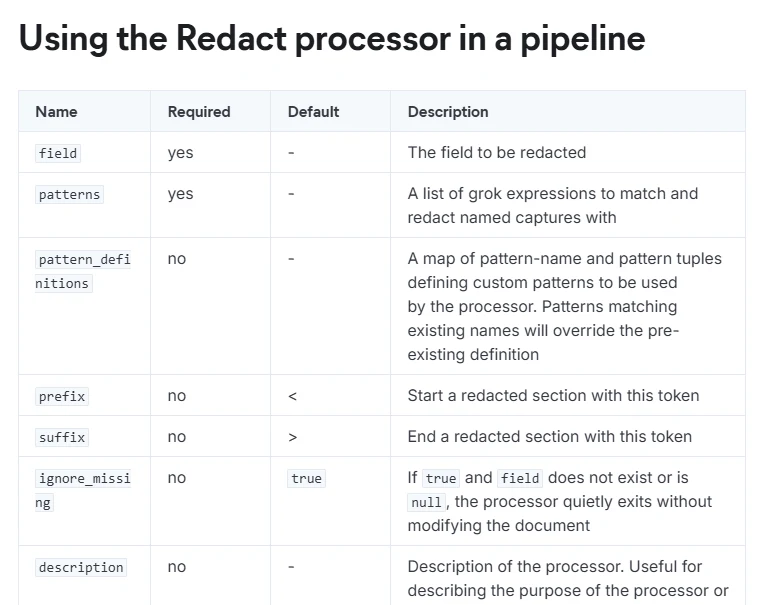
Elasticsearch’s Redact processor applies Grok patterns in an ingest pipeline and masks matching text. This is useful when Elastic already receives SQL Server logs and a team wants the indexed copy to preserve event context while replacing recognized identifiers.
The strength is using the central ingest pipeline, with simulation available for sample documents. The events need to pass through that pipeline, and unsupported formats or pipeline failures need deliberate handling. Patterns should preserve time stamps and error details that operators still use.
Attach the ingest pipeline to the intended SQL events and verify the redact processor and license in the actual cluster. The documented skip_if_unlicensed setting can leave a document unchanged when the feature is unavailable.
Inspect indexing error behavior with the synthetic event. Confirm the searchable document and any protected failure sink under the policy, including which route an event takes if the expected pipeline is omitted.
- Compatibility
- Supported Elasticsearch deployment and ingest pipeline. License requirements depend on the processor and deployment.
- License and trial
- Elastic licensing and deployment terms apply.
Azure Monitor Data Collection Rules
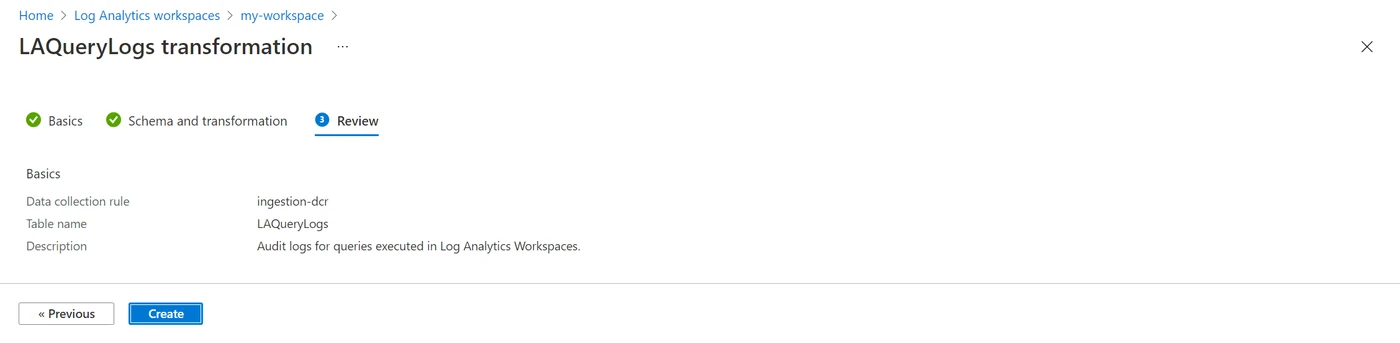
Azure Monitor Data Collection Rules can use a supported KQL transformation to reshape incoming records before writing them to a Log Analytics table. This is useful when SQL Server logs reach Azure Monitor through a collection path that supports DCR transformations and sensitive fields should be removed or replaced in the stored result.
Its strength is applying a transformation where a particular table is fed. The available KQL functions and table support define what the rule can change. Other exports or workspaces using a different rule can receive a different copy, so the source-to-table configuration matters.
Verify that the Microsoft data path uses a supported data collection rule transformation for the intended table. Compare a synthetic event before transformation with the resulting Log Analytics record.
Run the same test through each collection path that reaches the table and check which source files or upstream archives retain their records. Test how dropped or rejected rows appear in collection diagnostics.
- Compatibility
- Azure Monitor collection path and destination table that support DCR transformations.
- License and trial
- Azure ingestion, transformation and retention charges depend on configuration.
Grafana Alloy
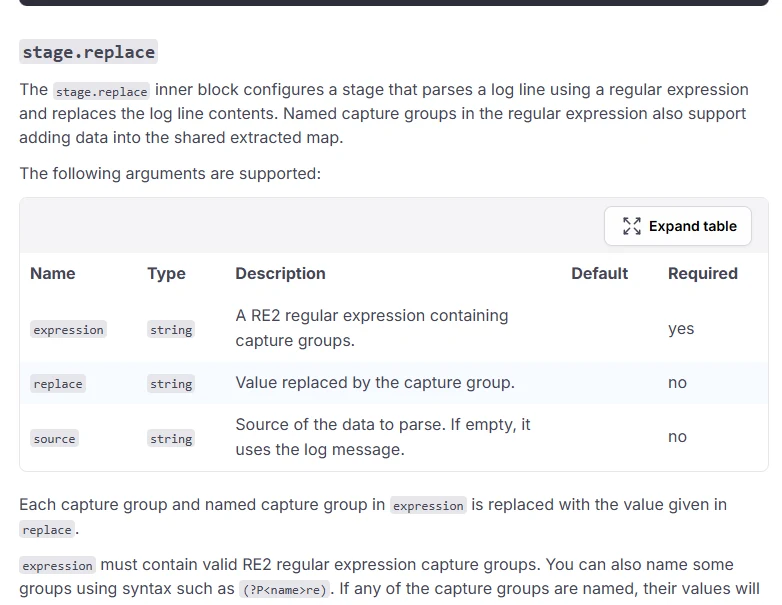
Grafana Alloy’s loki.process component offers pipeline stages for parsing and replacing parts of a log message. It is useful when SQL Server logs already pass through Alloy and the team can apply transformations close to the source before sending the event to Loki.
The value is a versioned collector configuration with explicit processing order. Multiline assembly, extraction and replacement need to act on the intended message. Sensitive values used as labels or sent through another pipeline need their own handling.
Use the documented replace stage on the appropriate parsed field or log line. Verify the order of parsing, replacement, label promotion and shipping so the sensitive token cannot survive as another field.
Run the same synthetic event into a lab Loki destination and search log lines and labels. Check the branch taken by malformed input, plus any upstream buffers and alternative outputs.
- Compatibility
- Grafana Alloy with access to the log source and an applicable Loki pipeline.
- License and trial
- Open-source collector and optional managed-service terms.
Vector
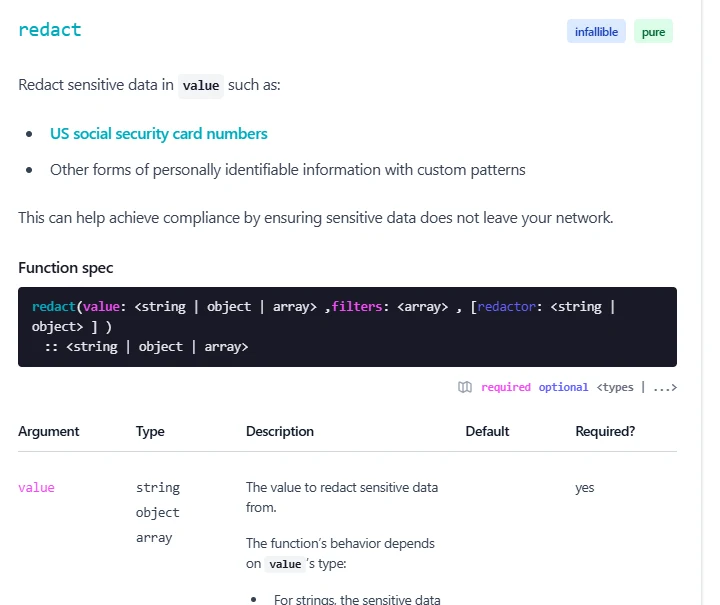
Vector can transform SQL Server log events through its Remap transform and Vector Remap Language. It can remove fields or apply matching and replacement rules before a sink receives the event. This is useful for teams that want redaction defined as part of a collector configuration.
Its strength is control over structured fields and event routing. The result depends on how the source parser represents the message and what happens when a transformation fails. A route for unprocessed events can have different exposure from the normal output.
Write a remap transform that targets all known SQL event fields and defines how errors are handled, using the documented VRL redact function. Keep the route before the general-purpose sink.
Validate one well-formed event and one malformed line with the same marker. Confirm the remap behavior and any dropped or rerouted record, and check that the normal destination retains the diagnostic keys.
- Compatibility
- Vector deployment with a supported log source, transform and sink.
- License and trial
- Open-source collector. Infrastructure and destination terms are separate.
OpenTelemetry Collector Contrib
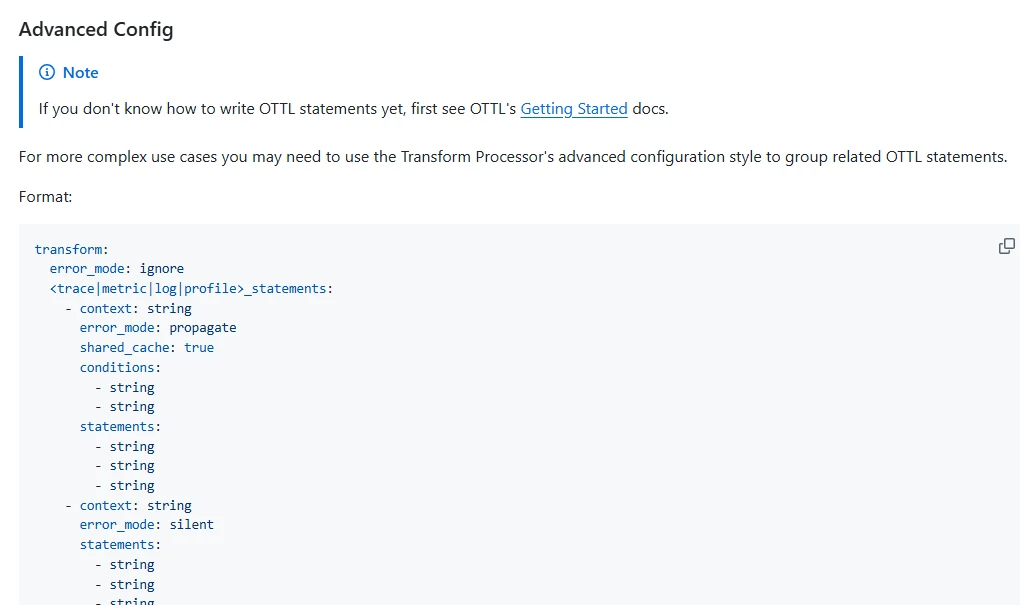
OpenTelemetry Collector Contrib can transform log bodies and attributes with the Transform Processor and supported OTTL functions. This is useful when SQL Server or application logs already pass through a collector and the team wants to remove sensitive fields before forwarding them to an observability backend.
The fit depends on which Collector distribution and processor versions are available. A resource attribute, log attribute and message body are separate contexts and need coverage appropriate to their contents. Processor order and error mode determine whether an event reaches a destination as expected.
Place the transform processor in the selected logs pipeline and scope its statements to the body and attributes that require handling. Review policy behavior for processing errors in the deployed Collector release.
Send synthetic events with text and structured bodies, then inspect each exporter result. Confirm no unintended route exports the original data and record distinct behaviors when the parsing or rule step fails.
- Compatibility
- Collector Contrib distribution or compatible build with the applicable processors and log pipeline.
- License and trial
- Open-source tooling and separate hosting or backend costs.
Pick the point where the original value must disappear
| What you need | Tools to shortlist | What to verify |
|---|---|---|
| Redact before logs leave a controlled network | Run the worker inside the boundary and review every configured output, including retries and diagnostics. | |
| Mask during ingestion to the existing log platform | Find the raw event in the actual destination and verify the same rule covers each route into the index or table. | |
| Clean up logs before sending them to Loki | Check stage order and the final message, labels and metadata that Loki receives. |
Place redaction before the SQL log destinations that need it
Map the original SQL Server or application log, any collectors and buffers, processing stages, exports and the search index. A processor only transforms the copy it receives. Keep raw source access restricted when legal or incident requirements still call for that copy.
Decide which metadata needs to stay searchable. Timestamps, instance and error code often matter more than parameter values or identifiers. Make a deliberate plan for invalid formats and transform failures before applying the rule across all SQL sources.
Before a shared log collector receives them
Change the application or source-side handling
Verify the original log and engine audit paths separately.
After collection and before multiple exports
Use a scoped collector pipeline
Check buffers, field parsing, output order and fallback routes.
At a supported destination's ingestion stage
Verify an ingest-time transformation
Check that every route uses it and record where earlier raw copies remain.
Send a synthetic token through each SQL log field and failure path
The SQL sample emits a single JSON event containing SQLTRIAL-PRIVATE-A1 in both a statement-like field and an error message. These are synthetic strings, and running the sample only returns a result. Send the event through a dedicated test input. Set the scanner to replace the marker or deliberately route it to an approved restricted path.
Then send a plain-text version of the synthetic record into the same test pipeline. Verify the desired policy for an unparsed line. Search all normal destinations, raw fields and labels for the marker, and record restricted test storage separately.
| Case | Expected output | Where to verify |
|---|---|---|
| Valid JSON with repeated token | Configured replacement in both fields | Search exported body, fields and labels |
| Invalid or unexpected format | Configured mask, drop or restricted route | Verify the raw marker never reaches normal sinks |
| Benign error and instance fields | Still available for troubleshooting | Compare event metadata before and after |
| Processor disabled or unavailable in lab | Explicitly handled failure path | Confirm alerts and verify output policy under failure |
How to compare these tools
Seed known secret-like values in multiline and structured logs. Check each sink and any forwarded error stream, then verify that redact rules leave the instance, timestamp and troubleshooting fields intact. Sources checked .
Test what lands in the index
Run this read-only SQL in the dedicated LogRedactionTrial database. Save the single synthetic output event through the approved test input. Test both the JSON output and a deliberately plain-text synthetic record. Keep a search by event ID for comparison.
Emit synthetic SQL Server log fields for a redaction test
T-SQL · 13 lines
- Run the fixture and send only synthetic payloads through the isolated test collection path. Track each test record by event ID and save the configured transform.
- Search for the marker and check diagnosis fields at every ordinary destination. Repeat with a malformed or plain-text input and verify the chosen error handling.
- Temporarily disable the lab rule or exercise its documented failure condition. Record normal and restricted outputs, retry storage and alerts. Restore the policy and rerun the valid and invalid cases.
Conclusion
Use the existing collector or ingestion stage if it matches the required boundary and you can verify every output. The trial passes when the test login and tokens disappear from every intended destination and the original troubleshooting fields still work in searches and alerts.
Frequently asked questions
Can these tools redact the SQL Server error log on disk?
They redact the diagnostic events you collect or send. The source file and any exported copy upstream of the rule still need access controls and a retention policy. Check which path generates the sensitive text so future events can omit it where possible.
Should I redact SQL Server logs before sending them to a cloud platform?
Use a worker or collector in the controlled environment when raw values must stay there. An ingestion-time rule in the cloud can keep data out of the final index or table after the event has already crossed the network boundary.
What can I keep when redacting SQL Server login failures?
Keep the error number, state, timestamp, instance and source information your troubleshooting policy needs. For error 18456 the state helps identify the failure reason. Check whether login names, IP addresses or hostnames need treatment under your policy.
Can a regex redact both SQL Server error messages and structured fields?
Many tools can handle both. Apply the expression to the diagnostic message or chosen field, and test original-message copies and alternate routes. Check multi-line records and JSON escaping against the collector’s actual event format.
Does a redaction rule change SQL Server’s transaction log?
The transaction log is part of SQL Server recovery. These processing rules act on copies of diagnostic log events that you send to a collector or monitoring platform.
Does removing a value from a log dashboard remove it from stored SQL logs?
Check where the change occurred. A display filter may mask results while the source, raw index, backups or another export still contains the value.
What if the SQL log isn't valid JSON?
Set an explicit rule for unparsed events. Trial a raw-text mask, a deliberate drop or a restricted destination according to the approved policy and verify that the normal sink receives no raw token.