

A physical Windows Server running SQL Server needs two recovery paths. A bare-metal backup helps rebuild the operating system, boot volumes and machine configuration. SQL Server backups let a DBA recover individual databases and follow the transaction log chain. Some products cover both paths with one platform, while others protect the database and rely on separate Windows recovery.
The distinction matters when a failed server must be rebuilt on different hardware. Boot media needs to see the network and disks, and SQL Server still needs compatible software, data paths and access to the backup chain. Compare how each product handles both a lost machine and a lost database, including which recovery steps remain with the operator.
SQL Server backup tools for physical Windows servers at a glance
Separate machine recovery from database and log recovery. Evaluate each listed tool for the scope it documents, along with any required companion protection.
| Tool | Protection scope | Prerequisite to record | Recovery proof |
|---|---|---|---|
| Windows Server Backup and native SQL Server backup | Windows critical volumes plus a separate SQL backup policy | Compatible Windows media, storage and SQL backup files | Rebuilt host, controlled SQL restore and role-specific query |
| Veeam Agent for Microsoft Windows | Supported Windows image recovery and configured processing | Bootable recovery media, drivers and destination access | Rebuild Windows and validate SQL and log strategy |
| Commvault 1-Touch Recovery and SQL Server Agent | Windows system recovery and SQL Agent protection | Supported OS recovery setup and SQL Agent input | Rebuilt host, SQL recovery job and restored identity |
| Microsoft System Center Data Protection Manager | System state or bare metal plus supported workload protection | DPM version, agent and recovery destination | Machine and database recovery records |
| Acronis Cyber Protect | Supported Windows machine and application-aware backup | Boot media and eligible SQL workflow | Windows boot, SQL readiness and application check |
| MSP360 Backup for Windows | Selected machine- and SQL-level features by edition | Exact plan, media, destination and key access | Separate proof for system and database recovery |
| Quest LiteSpeed for SQL Server | SQL-only backup and recovery workflow | Supported restore host and vendor backup components | Selected database point recovered on the rebuilt host |
| Redgate SQL Backup Pro | SQL-only backup and recovery workflow | Compatible tooling, archive access and encryption material | Selected SQL restore plus independent Windows recovery |
Windows Server Backup and native SQL Server backup
Windows Server Backup and wbadmin can capture critical Windows volumes for system recovery. Native SQL Server BACKUP can independently protect databases and transaction logs. This combination is useful for a small estate that already uses Microsoft tooling and can manage server and database recovery separately.
Its value is explicit control over what each job protects. Bare-metal recovery requires accessible media and compatible host hardware. SQL Server recovery still needs its own backup history, encryption keys and restore permissions. Each path should be exercised on the kind of replacement system the team expects to use.
Review wbadmin's documented critical-volume, system-state and VSS choices. Verify which Windows resources are covered and what recovery media and drivers the physical replacement requires.
Test native SQL full and log files separately. On the replacement, verify SQL instance settings, jobs and application login mapping before passing the service recovery.

- Compatibility
- Windows Server Backup and a supported SQL Server instance with suitable backup targets.
- License and trial
- Built-in Microsoft tooling. Windows, SQL Server and storage terms apply.
Veeam Agent for Microsoft Windows
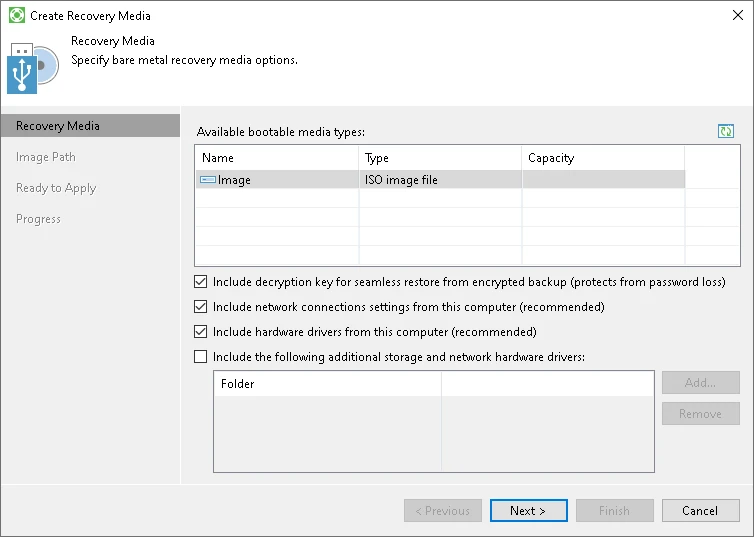
Veeam Agent for Microsoft Windows can take eligible machine backups, produce recovery media and use SQL Server-aware processing in supported configurations. It is useful for physical Windows servers where a team wants to recover volumes and protect the database workload through the same platform.
Its advantage is combining a system image with guest or application settings for SQL Server. The selected agent mode and edition determine which log-handling options are available. Recovery media must have the drivers and network access needed to find and restore the protected copy.
Create and test the documented Windows recovery media on approved compatible replacement hardware. Record the needed network and storage drivers and access to the actual backup set.
Recover the test machine and compare SQL's observed state with the backup policy. Confirm whether required SQL log points come from a separate workflow and test that independently.
- Compatibility
- Supported Windows agent, SQL Server-aware processing where required, and compatible recovery media and repositories.
- License and trial
- Commercial and applicable free options. Server and application features depend on the edition.
Commvault 1-Touch Recovery and SQL Server Agent
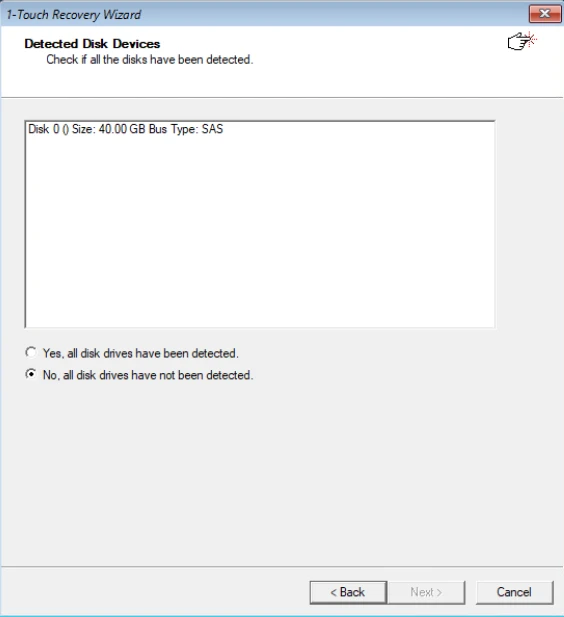
Commvault 1-Touch Recovery can help rebuild a supported Windows server, and its SQL Server Agent provides database-aware backups and restores. This is useful when an enterprise wants coordinated protection of a physical host and its SQL databases in one backup environment.
The recovery paths still have distinct dependencies. Bare-metal recovery requires compatible boot, storage and network settings, while the SQL Agent depends on the catalog, backup chain and destination engine. A test should show which data and configuration come from each source.
Verify the documented Windows full-system recovery requirements for the replacement and the SQL Server Agent requirements for the database protection. Keep identities and tools for those layers in the recovery record.
Recover the synthetic database on a rebuilt target and run the role-specific marker. Record the Windows recovery sequence and the source protection used for each SQL restore step.
- Compatibility
- Supported Commvault Windows recovery and SQL Server Agent configuration.
- License and trial
- Commercial Commvault licensing and recovery infrastructure.
Microsoft System Center Data Protection Manager
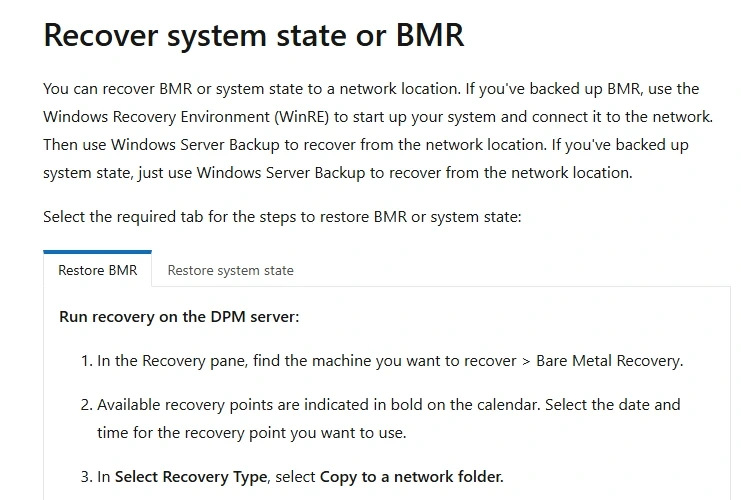
Microsoft System Center Data Protection Manager can protect a server’s system state or bare metal and offers separate SQL Server workload protection. That is useful when an organization already operates DPM and wants Windows and SQL Recovery policies within the same management infrastructure.
It fits teams able to provide the prerequisite protection agents, storage and compatible Windows versions. The host protection group and the SQL protection group prove different things. A SQL restore still needs a protected database and eligible target even after Windows boots.
Use the supported DPM combinations for bare-metal or system-state protection and check the requirements for restoring to the intended hardware. Record what separate SQL data protection delivers.
Compare a system rebuild and an individual database recovery exercise. Keep operator permissions, recovered SQL marker and any needed SQL Agent configuration in the final run evidence.
- Compatibility
- DPM with supported Windows Server and SQL Server versions and the appropriate protection groups.
- License and trial
- System Center and applicable Microsoft licensing and infrastructure.
Acronis Cyber Protect
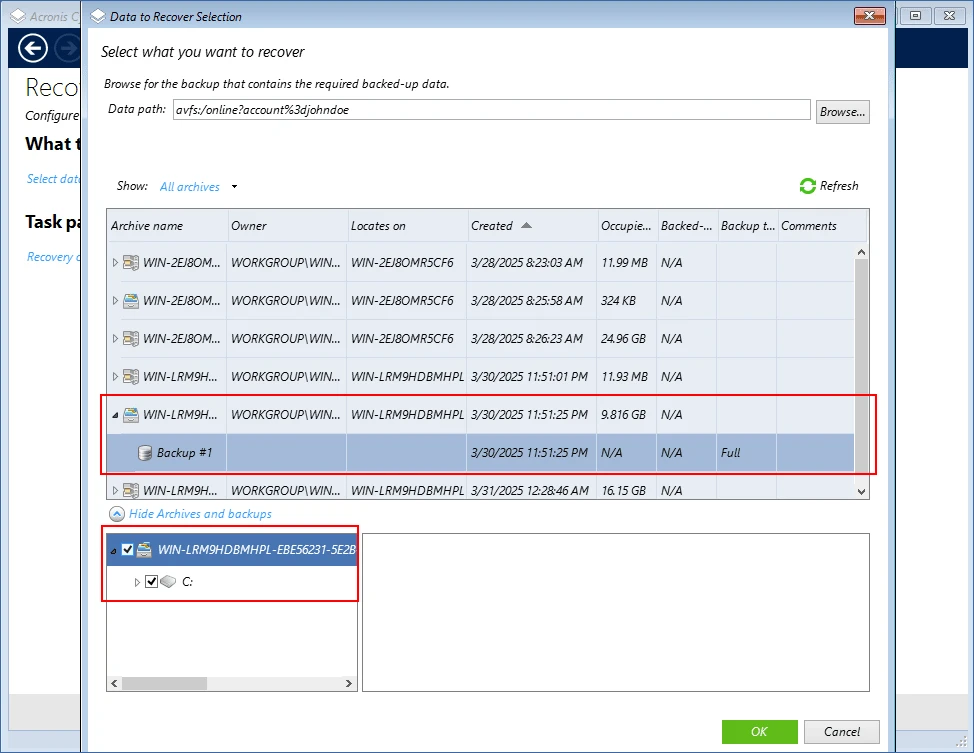
Acronis Cyber Protect documents application-aware backup for eligible workloads and offers recovery using bootable media. It is useful when a physical SQL Server needs an image recovery path as well as access to application data from the protected machine.
Its strength is combining backup and machine recovery in one operational workflow. The product and agent support determine which SQL recovery options are available. Storage and network drivers, firmware mode and SQL Server version can each affect a restore to a different machine.
Confirm the selected Acronis edition and mode support the physical Windows and SQL Server workload. Test the bootable media and driver visibility separately from the application backup result.
Check whether the recovered machine starts SQL Server with the intended service identity and whether the database or log point meets requirements. Record the client access evidence after the rebuild.
- Compatibility
- Supported Acronis Cyber Protect deployment, Windows host and applicable SQL Server configuration.
- License and trial
- Commercial Acronis licensing.
MSP360 Backup for Windows
MSP360 Backup for Windows provides Windows imaging and bare-metal recovery in supported editions. Its SQL Server backup workflow is available through the applicable product and edition. It is useful for teams that want to configure both server and database protection while sending backups to their chosen storage.
The fit depends on the edition and which backup plan created the copy. An image and SQL database backup can have different schedules and destination requirements. The team needs boot media, compatible equipment and the correct product setup to retrieve and restore each protected copy.
Use the current edition matrix to confirm available image and SQL protection features for your license and machine. Check whether you will need separate backup plans or recovery components.
Run both lab recovery types that the service depends on. Save the supported media, agent access and the SQL application marker for the rebuilt target.

- Compatibility
- MSP360 edition supporting the required image or SQL Server workflow, with accessible backup storage.
- License and trial
- Commercial MSP360 licensing and destination charges.
Quest LiteSpeed for SQL Server
Quest LiteSpeed for SQL Server protects the database and transaction log through its SQL backup and restore tooling. It is useful when a physical server already has a Windows recovery path and the DBA wants to manage SQL recovery, backup compression and restore behavior through LiteSpeed.
Its main value is SQL Server-specific recovery control. Rebuilding Windows is a separate dependency. The recovery host also needs compatible SQL Server and LiteSpeed tools, media access and the chain required for the intended recovery time.
Use LiteSpeed for the SQL database backup and recovery scope, with planned companion Windows protection. Record the vendor version and restore requirements when preparing a fresh instance.
Restore the database and verify the expected marker. Document which instance-level settings and identities must come from the Windows plan, a SQL system backup or a separate inventory.

- Compatibility
- Supported LiteSpeed and SQL Server versions on Windows.
- License and trial
- Commercial Quest license.
Redgate SQL Backup Pro
Redgate SQL Backup Pro provides SQL Server backup, verification and restore options on supported Windows servers. It is useful when a DBA wants repeatable database recovery while the infrastructure team already protects the physical host through separate Windows backups or images.
The choice is strongest when the SQL media and catalog are already managed in the product. A rebuilt machine still needs compatible SQL Backup components or an eligible conversion path. Host recovery, backup retention and application validation belong in the wider recovery plan.
Use the documented SQL Backup Pro requirements on the original and recovery SQL Server versions. Prepare the independent Windows path and the SQL Backup media and keys separately.
Prove a target restore without relying on the original SQL backup installation. Record what the replacement service and SQL reader need for a successful application connection.
- Compatibility
- Supported Windows SQL Server and SQL Backup Pro installation, with media and restore access.
- License and trial
- Commercial Redgate licensing.
Choose a backup path for the host and the database
| What you need | Tools to shortlist | What to verify |
|---|---|---|
| Recover Windows on spare hardware | Boot the recovery media on the actual spare. Check firmware mode, drivers, storage visibility and access to the backup. | |
| Restore a database using its SQL log chain | Confirm which job owns the SQL backups. Restore a base and subsequent log backup to a separate instance. | |
| Use built-in Windows and SQL Server backup features | Keep a reachable host image and maintain the native SQL backup chain independently. |
Separate Windows rebuild, SQL instance metadata and database recovery
A bare-metal recovery plan needs supported boot media, hardware drivers, system volumes and access to the backup. A database recovery also needs the correct SQL Server build, backup chain and encryption material. Document shared dependencies such as storage, domain identity or a repository credential.
A user database restored on another instance does not bring every server-level object with it. Verify the applicable logins, SQL Agent jobs and instance settings. Preserve needed metadata through an approved system backup or scripts. Use authorized SQL login migration methods and protect exported identity material.
The physical Windows host is lost
Use the Windows rebuild or bare-metal procedure
Verify boot media, replacement storage and SQL instance metadata.
A database or point is missing
Use the SQL backup and log plan
Recover supported media and check exact data and permissions.
The database opens but the application fails
Check login mapping, service identity and connectivity
Compare against the instance inventory and run a role-specific query.
Verify a restored database through a test application identity
On a supported replacement machine, recover Windows or prepare a clean SQL Server instance. Restore a synthetic PhysicalSqlRestoreTrial database containing dbo.PhysicalRestoreTrialMarkers with MarkerId and Marker columns and marker physical-01 at ID 1. Re-establish the approved PhysicalRestoreReader database identity and minimum access.
Use the intended application route to check SQL readiness and authorization. Verify service accounts, Agent jobs and other SQL instance dependencies through separate owner-approved checks. Record Windows time, SQL restore time and time to the test application result independently.
| Layer | Evidence | Question answered |
|---|---|---|
| Replacement hardware and Windows | Boot media, storage and compatible drivers | Can Windows recover without the original server? |
| SQL instance and metadata | Service status, approved logins and required jobs | Can the recovered instance run required workloads? |
| Database recovery | Backup chain, reported instance and marker | Did the intended database content return? |
| Role-specific application query | Expected login mapping, route and read result | Can the service use the recovered database? |
How to compare these tools
Test Windows recovery on spare hardware or a supported lab target, then restore the SQL Server database to the required time. Verify storage, drivers and the backup log chain. Sources checked .
Recover a physical host and check a newer SQL backup
Prepare the synthetic marker before backup. After restoring on the isolated replacement, connect under the approved lab application identity and run this proof. Set the expected mapped database user if the pilot uses a different dedicated identity.
Verify the replacement SQL Server and restored application account
T-SQL · 20 lines
- Rehearse Windows preparation and identify which backups reconstruct the SQL instance and user database. Retain recovery media and alternate backup access for the authorized lab.
- Restore the SQL database, configure the intended trial identity and run the marker through the actual lab application route. Capture the target SQL instance, database user and successful result.
- Verify required jobs, service roles and optional point-in-time recovery separately. Compare elapsed times and record what needed to be rebuilt manually.
Conclusion
Choose the host recovery workflow based on the spare you can actually boot. Choose the database backup workflow based on the log chain you can restore from that machine. Record the two timings and the credentials or keys the recovery required.
Frequently asked questions
Does bare-metal recovery recover SQL Server to a specific time?
Bare-metal recovery restores the Windows machine and selected volumes to the image’s recovery point. Use the applicable SQL database backup and log sequence when the application needs recovery to a different database timestamp.
Can Windows Server Backup protect a physical SQL Server?
Windows Server Backup can cover host recovery on supported releases. Verify the SQL Writer behavior in your backup configuration and keep a documented native SQL full and log backup plan for database point-in-time recovery.
What should I test before choosing a bare-metal backup tool?
Boot the tool’s recovery media on the actual spare or supported target. Verify boot mode, storage and network drivers, target disk size and access to the backup location while the original machine is offline.
Can I use SQL Backup Pro or LiteSpeed for the whole Windows server?
These tools cover SQL Server database backups and restores. Pair either one with a documented Windows recovery path that covers boot volumes, drivers and server configuration.
How do I check that the recovered SQL database is usable?
Use the expected application login to query known data. Check that the database contains the marker written before the final log backup. Restore required encryption material, login SIDs and instance dependencies where applicable.
Does restoring a database on a new physical host recover its SQL Server logins?
Check how the server-level logins and database users were restored or recreated. The database alone can contain a user whose corresponding server login is missing or maps to a different identity.
Should the operating system backup and SQL backups be tested independently?
Test each recovery path that the service needs. A database-only incident and a lost physical server require different steps and deliver different recovery evidence.