

SQL Server backup compression trades CPU and processing time for less data written and transferred. Quest LiteSpeed and Redgate SQL Backup Pro give a DBA different controls over the compression process and store backups in their supported formats. Native SQL Server compression is also a useful baseline because it can keep backup and restore on the same engine tooling.
A useful comparison measures size, elapsed backup time, CPU and restore time on representative data. Encryption, existing compression and storage throughput can change which setting works best. File format matters too. A smaller file is only useful if the recovery team has the engine, converter or backup application needed to read it.
Quest LiteSpeed vs Redgate SQL Backup Pro compression at a glance
Identify which component compresses the data and what a clean restore host needs. Include native compression as a baseline on the same SQL Server release.
| Tool | Compression path | Useful evidence | Restore prerequisite |
|---|---|---|---|
| Quest LiteSpeed for SQL Server | LiteSpeed settings and documented backup format | Selected setting, actual bytes and SQL host load | Supported LiteSpeed or conversion path for the generated media |
| Redgate SQL Backup Pro | Product-specific SQL Backup Pro levels | Selected level, SQL Backup log and file size | Compatible restore components or supported conversion |
| Native SQL Server backup compression | Engine compression algorithm supported by the build | msdb byte fields and measured work on SQL Server | Compatible SQL Server and keys for the selected backup |
| Ola Hallengren SQL Server Maintenance Solution | Configured native or selected supported backup solution | CommandLog and underlying backup or media records | Depends on the actual backup format used |
| MSP360 Backup for SQL Server | Applicable backup plan compression and encryption | Size of SQL backup and transferred bytes by stage | Verified version and encryption recovery path |
| SQLBackupAndFTP | SQL backup options and applicable packaging | Backup size and archive or transfer size independently | Recover and verify the native or packaged media |
| Veeam Plug-In for Microsoft SQL Server | Supported plug-in storage compression settings | Plug-in job, repository and measured bytes | Supported plug-in recovery and storage path |
| Commvault SQL Server Agent | Agent and storage policy compression | SQL backup job and downstream storage bytes | Required Agent and compatible policy and credentials |
Quest LiteSpeed for SQL Server
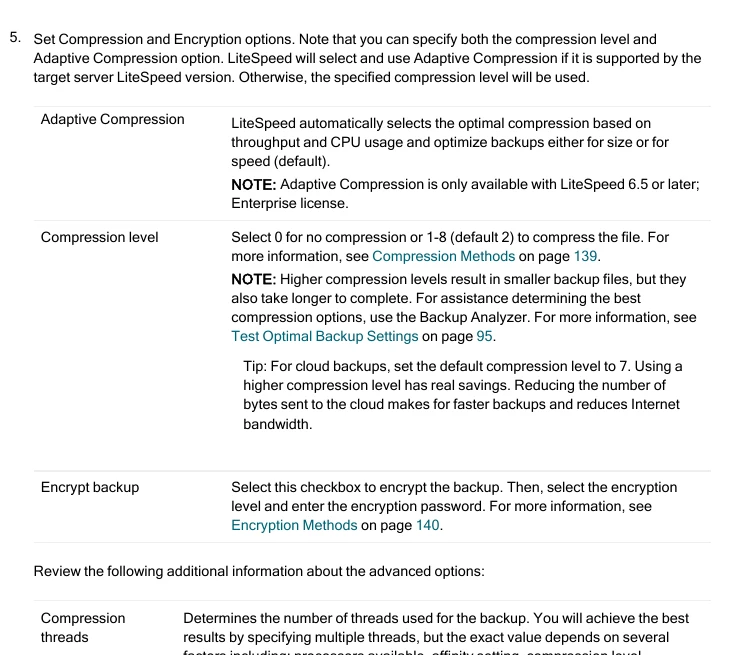
Quest LiteSpeed for SQL Server provides SQL Server backup and restore with configurable compression and documented adaptive compression options. It is useful when backup size and throughput need to be tuned separately from native SQL Server defaults and the team already manages SQL Server protection through Quest.
The key trade-off is CPU against storage and transfer time on the actual workload. Backup format and recovery tooling are also part of the decision. A team using LiteSpeed for protected copies needs an available restore or documented extraction path in its recovery environment.
Use a current LiteSpeed version that supports the pilot SQL build and confirm how the documented compression settings apply to the backup type. Record preset, input data set and version for each run.
Export job duration and actual storage bytes, then recover on the planned clean target. Verify whether your restore procedure requires LiteSpeed components, a supported conversion process or additional encryption material.
- Compatibility
- Compatible LiteSpeed and SQL Server deployment and access to the selected store.
- License and trial
- Commercial Quest licensing.
Redgate SQL Backup Pro
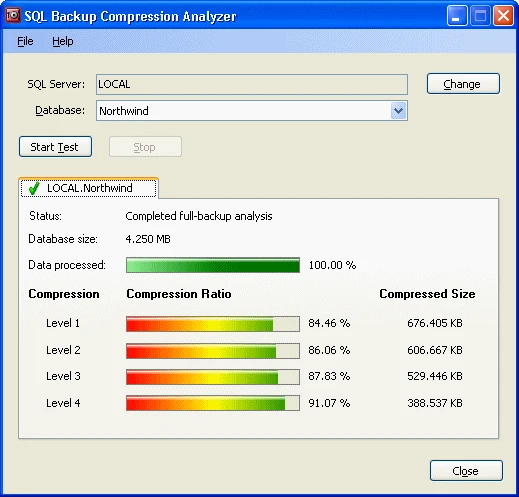
Redgate SQL Backup Pro offers multiple compression levels and a Compression Analyzer for trying them on a chosen database. It is useful when a DBA wants evidence about size and elapsed time before choosing a scheduled setting. A backup job can also be defined through the supported SQL Backup tooling.
Its strength is giving the team a direct way to compare Redgate compression levels. Results depend on the data and storage path. The SQB format also makes the supported restore tooling or conversion path part of the decision, including when recovery happens on another server.
Select a modest level for the first comparison and try a higher level only if there is CPU headroom. Redgate documents four SQL Backup Pro compression levels. Record the exact level and backup type for the trial.
Capture generated file bytes, backup time and foreground workload latency. Restore the media with the planned supported tooling and compare the whole recovery workflow, including packaging or conversion where required.
- Compatibility
- Supported Redgate SQL Backup Pro and compatible SQL Server versions.
- License and trial
- Commercial Redgate licensing.
Native SQL Server backup compression
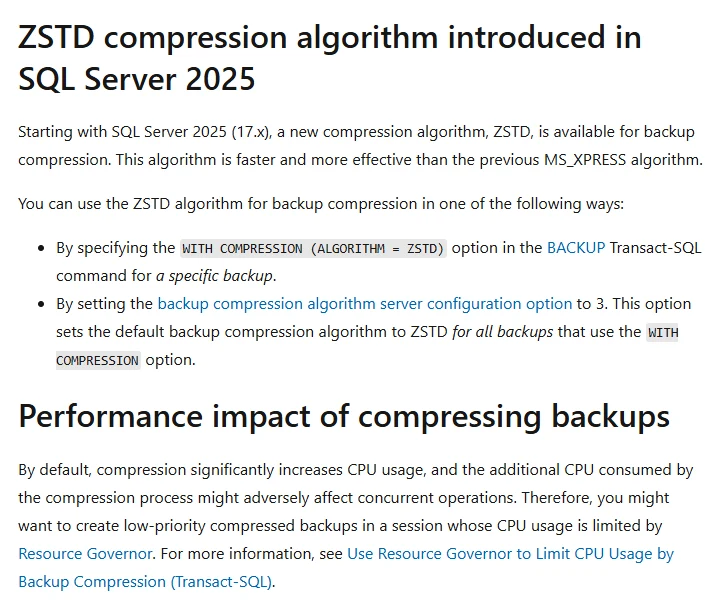
Native SQL Server backup compression reduces the size of engine-generated backup media and remains available through standard backup and restore tooling. Microsoft documents algorithm choices for eligible releases, including ZSTD in SQL Server 2025. It is useful as a baseline for comparing commercial software and for environments that prefer native formats.
Compression support and algorithms depend on SQL Server version and edition. Data that is already compressed or encrypted can behave differently, and CPU versus storage bottlenecks influence throughput. The restore target needs to support the backup format and version that produced the media.
Use the default supported native compression as a comparison baseline and document the chosen engine algorithm. SQL Server 2025 adds a ZSTD option in the documented syntax. Confirm what your actual edition and build support.
Use backupset evidence and actual backup media bytes where possible. Record backup and restore elapsed separately and verify encrypted or TDE-protected media on the recovery host.
- Compatibility
- SQL Server version and edition with the appropriate native backup compression support.
- License and trial
- Built into supported SQL Server editions.
Ola Hallengren SQL Server Maintenance Solution
Ola Hallengren’s SQL Server Maintenance Solution wraps native SQL Server backups in configurable T-SQL jobs. Its backup settings can apply the engine’s compression behavior and other backup options consistently across servers. This is useful when a team wants a repeatable native format and backup policy.
Its strength is consistent jobs and logging across an estate. The engine still does the actual compression, so supported algorithms and behavior follow the SQL Server build. Job configuration, offsite copies and tested restore capacity remain the operator’s responsibility.
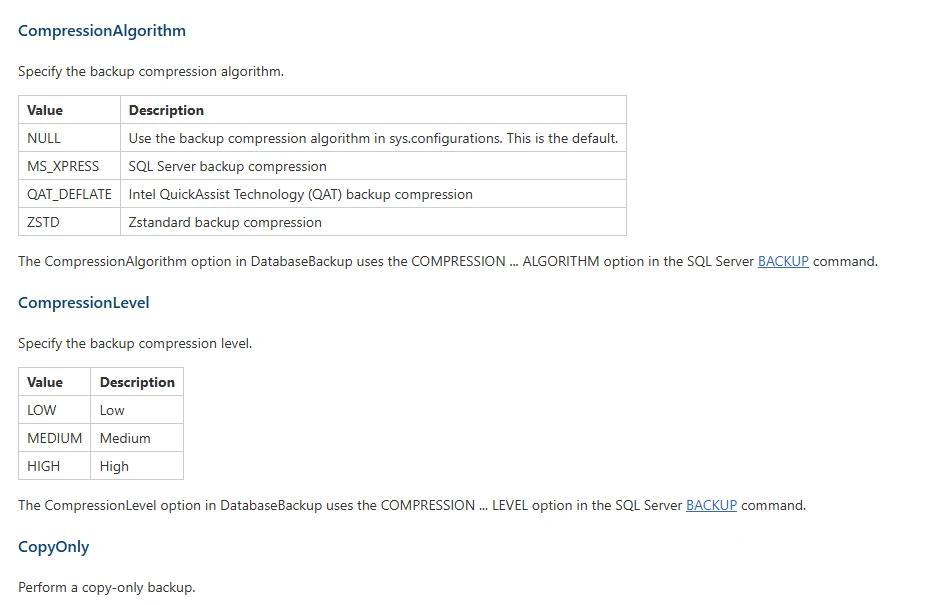
Identify whether DatabaseBackup invokes native SQL backup or a supported vendor path for the pilot. Match the compression settings to the selected backend and archive the actual generated command and job result.
Compare the underlying backup bytes and restore steps. A change to the maintenance job can select a different format or setting, so note which route produced each recorded backup.
- Compatibility
- Supported SQL Server and installed Maintenance Solution with scheduling and storage access.
- License and trial
- Free maintenance scripts. SQL Server and infrastructure terms apply.
MSP360 Backup for SQL Server
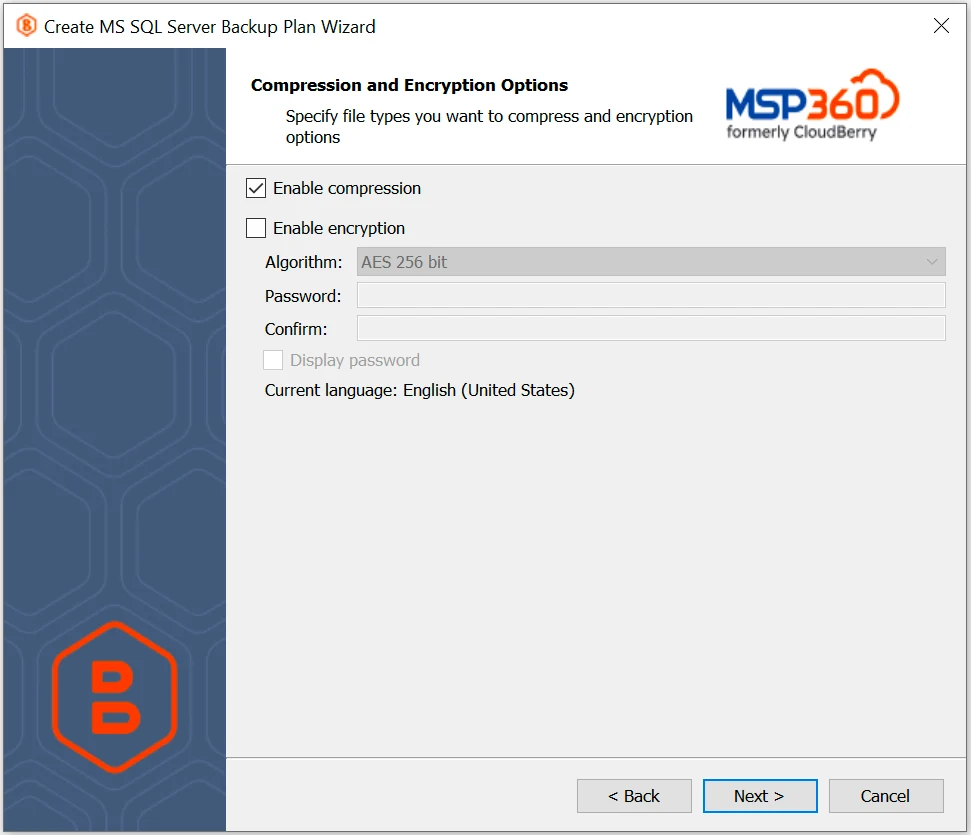
MSP360 Backup for SQL Server offers its backup plan workflow with compression and storage destinations. Its documentation states that it can use native compression on supported SQL Server versions and a custom algorithm elsewhere. It is useful when the backup also needs to be uploaded to configured storage.
The backup path can affect both performance and restore compatibility. The actual compression method depends on SQL Server support and product settings. Encryption, plan configuration and cloud storage should be kept recoverable on an alternate host if that is part of the design.
Check the compression and encryption settings documented for the supported SQL backup workflow. Record whether metrics describe source SQL payload, worker output or cloud storage transfer in your selected deployment.
Restore the trial output on an independent target and check key availability and client load during the backup test. Compare the backup format and transfer stages separately from vendor claims about reduction.
- Compatibility
- Supported MSP360 Backup for SQL Server configuration and storage target.
- License and trial
- Commercial MSP360 licensing and storage terms.
SQLBackupAndFTP
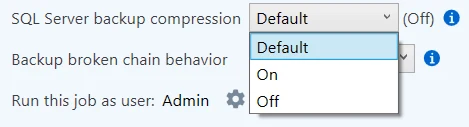
SQLBackupAndFTP schedules SQL Server backups and can compress and deliver them to supported destinations. This is useful for smaller teams that want a repeatable backup and transfer job with less manual coordination. Compression can be part of the stored or delivered backup workflow.
Its fit depends on SQL Server’s capabilities and the application’s archive options. A compressed archive and a compressed native SQL Server backup are separate layers. The team should know which files will reach the destination and what the recovery operator must do to read them.
Review the SQL Server plan settings and identify whether the result is an engine backup, additional archive packaging or both. Keep the innermost backup size distinct from the packaged bytes.
Check the work needed to download, unpack and restore on the target. Record this duration alongside the backup job time and inspect a row in the recovered lab database.
- Compatibility
- SQLBackupAndFTP with a supported SQL Server connection and destination.
- License and trial
- Free and paid editions with different limits.
Veeam Plug-In for Microsoft SQL Server
Veeam Plug-In for Microsoft SQL Server can send database backups to Veeam repositories through its supported SQL protection workflow. It is useful when repository policies and data efficiency already matter to the estate and backups should share the same management and recovery infrastructure.
Its main strength is using the Veeam backup and restore path for SQL Server workloads. Compression and storage behavior depend on the selected plug-in and repository configuration. A repository footprint needs to be compared with elapsed time and tested restore behavior before treating it as a substitute for a native file.
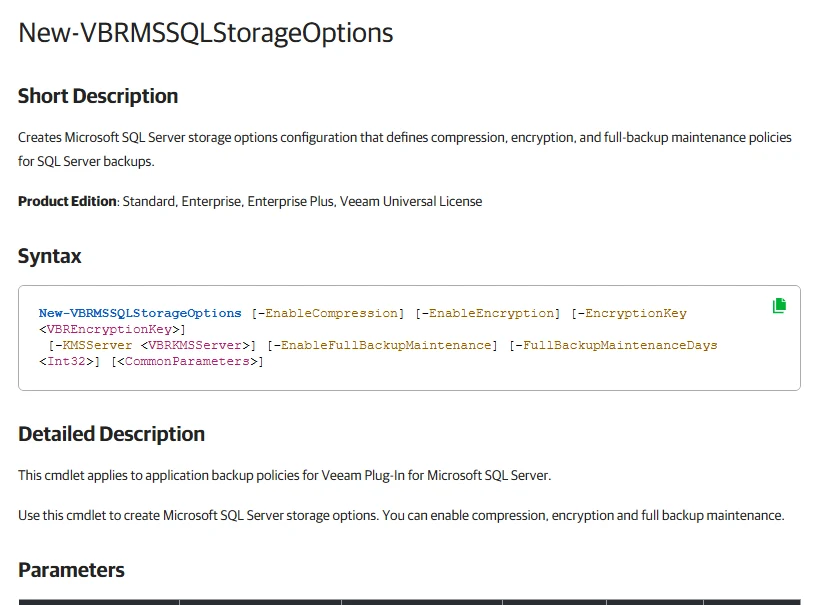
Confirm the applicable Veeam plug-in compression and repository settings for the selected SQL Server workload. Record where the processing and storage measurement happen for this test setup.
Run the backup with representative application activity on a dedicated lab SQL Server. Compare database host workload, repository bytes and the documented restore result rather than a cross-product level number.
- Compatibility
- Supported SQL Server plug-in, Veeam components and repository.
- License and trial
- Commercial Veeam licensing.
Commvault SQL Server Agent
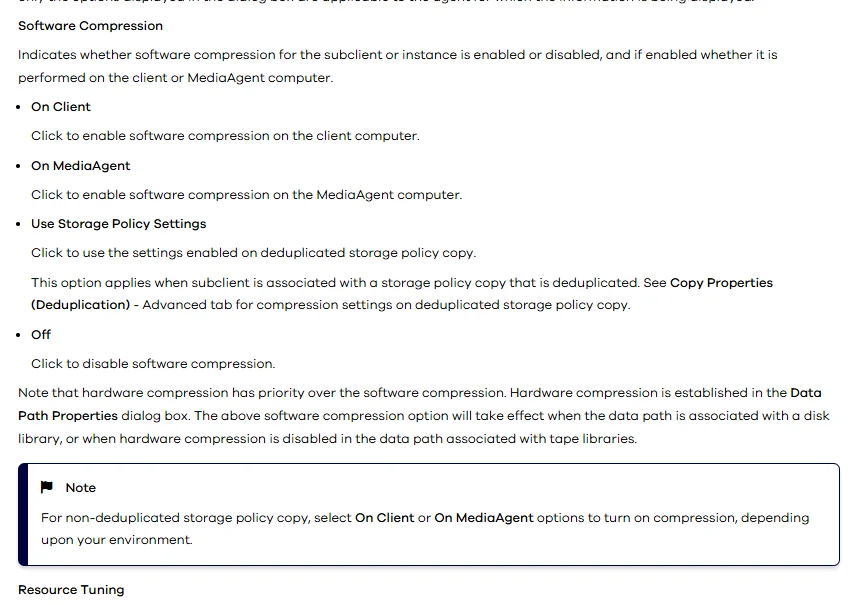
Commvault SQL Server Agent protects SQL Server backups under storage policies. Backup data can use supported policy-level compression and storage options. This is useful in a centrally managed estate where backup retention, copy movement and storage use are evaluated together.
Its useful comparison is the complete storage and recovery path. Engine-level backup settings and storage policy effects can both influence the observed size. Restore readiness depends on the Commvault catalog, media coverage and compatible target, as well as the footprint of the copy.
Review in the SQL Server Agent documentation where compression operates for the chosen storage policy. Record agent and deployment versions and whether deduplication or another storage operation also affects the resulting bytes.
Keep source backup and repository evidence separate when comparing with native files. Restore to the intended lab target and record the data verification and any processing prerequisites.
- Compatibility
- Commvault SQL Server Agent and configured storage policy.
- License and trial
- Commercial Commvault terms.
Quest LiteSpeed and Redgate SQL Backup Pro side by side
| Feature | Quest LiteSpeed for SQL Server | Redgate SQL Backup Pro |
|---|---|---|
| Compression controls | The 9.0 User Guide lists levels 0 through 8 and an Adaptive Compression option in the backup wizard for supported LiteSpeed targets. | The SQL Backup 10 documentation lists levels 0 through 4. Levels 2 and 3 use zlib and level 4 uses LZMA. Level 0 disables compression. |
| Choosing a setting | Test the same dataset with fixed and adaptive settings. Record which settings the backup job used and check SQL Server responsiveness during the run. | Use Compression Analyzer for a supported full backup test. Compare a practical level and the high-compression level with the same I/O and CPU measurements. |
| Backup size and elapsed time | Record total backup file bytes, elapsed time and CPU for the SQL Server workload and backup process. Keep file stripes and storage comparable. | Record the same measures for the SQL Backup files and processes. Use actual completed job size instead of the analyzer estimate for the comparison. |
| Restore software | Identify the supported LiteSpeed restore or extraction path for the exact backup format and encryption settings you use. | Identify the SQL Backup restore or conversion workflow for the generated SQB file and any credentials the recovery instance requires. |
| Recovery check | Restore the compressed backup to a separate instance. Record total time until the lab query returns the expected value. | Restore the compressed backup on the same target used for the other runs. Record total elapsed time and query the same test row. |
Choose where compression runs
| What you need | Tools to shortlist | What to verify |
|---|---|---|
| Compare dedicated SQL Server backup compression | Measure the backup and restore windows together with CPU and the exact bytes in the finished files. | |
| Use SQL Server’s own backup compression | Record the SQL Server build and algorithm. Confirm which tools use native compression and which can add another stage. | |
| Measure compression inside a backup platform | Record both workload-level backup size and destination storage. Identify whether compression or deduplication changed the effective size. |
Choose compression settings under the same SQL workload limit
Quest's and Redgate's level numbers are product settings. Choose settings that meet the same backup window and foreground workload limit. Use the same SQL build, representative dataset, target storage class and encryption policy for each full backup. Record where compression runs, including any agent or storage process.
Keep the source identical between runs. Alternate the test order and repeat enough times to observe variability. Take the restore and application timing from the same repeated tests. Use the same types of byte measurements or label them separately.
Limited backup window or foreground CPU headroom
Compare a modest setting and the native baseline
Track elapsed time and application latency during the backup.
Limited storage or transfer bandwidth
Compare higher compression settings at equivalent policy
Record actual media, transfer bytes and the restorable format.
Strict recovery time on a clean host
Add an independently timed restore
Count unpacking, prerequisites and verification as separate phases.
Record backup size, workload impact and restore proof
Use SQL Server msdb results for backup sets that the SQL engine records in the local history. This read-only query shows the documented logical and stored byte fields when they are populated. If a tool only reports job or storage bytes elsewhere, put them in a separate column with their source.
Compare matching full backups of the same starting data and compute a ratio only from comparable fields. Record actual media bytes and restoration time independently. Test a marker read on a restored lab target and include restore components and key access in the operator notes.
| Measurement | Capture method | Control |
|---|---|---|
| Backup duration and application latency | SQL or vendor job time and representative workload p95 | Same concurrency, source, backup type and target class |
| Logical and stored bytes | msdb for supported records and actual media size | Keep deduplicated repository and transferred bytes separate |
| Restore elapsed and dependency | Clean target job start, completion and proof query | Same target resources and documented format |
| Version and settings | Engine, vendor, level, algorithm and encryption | Compare the exact recorded setting |
How to compare these tools
Use the same source, recovery mode, storage and backup type. Record elapsed time, compressed size, CPU and whether the proposed recovery host can read the backup. Sources checked .
Measure the backup and the recovery
Create a disposable BackupCompressionTrial database with representative synthetic data and a marker for restore verification. Run matching full backup trials, recording the exact format and settings in a lab manifest. Read the local SQL history under an authorized account. Collect third-party values independently when unavailable in msdb.
Read recorded byte and elapsed-time evidence for comparable full backups
T-SQL · 20 lines
- Record the chosen settings and benchmark conditions. Create the matched full backups and collect native history, product job metrics and measured media size where available.
- Restore each result to a clean compatible test target. Record preparation and job time separately. Read the synthetic marker and confirm restore success independent of archive size.
- Compare each setting against the actual operating limits. Keep unknown metric fields and different storage measurement points labeled in the benchmark record.
Conclusion
Trial LiteSpeed if the documented fixed or adaptive compression controls suit your workload. Trial Redgate if its per-job settings and analyzer fit the way you schedule SQL backups. Keep the native SQL Server results next to both. Pick a configuration that saves enough space while meeting the backup window and the restore target.
Frequently asked questions
Which compresses SQL Server backups more, LiteSpeed or Redgate?
The result depends on the data, compression settings, CPU and backup path. Run both on the same database and compare total stored bytes, backup time and restore time.
Should you test native SQL Server backup compression too?
Yes. Compare the supported compression algorithms on your SQL Server version. SQL Server 2025 introduced ZSTD for backup compression. Test it alongside the existing native option where the deployed build supports it.
Can I compare compressed backup size using msdb alone?
Use msdb for metadata recorded by SQL Server. Record the total physical file size for each run and keep vendor repository compression or deduplication as a separate measurement.
What should I check before restoring a proprietary compressed backup?
Verify the required restore or conversion utility, supported version, backup stripes and encryption material. Restore to another instance before using that configuration for production recovery.
Does a smaller backup always restore faster?
Restore time also depends on read throughput, decompression, database file writes and the target. Time the recovery on the same target and wait for a real query to return the expected result.
Is Quest compression level 4 equivalent to Redgate compression level 4?
Treat the numbers as vendor-specific settings. Compare actual bytes, run time, workload impact and recoverability for the levels you test on equivalent inputs.
Can smaller backups be assumed to restore faster?
Measure restore time on the intended target. Reads, decompression, encryption material, data-file writes and any unpacking or conversion all affect the recovery workflow.