

VM disaster recovery tools replicate, start and reconnect the machines that run an application. For SQL Server, that can recover the operating system, instance configuration and attached database disks together. The VM recovery point still has to be suitable for SQL Server. Restoring to a precise transaction time uses a separate SQL backup or replication workflow.
The most useful products can test startup and networking without exposing the recovered workload to production. A SQL Server plan often needs storage, identity, DNS and application tiers to come up in a specific order. Compare how each tool chooses a recovery point, validates the application and manages writes after failover, including when the primary site returns.
VM disaster recovery tools for SQL Server at a glance
Start with the supported virtualization platforms and test failover workflow. Use application-level checks to verify the actual SQL Server recovery.
| Tool | What it orchestrates | Dependency to verify | Trial evidence |
|---|---|---|---|
| Microsoft Azure Site Recovery | Azure Site Recovery recovery plans | Supported SQL VM topology, virtual network and role | Test failover job, chosen recovery point and SQL checks |
| Veeam Recovery Orchestrator | Available automated recovery plan steps | Supported replica or recovery source and scripted work | Plan state and service readiness checkpoints |
| HPE Zerto Software | Supported replication and failover grouping | Platform, application grouping and selected recovery point | Recovery group and app-side verification |
| VMware Live Site Recovery | VMware site recovery plans | Network mapping, compatible replication and protected groups | Isolated plan result plus database status |
| Commvault Auto Recovery | Failover group operations and recovery workflows | Group ordering, dependencies and supported target | Recovered group and SQL access state |
| Nutanix Disaster Recovery | Supported Nutanix platform and recovery plans | Cross-site infrastructure, network and recovery access | Proof of required workload startup and usable database |
| NAKIVO Backup & Replication Site Recovery | Configured site-recovery jobs | Supported VM platform, ordering and test mode | Task detail and successful SQL client check |
| Dell RecoverPoint for Virtual Machines | Protected VM replication and recovery networks | Supported VMware and failover placement | Recovered VM path and target SQL workload check |
Microsoft Azure Site Recovery
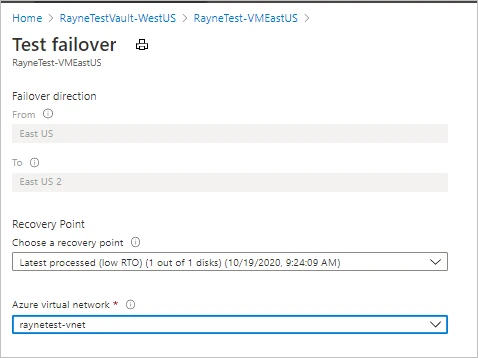
Azure Site Recovery replicates supported virtual machines and organizes failover into recovery plans. A plan can group VMs in startup order and run eligible automation before or after a group. It is useful when a SQL Server VM and the application servers around it must move into Azure together.
The plan controls machine recovery and the sequence of workload checks. The selected recovery point can have different consistency properties. Destination networking and SQL Server validation are part of the plan, especially when the database requires a particular restore point or availability group procedure.
Define the startup sequence in a documented recovery plan and map the isolated test network before scheduling a job. Record which recovery point and connectivity rules the selected SQL VM topology supports.
Compare job output with end-to-end readiness. Verify DNS, security rules and the role the test application uses before calling the database recovered.
- Compatibility
- Azure Site Recovery with a supported VM replication scenario and prepared Azure recovery network.
- License and trial
- Azure Site Recovery and target infrastructure charges apply.
Veeam Recovery Orchestrator
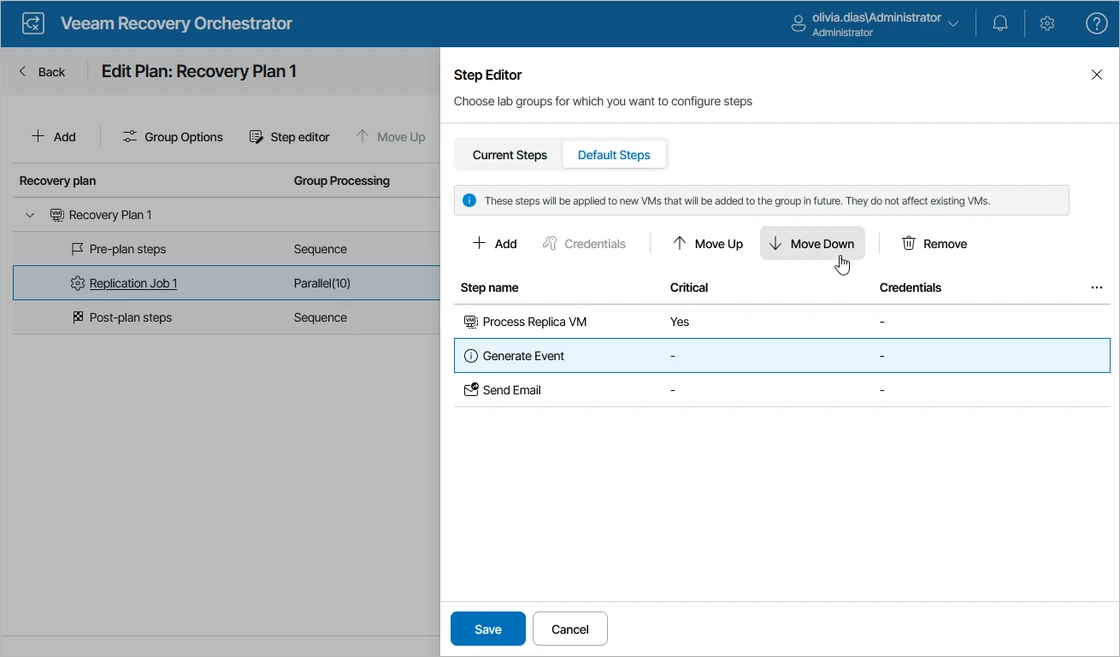
Veeam Recovery Orchestrator builds recovery plans from supported Veeam backups, replicas or other eligible recovery sources. Plans can contain ordered steps and tests. It is useful when a team already protects SQL Server VMs in Veeam and needs documented recovery of the wider application.
Its strength is making execution order, testing and evidence repeatable. The supported hypervisor, plan type and available test functions affect the workflow. SQL Server startup and application checks should be represented in the plan so a powered-on VM is only one recorded milestone.
Use plan steps suited to the documented source and target type. Define an explicit check after SQL Server starts and another after the application can connect with its test service account.
Collect the ordered plan and execution times, then run the same test with one controlled dependency failure. Verify that a script or role failure stays visible in the recovery report.
- Compatibility
- Veeam Recovery Orchestrator and eligible managed recovery sources and infrastructure.
- License and trial
- Commercial Veeam orchestration license and underlying backup requirements.
HPE Zerto Software
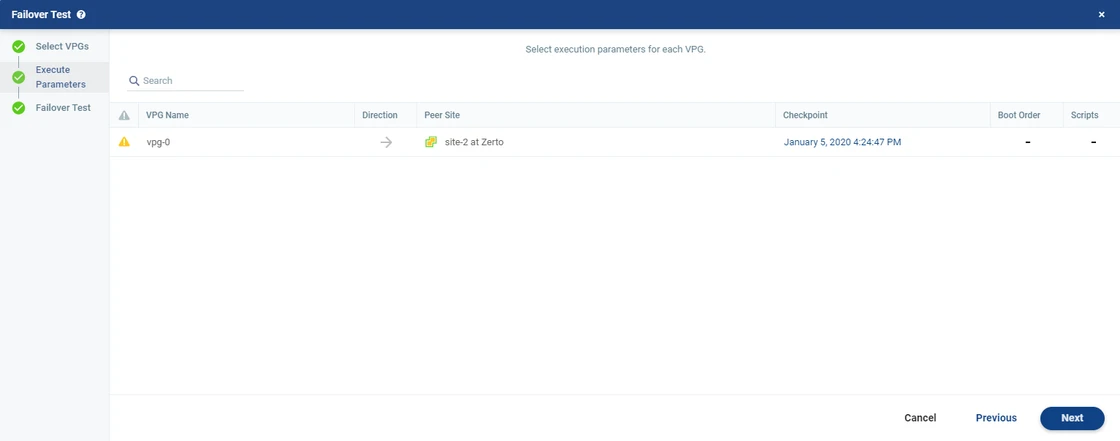
HPE Zerto can protect groups of related VMs through virtual protection groups and use journal checkpoints for supported recovery. This is useful when a SQL Server VM, application VMs and related services need the same coordinated recovery workflow and a test environment can be isolated.
The checkpoint, boot order and recovery network determine what the recovered application can reach. A journal point is useful for machine recovery, while its SQL Server consistency and the application’s ability to use it depend on the workload. The live failover and failback sequence need their own evaluation.
Check that the protected group and replication settings are supported for the selected SQL Server topology. Label the chosen journal recovery point and all VMs required by the application before a test.
Validate cross-VM consistency expectations with the vendor and prove the actual data recovered from the selected point. Time client routing and queries after initial VM startup.
- Compatibility
- Supported Zerto production and recovery environments with a configured protection group.
- License and trial
- Commercial HPE Zerto licensing.
VMware Live Site Recovery
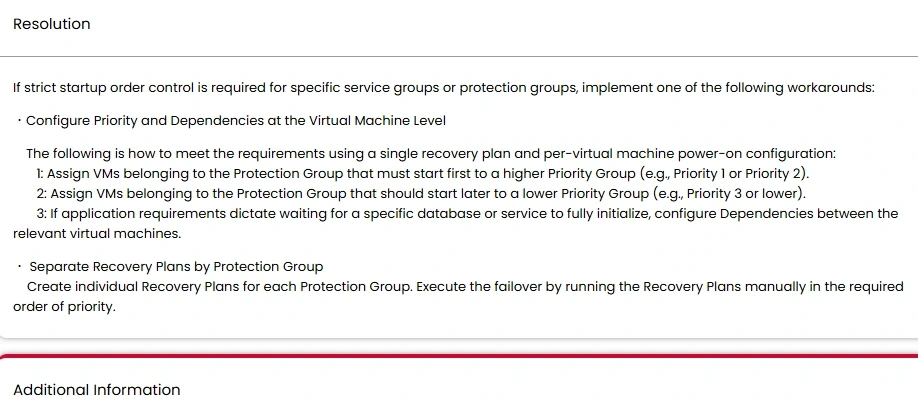
VMware Live Site Recovery can group protected VMware workloads into recovery plans and test how they start at the recovery site. Its orchestration is useful when SQL Server runs inside a vSphere application estate and restoring dependent virtual machines and network mappings together is important.
Its value depends on the underlying replication method and recovery point, plus the tested guest networking configuration. An isolated test can prove that a group boots and applications connect. SQL Server consistency and log-based recovery need the verification appropriate to that workload.
Verify the supported VMware recovery plan and array or replication setup, including the test network and target resource mappings. Record how a SQL Server VM and app workload are grouped.
Run an isolated plan and compare power-on status with SQL Database Engine availability and the test app's login. Keep the recoverable point and original plan with the drill results.
- Compatibility
- Supported vSphere environment with applicable replication and Live Site Recovery configuration.
- License and trial
- Commercial VMware and applicable replication licensing.
Commvault Auto Recovery
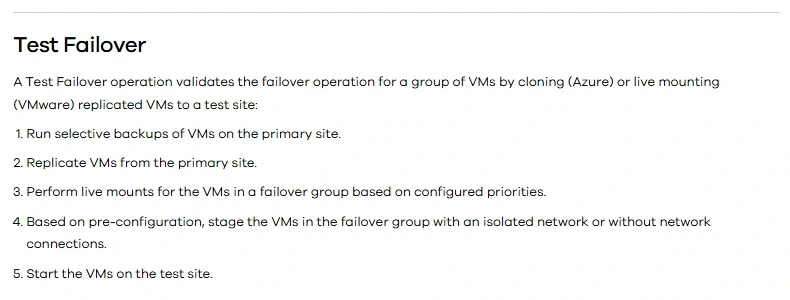
Commvault Auto Recovery uses failover groups to coordinate replicated virtual machines. Supported workflows include test boot, isolated test failover and planned or unplanned failover. This is useful when an organization already protects workloads in Commvault and wants its SQL Server application moved as a group.
Its strength is defining which machines move and how the destination is validated. Available test and failback actions depend on the source and target platform. The VM recovery point and SQL Server’s recovery requirements should be assessed together, especially after the application accepts writes at the destination.
Use a supported Auto Recovery failover group and identify dependency ordering and expected network transitions. Save the documented plan and its startup or health steps under the authorized test scope.
Match each group operation with corresponding SQL Server and application observations. Verify failback or cleanup steps separately so no temporary test resources are left on the intended application route.
- Compatibility
- Commvault Auto Recovery with a supported failover group and target platform.
- License and trial
- Commercial Commvault licensing.
Nutanix Disaster Recovery
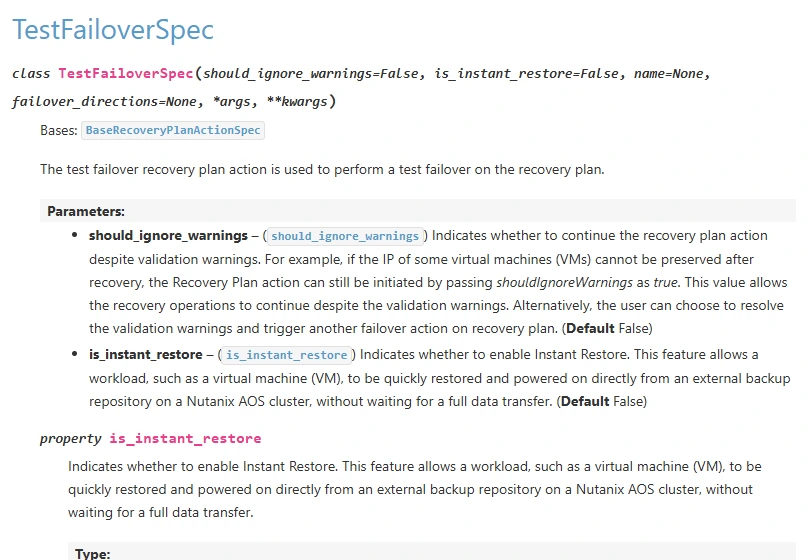
Nutanix Disaster Recovery can use protection and recovery plans and supports testing failover in applicable Nutanix environments. It is useful for SQL Server applications that run on Nutanix and need virtual machine replication and orchestration as part of a wider infrastructure recovery.
Its main value is alignment with the existing Nutanix platform. The supported source, destination, recovery plan and network mappings determine what can be tested. The SQL Server workload still needs verification at the recovered time and a defined way to return to production.
Validate which Nutanix replication and recovery design applies to the SQL virtual machines. Record storage and network roles, the expected recovery site and all workloads required for authentication or integration.
Measure the recovery of SQL and the application independently. Record whether the test site can locate persistent storage, connect with the designated account and return the expected marker.
- Compatibility
- Supported Nutanix recovery architecture, protection policies and target site.
- License and trial
- Commercial Nutanix licensing and infrastructure.
NAKIVO Backup & Replication Site Recovery
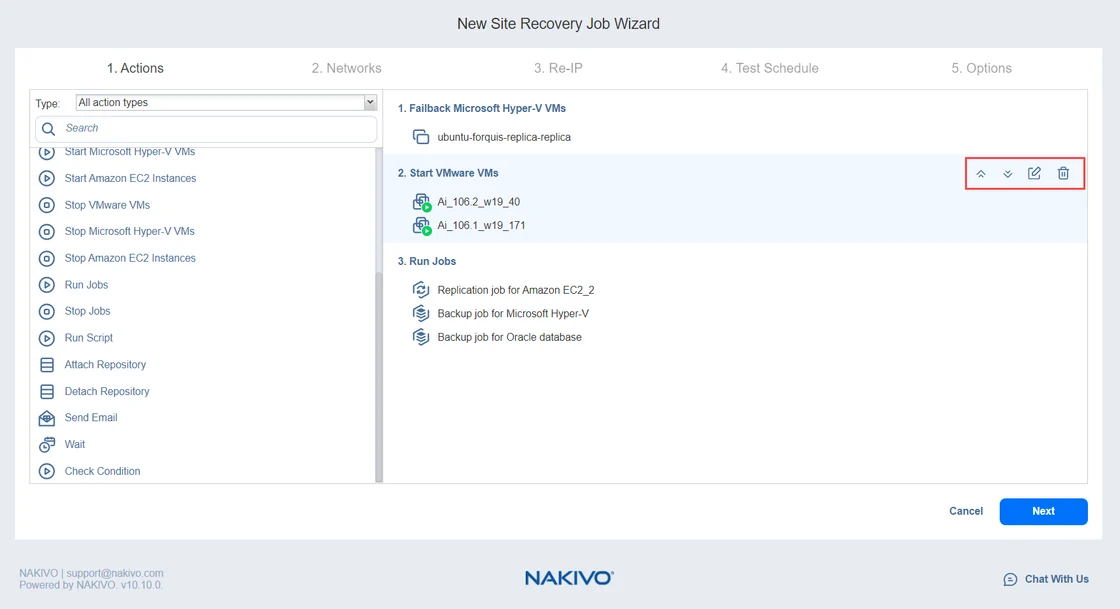
NAKIVO Backup & Replication Site Recovery can organize supported replicas into a workflow with failover, failback and related actions. It is useful when a team uses NAKIVO-managed replication and wants to codify how a SQL Server VM and dependent machines move to another site.
The advantage is repeatable orchestration around the supported replica types. Test and live execution can use different networking or actions, and compatibility varies by platform. SQL Server consistency and the point available in its log chain still need to be proven independently.
Build a site-recovery job for the supported platform, then confirm application startup and network steps. Verify whether the documented test mode isolates the recovery systems as required.
Save the recovery task evidence and actual outage timeline. Compare the recovered SQL database and application query under a test identity and document the approved return path.
- Compatibility
- Supported NAKIVO replicas and a compatible Site Recovery configuration.
- License and trial
- Commercial NAKIVO licensing.
Dell RecoverPoint for Virtual Machines
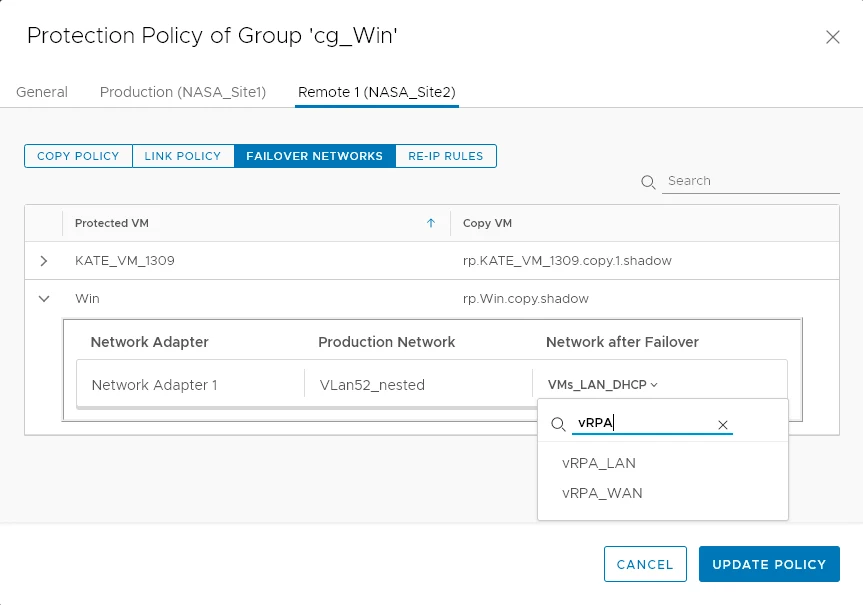
Dell RecoverPoint for Virtual Machines replicates supported VMware workloads and can make a non-production copy active during a failover. Its recovery workflow is useful when SQL Server is one of several virtual workloads that need a prepared copy at another site.
The useful boundary is the selected recovery image and the consistency the configured workflow provides. The recovered VM still needs its networks and services. Failback also needs a clear decision about handling data written to the secondary environment during the outage.
Check the RecoverPoint release and failover-network configuration for the selected VMware environment. Capture the source group, recovery image and expected route after promotion.
Measure the time until the recovered SQL instance responds correctly to the application's synthetic query. Keep failover networking and data verification results together with the recovered point.
- Compatibility
- Supported VMware and RecoverPoint for Virtual Machines environment with available recovery copies.
- License and trial
- Commercial Dell licensing and infrastructure terms.
Match the recovery plan to the VM platform
| What you need | Tools to shortlist | What to verify |
|---|---|---|
| Recover Azure VMs across supported Azure locations | Check target network, quotas, disk support and the recovery point the drill will use. | |
| Sequence a vSphere recovery plan | Set SQL and application boot order. Verify whether the next stage can wait for a SQL query or requires an external check. | |
| Run repeatable drills and include checks in the plan | Try a failing SQL check and examine the plan log, network isolation and cleanup. | |
| Recover VMs in a Nutanix estate | Verify availability zones, protection policy and test network mapping for the installed release. |
Map startup order and SQL Server service dependencies
Identify which steps must finish before an application can use SQL Server. Include the recovery network, name resolution, identity provider, VM and storage, database recovery and the client route. A VM power-on event is useful as one timestamp in that sequence.
Define the test failover isolation in the recovery plan and verify it before bringing up a clone. Record dependency ordering and failback steps, plus how the tester confirms which site accepted the database connection.
The test copy boots with missing infrastructure
Check network, identity and dependency readiness
Capture ordering and route evidence before opening the SQL check.
SQL Server responds with an unexpected database state
Verify the selected recovery point and database readiness
Match instance, latest recovered marker and state.
SQL is healthy but the application fails
Check the intended client route and identity
Run the smoke test with the real connection policy.
Measure the time to a verified application query
The chart is an illustrative sequential drill with 36 minutes from start to verified application behavior. Replace the five values with actual start and end observations. For concurrent work, track the elapsed wall-clock interval and the critical path, so overlapping phases are counted once.
Prepare a synthetic VmDrTrial database and marker table. Record the last committed marker on the source and compare it with the latest recovered marker on the test site. Include the requested point, selected source or replica and any expected data loss window.
- Network and identity6 minutes
- Start the recovered VM9 minutes
- SQL database recovery4 minutes
- Application route readiness12 minutes
- Verify the marker5 minutes
| Checkpoint | Observe | Report |
|---|---|---|
| Isolation and plan start | Test network, target and UTC timestamp | Recovery plan, point and operator |
| VM and database started | Guest recovery status and SQL readiness | Instance, database and selected recovery point |
| Client verified | Approved user and known query result | Observed recovery time and recovered marker |
| Cleanup | Rollback or failback checks | Temporary assets and final environment state |
How to compare these tools
Recover an application stack in an isolated network. Check boot order, network changes, when SQL Server accepts connections, and the last transaction the application can read. Sources checked .
Run a failover drill from SQL startup to application commit
Prepare dbo.VmDrTrialMarkers with an increasing integer MarkerId and a CommittedUtc datetime2 column in the existing synthetic VmDrTrial database. Use the read-only probe via the actual test application route. Compare the returned site identity and latest marker against the drill manifest.
Verify SQL Server identity and the latest recovered marker
T-SQL · 11 lines
- Record source SQL identity and latest committed marker before the isolated failover. Start the approved recovery plan and note major dependency events in UTC.
- Open the application route and verify the expected recovered SQL instance, identity and latest marker. Save both actual end-to-end elapsed time and observed recovery point.
- Compare what failed or required manual work, then verify cleanup and the authorized failback procedure. Preserve the drill's evidence so another operator can reproduce it.
Conclusion
Choose the tool that can run your supported recovery path in the right order and show where a drill failed. Require a successful SQL transaction from the application connection before calling the stack recovered. Keep a separate database backup and restore plan for recovery to a SQL log timestamp.
Frequently asked questions
What should SQL Server disaster recovery orchestration automate?
It should recover the application’s VMs in the required order, attach the right network and run or prompt for readiness checks. Record which dependencies require a manual action in the selected tool.
Does powering on the SQL VM finish the disaster recovery test?
The application still needs a usable database, name resolution and permissions. Execute a test transaction from the application tier and include the successful commit in the drill timing.
Can I run the recovery plan while production is online?
Several platforms support test failover to an isolated network. Use the documented test mode, verify the network and integrations are isolated, and clean up the trial after collecting its results.
How do I measure recovery point and recovery time for SQL Server?
Measure recovery time from the start of failover until the application commits. Compare the latest usable recovery marker on the recovered database with the source marker you recorded before failover.
Do VM recovery plans replace SQL Server transaction log backups?
VM recovery plans recover VM copies or replicas. SQL Server log backups provide database recovery within the retained SQL log chain. Keep both when the recovery requirements include application failover and database-level point-in-time restore.
When should the SQL Server VM recovery timer stop?
Use the service's agreed end condition. If it requires the application to work, include client routing, SQL readiness, authorized login and the successful application query.
How can a SQL query prove which VM received a failover request?
Record its SQL Server identity and compare the actual VM or recovery route independently. VM clones can preserve configuration and instance names, so use both observations.