

SQL Server on an Azure VM can be protected at the database level, the virtual machine level or both. A database job can retain SQL backups and transaction logs for a selected recovery time. A VM backup protects the machine and disks. A recovery plan can use both layers. The available database recovery time depends on the SQL backup and log chain.
Azure Backup offers a workload-aware option through a Recovery Services vault. Backup to URL keeps the backup in the SQL Server engine and Azure Storage. Third-party SQL agents can fit organizations that need the same backup policies in Azure and elsewhere. The useful comparison is where backups and logs live, which account can restore them and how another Azure VM can be prepared as a destination.
Database backup tools for SQL Server on Azure VMs at a glance
This comparison concerns SQL Server installed on Azure VMs. Identify the guest or SQL component, storage authority and supported alternate restore destination.
| Tool | Backup path | Azure dependency to verify | Recovery proof |
|---|---|---|---|
| Azure Backup for SQL Server on Azure VMs | Recovery Services vault and workload-aware SQL protection | Supported VM, guest access, extension and target registration | Restore point, target VM and database contents |
| SQL Server Backup to URL | Native SQL backup to Azure Blob Storage | Credential, supported storage and network path | Full and log copies usable on a separate SQL Server |
| Veeam Plug-In for Microsoft SQL Server | SQL Server plug-in to compatible repository | Guest and repository reachability, identities and format | Database restore from approved test media |
| Commvault SQL Server Agent | Agent-protected SQL workload on Azure | Cloud storage and supported SQL host configuration | Protected full and log chain, target and task trace |
| Rubrik Security Cloud for Microsoft SQL Server | Supported SQL workload protection | Exact SQL Server on Azure VM deployment and protection tier | Restore or mount proof in a permitted target |
| Druva Hybrid Workloads for MS-SQL | Supported in-guest SQL backup workflow | Connectivity, source registration and store access | SQL database restore and observable log coverage |
| Redgate SQL Backup Pro | SQL backup service and configured delivery path | File/share or approved downstream copy path | Compatible target restoration and archive access |
| MSP360 Backup for Windows Server | Applicable SQL Server support in product plan | Plan edition, destination and guest privileges | Supported database backup and restore result |
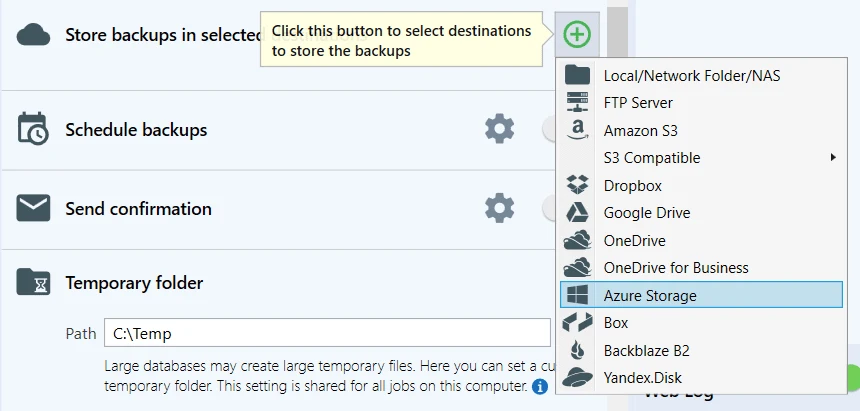
| SQLBackupAndFTP | SQL Server job and Azure Storage destination | Blob credentials and selected SLAs | Retrieve, unpack if needed and recover original SQL media |
Azure Backup for SQL Server on Azure VMs
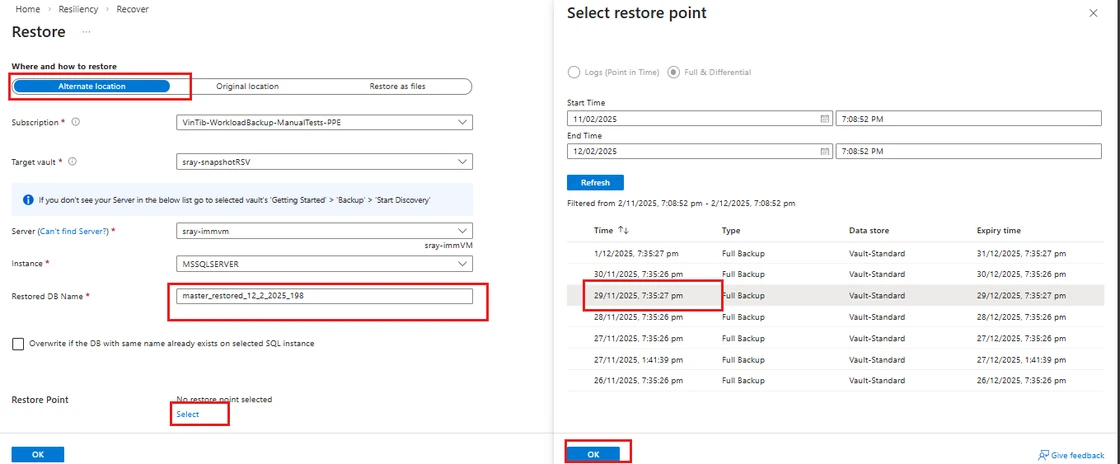
Azure Backup can protect SQL Server databases on supported Azure VMs through a Recovery Services vault. It manages database backup policies and can restore to supported times and locations. This is useful when the team wants database-level Azure protection without owning the scheduling and catalog separately.
The fit depends on the workload support matrix and how agents, vaults and target servers are configured. An alternate restore requires a supported registered destination. Service settings and the retained chain determine which times are recoverable, and backup success should be evaluated at the database level.
Check the official workload support matrix for your SQL Server edition, VM and vault. Confirm database discovery and the supported alternate-location recovery rules before onboarding the first production instance.
Run a disposable database backup and verify log coverage and destination registration. Capture the vault job, actual target VM and SQL query output alongside the requested time.
- Compatibility
- Supported Azure VM, SQL Server workload and Recovery Services vault.
- License and trial
- Azure Backup, storage and any applicable recovery infrastructure charges.
SQL Server Backup to URL
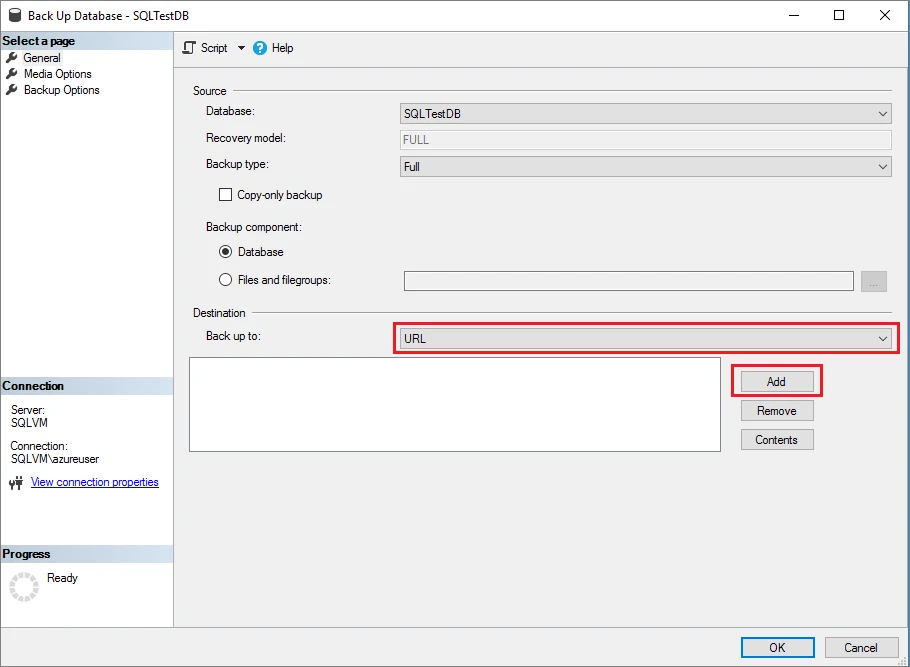
SQL Server Backup to URL lets the database engine write native SQL backups to a supported Azure Blob Storage container. It is useful when a DBA wants direct control of the full, differential and log jobs and wants to use ordinary SQL Server restore tooling.
Its strength is keeping media selection and restore behavior visible to the DBA. Credentials, backup history, retention and alerting are responsibilities of the SQL and storage workflow. Direct backup to supported immutable Azure Blob storage is a separate capability that depends on SQL Server version and policy.
Apply the documented native SQL Server setup for the selected Azure Blob path. Record how the isolated SQL host authenticates and whether the storage and network policies permit both backup and restore.
Use the required full and subsequent log files directly in the lab recovery. Record exact media names and recovery time, and confirm the target can work without the original VM's local files.
- Compatibility
- Supported SQL Server Backup to URL configuration and Azure Storage access.
- License and trial
- Native SQL Server capability with Azure Storage and applicable SQL Server charges.
Veeam Plug-In for Microsoft SQL Server
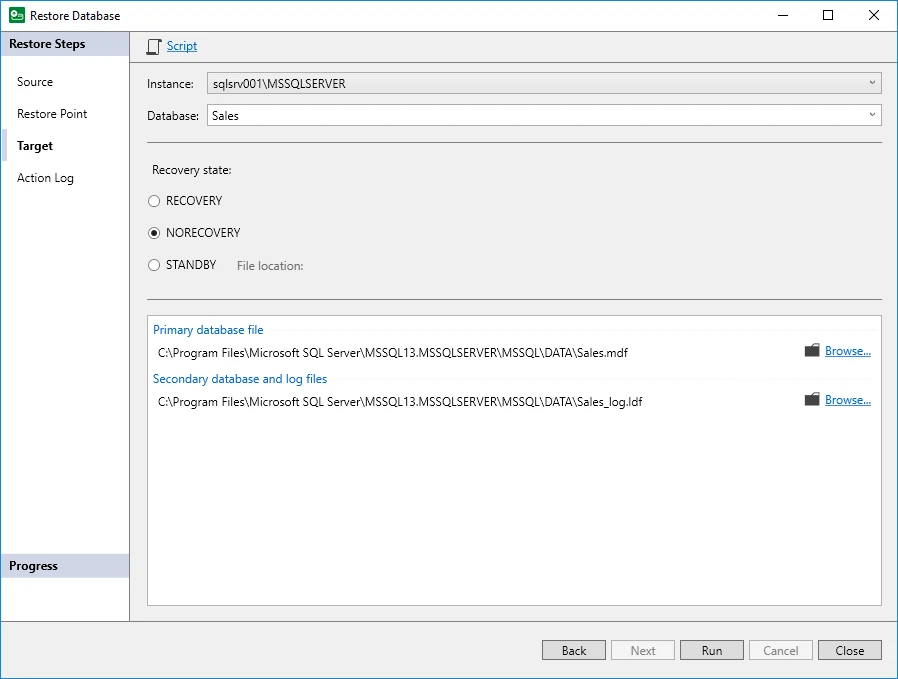
Veeam Plug-In for Microsoft SQL Server protects SQL databases through a supported plug-in and stores backup data in configured Veeam repositories. It is useful for an Azure VM that belongs to a wider Veeam estate and needs SQL workload protection and a consistent recovery console.
The comparison depends on the repository path, plug-in coverage and which component owns the SQL log backups. Veeam VM protection and the SQL plug-in can address different recovery targets. The repository and compatible SQL destination need to remain reachable for an alternate restore.
Validate the plug-in release and repository combination for the Azure VM. Record where processing and credentials run, including what a support operator must establish on a new SQL Server host.
Test one database from protection through approved alternate-server recovery. Match the source and target SQL instance, recovered marker, backup chain and repository reachability.
- Compatibility
- Veeam SQL Server plug-in, compatible Windows SQL Server host and reachable repository.
- License and trial
- Commercial Veeam licensing and storage charges.
Commvault SQL Server Agent
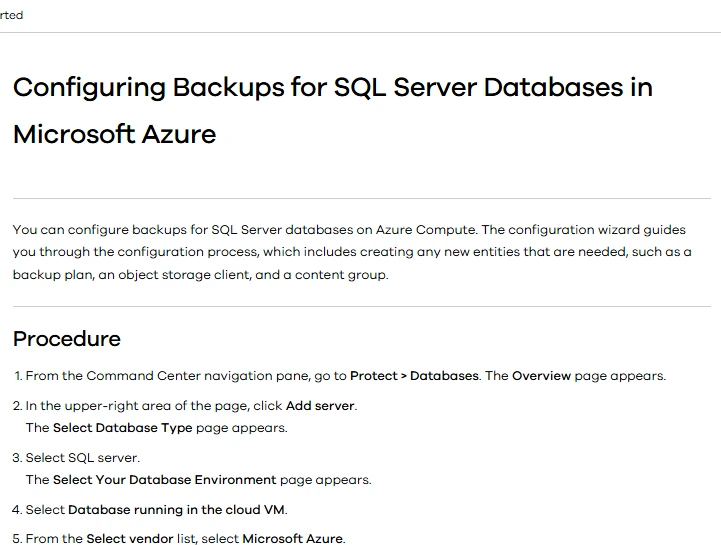
Commvault SQL Server Agent documents protection for SQL Server databases running in Microsoft Azure and out-of-place restore workflows. It is useful when the same organization protects Azure VMs and other SQL Server instances under an existing backup platform.
The value is using SQL Server-aware backup and a common policy catalog across environments. Agent placement, network routes and access to the selected media determine recovery. The destination still needs compatible SQL Server software and permissions for the chosen restore path.
Confirm the Commvault SQL Server backup configuration applies to the intended virtual machine and cloud storage path. Record the guest and management requirements and which copy the repository retained.
Recover the db on the supported target after closing the original path in the lab. Save the source job, actual data recovery time and exact restore steps required by the current deployment.
- Compatibility
- Commvault SQL Server Agent and supported Azure VM configuration and backup destination.
- License and trial
- Commercial Commvault licensing and storage or infrastructure charges.
Rubrik Security Cloud for Microsoft SQL Server
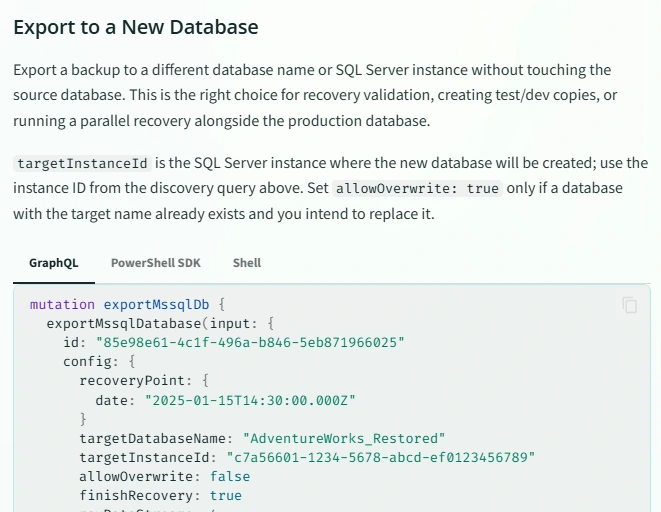
Rubrik Security Cloud can protect supported Microsoft SQL Server workloads through its database protection workflow. It is useful for organizations that already use Rubrik policies and need a SQL backup catalog and recovery range for an eligible SQL Server VM in Azure.
The protection method matters because an Azure SQL managed service, an Azure VM and a discoverable SQL Server database are different resources. SQL Server workload support and host connectivity determine where database and log protection can be used. Recovery still depends on the target and retained data.
Identify the Rubrik product and deployment that protect SQL Server on Azure VMs, along with the workload and version support. Ask which recovery path is actually available for the registered instance.
Review the real protected point and recover a synthetic database on the supported alternate host. Capture prerequisites, evidence of log coverage and how the operator gets access to the protected media.
- Compatibility
- Rubrik environment with a supported SQL Server Azure VM workload and connectivity.
- License and trial
- Commercial Rubrik licensing.
Druva Hybrid Workloads for MS-SQL
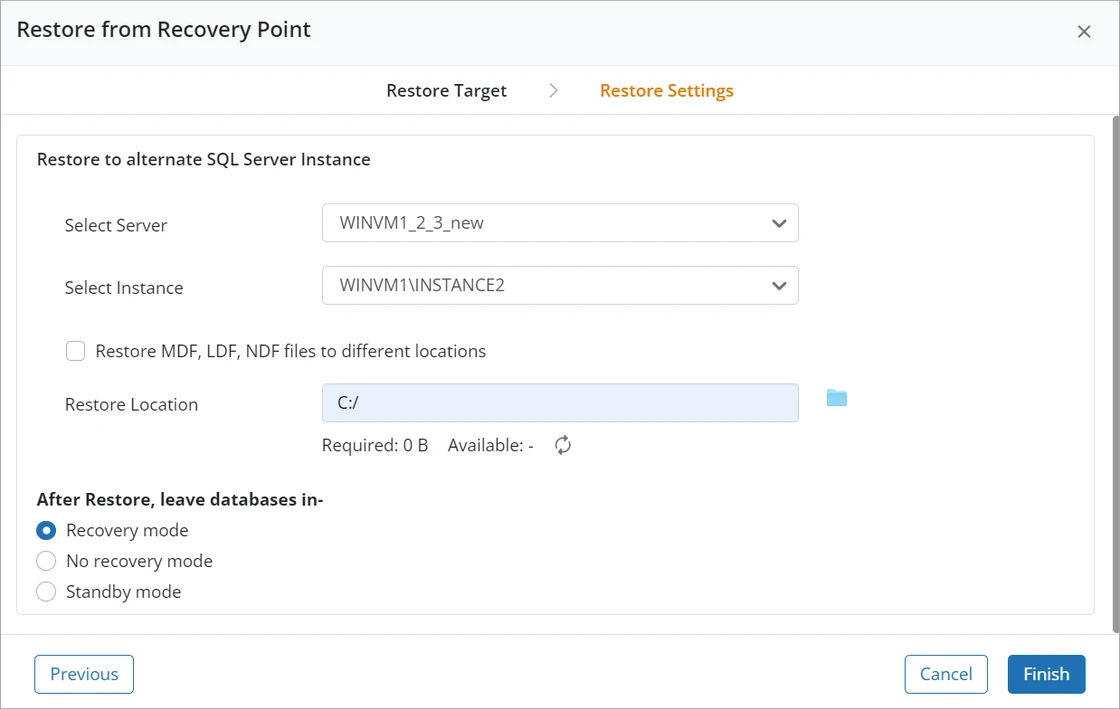
Druva Hybrid Workloads can protect supported SQL Server servers and retain transaction logs for eligible database recovery. This is useful when a team wants an independently managed service for SQL backups and has Azure VM connectivity and credentials that meet Druva’s requirements.
The fit depends on the supported Windows and SQL Server configuration and how the source agent sends backups to the service. The recovery target needs the correct access and SQL version. An available backup and the application’s ability to use the restored database are separate milestones.
Review the Druva SQL workload FAQ and exact source configuration for the pilot. Confirm host identity, supported versions and which recovery destination can receive the database.
Record log and database backup evidence, then verify the expected marker on the restored VM. Determine which required recovery controls remain available from a separate Azure network path.
- Compatibility
- Supported Druva Hybrid Workloads SQL Server deployment and Azure VM connectivity.
- License and trial
- Commercial Druva subscription.
Redgate SQL Backup Pro
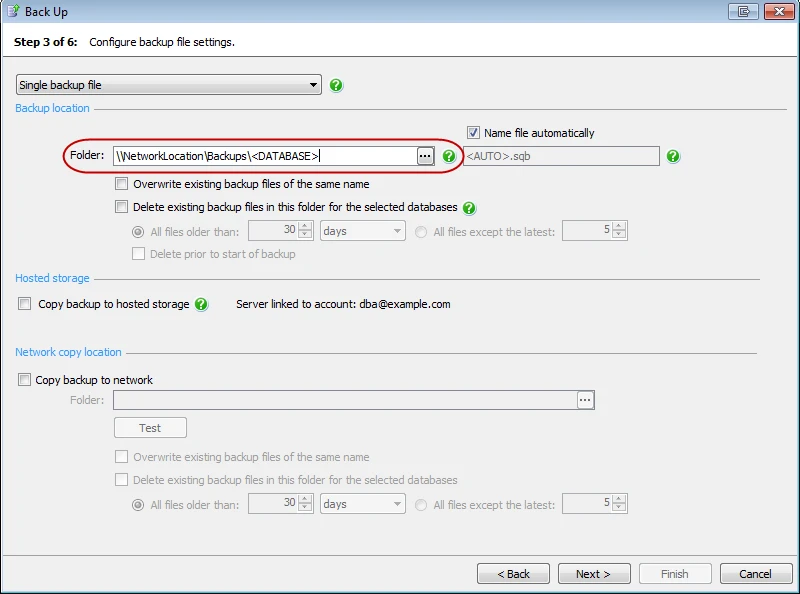
Redgate SQL Backup Pro manages SQL Server backups and restores using agents and its supported backup formats. It can use a documented network share workflow, which is useful for teams with Azure VMs already managed through SQL Backup Pro and a reachable backup storage path.
Storage and recovery need to be evaluated together. An Azure VM can use a network share the SQL Backup service can reach, with permissions on the actual service account. Restore also needs compatible SQL Backup tooling or the documented conversion path.
Use the supported SQL Backup Pro backup and restore procedures and document file delivery explicitly. A network share or subsequent blob copy can have different identities and retention than the SQL backup job.
Recover from the approved stored media on the intended second VM. Confirm backup format, supported components, key access and elapsed time from retrieving files to successful SQL query.
- Compatibility
- Supported Windows SQL Server VM, SQL Backup Pro components and accessible storage.
- License and trial
- Commercial Redgate license and storage costs.
MSP360 Backup for Windows Server
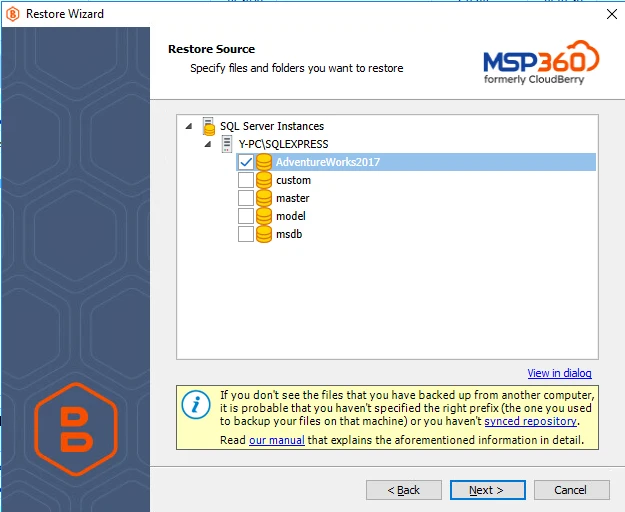
MSP360 Backup for Windows Server provides a SQL Server backup workflow in the applicable product and can send backups to supported cloud storage including Azure. It is useful for smaller estates that need a configurable backup and upload plan for SQL Server on a Windows VM.
Its strength is combining backup selection and cloud destination management. SQL backup, retention, encryption and target compatibility depend on the plan and edition. An alternate VM needs access to the backup and the software and credentials required to restore it.
Verify the SQL Server capability in the intended MSP360 plan and actual Azure VM deployment separately from the supported storage destination. Document the backup approach and destination credential scope.
Try backup and recovery with the smallest permitted SQL test database. Record whether the product output provides log recovery within policy and what client or unpacking components a new VM needs.
- Compatibility
- Supported MSP360 Windows Server edition with SQL Server backup and configured Azure storage.
- License and trial
- Commercial MSP360 license and Azure Storage charges.
SQLBackupAndFTP
SQLBackupAndFTP can schedule SQL Server backups and deliver them to Azure Storage or another supported destination. It is useful for teams that need a straightforward database backup workflow on an Azure VM and want the job and transfer configured together.
The job owns both the SQL operation and the upload. Those can fail separately, and the team needs to know which copy actually arrived at the destination. Available log handling, destination support and recovery format depend on the edition and configuration.
Configure the documented Azure Storage destination and note the supported SQL Server backup type. Record the Blob access model, SQL Server account and any compression or encryption steps.
Retrieve the lab artifact from an isolated VM and recover it with the supported SQL steps. Verify that the current Azure network reachability and keys are sufficient when the original machine is unavailable.
- Compatibility
- SQLBackupAndFTP with compatible SQL Server and Azure Storage connection.
- License and trial
- Free and commercial editions. Azure Storage charges apply.
Choose a database backup path for your Azure VM
| What you need | Tools to shortlist | What to verify |
|---|---|---|
| Manage SQL database recovery through an Azure vault | Confirm the Windows and SQL Server versions, region, vault setup and alternate target permissions. | |
| Control backup files and storage in your Azure subscription | Make the restore account read a full and log backup after you switch to the alternate instance. Include storage networking in the test. | |
| Add the Azure VM to a fleet-wide SQL backup policy | Check how the platform registers the guest and exposes the usable SQL log recovery window. | |
| Keep a SQL DBA-managed backup and restore schedule | Test an off-VM backup destination and move the operator to the actual account that will run the restore. |
Choose a SQL database recovery path for the Azure VM
A VM-level backup helps recover machine state. A workload-aware backup or native SQL backup sequence can target a database and a log point if that coverage is configured. Decide whether the service needs the entire VM, a selected database or a clean point between transactions.
Record VM platform, SQL edition and build, Azure region and target constraints, and the identities allowed to use the vault, repository or storage account. If private connectivity is required, verify the documented path from both the source and independent recovery VM.
Managed workload backup on supported Azure VMs
Trial Azure Backup and the intended vault controls
Verify workload discovery, logs and supported alternate-location restore.
Native SQL files are the recovery contract
Trial Backup to URL
Prove the full/log chain and storage access from a separate VM.
The estate uses an existing backup platform
Trial its documented SQL Server workload path
Confirm guest support, network, restore format and destination.
Recover a known SQL Server marker on an independent Azure VM
Create AzureSqlVmBackupTrial with a synthetic table dbo.AzureVmTrialMarkers containing MarkerId and Marker. Take the test backup after recording marker ready-01 at ID 1. Recover to AzureSqlVmRestoredTrial on a different supported Azure VM. If log recovery is in scope, add a later marker and verify the intended cutoff separately.
Capture the actual independent VM's identity outside the SQL query as well as its SQL Server name. Record VM preparation, restore and SQL validation duration separately. Test the planned vault or storage permission and private path while keeping the original lab source out of the recovery route.
| Stage | What to record | Pass condition |
|---|---|---|
| Source and protection | VM and SQL version, exact database and policy | Backup success and supported recovery point in chosen storage |
| Recovery access | Destination VM, roles, network and key access | Restore can start without source-local media |
| Recovered database | SQL identity, online state and known marker | Requested database returns the expected data |
| Optional log point | Available chain, UTC cutoff and later marker | Recovered data matches the intended SQL point |
How to compare these tools
Create the same SQL Server recovery point with each candidate. Confirm log coverage, who can restore, and whether the restore target must be in a particular region or subscription. Sources checked .
Restore before a known change on a second SQL Server
Set the source marker before the disposable test and use the approved backup and alternate restore procedure. Run the read-only probe from AzureSqlVmRestoredTrial. Confirm the Azure VM independently of what SQL Server reports.
Verify the restored SQL Server database and marker on a second Azure VM
T-SQL · 14 lines
- Record the exact Azure VM, SQL version and backup configuration. Test source discovery and a supported full backup before setting a log-based target point.
- Use the independent Azure VM and documented choices for the product restore. Record role, vault or media access and compare actual restored database state with the known marker.
- Retry with the approved private or isolated network route. Save any missing permissions or unsupported targets and distinguish availability of the full backup from availability of later log points.
Conclusion
Start with Azure Backup if the estate already uses Recovery Services vaults. Use Backup to URL when your team can own scheduling, storage and restore credentials. For commercial tools, compare the alternate-restore workflow and storage requirements before adding a new product to the Azure VMs.
Frequently asked questions
What is the difference between Azure VM Backup and Azure Backup for SQL Server?
The Azure VM workload protects the VM and disks. Azure Backup for SQL Server in Azure VMs registers SQL workload items and provides database recovery with SQL log backups under the supported policy.
Can I restore an Azure VM SQL database to a different Azure VM?
Yes. With Azure Backup, use Alternate Location on an eligible registered SQL Server target and confirm the vault, region and permissions. File-based and guest tools have their own target registration or storage access requirements.
Is SQL Server Backup to URL enough for point-in-time restore?
Yes, with an applicable full backup and an unbroken SQL log chain. The destination instance needs access to the backups and any encryption keys. Apply the logs in order and use the same target time in each RESTORE LOG WITH STOPAT statement.
Can the native Azure Backup SQL workload protect a Linux Azure VM?
Microsoft’s SQL workload support matrix lists Windows and excludes Linux. On a Linux guest, check supported native SQL backup features or a third-party SQL workload agent for the exact distribution and version.
Does this apply to Azure SQL Database or Azure SQL Managed Instance?
This comparison covers a SQL Server installation inside an Azure VM. Azure SQL Database and Azure SQL Managed Instance use separate service backup and restore procedures.
Are SQL Server backups on Azure VMs the same as Azure SQL Database backups?
SQL Server on Azure VMs is an installed Database Engine workload. Use the VM, workload or native backup path supported for that deployment and confirm destination requirements.
Does a vault show that a SQL Server backup can restore on every Azure VM?
Check the documented support matrix and target registration or permission requirements. Prove the eligible alternate restore in the actual test environment.
Related guides
- Compare VM recovery plans for SQL Server applications
- Compare backup and recovery tools for Azure SQL Managed Instance
- Compare SQL Server backup tools across platforms
- Compare tools for testing SQL Server restores
- Compare SQL Server backup tools for Hyper-V
- Compare Veeam and Commvault point-in-time restores
- Review SQL Server recovery steps