

Azure SQL Managed Instance includes automated backups and service-managed point-in-time restore. A separate database copy, a native copy-only backup and a BACPAC export address other recovery needs. A BACPAC contains logical schema and data. A supported native backup preserves more engine-level state, while the automated service retains its own recovery history.
The choice depends on where the recovery must happen and how much history it needs. Managed Instance backup and restore support depends on database encryption, update policy and target type. Third-party services can add independent retention or a separate recovery workflow. Their available recovery points and supported destinations need to be assessed against the actual database.
Azure SQL Managed Instance backup and recovery tools at a glance
Classify each option by what it can recover. A query runner or a logical export can supplement a recovery plan with different evidence than a database backup.
| Tool | Role in the plan | Destination or dependency | Trial evidence |
|---|---|---|---|
| Azure SQL Managed Instance automated backups | Managed backups, retention and supported restore operations | Eligible MI scope and Azure permissions | Requested UTC point and new restored database |
| SQL Server Management Studio | Client for documented native backup or restore work | Supported native media, storage and destination | Readable .bak at the correct target |
| Microsoft SqlPackage | Logical BACPAC export and import | Supported schema, consistent source and target compatibility | Imported schema and selected data |
| dbatools | SQL connection and smoke test automation | Supported connection and authorized target principal | Reproducible SQL validation output |
| Commvault Cloud for Azure SQL Managed Instance | Supported MI protection workflow | Deployed service, plan and supported recovery scope | Exact source, eligible destination and retained data |
| Druva Data Security Cloud for Azure SQL | Supported Azure SQL MI workload protection | Current region, identity and scope in the support matrix | Restore event and selected database outcome |
| Cohesity NetBackup for Azure SQL Managed Instance | Documented MI workload protection | NetBackup version, Azure assets and destination support | Policy result and recovered SQL query |
| Rubrik Security Cloud for Azure SQL | Supported protection and recoverable MI database operations | Azure deployment and API or UI capabilities | Recovery request, point and observed database content |
Azure SQL Managed Instance automated backups
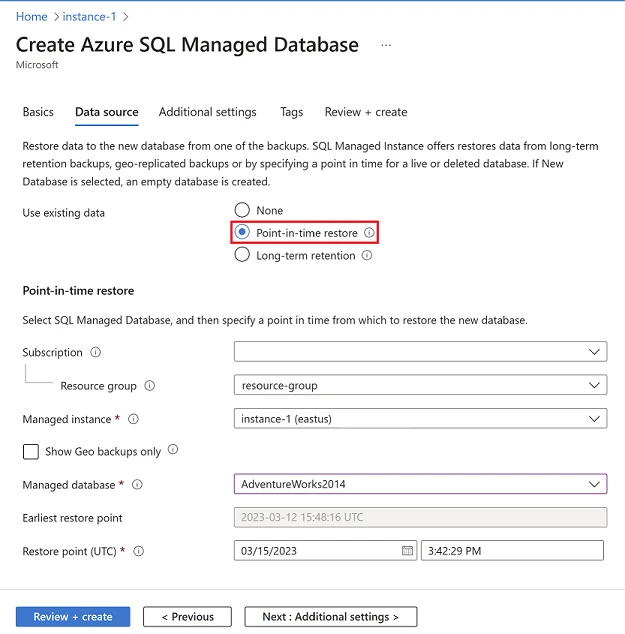
Azure SQL Managed Instance automatically takes managed backups and can restore an eligible database to a point in time. Long-term retention can keep designated backups under a separately configured policy. This is useful for ordinary recovery inside Azure when the operations team wants the service to maintain the backup chain.
Its strength is an integrated recovery range without a separate database agent. Retention and supported restore destinations depend on the service settings and deployment. Point-in-time restore generally creates a recovery database that still needs validation before the application is redirected.
Check the MI backup policy, retention settings and desired target against the official Microsoft restore documentation. Record the effective management-plane permissions and any required target configuration.
Recover a disposable database to a documented MI destination at a known UTC point. Open the result over the supported SQL network route and independently verify the expected marker.
- Compatibility
- Azure SQL Managed Instance with applicable retention and restore permissions.
- License and trial
- Azure SQL and backup storage terms depend on retention and configuration.
SQL Server Management Studio
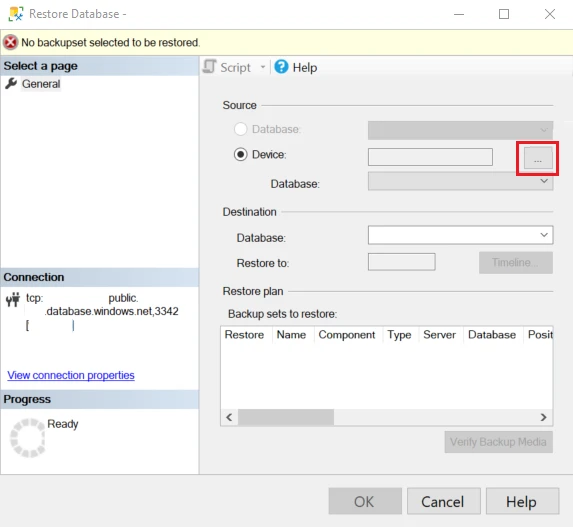
SSMS can run supported Managed Instance backup and restore statements, including documented native backup transfers where the source and destination qualify. It is useful when a DBA needs direct control over a particular database copy and wants to inspect the resulting backup or restore in a familiar client.
The manual workflow depends on native backup and restore restrictions, including managed encryption and target SQL Server update policy. An Azure automated recovery point and a copy-only file are separate artifacts. SSMS is the operator interface, while SQL Server and Azure enforce the allowed operation.
Use SSMS for the supported native backup or restore commands and Azure Blob access. SQL Server Management Studio does not change restrictions tied to the engine policy, target version or data encryption.
Verify whether the test database can produce a copy-only backup and whether the intended SQL Server destination can restore it. Check the same protector and media access where the database uses customer-managed TDE.
- Compatibility
- SSMS and supported Managed Instance native backup or restore scenario.
- License and trial
- Free SSMS. Storage, SQL Server and Azure charges apply.
Microsoft SqlPackage
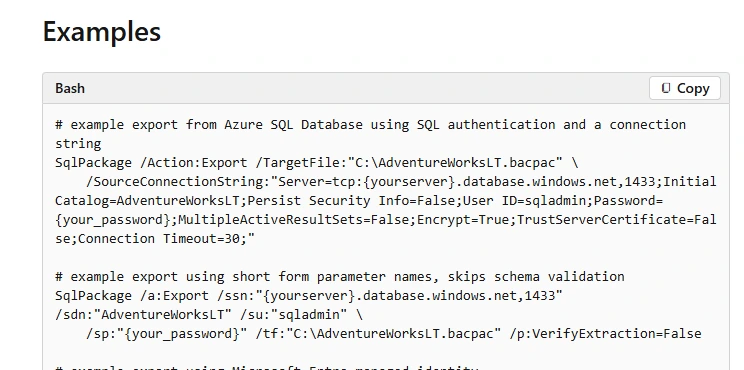
SqlPackage can export supported Managed Instance databases to a BACPAC and import the logical schema and data into an eligible target. It is useful for portability or an independent logical copy when a team can accept the scope and elapsed time of a model and data export.
A consistent export needs an appropriately stable source. Logical import has its own compatibility and capacity requirements and provides an independent copy of the captured data. Transaction-log recovery and instance-level configuration belong to other recovery workflows.
Treat a BACPAC as a logical representation of supported database schema and data. Review unsupported or target-specific objects and plan a consistent source, following Microsoft's documented export requirements.
Import to an appropriate disposable target and check required rows, identity, schema and workflow. Record export and import times separately and keep a managed or native recovery path for log-backed points.
- Compatibility
- SqlPackage with supported source, destination and enough space for the BACPAC.
- License and trial
- Free Microsoft tooling. Storage and database compute costs apply.
dbatools
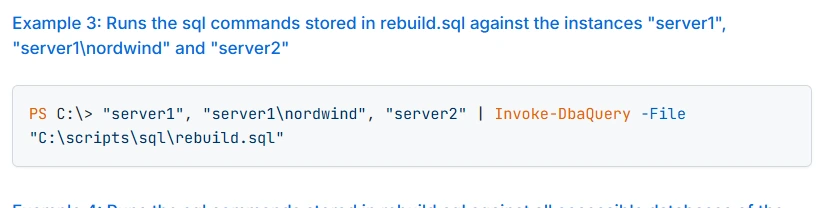
dbatools can automate supported SQL Server operations against Managed Instance using commands such as Invoke-DbaQuery and applicable Azure access tokens. It is useful when a team wants T-SQL backup checks, supported copy operations or recovery validation as part of existing PowerShell automation.
Its strength is making the selected SQL operation and its result repeatable. The module can only request operations allowed by the platform and the authenticated account. Managed point-in-time restore and supported native backup commands use different control paths.
Use Invoke-DbaQuery to verify the already-recovered database through the intended network path. Keep version, destination identity and exact result so the smoke test is repeatable.
Check how a bad path or marker mismatch becomes an automated failure. Keep dbatools reporting with the underlying recovery operation rather than treating the query result as backup media or policy evidence.
- Compatibility
- PowerShell dbatools with supported Managed Instance connectivity and authentication.
- License and trial
- Free, open-source tooling.
Commvault Cloud for Azure SQL Managed Instance
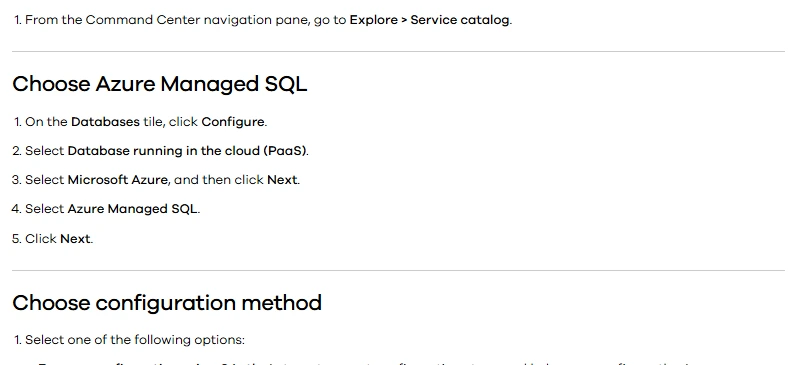
Commvault can protect Azure SQL Managed Instance databases and documents a workflow using native COPY_ONLY full backups. It also documents a separate approach for service-managed TDE cases. It is useful when an organization wants Managed Instance backup retention and recovery in its existing Commvault platform.
The supported method depends on encryption and target configuration. Commvault’s ordinary copy-only path creates full recovery points from the chosen schedule. The available recovery time and restore location should be checked using the actual workload and policy.
Verify the supported MI scope and current Commvault protection and restore capabilities for the deployment. Record discovery requirements, Azure permissions and where the backup and recovery items are shown.
Run the documented MI protection workflow for a disposable database. Recover to an eligible destination and record the requested point or supported backup type plus the actual result.
- Compatibility
- Supported Commvault Managed Instance protection setup, permissions and backup destination.
- License and trial
- Commercial Commvault terms and applicable Azure charges.
Druva Data Security Cloud for Azure SQL
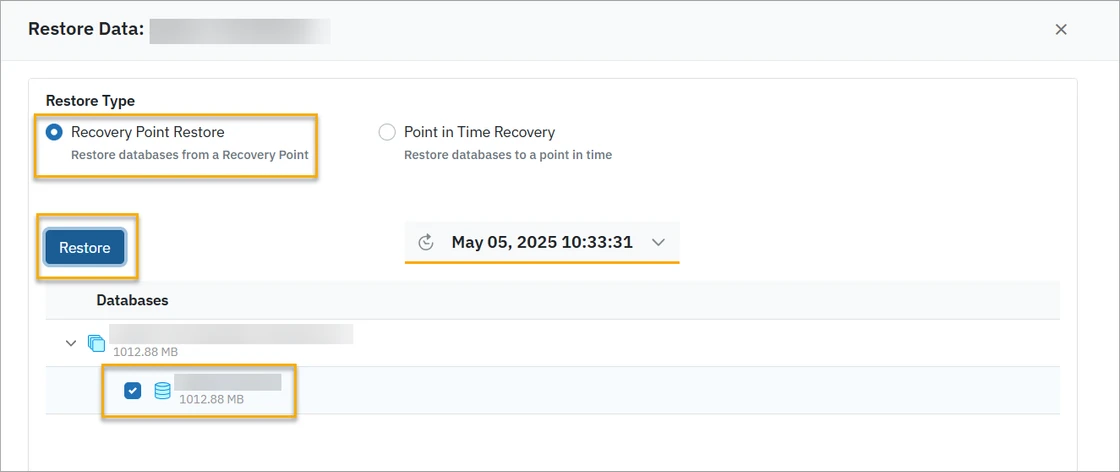
Druva’s Azure SQL protection covers supported Managed Instance databases and documents available backup and restore methods. It is useful when the organization wants an independently governed backup service and the database can meet the chosen method’s prerequisites.
Its support matrix separates the methods available for Azure SQL Database and Managed Instance. The database’s features and service tier affect protection, and Druva documents restore within the same resource type. An eligible Managed Instance destination is part of the recovery plan.
Use the current Druva support matrix for Managed Instance and the selected region, service and workload. Confirm the SQL database scope and clarify any excluded system databases before adopting it.
Recover a database using the documented policy and verify network reachability and marker contents. Save any protected scope and destination restrictions with the test results.
- Compatibility
- Supported Managed Instance deployment and Druva Azure SQL configuration.
- License and trial
- Commercial Druva licensing and applicable Azure consumption charges.
Cohesity NetBackup for Azure SQL Managed Instance
Cohesity NetBackup documents protection for Azure SQL Managed Instance as a PaaS asset, with full and supported incremental options. It is useful when the organization already manages several cloud workloads in NetBackup and wants Managed Instance data covered by its policy and recovery history.
The incremental workflow depends on a retained full backup and the required subsequent backups. NetBackup documents limitations for certain columns, backup copies and encryption settings. The product and media server version matter when defining the target restore and how it will be validated.
Check the documented NetBackup version and Azure SQL Managed Instance protection setup. Verify exact scope and available recovery options against the release deployed in the pilot.
Run a supported operation for one disposable database and keep the source protection, target, timestamp and accessible marker separate. Confirm any deployment-specific restore requirements with the actual product.

- Compatibility
- Supported NetBackup cloud protection, media server and Managed Instance configuration.
- License and trial
- Commercial NetBackup licensing and required Azure infrastructure.
Rubrik Security Cloud for Azure SQL
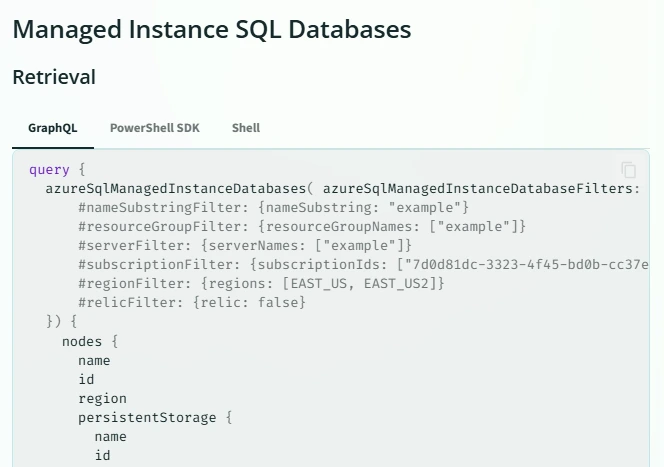
Rubrik Security Cloud exposes Azure SQL Managed Instance databases in its Azure protection model. It is useful when an organization wants to bring those managed databases into existing Rubrik policy, inventory and security operations without treating them as SQL Server VMs.
Its fit depends on the specific protection and recovery operations available for Managed Instance under the selected configuration. Inventory discovery and recoverability need separate verification. Retention policy, the Azure account connection and supported recovery destinations affect what a team can restore.
Confirm Managed Instance database protection and recovery operations in the selected Rubrik and Azure configuration. Record the authorized target, version and resource scope before the sample restore.
Match the restored point and managed request with a real SQL read. Check whether the workflow covers the target move, logical export or log-backed recovery that the service specifically needs.
- Compatibility
- Rubrik Azure protection with supported Managed Instance assets and account permissions.
- License and trial
- Commercial Rubrik service and applicable Azure charges.
Choose the Managed Instance recovery path
| What you need | Tools to shortlist | What to verify |
|---|---|---|
| Restore an Azure-managed recovery point | Confirm the earliest usable time, recovery target and access to the restore operation. | |
| Keep a portable SQL backup file | Check the native backup rules for TDE, storage access and the destination version. | |
| Manage database protection through a backup platform | Identify the exact Managed Instance backup method and whether the target can be a different instance or region. | |
| Export data and schema as a logical copy | Use a transactionally consistent source and test importing the BACPAC into the intended target. |
Choose between managed restore, native media and logical export
Managed point-in-time restore uses the Azure SQL Managed Instance service and an eligible target. A user-managed copy-only full backup to Blob can support portability when the documented conditions are met. An export can move supported schema and data, with separate limitations and consistency requirements.
For an instance encrypted with service-managed TDE, Microsoft documents that a copy-only backup of the database cannot be created. The native restore-to-SQL-Server path depends on the source update policy and exact destination version. When using customer-managed TDE, verify that the destination can use the same key.
An earlier point of an existing Managed Instance database
Trial the managed restore path
Verify retention, eligible destination and a known UTC transaction point.
A native copy for SQL Server on a supported target
Check the copy-only conditions first
Verify source update policy, TDE key access and exact restore version.
Schema and data without a log-backed history requirement
Trial a consistent logical export and import
Validate supported objects, data and application behavior.
- Microsoft Azure SQL Managed Instance automated backups
- Microsoft Managed Instance point-in-time restore
- Microsoft restore a Managed Instance database to SQL Server
- Microsoft SQL Server copy-only backup and Managed Instance TDE
- Microsoft SqlPackage export consistency
- Commvault Managed Instance protection
- Druva Azure SQL support matrix
- Rubrik Azure SQL Managed Instance operations
Measure Azure management recovery and SQL usability independently
Create a synthetic MiRecoverySourceTrial database with dbo.MiRecoveryTrialRows and columns MarkerId and Marker. Insert marker mi-proof-01 at ID 1 and record the observed UTC time. For a point-in-time test, add a second marker after the cutoff. Request recovery to MiRecoveryTrial at the intended earlier point.
Capture Azure resource and job identifiers, actual restore time and SQL connection path. Use a separate authorized SQL role to run the marker check. For a native or logical copy, record the corresponding copy point and its caveats in the same worksheet.
| Stage | Evidence | Outcome to verify |
|---|---|---|
| Azure operation | Actual source, retention, request and destination | Supported recovery starts under the intended role |
| Media or export path | Update policy, encryption and backup or export file | Only applicable and supported workflows are used |
| SQL result | Database identity and expected marker | Recovered database is usable at the intended point |
| Recovery gap test | Ineligible target or unavailable point in the lab | Clear failure instead of an inferred success |
How to compare these tools
Try the exact restore destination you need. Check available recovery times, required identities and how encryption affects whether a portable backup can be restored. Sources checked .
Compare a point-in-time restore with a captured copy
Run the backup, export or point-in-time restore through the documented workflow. Recover the synthetic database to MiRecoveryTrial and connect through the intended authorized SQL route. Keep the Azure management job and this read-only validation separate.
Verify the contents of a recovered Azure SQL Managed Instance database
T-SQL · 14 lines
- Record source instance update policy, encryption and expected recovery method. Confirm the test target is supported, then seed the markers and capture UTC time.
- Recover to the eligible destination. Match the management request with the current SQL database, verify the first marker and check the later marker according to the requested cutoff.
- Test an unavailable target or time within the disposable scope. Record the product's visible limitation and measure when the restored database becomes usable by the authorized reader.
Conclusion
Use the native Managed Instance restore to cover the recovery window you already pay for. Add a tool when you need a defined copy destination, a catalog across instances, policy reporting or portable data. Choose the option that can recover the required state to the actual target with the TDE configuration you use.
Frequently asked questions
Can I run BACKUP DATABASE on Azure SQL Managed Instance?
Microsoft supports a user-initiated copy-only full backup to Azure Blob Storage for eligible databases. For a native copy-only backup of a TDE-encrypted database, use a customer-managed key and verify the documented Blob Storage authentication and target key access.
Can I restore a Managed Instance backup to regular SQL Server?
Microsoft documents restore to SQL Server 2022 or 2025 for supported configurations. Match the source Managed Instance update policy to the allowed target version and check whether the SQL Server instance can use the source customer-managed encryption key.
Does a BACPAC support an exact point-in-time restore?
A BACPAC contains exported data and schema. Its import recreates the captured state. Use the Managed Instance service recovery window or a documented point-in-time workflow when you need a chosen timestamp.
Can every commercial backup product restore to another Managed Instance?
Destination options depend on the product’s capture method, region and account support, database encryption and access to the target. Try the intended destination and confirm the vendor recovery point is available there.
Does this apply to Azure SQL Database or SQL Server running in an Azure VM?
This guide covers user databases on Azure SQL Managed Instance. Azure SQL Database and SQL Server on Azure VMs have their own backup features and product support rules.
Can all Azure SQL Managed Instance databases be backed up to a native copy-only file?
Check source and encryption compatibility. Microsoft documents that MI databases with service-managed TDE cannot produce a copy-only backup. For eligible encrypted copies, provision the required customer-managed key access at recovery.
Can a BACPAC give Azure SQL Managed Instance point-in-time recovery?
A BACPAC is a logical schema and data export from a consistent source. Use a managed or other supported database recovery path to restore a chosen log-backed point.