

SQL Server Backup to URL supports Azure Blob Storage and, starting with SQL Server 2022, supported S3-compatible object storage. The two paths use different URL formats and credentials. An S3-compatible service also needs to handle the operations SQL Server uses to create and restore backup objects, including multipart uploads, over an endpoint the database can reach and trust.
The useful comparison is a full backup and restore through the real endpoint, with the intended object sizes, file striping and credential policy. An object lock feature on the storage side has its own compatibility requirements. A restore from a separate host tests read access, and a review of the retention policy confirms how long the chain is preserved.
Object storage for SQL Server Backup to URL at a glance
Check the documented SQL integration or compatibility profile first. Then prove the endpoint, credentials, backup parts and independent restore under the policy in use.
| Storage | SQL Server path to verify | Provider settings to check | Critical trial |
|---|---|---|---|
| Azure Blob Storage | Native Azure Blob Backup to URL | Account, container, credential and supported immutability mode | Same media restores from a separate authorized SQL instance |
| Amazon S3 | Native S3-compatible connector on supported SQL Server | Region, bucket policy, endpoint and multipart upload | Restore every backup stripe with the intended role |
| Google Cloud Storage | Documented Compute Engine SQL Server backup path | Supported endpoint and interoperability credentials | Read a full backup from a different test host |
| Dell Elastic Cloud Storage | Documented SQL Server object-storage design | Endpoint style, TLS and object/retention policy | Write, read and restore a representative striped backup |
| MinIO AIStor | S3-compatible connector on tested deployment | Endpoint, region, TLS and multipart primitives | Confirm SQL Server's exact sequence of operations |
| Wasabi Hot Cloud Storage | S3-compatible path using documented service endpoint | Region, object policy and access model | Pilot restore from the selected backend before adoption |
| Cloudian HyperStore | Documented S3 SQL Server integration path | Cluster endpoint, object lock scope and network | Restore using an independent path in the approved region |
| NetApp StorageGRID | S3-compatible path with documented multipart operations | Multipart, endpoint and supported policy options | Verify actual SQL credentials and recovered data |
Azure Blob Storage
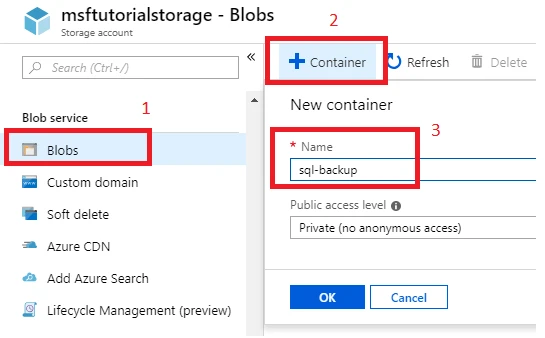
Azure Blob Storage is a documented native Backup to URL destination. SQL Server can write supported backups to an eligible container and restore them with the applicable credential. This is useful when an Azure-based team wants SQL Server to manage the backup format directly without deploying an S3 endpoint.
Its advantage is the documented Azure-specific path, including applicable container-level immutability for SQL Server 2025 and later. The blob type and permissions affect how backup behaves. Credential lifetime, naming and access from the recovery server need to be part of the design.
Use the documented Azure Blob connector for your SQL Server build, account and chosen security setup. SQL Server 2025 adds support for documented container-level immutability. Confirm the actual vault or object policy before choosing a retention design.
Use an independent SQL Server and the minimum authorized credential to recover a small protected backup. Check that every expected backup stripe and applicable encryption key can be reached from it.
- Compatibility
- Supported SQL Server and Azure storage account, container and SQL credential.
- License and trial
- Azure Storage usage and applicable SQL Server licensing.
Amazon S3
Amazon S3 is a documented destination for SQL Server’s S3-compatible Backup to URL workflow. SQL Server can write backup files to a supported bucket endpoint using an appropriate credential. It is useful for AWS estates that want the engine to create and read the backup without an intermediate staging system.
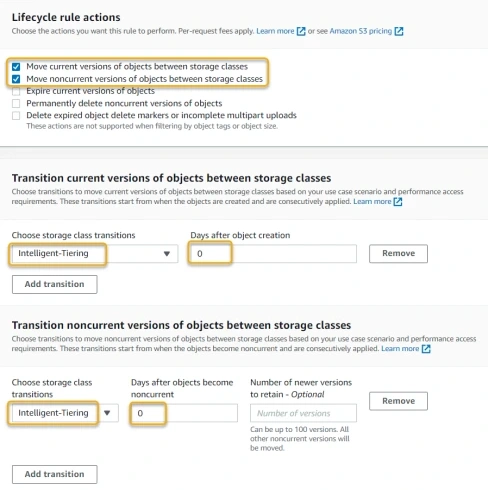
The choice depends on the endpoint, region, permissions and SQL Server’s multipart behavior. S3 lifecycle and object retention can change the availability and cost of old backups. A separate test is needed for the exact storage class or lock policy intended for recovery.
Start with the documented SQL Server to Amazon S3 setup and use a test bucket and regional endpoint. Compare the role's multipart, download and required lookup permissions with the built-in connector's operations.
Restore from the exact media generated by the source. Record TLS and region settings and test the intended log chain and retention policy independently of successful initial upload.
- Compatibility
- SQL Server version with S3 Backup to URL support and a supported S3 endpoint and credential.
- License and trial
- AWS storage, request, retrieval and transfer charges apply.
Google Cloud Storage
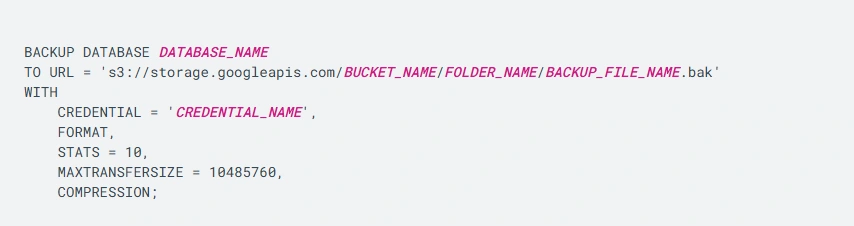
Google Cloud documents backing up SQL Server databases to a Cloud Storage bucket using the supported workflow. The interoperability path uses Cloud Storage credentials such as an HMAC key in the applicable configuration. It is useful for SQL Server workloads that already use Google Cloud storage and access management.
Its strongest case is following the documented engine and bucket configuration. The XML API path, endpoint and credential permissions matter for restores as well as uploads. Storage policies and network access must still meet the SQL Server job’s requirements.
Use the Google Cloud documentation for SQL Server on Compute Engine and verify the required storage API and credentials for the selected connector. Record whether the tested configuration uses native URL support or an alternate file-copy step.
Confirm that the separately provisioned recovery host can read all expected objects under the authorized role. Save the observed endpoint, backup and SQL restore results.
- Compatibility
- Supported SQL Server and Google Cloud Storage interoperability configuration with suitable credentials.
- License and trial
- Google Cloud storage and applicable network and request charges.
Dell Elastic Cloud Storage
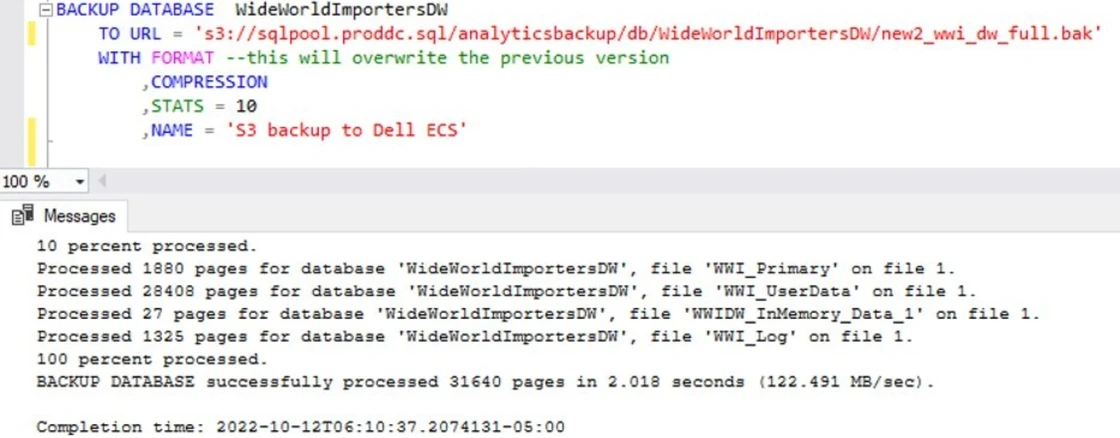
Dell documents a SQL Server 2022 backup and restore design with Dell Elastic Cloud Storage. The array provides an object storage endpoint and documented S3 API behavior. It is useful when an organization already operates Dell object storage and wants SQL Server backups on infrastructure it manages.
The vendor reference design gives the team a starting point for validating the actual endpoint. ECS versions and supported S3 behaviors can affect the backup workflow. Storage sizing, TLS and recovery access remain decisions for the deployed hardware and network.
Use the Dell ECS SQL Server design guide as a starting point and record the tested endpoint, certificate and object policy. Check whether the backup media and striping pattern work under the exact product release.
Recover the lab database through the independently configured ECS path. Confirm the recovery host can read every stripe and document any requirements for retention and alternate routing.
- Compatibility
- Supported Dell ECS environment, compatible S3 endpoint and appropriate SQL Server release.
- License and trial
- Commercial Dell infrastructure and support terms.
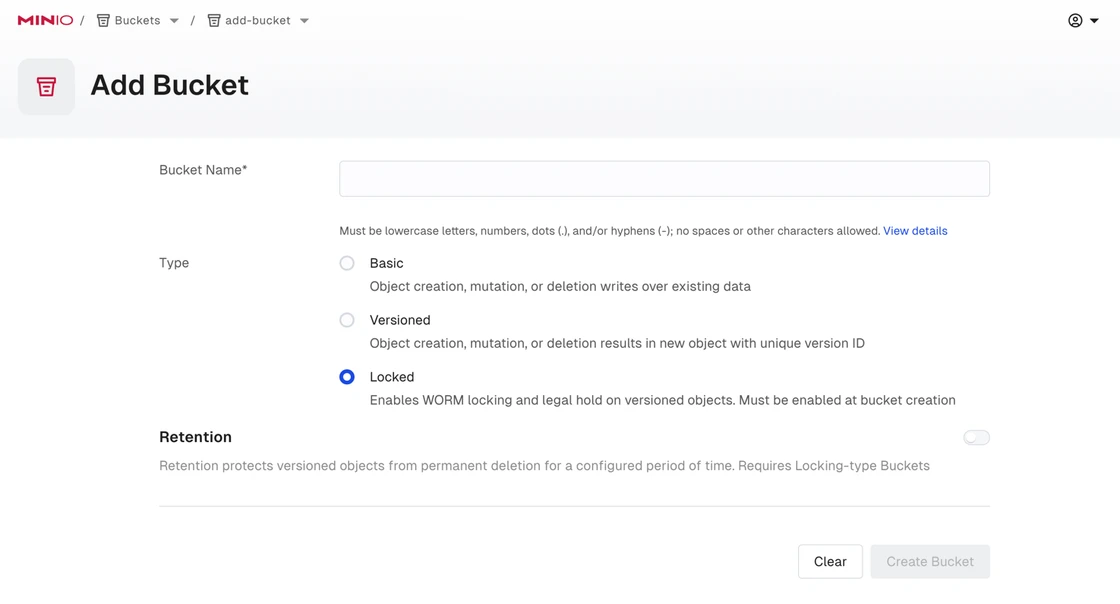
MinIO AIStor
MinIO AIStor provides a self-managed S3-compatible object store with documented API support and TLS configuration. It is useful when a team wants a private backup destination and can run object storage near its SQL Server estate. SQL Server uses the S3 compatibility path for eligible setups.
Its advantage is operational control of endpoints, certificates and placement. The exact server release and bucket policy must support SQL Server’s credential and multipart behavior. Availability, hardware and access from a recovery SQL Server remain the operator’s responsibility.
Check AIStor's S3 compatibility documentation for the exact operations required by SQL Server's connector. Verify the endpoint, authentication and TLS trust from the SQL Server service context.
Run a multi-object test and confirm the alternate SQL instance can read the same objects. Test interrupted multipart cleanup and review any unsupported operations reported by the SQL job.
- Compatibility
- MinIO AIStor with a compatible S3 endpoint and supported SQL Server version.
- License and trial
- Applicable AIStor commercial and deployment terms.
Wasabi Hot Cloud Storage
Wasabi Hot Cloud Storage exposes regional S3-compatible endpoints and documents multipart uploads. It is useful for teams that want a managed object store outside their SQL Server infrastructure and are prepared to confirm compatibility with the chosen SQL Server backup workflow.
The regional endpoint and account policy determine how the database connects. A successful test should include the actual write, required object parts and a restore from a target that can retrieve them. Retention settings and storage charges need to match the intended chain.
Select the documented regional service endpoint and test the connector with a small authorized bucket. Confirm required operations, object retention and access independently from the provider's general S3 compatibility.
Capture backup and restore duration, object list and actual role needed to recover. If immutability is a requirement, verify the precise policy by using the dedicated protected test object.
- Compatibility
- Wasabi S3-compatible endpoint and credentials with a supported SQL Server release.
- License and trial
- Commercial Wasabi storage terms.
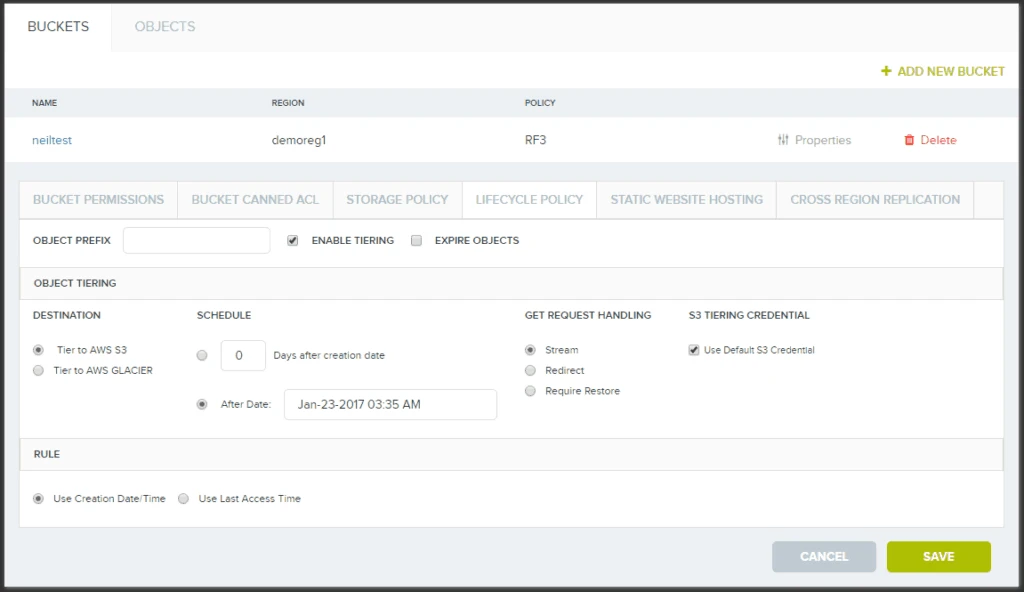
Cloudian HyperStore
Cloudian HyperStore is a managed-by-the-customer object storage platform with a documented S3 interface and storage security capabilities. It is relevant when an organization already operates HyperStore and wants a private S3-compatible endpoint for the SQL Server estate.
The fit depends on verifying the Backup to URL operation with the exact endpoint and bucket settings. SQL Server object access and multipart requirements remain important even where other S3 clients work. Retention protection needs to be validated against the actual backup and restore path.
Map the documented SQL Server integration to the actual HyperStore cluster and endpoint. Record which identity can write, read and change the tested retention policy.
Run the independent restore from the required site and confirm retained full and log backup objects. Test one intentionally inaccessible disposable object to ensure the operator sees a clear failure.
- Compatibility
- HyperStore deployment with compatible S3 connectivity and a supported SQL Server release.
- License and trial
- Commercial Cloudian software and infrastructure terms.
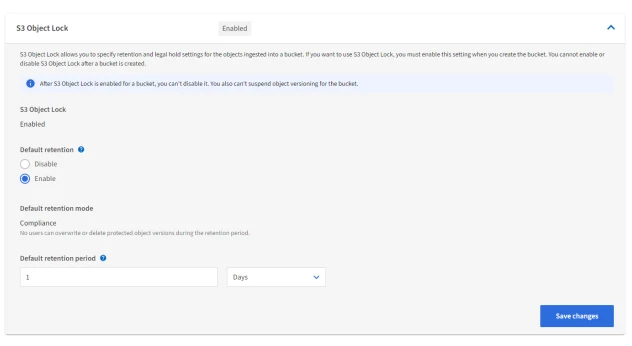
NetApp StorageGRID
NetApp StorageGRID provides object buckets and documents supported multipart S3 operations. It is useful when an organization wants SQL Server to write native backups to existing StorageGRID infrastructure and can provision suitable tenants, credentials and a dedicated endpoint.
Its strength is using a storage service the organization already manages. The specific load balancer endpoint, certificate and bucket policy determine whether SQL Server can use it. The product’s API coverage should be checked using the actual backup sizes and an independent restore.
Review StorageGRID's documented multipart support and compare it with the SQL Server S3 connector's expected operations. Confirm endpoint discovery, certificate trust and tenant or bucket policy on the tested device.
Write the backup to a dedicated destination and restore under a separate authorized identity. Check whether the chosen retention policy, stripe count and any endpoint failover preserve all necessary media.
- Compatibility
- StorageGRID deployment, eligible S3 endpoint and SQL Server with S3 Backup to URL support.
- License and trial
- Commercial NetApp infrastructure and support terms.
Pick the connector and where the backup will live
| What you need | Tools to shortlist | What to verify |
|---|---|---|
| Use SQL Server’s native Azure Blob Storage path | Verify the block blob credential or documented managed identity route on both instances. | |
| Write directly to a public cloud object store | Check the endpoint, TLS, credential scope, storage tier and retrieval charges for the exact account. | |
| Write to a private or on-premises S3 endpoint | Verify signature and multipart support on your release and test from the recovery network. |
Verify the SQL Server URL connector and object storage policy
Microsoft documents distinct Azure Blob and S3-compatible connectors. Check your SQL Server version, supported URL format, endpoint, certificate trust and authentication. General S3 compatibility is a starting point. Confirm the operations needed for backup and restore in the deployed configuration.
For the Microsoft S3 connector, per-file sizing depends on the documented multipart and MAXTRANSFERSIZE limits. When striping across URLs, retain the list of all required media members. Separately test storage retention or immutability under the identity that manages the protected bucket.
Azure Blob Storage
Use the native Azure connector requirements
Verify account and credential type and the exact supported immutable policy.
S3 protocol endpoint
Verify the S3 connector and provider operations
Check SQL version, TLS, credentials, multipart and stripe limits.
A retention-controlled archive or second site
Check object controls and recovery access
Prove the authorized clean SQL Server can read the complete media set.
- Microsoft SQL Server Backup to Azure Blob
- Microsoft SQL Server Backup to URL for S3-compatible storage
- Microsoft Backup to URL S3 best practices
- AWS SQL Server Backup to Amazon S3
- Google Cloud SQL Server database backup to Cloud Storage
- MinIO AIStor S3 API compatibility
- NetApp StorageGRID multipart support
Verify the media stripe inventory and recover a known test database
Use a dedicated UrlStorageTrial database with a synthetic marker. Create a supported trial full backup named UrlStorageTrialFull and record the complete stripe manifest separately. The SQL query summarizes the local backup media history without returning physical path or credential text.
Use the same documented storage route on an independent second SQL Server. Restore the full backup and any required logs and query the marker. Inspect provider inventory and SQL results together because history confirms what SQL recorded, while a restore exercises actual object readability.
| Check | Record | Pass condition |
|---|---|---|
| Source upload | SQL build, provider endpoint and test backup label | Backup completes and required storage objects exist |
| Stripe inventory | Expected count and local recorded media families | All intended media members are accounted for |
| Retention and access | Permitted write, restore and policy-change identities | Approved lab checks match the intended control |
| Independent restore | Required media, SQL target and recovered test marker | Recovery works with the actual target route |
How to compare these tools
Write the same sizable backup to each destination you’re considering. Test the TLS and credential setup, expected behavior for large files, and a restore from a second SQL Server. Sources checked .
Back up a lab database and restore it from the object
Make a documented disposable URL full backup using UrlStorageTrial and set the backup name to UrlStorageTrialFull. Run this read-only query on the SQL Server that generated the backup. Verify actual media and execute a supported separate restore to confirm content.
Summarize recorded Backup to URL media without exposing object paths
T-SQL · 16 lines
- Verify the storage connector, endpoint and identities on the test SQL build. Create a uniquely named protected full backup and keep the actual storage object list.
- Collect the SQL history counts and compare against the intended media stripes. Confirm access from the second test instance using approved credentials and restore the synthetic database.
- Verify the marker and any selected log point. Record media retrieval, retentions and failure behavior with one approved inaccessible test object separately from the successful restore.
Conclusion
Choose the destination that can accept the backup and provide it to the recovery host within your recovery window. Record the URL format, credential scope, storage tier and any retrieval steps. Keep a successful direct restore in the runbook.
Frequently asked questions
Which object storage connectors does SQL Server Backup to URL use?
Microsoft documents a native Azure Blob Storage connector. SQL Server 2022 and later also support S3-compatible object storage through the S3 connector. Check the current documentation for the installed version.
Can every S3-compatible storage service receive a SQL Server backup?
Compatibility depends on the endpoint, TLS trust, supported S3 operations and the SQL Server release. Check the provider’s API documentation and run both BACKUP and RESTORE on the actual database engine before adopting it.
What permissions are required to restore a backup from object storage?
Verify the destination SQL Server can reach the endpoint and read the backup object using the documented credential. For the S3 connector, check the required ListBucket and GetObject operations or their provider equivalents.
Can SQL Server restore directly from an archive storage tier?
Direct restore requires the backup object to be readable. If the selected tier requires retrieval or rehydration, complete that step and measure its effect on the available recovery time.
Does Object Lock replace the SQL Server restore test?
Object Lock controls retention and deletion for protected object versions. Restore the protected backup to check its data, access path, SQL Server compatibility and any encryption dependencies.
Does an S3-compatible storage product automatically support SQL Server Backup to URL?
Check the SQL Server connector and the provider's exact operations, authentication and endpoints. A real trial with upload, multipart handling where used and alternate-host restore validates the combination.
Can I restore a striped SQL backup with one object missing?
Inventory and protect every media member needed for the backup. Group the appropriate files together and verify actual restore behavior with the supported sequence.