

Syncing Salesforce data to SQL Server usually starts with loading selected objects and then moving changes identified by the Salesforce API. Copying updated rows is one job. Handling deleted records, renamed or newly visible fields and changes to object permissions are separate decisions. The SQL Server target needs a stable way to identify each Salesforce record.
Managed connectors offer a routine syncing and monitoring workflow. SSIS components are useful when the team already maintains packages and needs control over transformations and writes. A linked-server workflow can suit teams that want to run the sync from SQL Server. Compare the products using an object that receives updates and deletes and has API or permission constraints.
Tools for syncing Salesforce data to SQL Server at a glance
Verify Salesforce source support and the SQL Server destination together, including the deployment and plan. Then check what an incremental load produces for deleted and repeated records.
| Tool | Data flow | Setup decision | Trial evidence |
|---|---|---|---|
| Azure Data Factory | Salesforce V2 source and supported SQL sink | Integration runtime, OAuth identity and load design | Pipeline activity and current SQL rows |
| CData DBAmp | SQL Server-centric access and local copy workflows | Linked component, credential and refresh semantics | Local table and actual CRM changes |
| Fivetran | Managed Salesforce source and supported SQL Server destination | Plan, network and configured deletion handling | Sync history and approved active projection |
| Airbyte | Supported Salesforce source and SQL Server destination | Versions, deployment and sync modes | Destination rows with configured deduplication |
| Skyvia | Salesforce replication to supported SQL destination | Object selection, credentials and key mappings | Incremental run and latest SQL records |
| KingswaySoft SSIS Integration Toolkit | Salesforce source within SSIS | Runtime and approved Salesforce API mode | Raw exports and conformed SQL rows |
| Devart SSIS Data Flow Components | Salesforce input and configured SSIS SQL sink | Provider, runtime and destination mapping | Data Flow logs, updates and processed deletes |
| Informatica Cloud Data Integration | Supported Salesforce and SQL Server connection pair | Runtime, connector and mappings | Session history and target state |
| Qlik Talend Studio | Salesforce input and configured SQL output | Component version, API and failure handling | Valid staged records and job retry behavior |
| Integrate.io ETL | Salesforce source and configured SQL Server delivery | Eligible destination and input settings | SQL rows and observed incremental changes |
Azure Data Factory
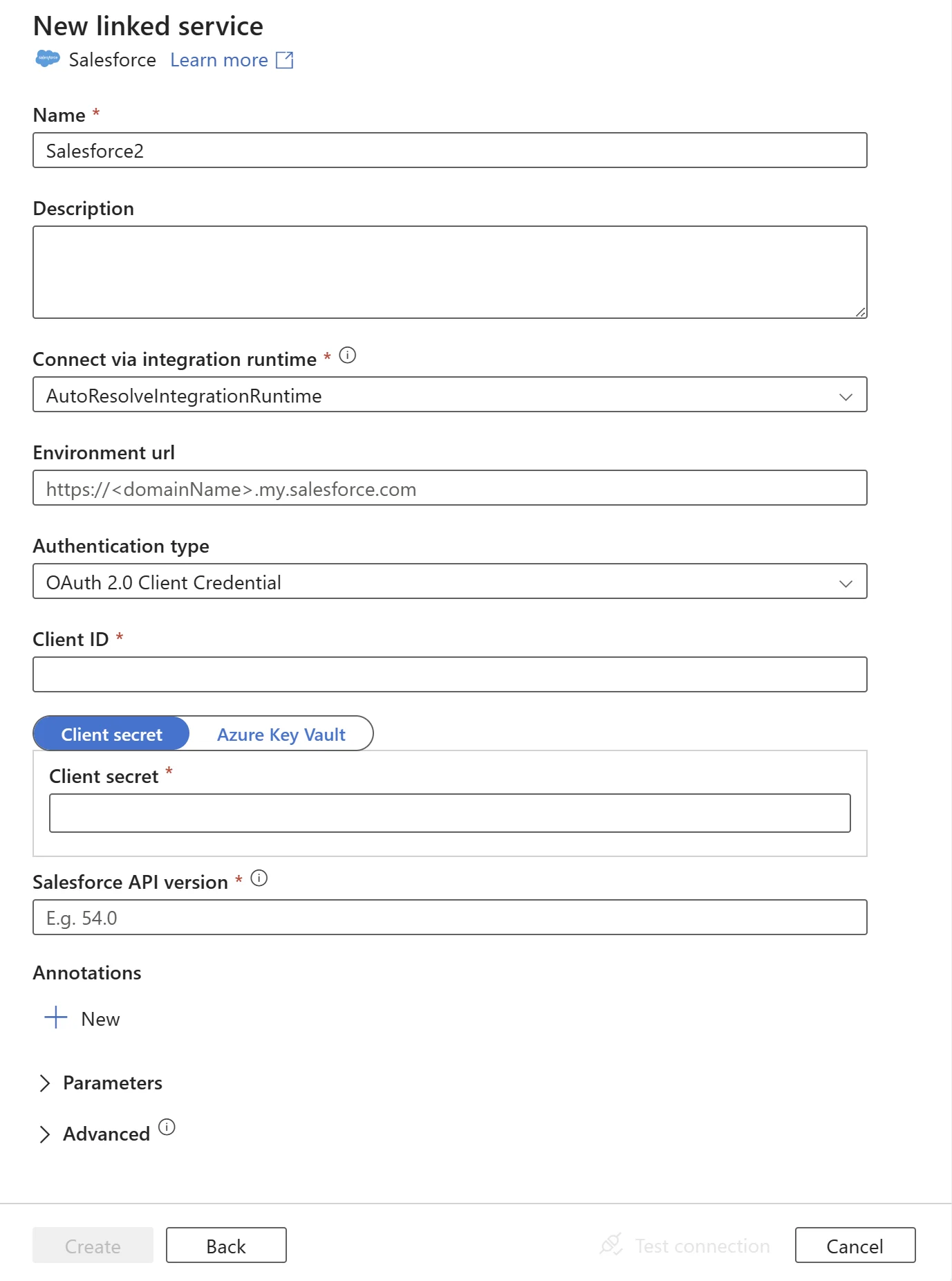
Azure Data Factory has a Salesforce source connector and SQL Server sink for building a scheduled copy pipeline. This is useful when the organization already uses Azure Data Factory and wants control over Salesforce queries, incremental boundaries and SQL Server staging.
Its fit depends on what the pipeline does after extracting Salesforce data. A timestamp filter can capture updated records, while deleted record handling needs an explicit extraction and apply rule. Runtime placement, API rights and SQL Server write behavior all affect the result.
Use the documented Salesforce V2 connector with the intended OAuth and SQL Server connection setup. Decide how the activity obtains changed or deleted records and which staging policy is applied.
Track activity runs and test the target projection after a controlled update and delete. Compare the pipeline's configured incremental point and what actually appears in SQL.
- Compatibility
- Azure Data Factory and supported Salesforce and SQL Server connectors.
- License and trial
- Azure service, integration runtime and related infrastructure charges.
CData DBAmp
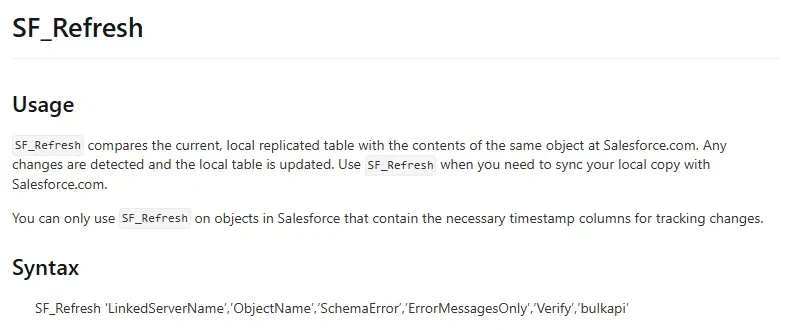
CData DBAmp provides SQL Server-centered Salesforce integration with stored procedures for replication and refresh. A DBA can use a supported refresh to update locally replicated SQL Server tables and handle relevant Salesforce changes. It is useful when management should remain inside SQL Server and its scheduling tools.
The source object, permissions and selected stored procedure determine what will be refreshed. DBAmp documents schema handling and options for deleted records. The team needs to account for SQL Server Agent history, Salesforce API limits and what happens if the schema must be rebuilt.
Use the documented DBAmp local-copy operations and choose the appropriate refresh workflow for the selected Salesforce objects. Record endpoint, access and which SQL Server identity can operate it.
Check how the refreshed local table changes when a known Account is updated or deleted. Compare resulting records and how the SQL reporting projection treats them.
- Compatibility
- Supported CData DBAmp installation, SQL Server connection and Salesforce account.
- License and trial
- Commercial CData licensing.
Fivetran
Fivetran offers a Salesforce source and a documented SQL Server destination. The managed service can create and update the supported destination tables. It is useful when a team wants a recurring Salesforce sync and prefers to hand connector operation to a service.
The source must expose objects and API permissions needed for the connection. Deleted record coverage depends on the Salesforce API and object, and retained changes can age out. A team should inspect how delete flags, system columns and source schema changes appear in SQL Server.
Verify the Salesforce connector and SQL Server destination pairing, including plan and network prerequisites. Record the source object, selected fields and expected deletion convention.
Inspect raw SQL rows after two changes and a retry. Compare the destination's current projection against the test manifest and keep actual sync and reset outcomes.
- Compatibility
- Supported Salesforce connector and Fivetran SQL Server destination setup.
- License and trial
- Commercial Fivetran service.
Airbyte
Airbyte has separate Salesforce source and SQL Server destination connectors and can run syncs through a supported deployment. It is useful when the organization wants to control its runtime or configure a Salesforce-to-SQL Server pipeline alongside other sources.
The source’s incremental mode and the SQL Server destination’s supported write modes are separate. Keys, normalization and deleted-record behavior affect whether the final tables represent current Salesforce state. A pipeline needs testing for interruptions and schema changes at both ends.
Select compatible Salesforce source and SQL Server destination versions. Record the sync mode, object primary key, configured cursor and any source limit or destination constraint.
Run the same fixture through the deployed destination and inspect actual histories, deletion flags or current records. Test a repeated sync and verify the newest row remains visible.

- Compatibility
- Airbyte deployment with compatible Salesforce source and SQL Server destination connectors.
- License and trial
- Open-source or commercial Airbyte options.
Skyvia
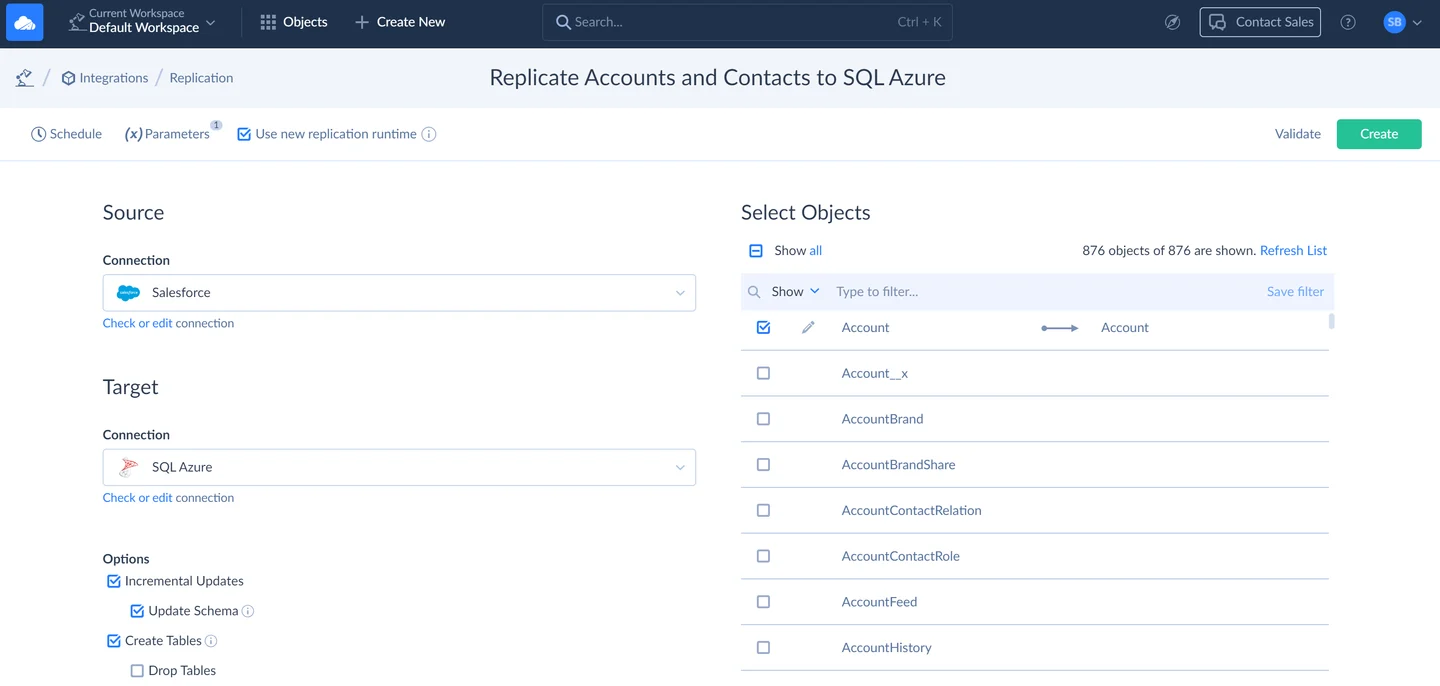
Skyvia documents Salesforce replication into Azure SQL using its managed replication workflow. It is useful for a team that wants scheduled refresh and schema handling with little local runtime management and whose SQL Server or Azure SQL configuration is supported.
The available features depend on the source, target and selected task. Incremental settings and schema updates need to match how downstream queries use the data. Network access, object permissions and the platform’s handling of deletions remain relevant.
Use the documented replication path for supported SQL Server deployments and select only the fixture objects. Confirm relationships and key mapping, plus the intended update policy.
Measure a full and incremental sync and compare the resulting Account state. Confirm what the pilot reports if the tested Salesforce account cannot access one object or field.
- Compatibility
- Skyvia with a supported Salesforce and SQL Server or Azure SQL destination.
- License and trial
- Commercial Skyvia plans and applicable usage limits.
KingswaySoft SSIS Integration Toolkit
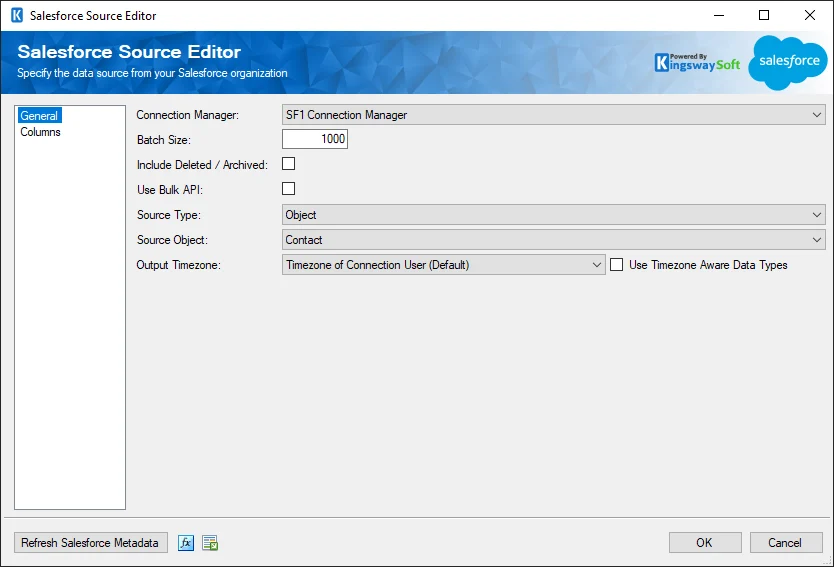
KingswaySoft’s SSIS Integration Toolkit provides a Salesforce source component that can feed SQL Server destinations through an SSIS package. It is useful when a team already operates SSIS and wants to control object extraction, filters and transformations inside its existing workflow.
Its main advantage is explicit package control. The Salesforce source options determine how records are read, and SQL Server components determine what happens during an upsert or bad-row event. Incremental state, deleted records and retry should be designed in the package.
Choose the Salesforce source mode in the SSIS toolkit and check which API and fields it needs. Determine whether the workflow reads deleted records and how the SQL sink applies them.
Check the SSIS package's stage and resulting reporting table. Save a rerun of the same controlled interval to prove the expected active data remains stable.
- Compatibility
- SSIS with a compatible KingswaySoft Salesforce toolkit and SQL Server destination.
- License and trial
- Commercial KingswaySoft licensing.
Devart SSIS Data Flow Components
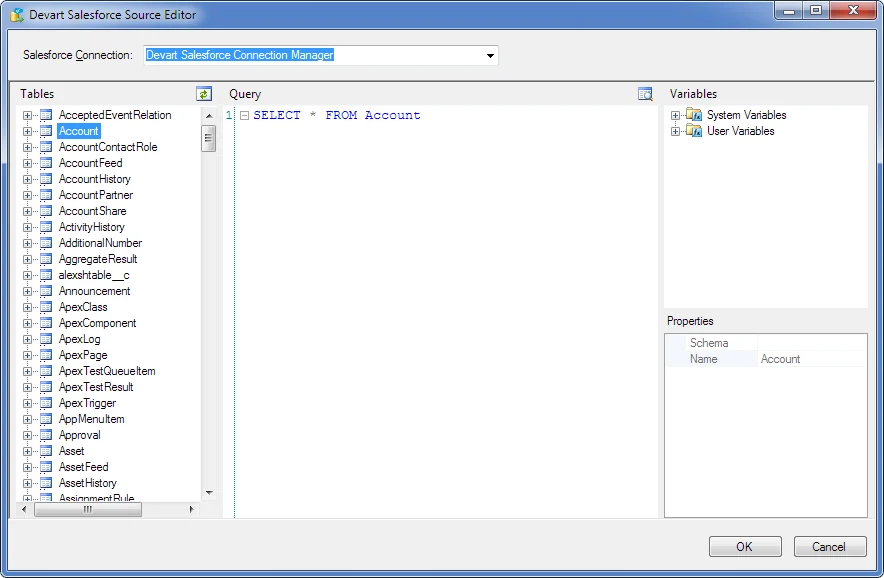
Devart SSIS Data Flow Components provide a Salesforce source for use inside an SSIS package. It is useful for teams that want to map Salesforce attributes into staging tables or apply existing transformations and validation before writing to SQL Server.
The main decision is which Salesforce data the source queries and how the downstream package interprets it. A merged target requires keys, mapping and retry logic. API permissions, the connection mode and SSIS deployment determine what can be automated.
Verify the Salesforce source component and actual SSIS runtime requirements. Map source keys and change indicators into explicit SQL Server stage types.
Test one updated and one deleted record with the documented connector and chosen destination. Check that replayed input does not introduce a second current row.
- Compatibility
- Supported SSIS and Devart Salesforce components with SQL Server destination access.
- License and trial
- Commercial Devart licensing.
Informatica Cloud Data Integration
Informatica Cloud Data Integration provides separate Salesforce and SQL Server connectors for managed mappings. It is useful when an organization already manages integrations through Informatica and wants the Salesforce sync to follow existing connection and operation standards.
The mapping and task determine how updates and deletes are represented. Salesforce API limits and object coverage affect extraction, while the SQL Server connector and write permissions govern the target. Runtime and credential placement matter when SQL Server is private.
Check the supported Salesforce and SQL Server connector versions in the intended runtime. Record connection roles, mappings, incremental method and any required source settings.
Verify row-level outcomes after updates and deletions. Reopen job or session evidence and record which result can be reproduced by querying the destination week to week.

- Compatibility
- Informatica Cloud Data Integration with supported Salesforce and SQL Server connectivity.
- License and trial
- Commercial Informatica service terms.
Qlik Talend Studio
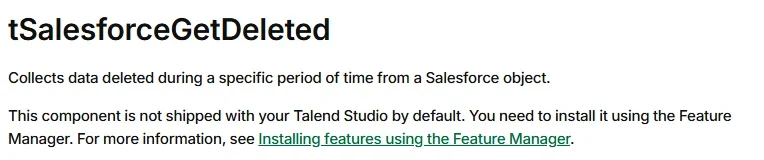
Qlik Talend Studio provides Salesforce input components and a documented GetDeleted component. It is useful when a team wants explicit control over the source calls and needs to manage deleted Salesforce records as a distinct input to SQL Server.
The benefit is defining the sync logic inside a job. The component and API support determine which objects and periods can be queried. The job still owns merge keys, schema changes and how deletion evidence is applied to the target table.
Use the documented Salesforce input component and configure the appropriate SQL Server output. Define which source query and load policy account for incremental and deleted records.
Apply the small staged data set and compare null, update and delete behavior. Verify retry and reject reporting against the team's operational expectations.
- Compatibility
- Supported Qlik Talend Studio Salesforce and SQL Server components and runtime.
- License and trial
- Commercial Qlik Talend licensing.
Integrate.io ETL
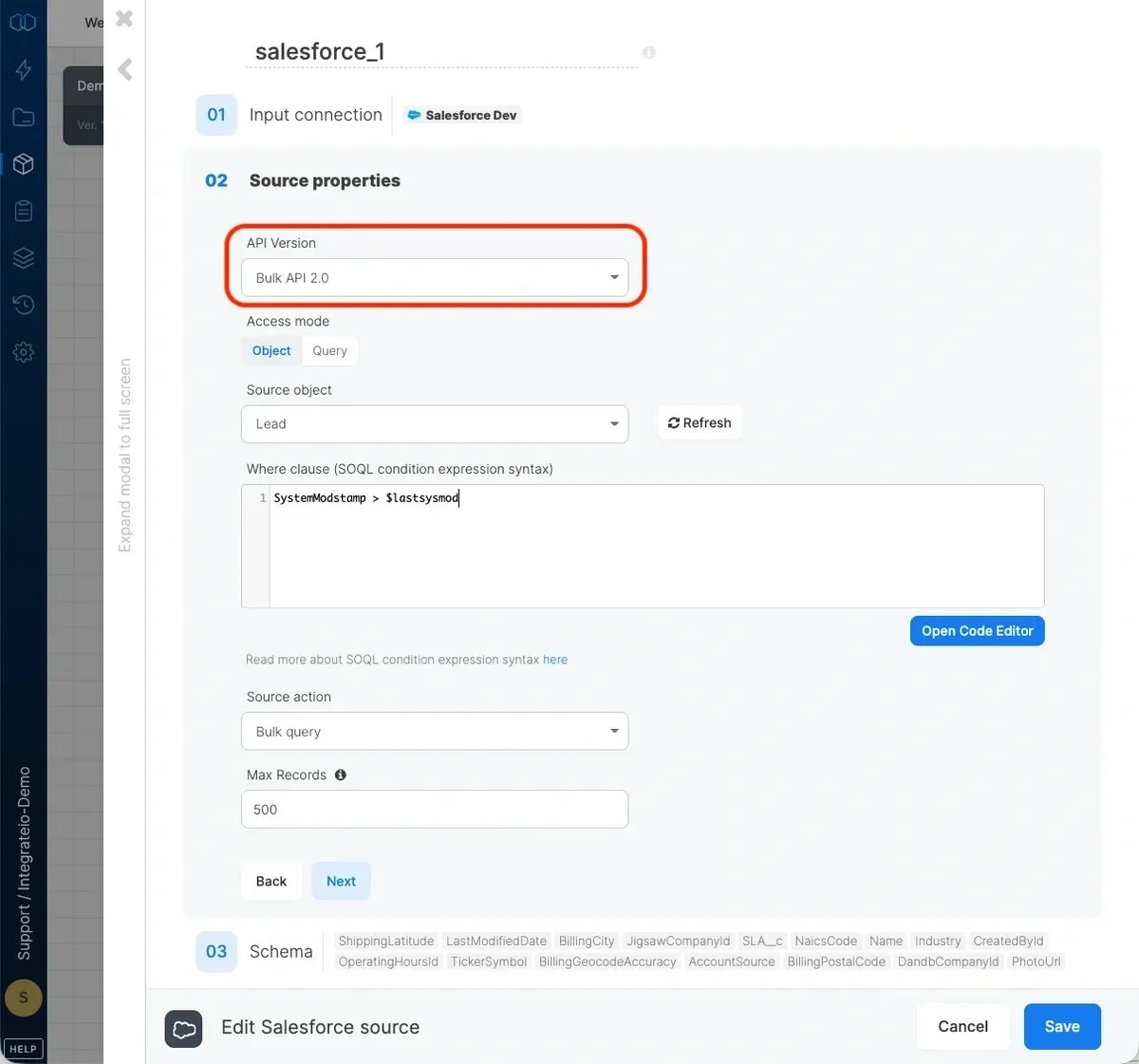
Integrate.io ETL can use Salesforce as a source and can work with supported Microsoft SQL Server databases. It is useful for teams that want a managed pipeline and control over field selections and transformations without deploying an SSIS runtime.
API access and the configured SQL Server connection determine what can move. The pipeline still needs a clear incremental rule and behavior for missing or deleted records. The chosen destination mode governs whether a run appends new rows or changes an existing record.
Use the documented Salesforce source and verify the intended SQL Server target and supported deployment. Define how source records, changes and deletes map to the target.
Test current-state queries after a controlled replay. Save pipeline configuration, exact record IDs and the latest available source and destination times.
- Compatibility
- Integrate.io account and supported Salesforce and Microsoft SQL Server connectivity.
- License and trial
- Commercial Integrate.io terms.
Salesforce to SQL Server sync tools by deployment
| What you need | Tools to shortlist | What to verify |
|---|---|---|
| Managed replication into a SQL Server reporting database | Check network access, the SQL Server destination edition, the delete policy, and who controls column changes. | |
| An existing Azure or cloud integration runtime | Confirm the runtime can reach SQL Server. Test how a failed write affects the next incremental window. | |
| SQL Server or SSIS already runs the integration | Test the object’s read mode, the target key and the step that applies each delete. |
Confirm what the Salesforce source and SQL Server target agree to keep
Choose the source objects, identifiers and audit or cursor fields the integration can read. Check how the actual API and connector retrieve deleted records. Salesforce documents QueryAll as a method for querying deleted records in its supported scope. Hard-deleted records and connector settings can affect available evidence.
Use the agreed Salesforce ID representation and destination collation consistently. Define which fields express deletion and which source or connector sequence determines the current record when a batch is repeated.
A current copy of Salesforce rows
Trial a documented recurring sync
Verify last-version and delete handling under the actual connector.
A custom ETL or API integration
Trial a staged load with an explicit merge policy
Keep Salesforce keys and source change fields available.
History for reporting or audit
Store and verify appropriate change evidence
Define current projection independently of archived records.
Check one updated Account and one deleted Account in SQL Server
The fixture is a normalized staging model, independent of any vendor's table or flag names. It contains an original and updated version of one Account and an original and deleted version of another. An extra record replays the same update. The current projection should show only the updated Account once.
Use each product's documented output to populate comparable staging fields in the live sandbox trial. Agree how to sort equal change timestamps. The fixture uses local ImportSequence only as a deterministic tie-breaker for a replay carrying the same record.
| Case | Normalized input | Expected SQL projection |
|---|---|---|
| Updated Account | Two versions with a later SystemModstamp | Latest label retained |
| Replayed version | Repeated latest update with the same value | One current record |
| Deleted Account | Later version has deletion flag | Absent from the active projection |
| Report scope | Dedicated sandbox and test IDs | Results attributable to the named source and batch |
How to compare these tools
Sync the same Salesforce object twice after a change and delete. Check incremental fields, API limits, write behavior and how the tool recovers after a failed run. Sources checked .
Test the Salesforce sync with three Accounts
Create an empty disposable SalesforceSyncTrial database. Run the staging fixture with Setup and Verify. Compare it with actual sandbox output normalized to the same fields, using a dedicated authorized Salesforce and SQL Server deployment.
Verify a current SQL projection after Salesforce updates and deletes
T-SQL · 39 lines
- Verify Salesforce source and SQL Server destination eligibility and access. Run an initial sandbox load and save the scoped object and identifier list.
- Apply a known update and supported deletion in the sandbox. Compare raw destination evidence and the approved current SQL projection with the fixture outcomes.
- Repeat the incremental interval or run the supported retry. Confirm the current record count and stored state, and record source limits and target behavior.
Conclusion
Choose based on who will maintain the Salesforce pull, the SQL Server schema and the retry procedure. If reports use current Accounts, settle the delete policy before they go live. Save the after-delete and after-replay results alongside the run history so the reporting owner can tell whether the data is current.
Frequently asked questions
Can Salesforce data sync directly to SQL Server?
Yes. Use a managed connector with a SQL Server destination, an integration runtime with both connectors, or a SQL Server-native product such as CData DBAmp. Check which deployment can reach your SQL Server and what permissions it needs to create or write tables.
How do I run an incremental sync from Salesforce to SQL Server?
Use the connector’s managed cursor where available. In a custom workflow, use a stable change field such as SystemModstamp where the object exposes it, read bounded windows, upsert by Salesforce ID and advance the saved position after the target commit. Test rereading an overlap and deduplicating by ID.
How do Salesforce deletes reach SQL Server?
The connector can apply a delete it retrieves, retain a flag, or pass the event to a separate job step. Check how the chosen connector reads deleted records for the object. In your current reporting view, exclude flagged rows and confirm a removed Account stays absent after replay.
What should SQL Server use as the Salesforce Account key?
Keep the full Salesforce API ID as text and use it as the replication key. Standardize on the 18-character form at extraction or normalization. Keep the source organization as part of the key if the same table consolidates several orgs.
Will custom Salesforce fields appear in the SQL Server replica?
That depends on the connector and its configuration. Verify whether it refreshes schema automatically or requires a mapping update. Add one field in the sandbox, check that a changed Account contains the value, and test whether older rows need a reload.
Can a Salesforce sync drop deleted records without reporting their IDs to SQL Server?
Check the connector's API query and configured delete semantics. If the target must mark or remove stale records, verify the actual delete evidence from the supported source scope.
Should Salesforce records be deduplicated solely by import time?
Use the agreed record ID and source change order, with a deterministic policy for true replays. Verify a retried older record does not replace a newer value.