

Migration verification checks whether the destination contains the data the application expects. Row counts can reveal missing batches. Aggregates and hashes can narrow differences. Row-by-row comparison can show exactly which values disagree. The choice depends on the amount of data, how much changed during the move and whether the two systems store or compare values the same way.
A stable comparison point matters as much as the tool. A live source can change while a target is still catching up, creating differences that disappear when replication finishes. SQL Server-specific tools can compare compatible schemas directly. Cross-engine tools usually need explicit keys, type conversions and rules for values such as timestamps, decimals and nulls.
Tools for verifying SQL Server migrations at a glance
Choose comparable data snapshots and keys before picking the tool. Decide how to report validation that is delayed, skipped or unable to read the destination.
| Tool | Comparison scope | Prerequisite to verify | Evidence to save |
|---|---|---|---|
| Microsoft tablediff | SQL Server table comparison | Supported key and comparable table structure | Difference list and exact source/target names |
| Redgate SQL Data Compare | Keyed SQL Server tables and data | Usable key, selected columns and filters | Missing, extra and different rows |
| Devart dbForge Data Compare for SQL Server | SQL Server row comparison and reports | Matching key and comparison options | Detailed report and approved scope |
| AWS DMS Data Validation | Supported source and target in an enabled task | Key, supported types and current validation status | Failed, pending and unsupported counts |
| Fivetran HVR Compare | Source and target for an HVR channel | Compatible columns, keys and compare method | Per-table result and identifiable differences |
| QuerySurge | SQL pairs and data verification workflows | Comparable queries and target connectivity | Saved test result and row-level evidence |
| Tricentis Tosca Data Integrity | Reconciliation across supported sources | Execution setup and actual data mappings | Record/count rules and failed comparisons |
| Google Cloud Data Validation Tool | Supported source and target queries or compatible extracts | Connector and field support in installed tool | Repeatable aggregates and validation records |
| SQLines Data | Supported data validation and comparison | Source, target and mapping options | Selected validation and quantified mismatches |
Microsoft tablediff
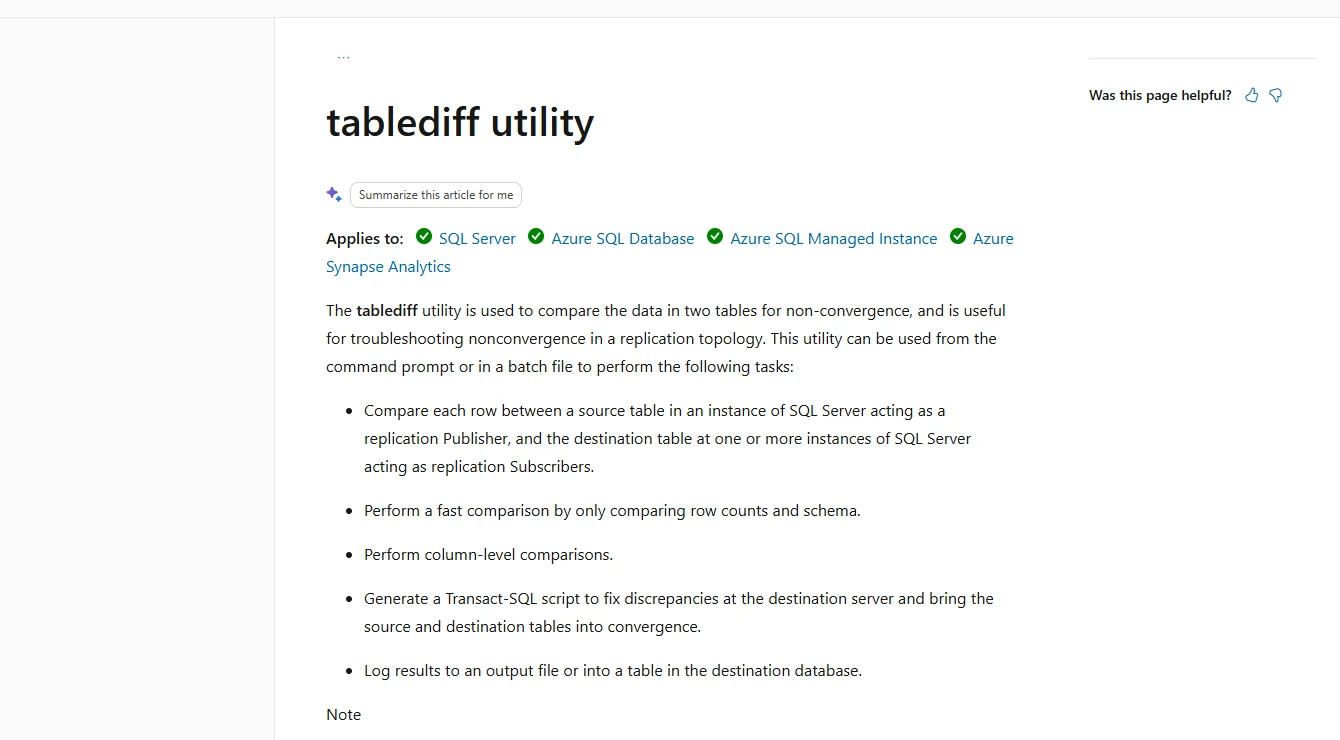
Microsoft tablediff compares one SQL Server table with another and can report rows that differ. It can generate a convergence script for supported differences. It is useful for focused checks of replicated or migrated tables when the source and target use compatible definitions.
The strength is a narrow, scriptable native comparison. Microsoft documents source key or identity requirements and supported type mappings. Comparing many tables needs orchestration, and the direction and scope of any generated corrective SQL should be reviewed independently.
Confirm the documented source key, identity or ROWGUID prerequisite and whether strict destination matching is appropriate. Run the comparison with explicitly named source and target endpoints.
Keep the raw differences and matching criteria from the fixture. If automatic script generation is used, inspect it separately and keep the live validation path read-only.
- Compatibility
- SQL Server replication tooling with compatible source and destination tables and access.
- License and trial
- Included with applicable Microsoft SQL Server tooling.
Redgate SQL Data Compare
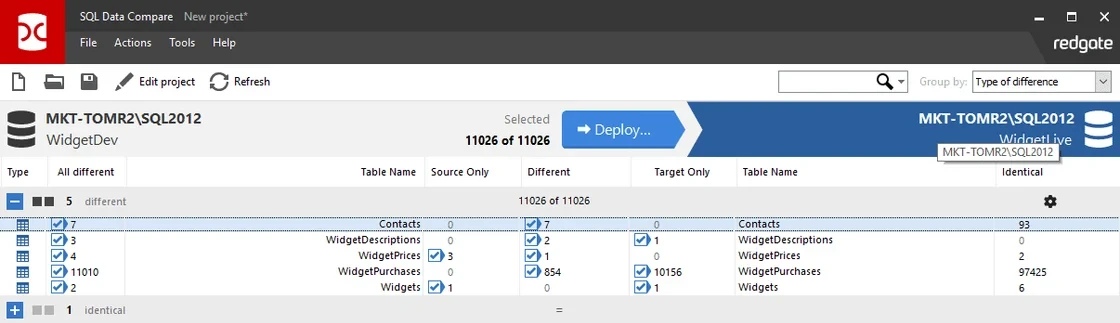
Redgate SQL Data Compare can match records in SQL Server tables or views using a suitable key and display missing, extra or changed data. It is useful when a DBA needs to inspect concrete row differences between a SQL Server source and target after a migration.
Its strength is showing differences and, when useful, generating a selected data synchronization script. The comparison can only match the rows identified by the configured columns. If the migration changed keys or transformed values, the comparison needs mapping and interpretation of those changes.
Select and validate the matching key before comparing data, particularly if the table was recreated during migration. Check mappings, nulls and excluded columns as part of the scope.
Generate a difference report from the fixture and compare it with native SQL. Review extra rows separately and keep any proposed synchronization script out of the validation step.
- Compatibility
- Supported SQL Data Compare installation and compatible SQL Server connections.
- License and trial
- Commercial Redgate licensing.
Devart dbForge Data Compare for SQL Server
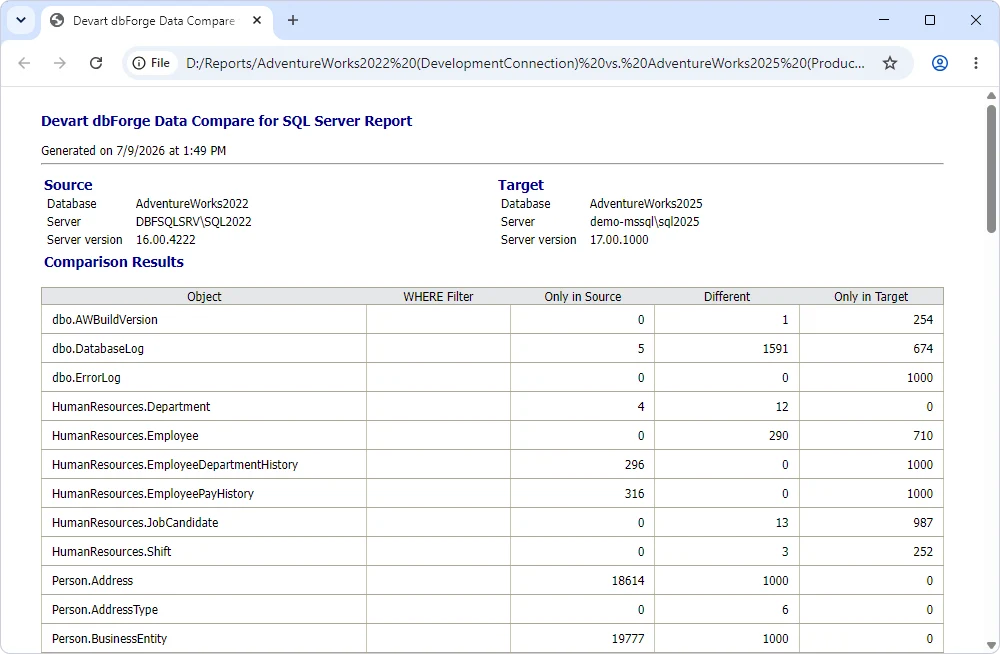
Devart dbForge Data Compare for SQL Server compares selected database objects and can generate reports and synchronization scripts. It is useful when the operation needs a repeatable record of rows that differed and the team already uses dbForge to match SQL Server objects.
The useful scope depends on object, column and comparison key mapping. A generated report gives evidence about a specific selection. Changes made by the migration itself need explicit treatment so accepted differences are distinguishable from errors.
Choose the comparable tables and column rules then save the documented comparison report. Confirm the primary or alternate key actually identifies rows after the move.
Inspect example changed, missing and extra rows in the selected report format. Compare against local fixtures and ensure the right operation is visible for each record.
- Compatibility
- Supported Devart Data Compare edition and compatible SQL Server connections.
- License and trial
- Commercial Devart licensing.
AWS DMS Data Validation
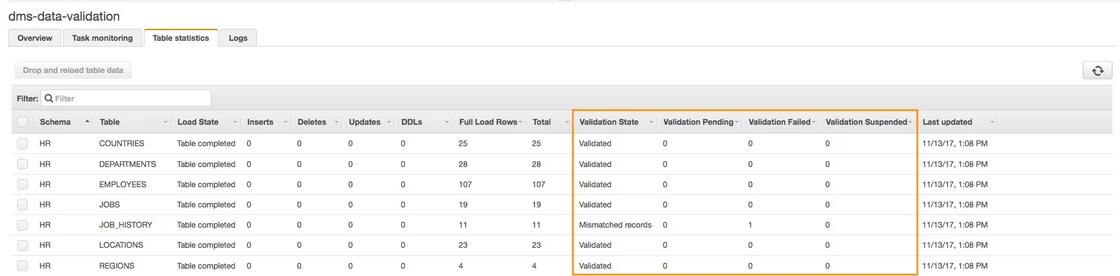
AWS DMS Data Validation compares supported source and target records as part of an AWS DMS migration or validation workflow. It can report mismatches or records that are still pending. It is useful when the DBA wants validation beside the migration task and visibility into selected tables.
The feature depends on supported endpoints and table keys. Validation can compete for resources on both databases, and CDC lag or changing rows can affect timing. The output should make unsupported or unvalidated tables visible before cutover.
Enable validation where the SQL Server migration task, source and target support it and record which tables use a key. Check the current restrictions for types, filters and unsupported cases.
Save failed, pending and skipped results separately. Repeat after changes have caught up to the intended source snapshot and independently verify a small keyed sample.
- Compatibility
- Supported AWS DMS endpoints, task version and validation configuration.
- License and trial
- AWS DMS capacity and related infrastructure charges apply.
Fivetran HVR Compare
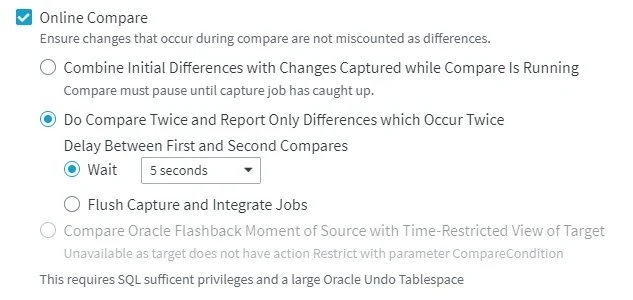
Fivetran HVR Compare can compare data between configured locations. Its bulk or row-wise approaches are useful for an initial assessment and for drilling down where the HVR channel reports a difference. It is useful when the same endpoints already participate in an HVR migration or replication workflow.
The comparison mode determines what is read and how specific the result can be. A checksum can point to a table or subset, while row-level results reveal individual differences. The expected state depends on timing and apply status when source and target are live.
Use the configured channel and documented comparison method for the eligible source and target. Record comparison scope, such as table, key and selected columns.
Verify a known changed row and source-only row in the tested mode. Compare elapsed time and evidence available for a later investigation, using a stable point on both sides.
- Compatibility
- Fivetran HVR channel with supported database locations and read access.
- License and trial
- Commercial Fivetran HVR licensing.
QuerySurge
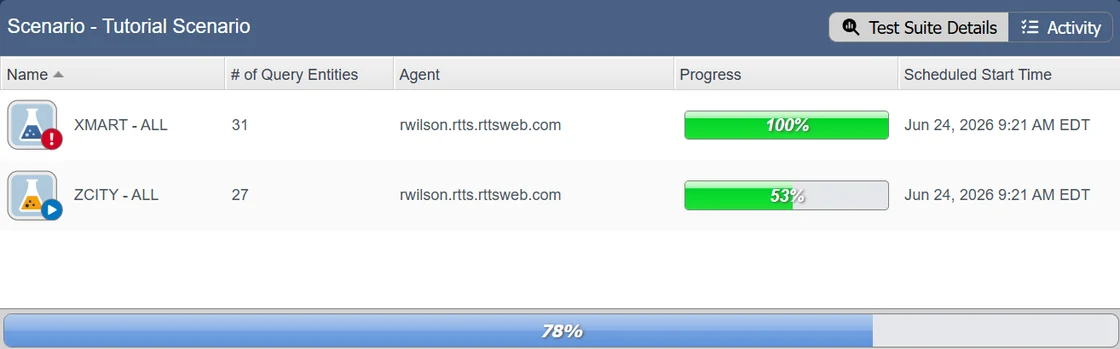
QuerySurge can run pairs of queries against source and target and compare their returned data. It is useful for a migration test program that needs rules for expected transformations and repeatable reports across several endpoints. SQL Server can be one of the supported query connections.
Its strength is allowing a test to express the intended relationship between two results. The tests still need stable ordering or keys, normalization and an agreed data cutoff. A test suite provides evidence only for the queries and migration behaviors it was written to cover.
Use paired queries that intentionally return the same keys and types. Add one check for table totals and a separate keyed comparison for the actual migration acceptance decision.
Check how the report distinguishes failures caused by connection or query problems from genuine row mismatches. Repeat with the exact saved comparison configuration.
- Compatibility
- QuerySurge with supported source and target database connections.
- License and trial
- Commercial QuerySurge licensing.
Tricentis Tosca Data Integrity
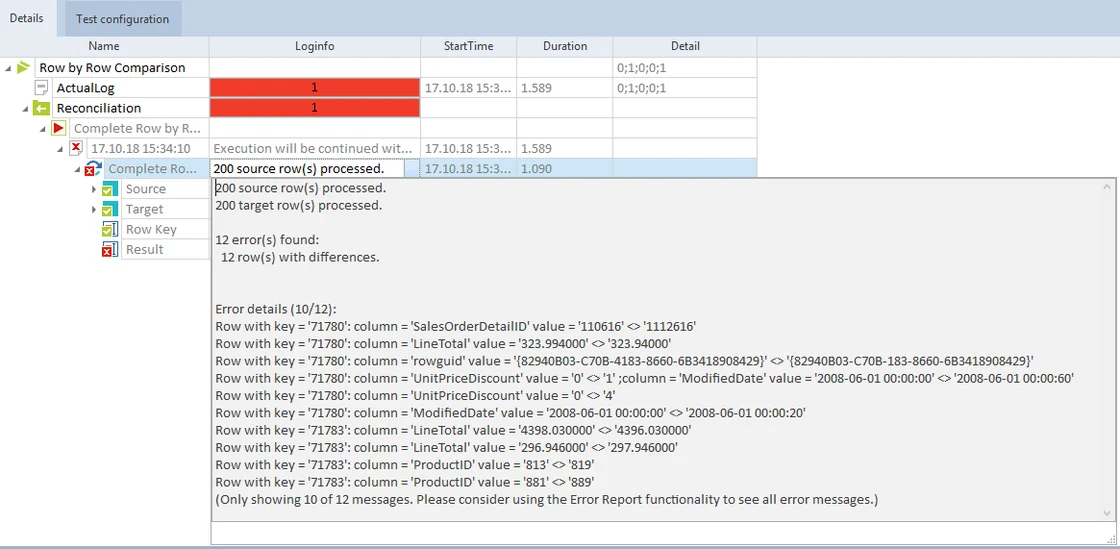
Tricentis Tosca Data Integrity includes reconciliation tests for comparing selected data between sources and destinations. It is useful when validation needs to be part of a broader test management workflow and reviewers want traceable cases and mismatch evidence.
The benefit is managing reconciliation alongside other tests. The source queries, filters and joins determine what the comparison represents. It is particularly important to agree how intentionally transformed SQL Server data should appear in the target test.
Configure reconciliation for the intended source and target and record the mapping and run context. Keep aggregate checks separate from row comparisons in the test evidence.
Seed known source-only, target-only and changed examples. Verify that the report describes all three problem types and can be reproduced at a named checkpoint.
- Compatibility
- Applicable Tricentis Data Integrity configuration and supported database connections.
- License and trial
- Commercial Tricentis licensing.
Google Cloud Data Validation Tool
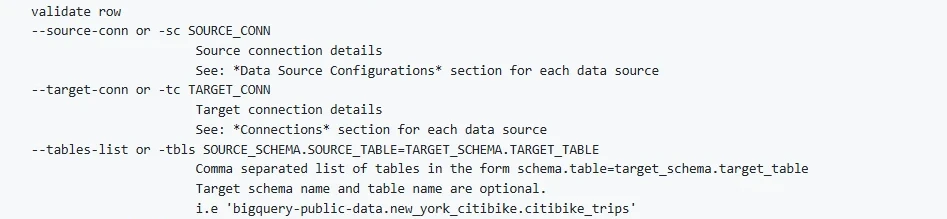
Google Cloud’s Data Validation Tool is a command-line utility for comparing data across supported engines, including SQL Server connections. It can run aggregate and supported row-level checks. It is useful when a team wants reproducible comparison commands without making the validation depend on the migration vendor’s report.
The strongest case is explicit and reviewable validation across platforms. Connection support, column rules and limits for special data types affect row checks. A selected hash or aggregate represents a defined set of data and should be interpreted with its filters and normalization rules.
Verify the supported connector pair in the installed Data Validation Tool or use controlled comparable extracts. Use a narrow test query and record any required field normalization.
Save the validation configuration and compare aggregate results with the native row-level fixture. Record whether data or permissions leave any fields outside the comparison.
- Compatibility
- Data Validation Tool with SQL Server and target connectivity and required drivers.
- License and trial
- Free, open-source tooling. Database or execution costs are separate.
SQLines Data
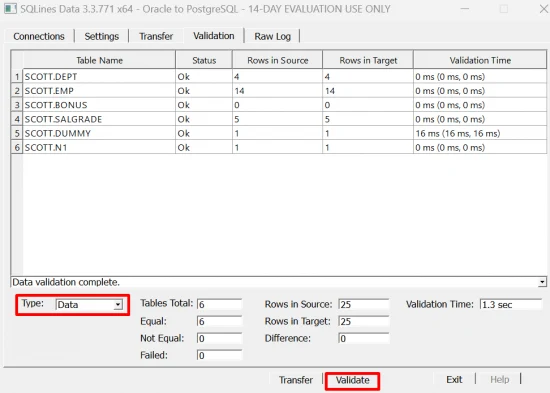
SQLines Data provides validation modes for comparing data after transfers on supported database pairs. It can run row-count or detailed validation workflows depending on configuration. It is useful when the migration already uses SQLines and the team wants verification from the same command-line toolset.
Its value comes from pairing repeatable extraction with a repeatable check. Types, comparison keys and rules for cross-engine differences influence the result. An unexpected value needs to be traced to either the migration conversion or an actual discrepancy in the target.
Use the documented supported source and target data validation and select actual objects and mapped columns. Verify that transformed target values have an explicit acceptance rule.
Run exact targeted checks on the fixture and compare the report to the native result. Keep the source snapshot, target scope and outcome identifiers for reruns.
- Compatibility
- Supported SQLines Data configuration and source and target access.
- License and trial
- Applicable SQLines licensing and usage terms.
Which validation tool fits the migration?
| What you need | Tools to shortlist | What to verify |
|---|---|---|
| Compare two SQL Server databases directly | Use a stable key and record the three difference types before considering repair. | |
| Validate an existing replication or migration task | Check what was validated at the chosen migration point and which tables or columns were skipped. | |
| Run repeatable source and target reconciliation | Test the key, source and target queries, type normalization rules and report output. | |
| Use a scriptable validation workflow | Review generated SQL, the key and result output before repeating the validation across key ranges. |
Choose a comparable point and keys before interpreting differences
Use the same committed point for both sides. During an online move, pause writers or use known equivalent snapshots and confirm replication has reached the required point. Record limitations caused by omitted columns, unsupported objects or inconsistent source access.
Choose a stable unique key and agreeing types. Use aggregate counts and totals to find broad gaps, then compare exact rows where integrity matters. Normalize differences such as intended type conversions under an explicit rule.
Tables and key definitions match in SQL Server
Trial keyed comparison or native SQL
Check missing, extra and changed rows at the same point.
The migration path includes ongoing change capture
Use built-in validation and independent samples
Check apply state and report pending or skipped work.
Target types or schema names are intentionally changed
Use paired queries and documented mappings
Record agreed transformations and exact tolerances.
Prove a keyed comparison can catch errors with equal counts
The disposable fixture stages three rows on each side. ID 1 is identical, ID 2 has a revised amount and a different null state, ID 3 is only in the source and ID 4 is only in the target. A total of three on both sides is expected. The validator must still report all three row problems.
Run the product comparison and native check using the same unique key and data project. Keep the exact keys and change categories as acceptance evidence. For larger tables, use scoped ranges and only compare equivalent snapshots.
| Key | Source condition | Target condition | Expected report |
|---|---|---|---|
| 1 | Present | Identical | No mismatch |
| 2 | Amount 20.00 and null status | Amount 21.00 and status 2 | Changed |
| 3 | Present | Absent | Missing at target |
| 4 | Absent | Present | Extra at target |
How to compare these tools
Reconcile source and target at the same point in time. Include counts, matching keys and value differences, and test a deliberate mismatch so you know what the tool reports. Sources checked .
Verify three differences with matching row counts
Create an empty disposable MigrationVerifyTrial database. Run Setup once to stage the two snapshots and then Compare to collect the counts and keyed differences. Verify both observed results through each tool's read-only comparison workflow.
Find changed, missing and extra rows despite equal table counts
T-SQL · 39 lines
- Check the expected counts and row-level results in the native fixture. Configure each tool using ItemId as the comparison key and the same selected fields.
- Verify each mismatch and how the comparison output handles nullable values and missing keys. Record the actual source and target checkpoints, coverage and exact settings.
- Compare what happens if access is intentionally withheld from one lab table. The report needs a visible skipped or failure state rather than inferred agreement.
Conclusion
Use a direct compare when both endpoints are SQL Server and you need a short list of exact rows. Choose a migration-native validator if its coverage fits the task, or run an independent test suite when sign-off needs repeatable checks across platforms. Keep the comparison point, checked columns and unresolved rows with the result.
Frequently asked questions
How do I verify data after a SQL Server migration?
Compare the same logical point on the source and target. Match rows by a stable unique key and check which keys are missing, extra or changed. Include the comparison scope and any unresolved exceptions in the cutover record.
Are matching row counts enough after a database migration?
Compare keyed values as well. A missing row and an extra row can cancel out in the count, and changed values leave the count unchanged. Counts are useful for narrowing the investigation.
Can I use CHECKSUM to validate an entire SQL Server migration?
A checksum may help narrow a candidate range, depending on the method. SQL Server documents collisions for CHECKSUM. Use a keyed comparison to confirm which rows and columns actually differ.
How do I compare rows when the destination changes data types?
Write down the intended mappings for dates, numbers, collations and NULL values. Compare the normalized values with an agreed precision and scope. Keep expected transformations visible in the result.
What should a migration validation report include?
Record the source, target, comparison time or checkpoint, keys and columns, matching, changed and missing rows, and any skipped tables. Add the owner and decision for each unresolved issue.
Can matching row counts prove a SQL Server migration transferred the right records?
Use counts as a first check and compare keys and selected values independently. Missing and extra rows can cancel each other numerically.
Why can validation find differences during a live migration?
The two queries may be reading different committed points or change application may still be running. Align snapshots or confirm catch-up before reconciling.