

SQL Server ETL data quality checks do different jobs. A file or incoming table can be checked before it loads. A transformation can be tested in a database. A finished table can be checked for freshness, uniqueness, accepted values and relationships. A useful tool makes clear what it inspected and where a failed check can stop the data from moving further.
Tools such as Great Expectations, Soda and dbt let engineers maintain tests as code. Enterprise platforms can centralize rules, profiling and steward workflows. Pipeline checks can reject individual rows, while database tests can validate a transformation’s known behavior. Compare how each tool runs at the right stage, explains a failure and avoids marking a partially checked load as complete.
Data quality tools for SQL Server ETL at a glance
Choose the stage at which checks apply and what happens on failure. Compare rule output and evidence before enabling an automated load.
| Tool | Validation path | Useful scope | Evidence to verify |
|---|---|---|---|
| Great Expectations (GX Core) | Expectation checks against a connected dataset | Versioned Python validation and reports | Failed rules and accessible sample rows |
| Soda Core | Configured scans or data contracts | Reusable quality checks with supported SQL deployment | Rule results, failed-row access and job status |
| dbt Core with the SQL Server adapter | Tests executed against built models | Relationships, uniqueness and assumptions in SQL models | Stored or repeatable failures and CI state |
| Informatica Cloud Data Quality | Managed rules and profiles | Data quality and stewardship workflows | Scope, quality results and rejected data |
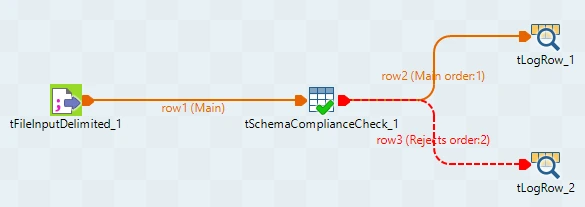
| Qlik Talend Studio | Profiling and validation within ETL | Transform-level checks and reject processing | Failing row and pipeline outcome |
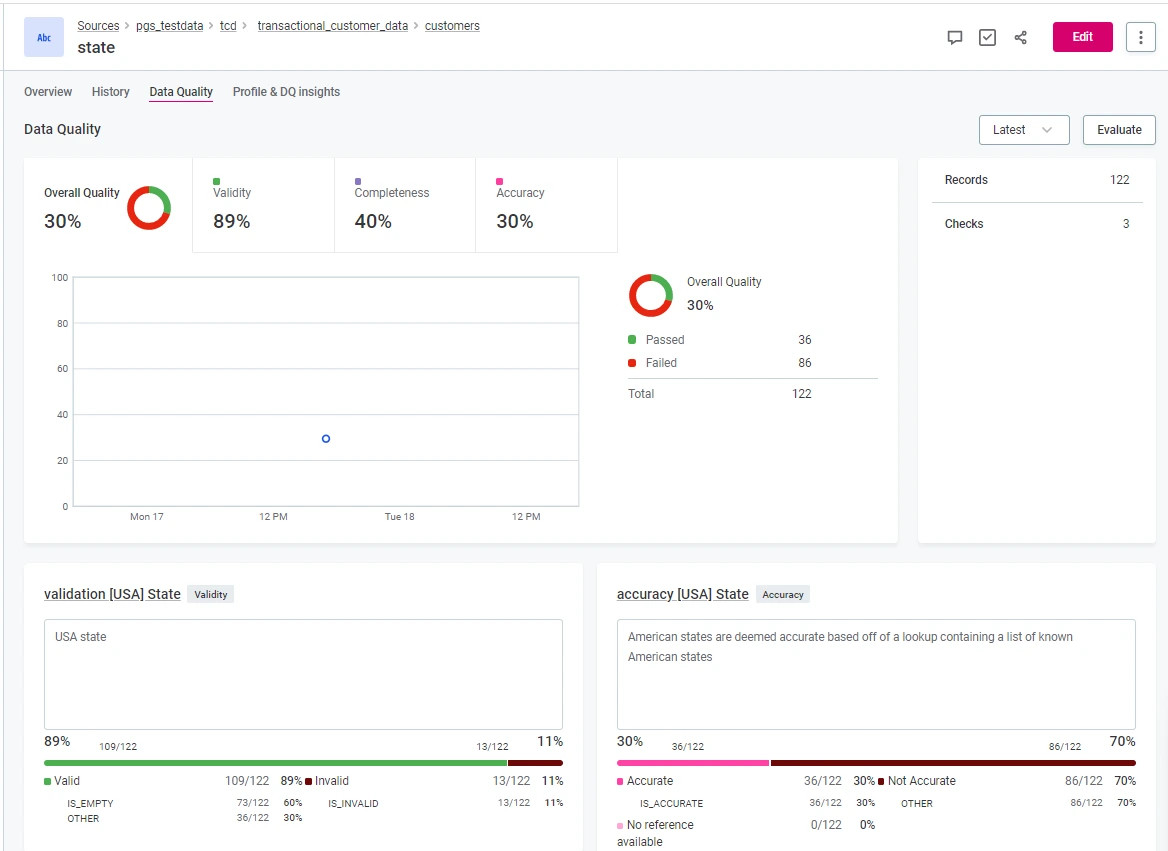
| Ataccama ONE | Supported source monitoring and rules | Managed source discovery and quality operations | Rule coverage and available defect evidence |
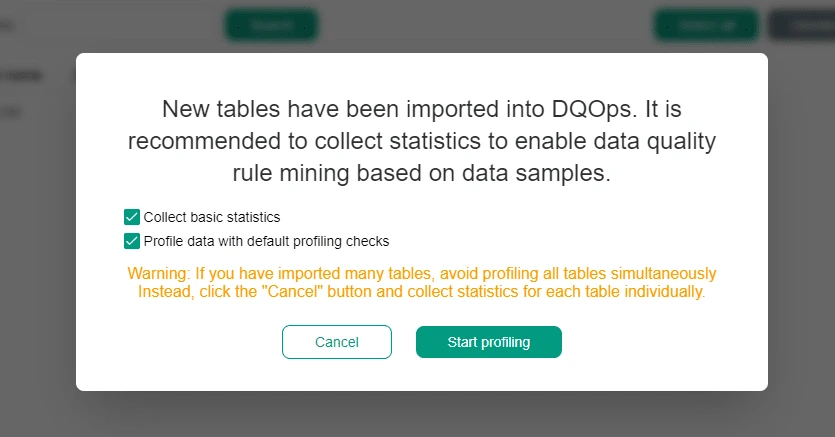
| DQOps | SQL Server source monitoring and checks | Recurring quality and observability | Check status and broken rule counts |
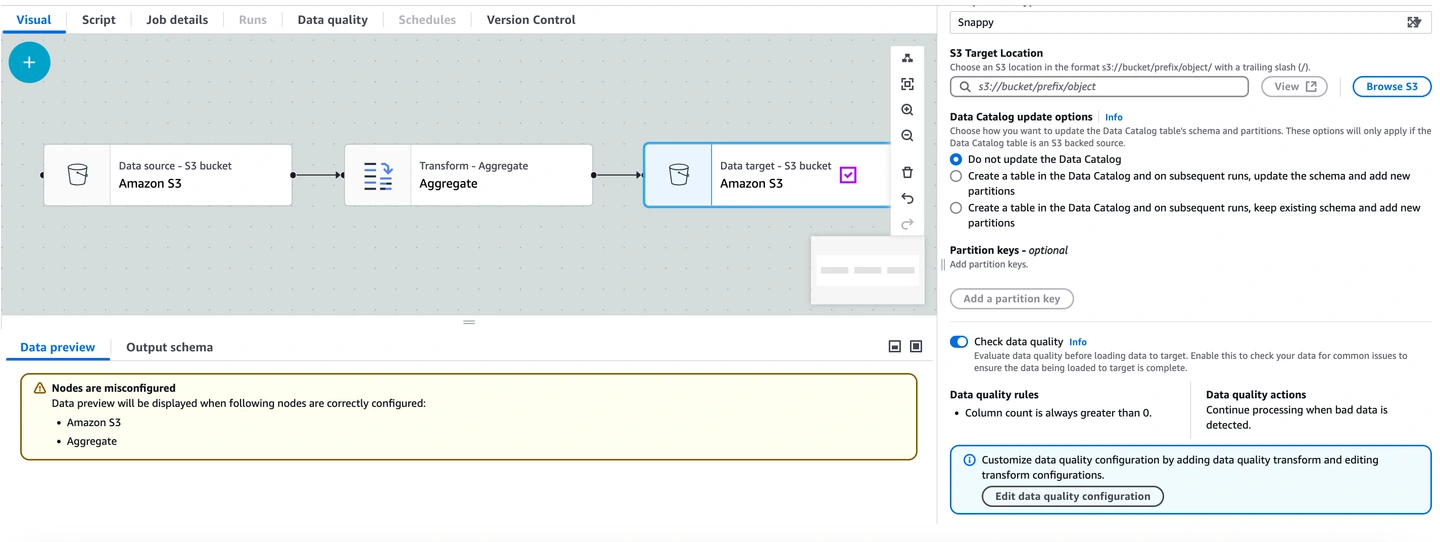
| AWS Glue Data Quality | Managed checks in supported Glue workflow | SQL extraction and managed ETL validation | Rule state and any configured row results |
| Apache Hop | Data Validator in a pipeline | Explicit pipeline routing and rule failures | Reject outputs and execution status |
| Redgate SQL Test with tSQLt | SQL Server tests in dedicated database | Testing SQL logic and expected fixture outcomes | Assertion results and reproducible failure |
Great Expectations (GX Core)
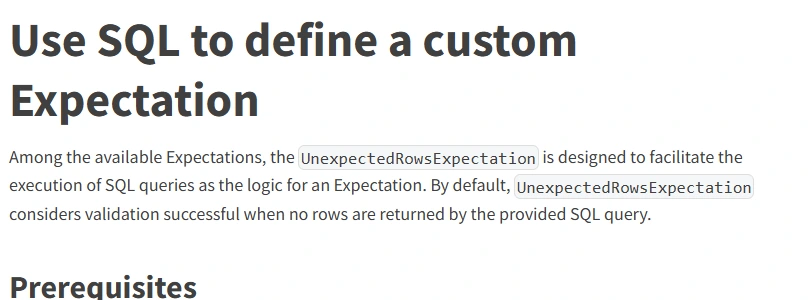
Great Expectations GX Core can connect to SQL Server and evaluate expectations on configured datasets. It supports custom SQL expectations for rules that depend on the data model. It is useful for teams that want validation logic and evidence managed next to Python-based pipelines.
The chosen data asset, batch and query scope determine what is checked. A passed expectation needs to be tied to the same batch the job publishes. Teams own the scheduling, credential handling and decision about whether failed rows are reported, quarantined or allowed through.
Use a supported SQL connection and choose the expectation suite for the staging dataset. Record GX version, query scope and which roles can read or export example failures.
Compare every failing rule and whether the result can identify the corresponding stage row. Verify execution status if a data source fails before the expectation runs.
- Compatibility
- GX Core with supported Microsoft SQL Server connectivity and pipeline integration.
- License and trial
- Free, open-source core with commercial service options.
Soda Core
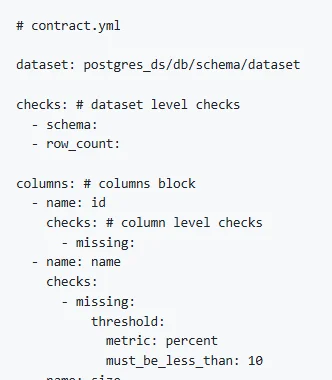
Soda Core provides code-based data quality and data contract checks with a supported SQL Server integration. It is useful when teams want to declare expectations around columns, freshness or row-level conditions and run those checks as part of their normal orchestration.
Its fit depends on using a compatible version and database package. The SQL login and selected dataset control which rows can be evaluated. A data contract or check is useful when failure handling and cost are defined in the pipeline that consumes the result.
Choose the documented SQL Server connection and Soda version used in the actual pipeline. Set up checks for the fixture key, reference and amount rules at one named staging point.
Capture the scan or contract output and prepare the reject workflow. Confirm that failed rows are attributable when supported and that the pipeline gate follows the configured policy.
- Compatibility
- Compatible Soda Core SQL Server package and authorized database connection.
- License and trial
- Open-source core and applicable commercial Soda features.
dbt Core with the SQL Server adapter
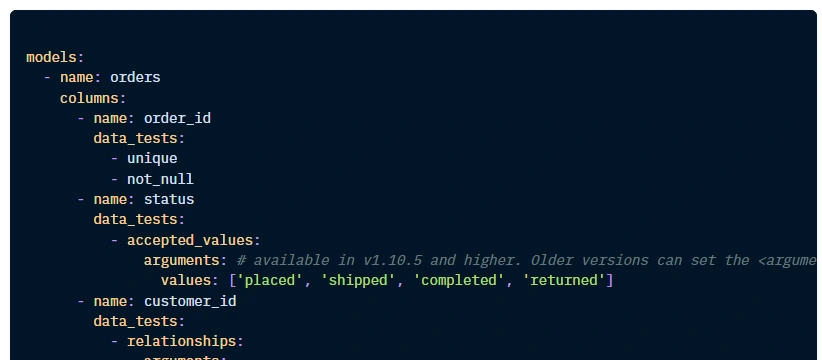
dbt Core can use a SQL Server adapter to build models and run data tests. This is useful for teams whose SQL transformation logic already lives in dbt and who want uniqueness, relationships and custom assertions managed with that code.
The advantage is placing tests close to their models and dependencies. Adapter behavior and SQL Server features need to match the selected versions. A model test verifies the queries it represents, while source-file quality and operational monitoring may require checks elsewhere.
Verify the SQL Server adapter and selected dbt version. Add appropriate schema or singular tests to the tested model and keep the source data separate from production.
Check how generic relationships and custom amount rules contribute to the run result. Save actual failed records where configured and verify the downstream build's behavior.
- Compatibility
- dbt Core, a compatible dbt-sqlserver adapter and SQL Server ODBC driver.
- License and trial
- Open-source tooling. Operation and service costs can be separate.
Informatica Cloud Data Quality
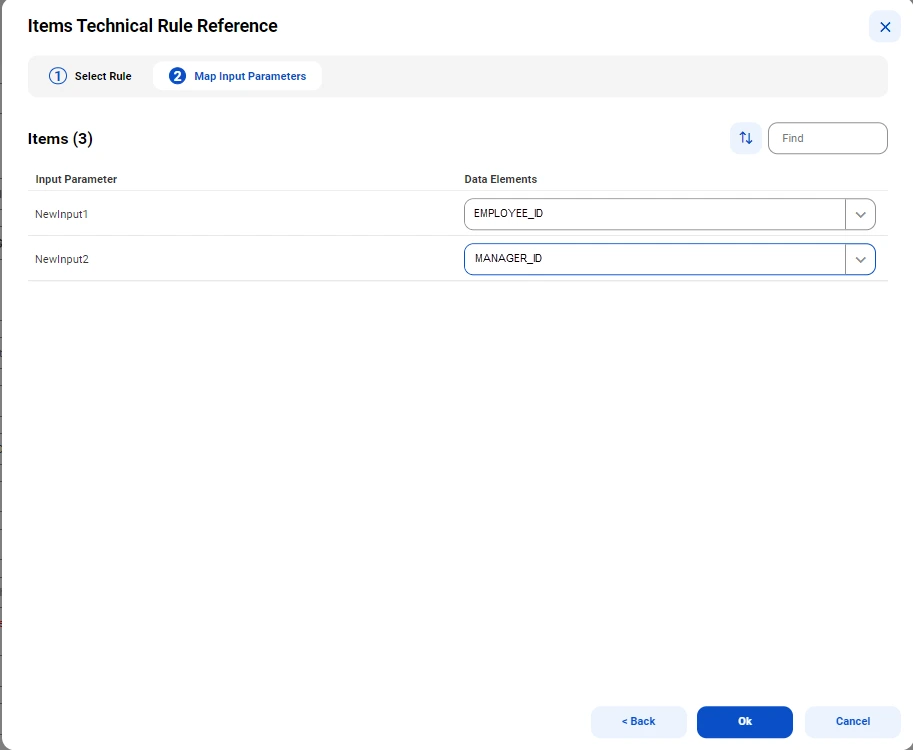
Informatica Cloud Data Quality offers profiling and rule-based measurement as part of its cloud data management platform. It is useful when a larger organization wants common quality definitions and evidence that can be applied to supported SQL Server data across pipelines.
Its strength is connecting checks, rule governance and operational reporting. The configured runtime and connector determine what data it can reach and where it processes it. Reusable rules need agreed thresholds and a defined way to manage rejected or corrected rows.
Use a controlled quality profile or rule configuration against the authorized SQL Server staging data. Record which checks run as part of the pipeline and which are managed by a separate quality service.
Compare results against the same fixture and observe what the reject output contains. Verify which people can see raw row details and what causes a blocked load.
- Compatibility
- Applicable Informatica Cloud Data Quality configuration and supported SQL Server connections.
- License and trial
- Commercial Informatica service terms.
Qlik Talend Studio
Qlik Talend Studio includes profiling and validation components that can be used around data from SQL Server. It is useful when the team already builds its data integration jobs in Talend and wants schema or row validation to run within those jobs.
The selected validation component and mapping determine whether a finding rejects an individual row or fails the job. Profiling can identify patterns, while enforcement requires an explicit job path. Handling rejected data and retries is part of the pipeline design.
Distinguish Talend Studio profiling from row validation running in the ETL pipeline. Configure the applicable components for the four explicit trial rules.
Route deliberately invalid values to the defined reject destination and compare the valid row with its source. Keep job failure behavior and record counts visible to operators.
- Compatibility
- Compatible Talend Studio edition, SQL Server connectivity and validation components.
- License and trial
- Commercial Qlik Talend licensing.
Ataccama ONE
Ataccama ONE can connect to supported SQL Server data and apply profiling and data quality rules in its governance workflow. It is useful when several teams need to review quality evidence and maintain business rules around shared database assets.
Its value is linking rules and findings to asset ownership and reporting. Connectivity, profiling scope and credentials decide what the tool can assess. Whether a finding blocks a new dataset or triggers follow-up depends on the configured workflow.
Verify the source connector and exact cloud or on-premises deployment. Define the test rules with stable identities and keep the observable output field list.
Run the same fixture and compare the row proof and trend or monitoring views. Test handling for a missing connector permission or skipped field in an isolated execution.
- Compatibility
- Supported Ataccama ONE environment and SQL Server source configuration.
- License and trial
- Commercial Ataccama terms.
DQOps
DQOps supports SQL Server as a data source and provides configurable checks for monitoring data quality. It is useful for teams that want a database-centered approach to tracking table or column health over time alongside their integration processes.
The checks depend on the selected schedule, data scope and SQL permissions. Monitoring a table is different from blocking a load at publication time. Teams should choose which checks run during the pipeline and which track trends outside it.
Use the DQOps SQL Server setup and document which checks run at the selected staging database. Record the checks available for within-table and reference data comparisons.
Verify rule failures and any mapped bad row output. Compare ongoing job status and the evidence available for a reviewer after the test data is corrected.
- Compatibility
- DQOps with a supported SQL Server connection and configured checks.
- License and trial
- Applicable open-source or commercial deployment terms.
AWS Glue Data Quality
AWS Glue Data Quality can apply defined rules in supported Glue ETL jobs. Glue can read SQL Server through a supported JDBC connection. This is useful when warehouse or lake ingestion already happens in Glue and groups want validation in the same processing stage.
The fit depends on where the rules actually run and how rows arrive from SQL Server. JDBC connection, partitioning and the chosen ruleset influence load and performance. The pipeline needs an explicit outcome when validation fails, including whether good rows continue.
Establish a supported Glue extraction and pipeline for the SQL Server source. Select the DQDL rules and distinguish data-quality results from any configured row-level handling.
Run the fixture through the actual Glue job and inspect the output if a rule fails or a source read is unavailable. Capture the role and configured report destination.
- Compatibility
- AWS Glue ETL job, supported JDBC access and compatible Data Quality rules.
- License and trial
- AWS Glue and related infrastructure charges apply.
Apache Hop
Apache Hop offers transforms for validating data in a pipeline, including checking values against a database. It is useful when a team wants quality checks to act on rows before they are written to SQL Server or to route invalid data to a separate output.
Its strength is showing validation and error handling as visible pipeline steps. The selected transforms determine which records are rejected and why. Database lookups can add load, and the team owns the reporting and retry workflow for rejected rows.
Use the Data Validator and supported pipeline transformations for explicit checks and error handling. Decide which duplicate and foreign key checks require an upstream or adjacent step.
Route invalid fixture rows to a known lab destination and inspect the validation messages. Verify the pipeline's overall outcome and record which row reached the approved path.
- Compatibility
- Apache Hop with compatible SQL Server drivers and validation transforms.
- License and trial
- Free, open-source tooling.
Redgate SQL Test with tSQLt
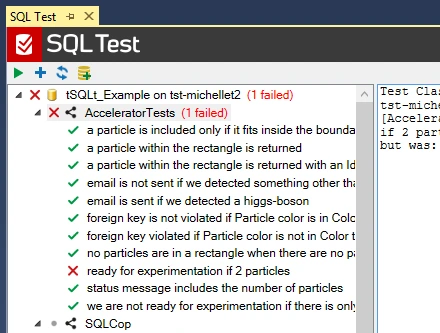
Redgate SQL Test provides a workflow for running tSQLt tests inside SQL Server. It is useful when data quality depends on T-SQL transformation behavior, such as whether a stored procedure populates the right rows under known inputs.
Its strength is testing database code in a controlled fixture. The test checks the behavior represented by that fixture. Checking every live batch for unexpected values, freshness or discrepancies still requires an appropriate pipeline or monitoring check.
Use tSQLt through SQL Test to assert what a SQL-based validation transformation returns for this controlled fixture. Treat these tests as part of the build or ETL rule validation scope.
Verify five rejected IDs and one valid record, then intentionally break one rule to check the test reports a real failure. Monitor a running pipeline and job status through the chosen operational tools.
- Compatibility
- Supported SQL Test environment and SQL Server database with tSQLt.
- License and trial
- Commercial Redgate tooling. tSQLt is an open-source framework.
Which data quality tool fits your SQL Server pipeline?
| What you need | Tools to shortlist | What to verify |
|---|---|---|
| Checks that run with an application or deployment | Verify SQL Server adapter support, failure output and how the orchestrator handles a failed run. | |
| Quality checks inside an existing data flow | Test the valid and reject branches. Make sure the final write depends on the outcome you expect. | |
| Recurring profiling and quality checks on SQL Server | Check what gets stored, who can see failing rows, and how an alert or result reaches the ETL job. |
Decide which data quality rules block the SQL load
A staging rule can measure, warn, quarantine a row or block the full batch. Assign an explicit action and record owner for each rule. Define which dataset and snapshot the check reads so the quality evidence belongs to the actual load.
Use a synthetic fixture with duplicate business keys, invalid numeric values and a missing relationship. Compare whether the rule output identifies each row and whether operators can rerun the batch after correcting it.
The pipeline needs an inline reject route
Trial the ETL validator and reject destination
Verify every routed row and whether bad values can reach the target.
The quality rules need independent monitoring or CI
Trial a versioned ruleset or adapter tests
Check output ownership and how it blocks a run.
The quality program needs centralized review
Trial managed monitoring and reporting
Confirm scope, filtering and authorized data visibility.
Make invalid SQL Server staging rows visible to the operator
The fixture seeds six stage rows, only one of which meets every rule. Business key A is duplicated on rows 1 and 5. The other three bad rows isolate a negative amount, a missing customer and a null amount. Compare each rule independently.
A reject count can differ from the number of failed rules when one row breaks several. Save both deduplicated row counts and the failing rule details. Use representative application policy to decide quarantine or block behavior.
| Rule | Expected stage rows | Workflow evidence |
|---|---|---|
| Duplicate business key | 1 and 5 | Both rows carry the duplicate rule |
| Negative amount | 2 | Explicit invalid numeric range |
| Missing reference | 3 | Customer not found |
| Required amount | 4 | Null amount failure |
| Valid row | 6 | Only row eligible for typed load |
How to compare these tools
Give each tool the same null, duplicate and out-of-range values. Confirm whether the job fails, the affected rows are identifiable, and the result is visible where the operator works. Sources checked .
Check seven staged rows before an ETL write
Use an empty disposable EtlQualityTrial database. Run Setup and then use the source or test tools with the staged tables. Run Check as an independent read-only baseline. The query reports rule failures and does not route or load any data.
Find duplicate, invalid and orphaned rows in an ETL test stage
T-SQL · 39 lines
- Set up the data and record the rule configuration and expected results. Apply the rules in the intended ETL stage or the authorized quality checker.
- Verify the rejected source rows and rule labels. Confirm the batch or quarantine result under the chosen behavior and check that the remaining fixture row is eligible.
- Trigger a controlled data-source failure or rule change and verify the job reports it. Preserve quality metrics, detailed outcomes and the rerun procedure.
Conclusion
Choose the tool that fits where your checks need to run. Require a reliable batch result, enough detail to find the failed rows, and a tested stop condition in the job. Run the clean control as well, so the operator can tell a valid load from a failed one.
Frequently asked questions
Which data quality checks should run before a SQL Server ETL load?
Start with key completeness, uniqueness, required references and business ranges. Add rules for the expected batch size and date window where they affect the load. Run the checks against the exact staged batch that the write step will use.
Is one duplicate key the same as one failed row?
A duplicate group can contain several rows. In this lab, order 200 is one group with two failed rows. Keep the stage row identifiers so an operator can inspect both records.
Can a SQL Server data quality monitor stop an ETL load?
The pipeline must use the check result before it writes the target. Configure a task failure, a workflow condition, or a supported integration that holds the write step. Test this with both a bad batch and a clean batch.
Should I replace target constraints with data quality checks?
Use staging checks to give people readable failure evidence and keep target constraints to enforce the database rules. The lab tests key and reference quality before writing to a constrained target table.
How do I capture the exact rows that fail a quality check?
Select a row-level result mode or store failing test results where supported. When a tool reports a count or a sample, run a query for that rule and retain the batch key and stage row numbers.
Is the number of rule failures the same as the number of rejected rows?
A single staging row can fail several checks. Record the number of distinct rejected stage IDs and keep each failing rule for remediation.
Where should SQL Server ETL data quality checks run?
Use the stage that reflects the intended typed load or promotion decision. Record the input scope and prevent an incomplete preliminary scan from being mistaken for full validation.
Related guides
- Compare Telerik and DevExpress scheduled SQL Server reports
- Compare tools to sync Salesforce data to SQL Server
- Compare CSV and Excel import tools for SQL Server
- Compare SSIS alternatives for SQL Server ETL
- Compare tools for verifying SQL Server migration data
- Compare SQL Server table data before and after a load
- Compare SQL Server database deployment tools