

A scheduled report has three jobs. The server must query SQL Server with the intended account, render the selected parameters and format, then deliver the resulting document. Telerik Report Server makes the schedule and created documents visible through its server and service agent. DevExpress Report and Dashboard Server likewise schedules document generation in its managed report environment.
The tools differ in how users subscribe, how parameter values are assigned and where delivery failures appear. Some are good at generating recurring files from paginated templates, while others also serve dashboards. A useful comparison follows one real report from a stored query through rendering, delivery and a retry after a SQL Server or email failure.
Telerik Report Server vs DevExpress scheduled reporting at a glance
Focus on the report server's scheduling and distribution model. Use the same parameterized SQL dataset and expected document in each candidate.
| Tool | Scheduling workflow | Delivery concern | Trial proof |
|---|---|---|---|
| Progress Telerik Report Server | Scheduled report tasks with recurrence and formats | Subscriber list, parameters and execution history | Correct report per recipient and visible delivery outcome |
| DevExpress Report and Dashboard Server | Scheduled document jobs including supported personalized output | Data model, parameters and per-recipient delivery | Correct document and configured recipient |
| Power BI Report Server | Supported report subscriptions and scheduled workflows | Actual report type, edition and support restrictions | Scheduled paginated report and correct credentials |
| JasperReports Server | Report scheduler and configured output | Server, roles and recipient delivery settings | Saved run and rendered output |
| Bold Reports Report Server | Supported report schedules and delivery | Report permissions, parameters and notifications | Expected attachment and authorized audience |
| Stimulsoft BI Server | Scheduler actions and supported distribution | Action steps, output type and recipient setup | Produced document and schedule result |
| ReportServer Enterprise | Schedule jobs for supported reports | Licensed scheduler, data source and job permissions | Report job, history and delivery confirmation |
| FineReport | Configured report scheduling task | Data connection, parameter binding and configured delivery | Matched output, schedule and access state |
Progress Telerik Report Server
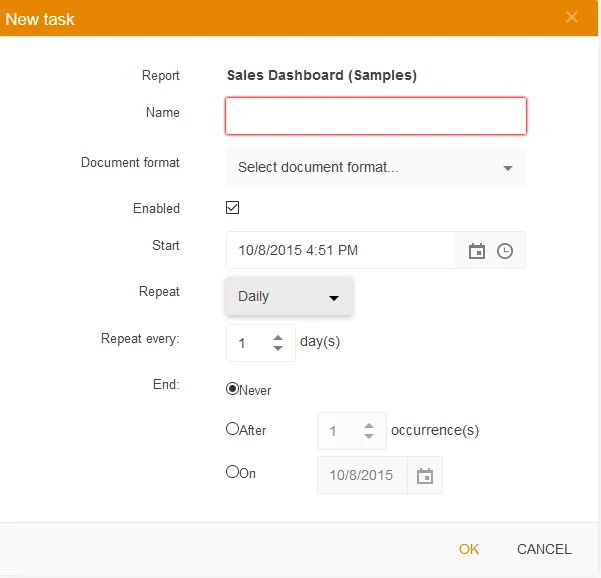
Progress Telerik Report Server uses scheduled tasks to render selected report definitions in specified formats and deliver them to configured subscribers. The service agent executes jobs and sends notifications. It is useful when a team wants report definitions, schedules and generated documents managed together.
The service agent makes execution a visible part of the deployment. Its connection context, worker capacity and email configuration matter when many reports overlap. Retained task output can help diagnose whether the failed step was the SQL query, rendering or notification.
Create a scheduled task with a known report and export format. Verify how the configured parameters and subscriber list are selected. Record the report definition and which credentials the unattended job actually uses.
Run a disposable schedule for two approved test inboxes. Compare each rendered total with the SQL baseline and inspect schedule history if rendering or email delivery is intentionally interrupted.
- Compatibility
- Supported Telerik Report Server with service agent and SQL Server data-source access.
- License and trial
- Commercial Progress Telerik licensing.
DevExpress Report and Dashboard Server
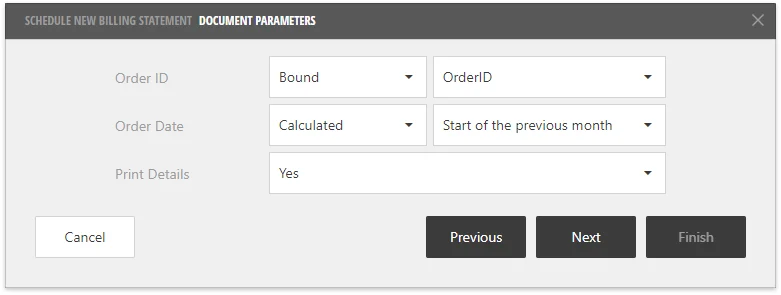
DevExpress Report and Dashboard Server can schedule production of eligible documents and manage SQL Server-bound reports through its designer. It is useful when a team wants browser-managed reporting and scheduling around the same DevExpress reporting components it already uses.
The scheduled output depends on the document type, data connection, parameters and delivery settings. A SQL Server credential that works in the designer still needs to be configured for server execution. The administrative workflow determines how failures and reruns are surfaced.
Use the documented scheduled document job and test the supported personalized workflow separately if per-recipient parameters are required. Verify the data field used for addresses and the parameter mapping.
Compare both scheduled outputs against the exact SQL results. Preserve the job and delivery state after a temporary lab failure and confirm that retry cannot silently use the wrong parameter.
- Compatibility
- DevExpress Report and Dashboard Server with an authorized SQL Server data source and configured scheduling.
- License and trial
- Commercial DevExpress licensing.
Power BI Report Server
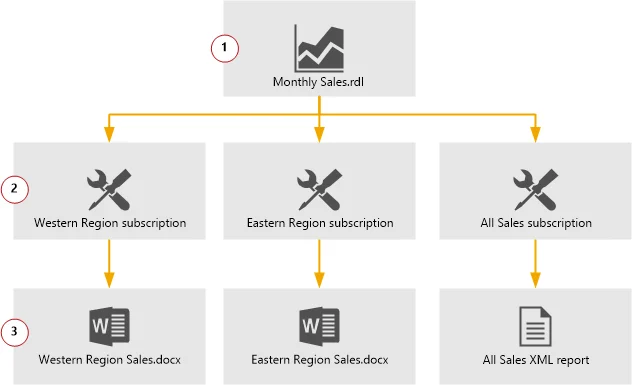
Power BI Report Server hosts paginated reports with reporting services subscription capabilities, alongside supported Power BI reports. It is useful when a Microsoft-centered team wants scheduled SQL Server-backed paginated documents under a self-hosted report server.
Paginated report subscriptions and Power BI report data refresh are different workflows. The chosen report type, supported delivery extension and stored credentials determine what can be scheduled. The report server license and build also affect which options are available.
Verify the supported report type and subscription features for the deployed Power BI Report Server version. Record whether the report is paginated and how the required data source credentials are configured.
Test scheduling from the actual server and compare the output with the report's expected SQL values. Check authorization and failure evidence using the tested subscriber scope.
- Compatibility
- Supported Power BI Report Server, applicable RDL reports and configured data sources and delivery.
- License and trial
- Applicable Microsoft licensing for the deployed Report Server.
JasperReports Server
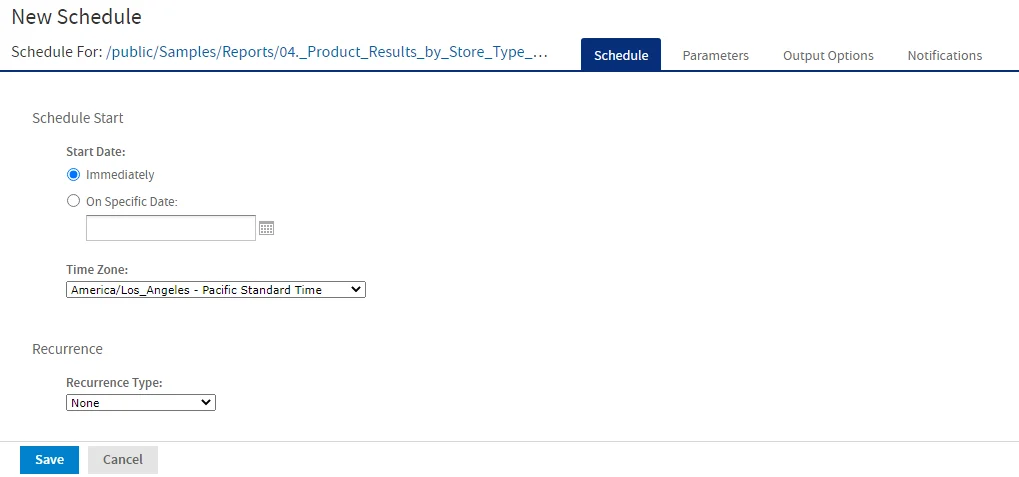
JasperReports Server can schedule reports, pass parameters and deliver supported output formats from a centrally managed repository. A Jasper report can use the configured SQL Server JDBC data source. It is useful when an organization already operates a Java-based report server or needs reusable scheduling and delivery.
The scheduler’s credentials and resource definitions determine what runs outside the interactive viewer. JDBC drivers, mail configuration and report outputs must be available on the server. The product version and edition govern deployment and scheduled delivery features.
Use a documented report job and select the exact SQL Server report data source. Record the report parameters, intended format, output path and test subscription or notification settings.
Check how the trial job distinguishes generation from delivery. Compare the attachment contents and approved recipient and verify the run is available to the operations role.
- Compatibility
- JasperReports Server and an applicable SQL Server JDBC connection and scheduler configuration.
- License and trial
- Jaspersoft product and edition terms apply.
Bold Reports Report Server
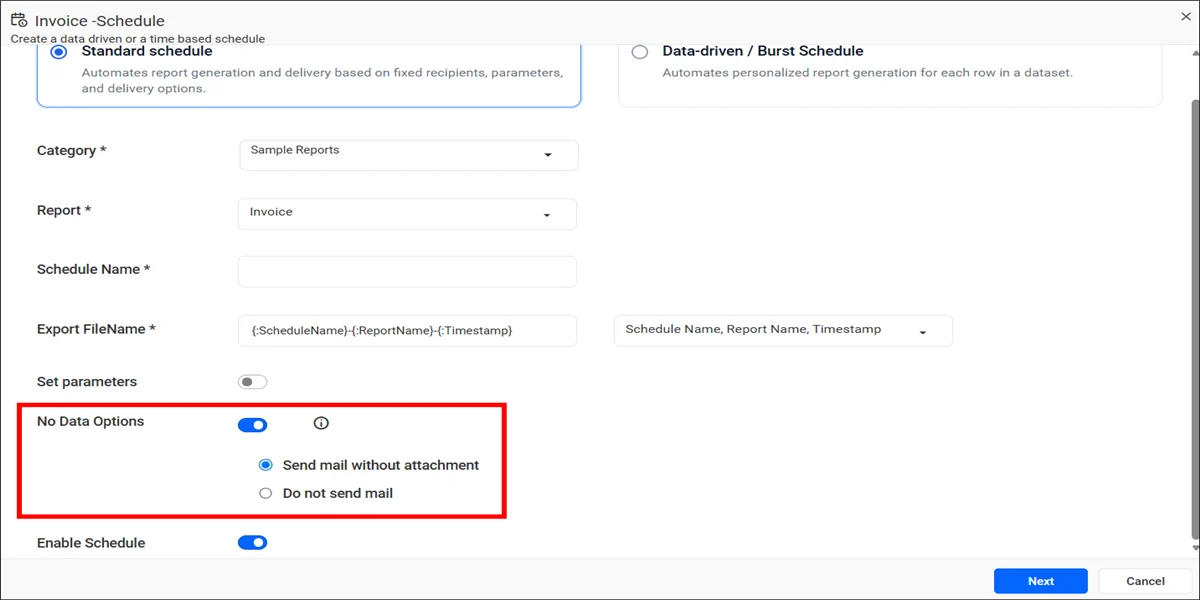
Bold Reports Report Server supports scheduled reports and documented email configuration for their delivery. It is useful for organizations that want to publish paginated SQL Server-backed reports and let the report server manage recurring document distribution.
Its value is putting report identities, output and schedules in one place. The database credential and mail account used for the scheduled run can differ from those in a designer session. The enabled delivery options and logging determine how failed runs can be recovered.
Use the documented Bold Reports schedule on the actual report server edition. Configure the selected SQL credentials and report filters before adding a test delivery target.
Run the two regional cases and compare recipient access and exports. Record which job fields identify a parameter or delivery issue when the lab run is retried.
- Compatibility
- Supported Bold Reports Report Server and configured SQL Server data source.
- License and trial
- Commercial Bold Reports licensing.
Stimulsoft BI Server
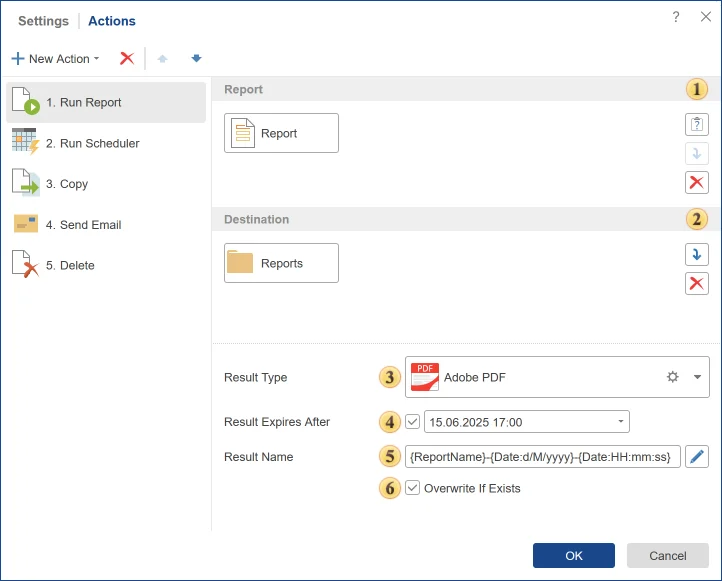
Stimulsoft BI Server offers scheduler actions for running and delivering reports and lets teams configure SQL-connected data sources. It is useful when the organization wants a server for managing report templates, data and recurring output without building application-level scheduling itself.
Its scheduler settings define the actual action, recipients and file formats. Connection credentials and rendering resources must work in the server environment. A template that previews successfully still needs a scheduled run to prove that the data and output are available in that context.
Review the documented Stimulsoft scheduler actions and choose an explicit render and delivery sequence. Record whether an action uses the intended parameter, format and test recipient.
Verify generated output and job action results separately. Compare behavior when SQL credentials fail or the test mail service rejects delivery.
- Compatibility
- Stimulsoft BI Server with supported SQL Server connectivity and applicable scheduler actions.
- License and trial
- Commercial Stimulsoft license.
ReportServer Enterprise
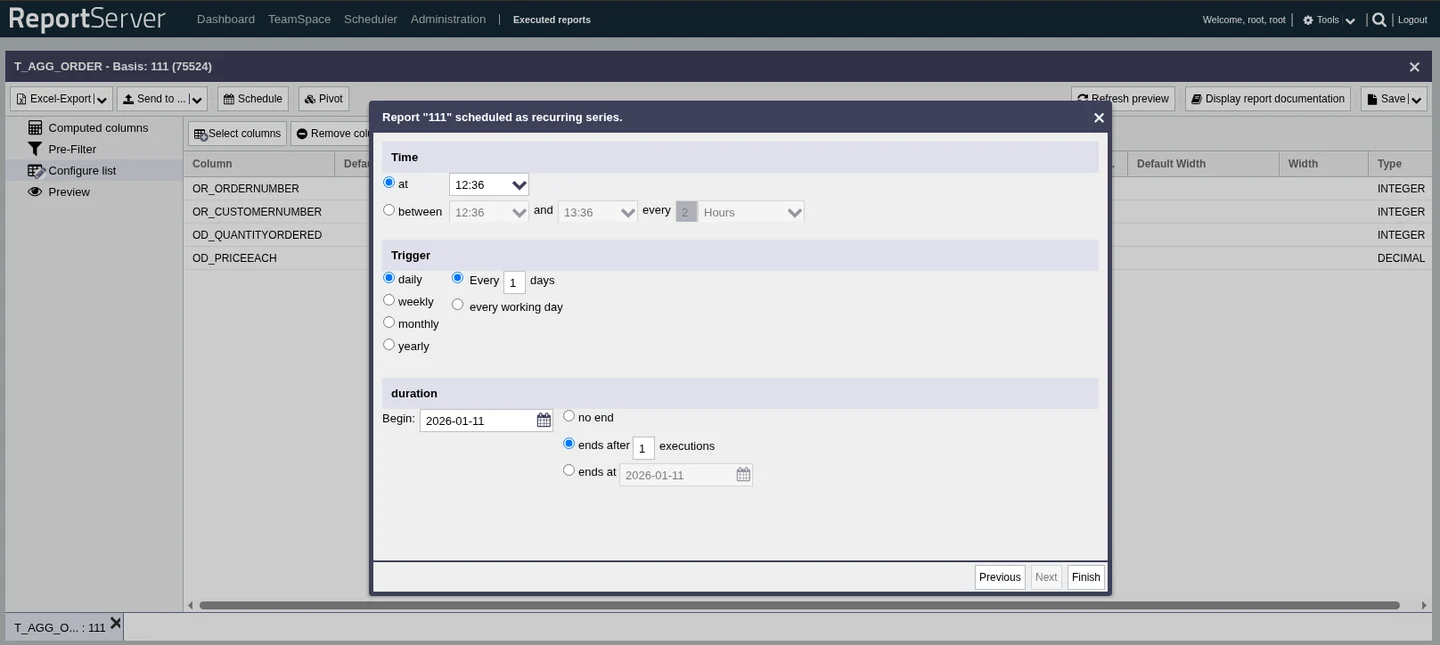
ReportServer Enterprise provides a centralized reporting environment with scheduling and configured database data sources. It is useful when an organization wants one server to manage access and recurring output across the supported report formats it already uses.
The useful capabilities depend on the report engine, scheduler and Enterprise features in the deployment. The report’s SQL Server connection and parameters must be valid for unattended execution. The team still needs to decide where failed tasks are reviewed and how run status is retained.
Confirm the installed ReportServer edition's scheduling and delivery options and target report engine. Scope the data source and schedule role to the authorized test report.
Compare the configured job and produced document with the SQL baseline. Reopen the failing or completed task and check whether the output and recipient record remain available.
- Compatibility
- ReportServer Enterprise with an eligible report engine and SQL Server data source.
- License and trial
- Commercial ReportServer Enterprise licensing.
FineReport
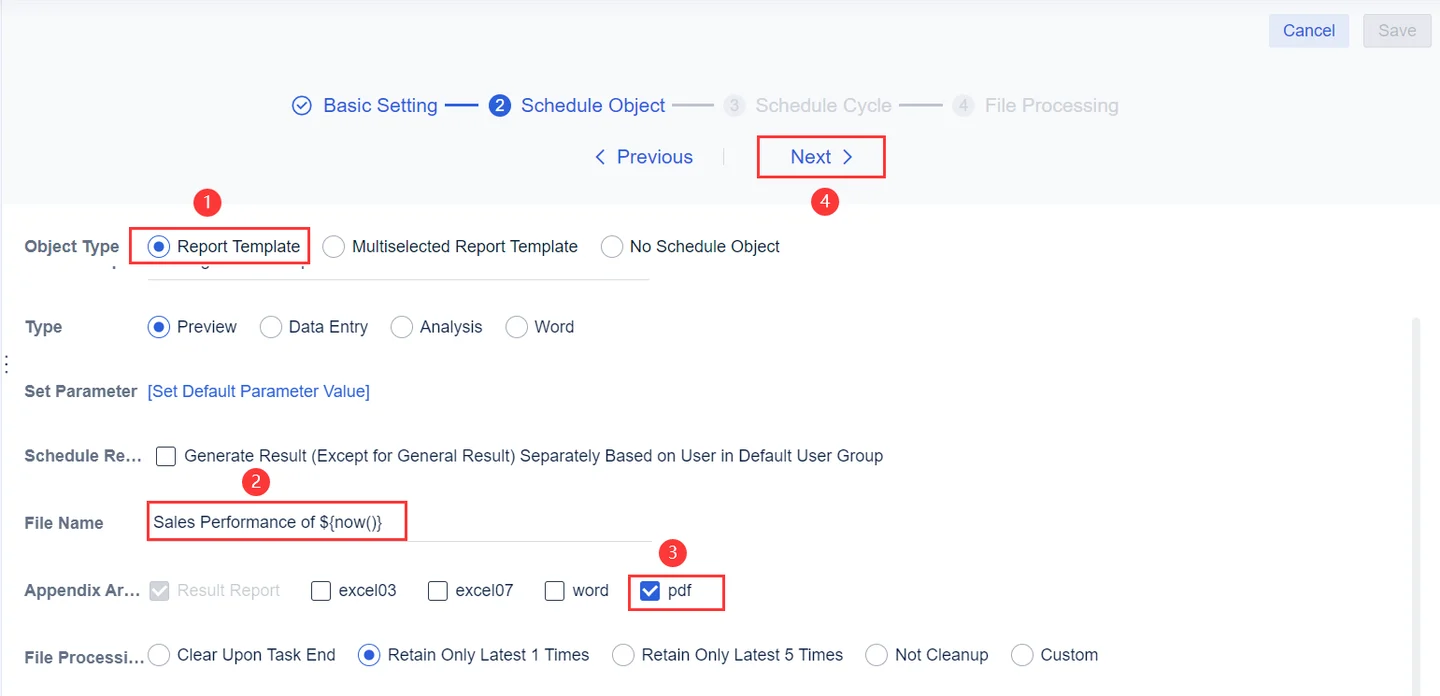
FineReport documents task scheduling and email notifications for server-side reports. It is useful when a team wants recurring operational reports or formatted documents that use SQL Server data and can maintain their templates through FineReport’s reporting environment.
A successful scheduled task depends on its parameters, permissions and the server’s ability to query and deliver the result. Email notifications and the report contents can be configured independently. The useful comparison includes how the installed edition records failures and supports reruns.
Use the documented FineReport schedule and verify the source connection and job permissions. Select the exact output format and representative parameter set for the test.
Verify the generated document under the intended role. Compare job execution time, delivery status and whether an intentional failure is visible to the operator.
- Compatibility
- FineReport with compatible SQL Server connectivity and configured task scheduling.
- License and trial
- Commercial FanRuan licensing and applicable deployment terms.
Telerik and DevExpress report scheduling compared
| Feature | Progress Telerik Report Server | DevExpress Report and Dashboard Server |
|---|---|---|
| Schedule and background process | Create a scheduled task with a one-time or repeating trigger. Check the Service Agent for the Report Server generation you deploy. | Create a basic or data-driven scheduled job. Check the installed server components, scheduling configuration and the account that runs the job. |
| Report parameters | Set values when you create the task or use the report’s defaults. Review how hidden parameters use their design-time values. | Set manual values or bind values from the configured data model for a data-driven job. The wizard also documents calculated date parameters. |
| Who receives the report | Select subscribers from registered users or enter external email addresses. Try one task for each fixed region and recipient group. | Use registered users and external addresses for a basic job. Use recipient fields from the data model for a data-driven job. |
| What arrives in the mailbox | Attach the rendered report in the selected task format. Verify the PDF and the storage and mail settings for the installed version. | Choose an attached PDF, an XLSX attachment, a preview link, or inline HTML for a report where supported. Check the recipient’s access when testing links. |
| What to check on failure | Review the task and the Service Agent. Telerik documents scheduled-task error mail for the System Administrator and Report Creator roles. | Review the job status and configured email settings. Run a mail relay rejection in the lab and record the status and available retry action. |
| Deployment and price | Check Report Server or Report Server for .NET requirements, deployment rights and users. Include the storage and Service Agent in the plan. | Check Windows and IIS requirements, the supported database configuration and the current Report and Dashboard Server license terms. |
SQL Server report schedulers by delivery workflow
| What you need | Tools to shortlist | What to verify |
|---|---|---|
| A fixed task or a data-driven job for each regional report | Verify parameter values and recipient addresses before enabling the schedule. Try a send to a lab mail sink. | |
| Paginated report subscriptions with an existing on-premises catalog | Check the report format, licensed features, PDF delivery and what happens when a query returns no rows. | |
| Scheduled exports in an existing reporting platform | Confirm the SQL Server driver, the scheduler runtime and how the administrator finds a failed delivery. |
Compare scheduler parameters, delivery and credentials
Telerik documents scheduled tasks with recurrence, report formats and email subscribers. DevExpress documents scheduled documents and supported personalization by parameters and recipient data. Verify the actual installed version and test how it chooses what each person receives.
Treat render, storage and delivery as distinct outcomes. Confirm job credential, scheduling time zone, recipient source and retry strategy. Use authorized test inboxes and restricted data during the pilot.
The same report goes to a fixed group
Compare basic scheduled execution and storage
Check recurrence, credentials and the expected export.
Recipients need different parameter values
Trial recipient-specific output
Validate recipient mapping and document contents independently.
Unattended delivery needs reliable operations
Exercise a failed SQL connection or delivery
Check retry, notification and history under the proper role.
Verify the scheduled report's values and recipient independently
Use two regional summaries from the same SQL Server fixture. For the date 2026-05-19, the North report should contain two items totaling 20.00. South should contain one item totaling 50.00. The prior-day North record must be excluded. Use two authorized test recipients and record which parameter each receives.
In the reporting designer, bind the date and region parameters using its documented mechanism. The sample declares defaults for standalone SQL testing. Schedule an ordinary test, then separately test a failure or retry without using real recipients.
| Check | Expected | Evidence |
|---|---|---|
| North document | Two records totaling 20.00 | Right date, region and authorized recipient |
| South document | One record totaling 50.00 | Correctly different report with same template |
| Render or delivery failure | Visible failed stage | Job history and defined operator outcome |
| Repeat run | Same valid output for the selected parameters | No unexplained additional send |
How to compare these tools
Schedule the same report for two recipients with different data. Verify PDF contents, delivery history, missing-recipient behavior and the effect of retrying a failed send. Sources checked .
Test one regional report against two mailboxes
Use an empty disposable ScheduledReportTrial database. Run Setup once and execute Report for each region. Use the query and parameter mapping to build the actual reporting fixture in the shortlisted server.
Create a parameterized SQL Server report with known recipient totals
T-SQL · 30 lines
- Run the fixture and verify both SQL totals. Set up the same template and documented scheduling parameters under the intended unattended role.
- Send the two test documents to authorized sandbox inboxes and compare contents, export format, date, recipient and delivery evidence.
- Rehearse a failed render or failed delivery, then run the supported retry. Check which job status, logs and outputs the appropriate reviewer can reopen.
Conclusion
Use a fixed task when both the parameter and recipients are known. When recipient routing comes from SQL Server, test the data-driven path with one parameter value and recipient per row. Open both PDFs and check the failure log before approving a production schedule.
Frequently asked questions
What is the main difference between Telerik Report Server and DevExpress for scheduled SQL Server reports?
Telerik documents scheduled tasks with report parameters and subscriber lists. DevExpress documents both basic jobs and data-driven jobs that bind recipients and report parameters from a data model. Test the job type that matches your delivery rules.
Can the report scheduler send a different PDF to each recipient?
Yes. Create separate fixed tasks with a distinct report parameter and subscriber list, or use a documented data-driven job with the recipient and parameter in each routing row. Test with two mailboxes and compare the files.
Do Power BI Report Server email subscriptions work with SQL Server paginated reports?
Microsoft lists email subscriptions for paginated reports in Power BI Report Server. Configure the report server’s delivery settings and test the chosen report format. Power BI report subscriptions have separate feature support.
Which credentials run a scheduled SQL Server report?
The scheduled run uses the configured data source credentials and server execution settings. Test a background run and check the SQL login reported by the dataset. Grant that identity only the read access the report needs.
What should I test when no rows match a scheduled report?
Use a region and date with zero rows. Confirm the scheduler’s actual behavior for empty attachments, notification without a file, or suppressed delivery. Record what the operator should expect so an empty day can be distinguished from a failed job.
Does a scheduled report's successful execution prove every recipient saw the right data?
Check the rendered document, parameter values and actual delivery separately. Use two known test recipients and confirm each receives only the intended regional result.
Can a report server personalize documents by recipient?
Check the documented feature for the specific report server and version. Verify which data fields control recipient and parameters and test its generated files.