

Moving from SQL Server to PostgreSQL involves schema conversion, data movement and changes to application code. A table loader can translate common column types and move rows. Stored procedures, T-SQL expressions and SQL Server-specific behavior need a separate review. The best fit depends on whether the move mainly involves tables or whether database code owns important application logic.
Managed services can combine conversion and change replication for supported cloud targets. Desktop and command-line converters are useful when the team wants more control over individual mappings or can schedule a shorter one-time copy. The practical comparison is what each tool converts, what remains to be rewritten and how the new database will be tested for equivalent behavior.
SQL Server to PostgreSQL migration tools at a glance
Select the destination and migration phases the tool supports. Compare converted definitions and actual values against the same source fixture.
| Tool | Main role | Destination or scope | High-value check |
|---|---|---|---|
| AWS DMS and DMS Schema Conversion | Schema conversion and supported data movement tasks | Documented AWS DMS SQL Server and PostgreSQL paths | Review conversion actions and recheck values after CDC |
| Google Cloud Database Migration Service | Heterogeneous conversion and supported migration workflow | Cloud SQL for PostgreSQL destination | Review conversion workspace and target version |
| Ispirer SQLWays | Database and supported code conversion | SQL Server to PostgreSQL project scope | Review transformed procedures, numeric and time values |
| SQLines Data and SQL Converter | Data transport and SQL conversion tools | Supported target and selected code or tables | Compare both generated DDL and transferred row values |
| DBConvert for SQL Server and PostgreSQL | Supported database copy and sync workflow | Specified source, target and data mapping | Identity handling and exact decimal values |
| Spectral Core Full Convert | Database conversion and transfer | Supported SQL Server and PostgreSQL connections | Check generated types and Unicode |
| pgloader | Open source SQL Server load with configurable casts | PostgreSQL with documented source loader | Review type casts, names and sequences |
| EDB Migration Toolkit | Supported schema and data migrations | Exact EDB or PostgreSQL destination by version | Check deployment type and migrated objects |
| Ora2Pg | Documented SQL Server export and conversion options | Supported version and export types | Compare exported definitions and values |
AWS DMS and DMS Schema Conversion
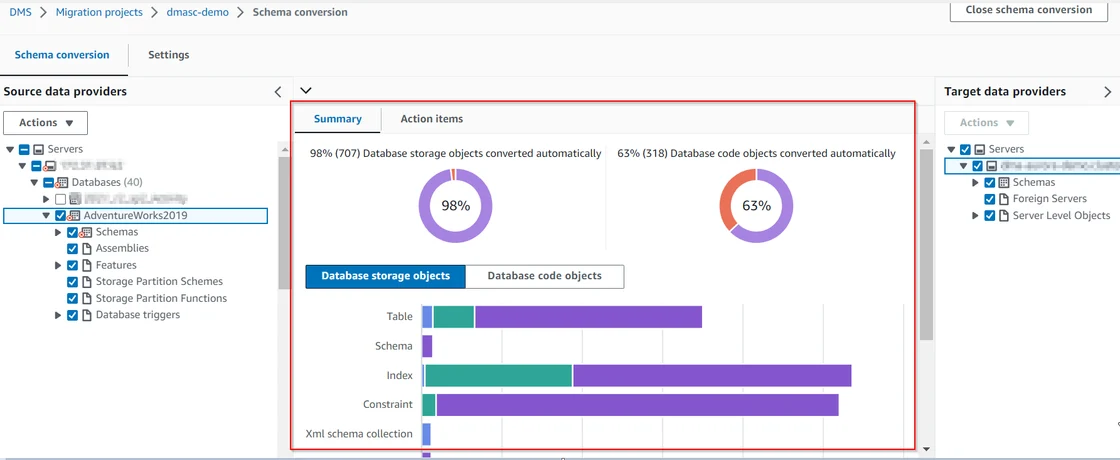
AWS DMS Schema Conversion can assess or convert supported SQL Server objects for a PostgreSQL target, while AWS DMS can move the data and capture changes in eligible scenarios. It is useful when the destination is a supported AWS PostgreSQL deployment and the team wants those two steps in a managed migration workflow.
The conversion report and data task provide different evidence. Objects that are only partly converted still require updated code, and live replication has separate SQL Server CDC, permission and type constraints. A final migration needs both consistent data and a tested PostgreSQL application path.
Run the documented SQL Server to PostgreSQL schema conversion and save its unresolved action items. Scope data movement separately and check exact target support for full load and ongoing changes.
Validate both source and destination for decimal values, timestamp conversion and keys. Test the last accepted change before cutover and document conversion work that needs manual review.
- Compatibility
- Supported SQL Server and PostgreSQL endpoints, DMS resources and appropriate source permissions.
- License and trial
- AWS service and infrastructure charges apply.
Google Cloud Database Migration Service
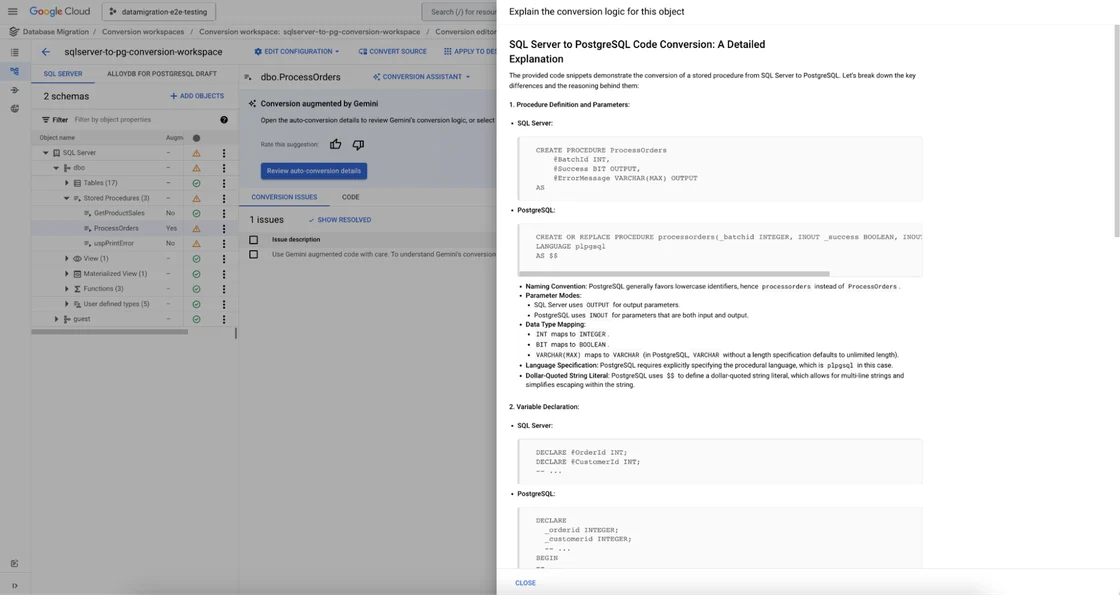
Google Cloud Database Migration Service supports documented SQL Server migrations to Cloud SQL for PostgreSQL and AlloyDB for PostgreSQL. Its conversion workspace can generate an initial schema conversion, and eligible migrations can continue with CDC. It is useful for a team whose destination and operations already live in Google Cloud.
The supported target and SQL Server source configuration determine how much can be automated. Conversion workspaces support a documented subset of constructs, and CDC introduces its own data and access requirements. The resulting PostgreSQL functions and application queries still need direct tests.
Use the documented heterogeneous Database Migration Service for supported SQL Server sources and Cloud SQL for PostgreSQL. Review the environment and conversion workspace for the exact target version.
Compare application-required objects, precision and source time semantics after conversion. Capture the migration job and verify an actual target row and default key generation.
- Compatibility
- Supported Google Database Migration Service source and destination configuration.
- License and trial
- Google Cloud migration and infrastructure terms apply.
Ispirer SQLWays
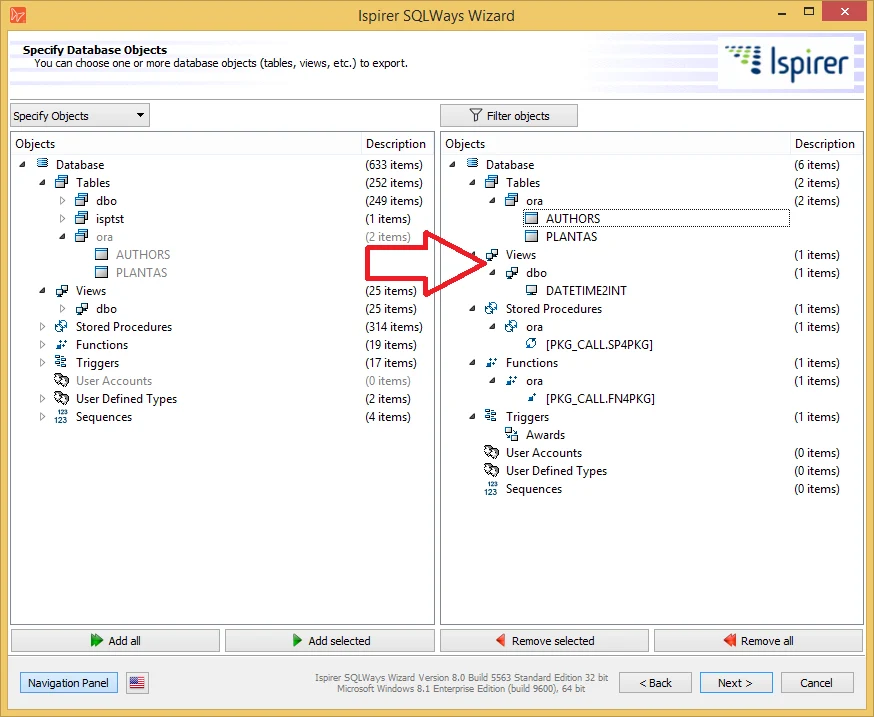
Ispirer SQLWays can convert supported SQL Server schema and code and migrate data to PostgreSQL. It is useful for an estate with a substantial amount of T-SQL because it offers a conversion workflow beyond simple table loading and lets teams review or customize the migration output.
Its strength is helping a team identify repeatable conversion patterns in a difficult schema. Stateful procedures, transaction behavior and dynamic SQL can still require human changes. The product’s coverage should be evaluated against application-critical objects and the target PostgreSQL version.
Select the conversion scope for schema, supported procedural code and data. Start with source types that have clear tolerances so you can identify where hand editing or additional conversion is needed.
Use the exact numeric and time-zone fixture as a regression test after reviewing generated SQL. Include sequence behavior and actual application queries against the destination.
- Compatibility
- Supported Ispirer toolkit, SQL Server source and PostgreSQL target.
- License and trial
- Commercial Ispirer product and any applicable services.
SQLines Data and SQL Converter
SQLines provides separate tooling for moving data and converting SQL Server SQL into PostgreSQL syntax. That is useful for a team that prefers command-line runs and wants to separate a repeatable table load from work on stored procedures and applications.
Its value depends on configuring the SQL tools for the intended source and target and reviewing generated code. A successful conversion or copy only covers the selected objects. Differences in types, collation and procedure behavior still need application and data validation.
Record which SQLines tool handles data and which handles schema or SQL code. Use the supported source and target parameters in the same project and compare their results independently.
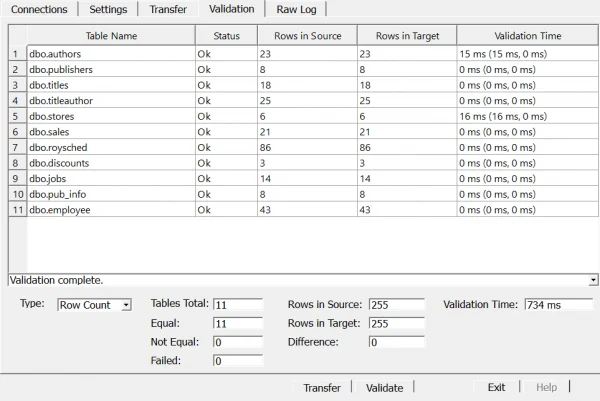
Check the converted decimal type, Unicode text and timestamp precision on PostgreSQL. Reconcile generated statements and actual row values before expanding migration scope.
- Compatibility
- SQLines tools with supported SQL Server and PostgreSQL connections or input scripts.
- License and trial
- Licensing varies by component and usage.
DBConvert for SQL Server and PostgreSQL
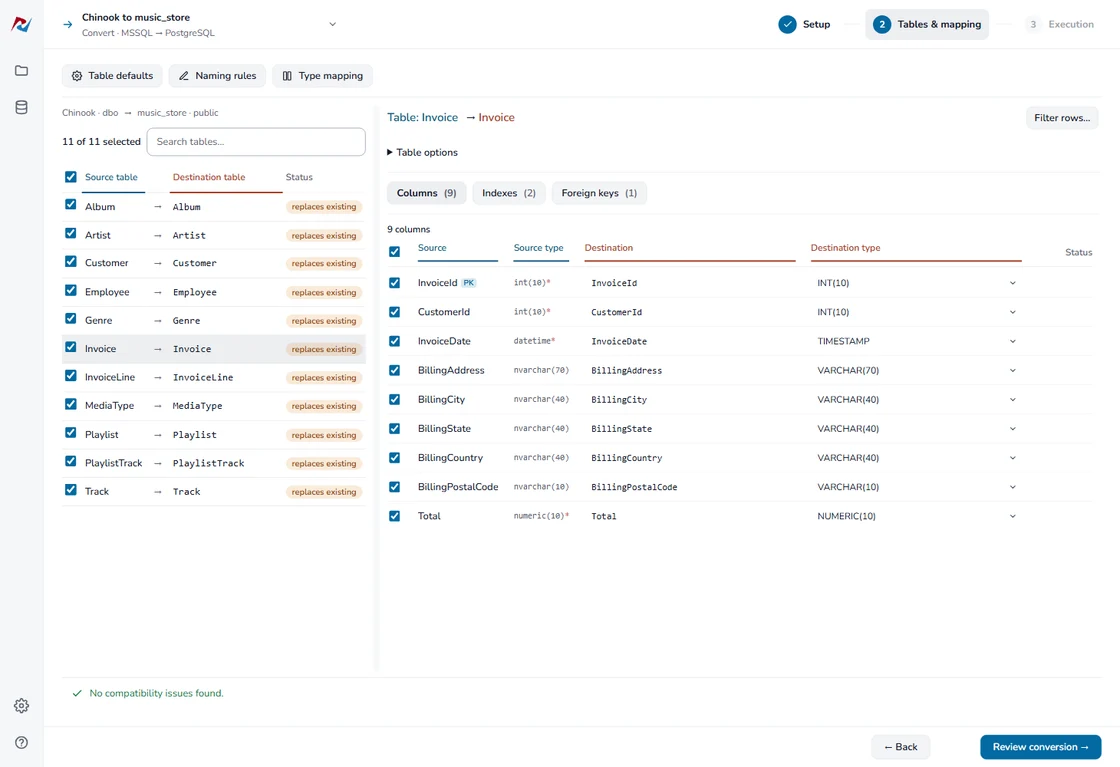
DBConvert for SQL Server and PostgreSQL can connect to both databases, map column types and copy selected tables and supported structures. Applicable synchronization modes can move changed data on a schedule. It is useful when the team wants a guided conversion and direct connections to both endpoints.
The strength is explicit mapping and selection from a desktop workflow. The scheduled synchronization mode and full database-code conversion are different capabilities. Stored procedures, constraints and semantics that fall outside the supported workflow still need a separate migration plan.
Configure the SQL Server and PostgreSQL endpoints and review type mappings and direction. Confirm which copy or synchronization behavior is available in the installed product.
Compare exact result rows and observe how a newly inserted target row receives an identifier. For simultaneous data movement, document the actual consistency and retry behavior tested.
- Compatibility
- Supported Windows DBConvert product and reachable SQL Server and PostgreSQL endpoints.
- License and trial
- Commercial product and edition terms.
Spectral Core Full Convert
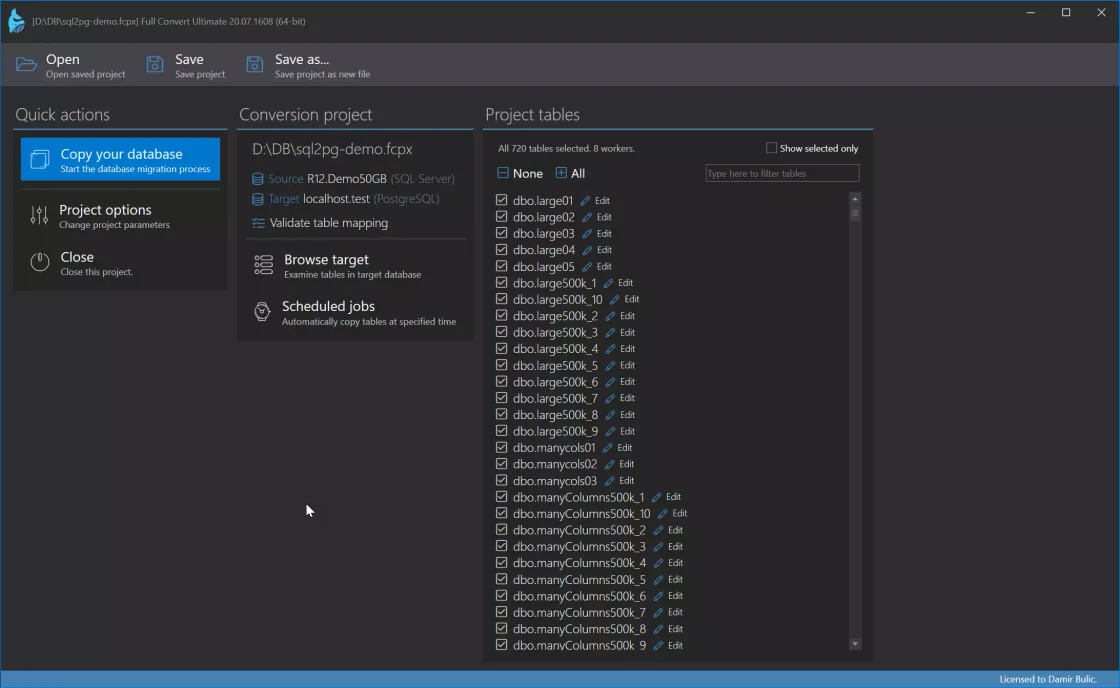
Spectral Core Full Convert copies tables from supported SQL Server sources to PostgreSQL and offers configurable type mappings. It is useful when an engineer wants to stage and rerun selected table conversions with a graphical tool and inspect how values will be represented in the new database.
Its main fit is a data and table conversion workload. The selected mappings determine how precision, dates and other values arrive. Existing business logic and production change synchronization depend on a separate migration or related product capability.
Select the Full Convert path for SQL Server to PostgreSQL and review generated types and table relationships. Record how the schema delivery and data scope were configured.
Verify the Unicode and numeric fixture after transfer, then try the intended PostgreSQL default values in an isolated target. Keep any unsupported object or code work in the conversion list.
- Compatibility
- Full Convert with supported SQL Server and PostgreSQL connectivity.
- License and trial
- Commercial Spectral Core licensing.
pgloader
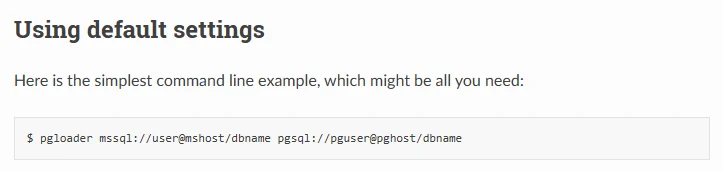
pgloader can connect to a Microsoft SQL Server source and load supported tables into PostgreSQL. Its configuration can cast data types, rename schemas and select tables. It is useful for a team that wants a repeatable text-based loader and is prepared to maintain and test the mappings.
It is strongest for table and schema movement with documented casting rules. A view can be read as a data source in a supported workflow, while rewriting the view’s T-SQL behavior is a separate job. Source consistency, permissions and application tests remain with the team.
Review the documented SQL Server driver, cast options and destination credentials. Use an explicit load configuration and record how it names the resulting target table and fields.
Inspect the actual PostgreSQL columns and sequence after a load. Validate the source offset requirement separately from successful UTC conversion, then run a target application query.
- Compatibility
- pgloader with compatible SQL Server connection libraries and PostgreSQL access.
- License and trial
- Free, open-source tool.
EDB Migration Toolkit
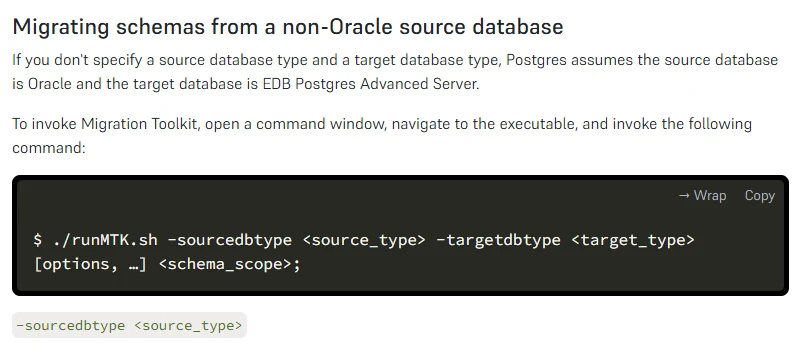
EDB Migration Toolkit provides a command-line workflow for supported source and target databases, including listed SQL Server and Postgres versions. It is useful for organizations already operating EDB or PostgreSQL that want to control schema or data selection in a scripted migration.
Its strengths depend on what the selected source-target path can migrate. JDBC driver compatibility is a prerequisite, and converted types and database objects need review against the intended Postgres edition. Application SQL and workload behavior still require tests after the copy.
Check the Migration Toolkit version and source-to-target matrix for the particular PostgreSQL or EDB product in use. Select relevant schema and data options before attempting a full load.
Review converted definitions independently of the row-copy report. Compare exact source and destination values, naming and application semantics using the same known input.
- Compatibility
- EDB Migration Toolkit, compatible Microsoft JDBC driver and supported Postgres destination.
- License and trial
- Tooling and product terms depend on the EDB deployment.
Ora2Pg
Ora2Pg’s maintained configuration documents connecting to SQL Server through Perl DBI and ODBC and loading supported exports into PostgreSQL. It is useful for teams that can run and review a repeatable script-based migration and want to inspect generated output before applying it.
Its strongest use is an auditable export and load in the supported SQL Server configuration. The SQL Server path depends on drivers and selected export types. Object and code conversion should be assessed feature by feature because the project’s capabilities and documentation differ by source engine.
Choose a release that documents Microsoft SQL Server export and configure the relevant export type. Confirm which objects are in scope before treating the product name as an indication of source support.
Run schema and data exports for the synthetic fixture and inspect the generated mappings. Compare decimal precision, Unicode and timestamp handling on PostgreSQL before scaling up.

- Compatibility
- Ora2Pg with compatible Perl DBI and Microsoft SQL Server ODBC setup and PostgreSQL access.
- License and trial
- Free, open-source project.
What do you need to move from SQL Server to PostgreSQL?
| What you need | Tools to shortlist | What to verify |
|---|---|---|
| Assess and migrate to a supported managed PostgreSQL platform | Confirm the exact target and inspect conversion action items before deploying the schema. | |
| Translate a substantial amount of T-SQL | Return the same result for a representative procedure, including ordering and NULL behavior. | |
| Transfer tables and data with visual mapping | Confirm the output types, indexes, identities and validation procedure for the chosen edition. | |
| Build a repeatable command-line migration | Review precisely which object types the workflow exports and measure the manual changes required. |
Separate PostgreSQL schema conversion, data movement and cutover
Start with types, keys, indexes, defaults and application queries. Review generated PostgreSQL code for cases that depend on T-SQL behavior, collation or special types. Then choose full load and any supported ongoing change path for the destination.
An instant and its original textual offset are different information. PostgreSQL stores timestamp with time zone as an instant and does not retain the source's offset. Store that offset in a separate field if the application needs it for display or audit.
Stored code and schema need substantial conversion
Trial a conversion tool with a reviewable report
Compare object coverage and run application query tests.
The destination schema already exists
Trial a data loader or supported replication path
Verify mappings, row values and the final write cutoff.
Original offset, precision or key behavior matters
Create an explicit semantic fixture
Validate exact values and test the next identifier.
Check exact decimal, Unicode and time semantics after migration
The fixture seeds one SQL Server row with an identity value starting at 41, a four-decimal value, Unicode text and a datetimeoffset with a two-hour offset. Carry the offset separately. If the approved PostgreSQL mapping uses timestamp with time zone, the target should represent the same UTC instant.
The PostgreSQL query assumes table public.type_trial and snake-case column names. Adjust only the names to match the actual conversion. Inspect the converted schema and test a new insert in a separate disposable copy to verify identity generation after imported values.
| Field | SQL Server input | PostgreSQL acceptance check |
|---|---|---|
| Identifier | 41 | Current row remains 41 and a later default insert uses an available key |
| Amount | 1234567890.1234 | Exact numeric precision survives |
| Text | árvíz | Unicode content and five characters survive |
| Captured time | 12:34:56.123 at +02:00 | UTC instant 10:34:56.123 and separate original offset 120 |
SELECT id, amount, note, char_length(note) AS note_characters,
       captured_at AT TIME ZONE 'UTC' AS captured_utc,
       original_offset_minutes
FROM public.type_trial
WHERE id = 41;How to compare these tools
Convert a schema and a stored routine with known differences. Transfer representative tables, then validate numeric precision, timestamps, constraints and results on PostgreSQL. Sources checked .
Convert one SQL Server table and one procedure
Use an empty disposable SqlToPgTrial database. Run Setup once and use View to inspect the expected row. Configure the approved mappings with at least four decimal places and a separate original offset field before moving the fixture.
Create a SQL Server fixture with exact values for PostgreSQL migration
T-SQL · 29 lines
- Create the synthetic source and inventory what schema, data and code objects the chosen tool will move. Record the approved PostgreSQL types and naming before conversion.
- Compare the source and target values, including UTC time, offset, decimal amount and Unicode text. Verify the generated schema and a new identifier in an isolated target copy.
- Run representative app queries and track remaining conversion items. If you use change capture, seed a new known source change after initial load and check both sides at cutover.
Conclusion
Choose for the target and the amount of T-SQL you need to keep. Managed conversion workspaces help when the destination is fixed. A loader can move the table data while your team rewrites routines. Use a generated schema and query results from the trial to estimate the remaining work.
Frequently asked questions
Can a SQL Server to PostgreSQL tool convert stored procedures?
Some conversion tools translate supported T-SQL objects and report items that need manual work. Compare the source and target result sets, transaction behavior and application call before accepting a conversion.
How do I migrate SQL Server IDENTITY values to PostgreSQL?
Preserve imported keys and verify the PostgreSQL identity or sequence for the next insert. Test an insert with no explicit key after loading the data. Check the target primary and unique constraints.
How should I check SQL Server datetimeoffset values in PostgreSQL?
Compare the instant in UTC. SQL Server datetimeoffset can store seven fractional digits. PostgreSQL timestamps support up to six, and timestamp with time zone is displayed in the session’s time zone. Agree on the precision rule and keep a separate offset field if the application needs the original offset.
Do schema conversion and data movement use the same tool?
Some services offer both steps in one workflow. Others export DDL or move table data separately. Check the exact tool and edition for tables, constraints, indexes, views and routines.
What should I verify after moving data from SQL Server to PostgreSQL?
Verify the row counts and sampled values, Unicode, numeric scale, timestamps, nullable fields, constraints and identity behavior. Run representative application queries and compare results before cutover.
Will PostgreSQL timestamp with time zone preserve the original SQL Server offset?
It preserves the instant and displays it according to the session time zone. Keep the original offset or required source representation in another column when it carries business meaning.
Why verify a new identity value after loading the old rows?
The loaded keys can be correct while the target sequence or default still generates an existing key. Run a new insert in an isolated copy and verify the configured generator.