

SQL Server data can reach Microsoft Fabric as a mirrored database, as rows written into a Lakehouse or Warehouse, or through a OneLake shortcut to files managed elsewhere. Those paths can look similar from a report. They differ in who owns the underlying table, how changes are applied and whether the team can control its layout and history.
Fabric Mirroring is useful when the source is supported and the goal is a managed analytical copy. Copy jobs and integration platforms provide more control over destinations and transformations. The important comparison is where shared tables physically live, what change capture the source requires and what happens if a connector falls behind or a table’s definition changes.
SQL Server to Microsoft Fabric replication tools at a glance
Check whether the tool writes a mirrored database or a separate Fabric or OneLake destination. Compare supported source versions, modes and delivered data.
| Tool | Destination path | Source or delivery check | Query evidence |
|---|---|---|---|
| Microsoft Fabric Mirroring for SQL Server | Native mirrored database and SQL analytics endpoint | Version-specific SQL Server prerequisites | Target schema, values and replication state |
| Fabric Data Factory Copy Job | Configured Fabric destinations and supported CDC job | Supported source, destination, mode and delete handling | Job scope and final query results |
| Azure Data Factory | Supported SQL Server source and designed Fabric delivery | Integration runtime, sink and incremental pattern | Scheduled copy and target data verification |
| Qlik Replicate | Documented SQL Server source and supported Microsoft destination | Exact Fabric or approved intermediary target support | Task and actual target query |
| CData Sync | SQL Server source and supported Fabric delivery | Driver, destination, keys and incremental settings | Sync result and active records |
| Striim | Documented Fabric delivery for SQL Server data | Pipeline and supported Fabric target configuration | CDC state and query visibility |
| Informatica Database Ingestion and Replication | Supported Microsoft Fabric target workflow | Exact source and release support | Captured changes and Fabric table |
| Oracle GoldenGate | SQL Server capture with a designed supported delivery path | Exact destination or intermediate connector support | Capture checkpoint and consumer-visible results |
| Fivetran Managed Data Lake Service | Supported SQL source to intended lake or Fabric access | Approved destination and OneLake integration path | Lake table and queryable projection |
Microsoft Fabric Mirroring for SQL Server
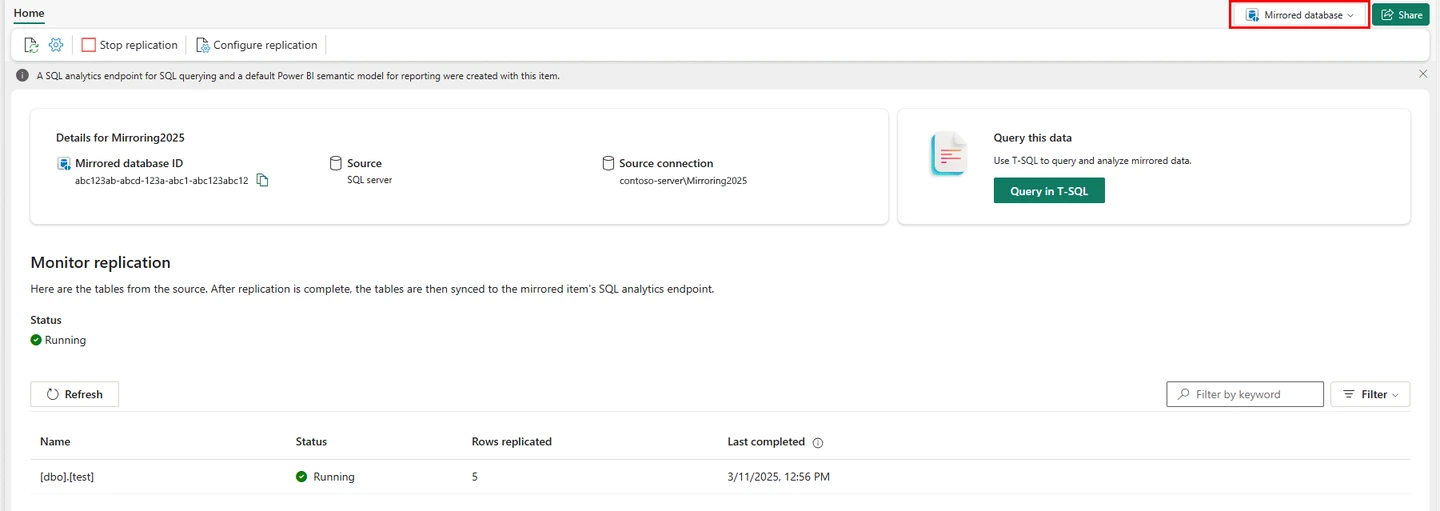
Microsoft Fabric Mirroring replicates eligible SQL Server data into a mirrored database item and OneLake, with a SQL analytics endpoint for querying it. It is useful when the team wants Fabric to manage a continuously updated analytical copy of supported SQL Server tables.
The source build determines how mirroring captures updates. Microsoft documents CDC for SQL Server 2016 through 2022 and a separate mirroring change feed for supported SQL Server 2025 deployments. Gateways, eligible tables and source log behavior need review before enabling it.
Confirm which SQL Server generation and deployment are eligible for mirrored databases. The SQL Server 2016 through 2022 prerequisites differ from the SQL Server 2025 path, and each has documented limitations.
Observe setup and replication status, then query the actual Fabric SQL analytics endpoint. Match table names, allowed data types and reporting freshness under the intended workspace role.
- Compatibility
- Supported SQL Server, Fabric capacity, gateway or Azure Arc configuration as applicable.
- License and trial
- Fabric and applicable infrastructure terms.
Fabric Data Factory Copy Job
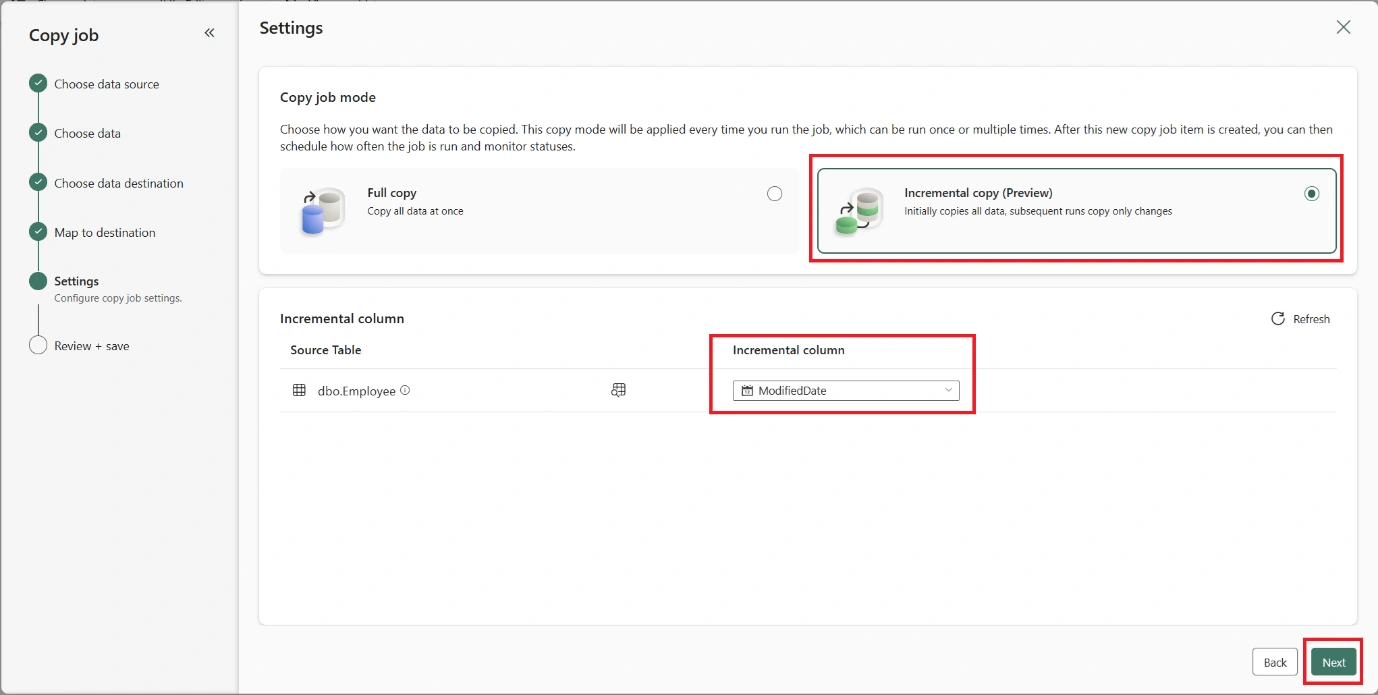
Fabric Data Factory Copy Job can move supported SQL Server data into a Fabric destination and offers a documented CDC replication mode. This is useful when a team wants a Fabric-managed copy process with explicit source and destination choices and a visible job schedule.
Copy Job depends on the feature support of each source and destination. CDC replication, watermark-based incremental copy and a scheduled full copy offer different semantics. Target keys and write behavior determine how updates and deletes appear.
Verify that the exact source and destination support the documented CDC Copy Job mode in your environment. Record options for initial load, updates, deletes and target schema.
Measure a complete job and validate all fixture keys after the source changes. Confirm the destination read path and how the job reports restricted objects or failures.
- Compatibility
- Fabric workspace and supported Copy Job connectors and replication mode.
- License and trial
- Fabric capacity usage and applicable infrastructure terms.
Azure Data Factory
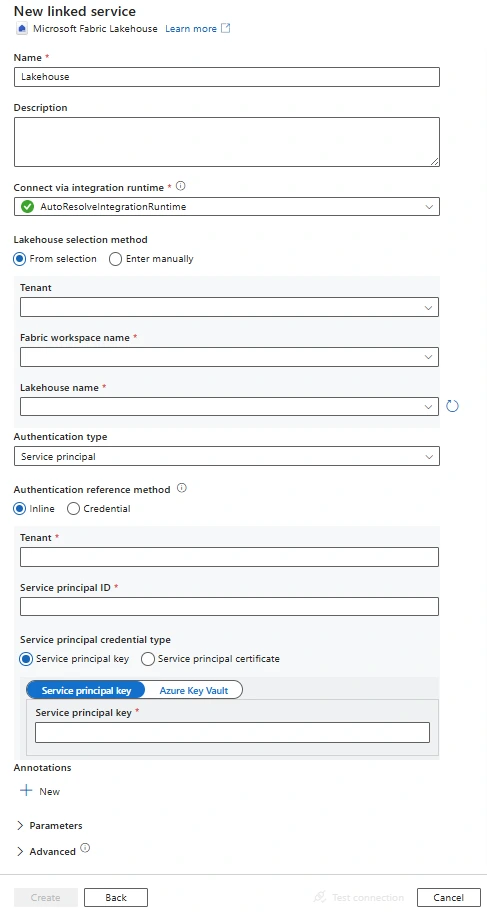
Azure Data Factory has a SQL Server connector and a Microsoft Fabric Lakehouse connector for supported copy workflows. It is useful when a team already runs ADF pipelines and wants control over extraction, orchestration, mappings and whether the destination is a file or a table.
The pipeline can control when and how data moves, but it must explicitly define incremental boundaries and the handling of changed or deleted records. Runtime placement, authentication and the Lakehouse target behavior determine the final result.
Configure the supported SQL Server source and intended Fabric or intermediary sink. Record the runtime and how incremental state, timestamps and keys are kept across writes.
Compare the pipeline log and final Fabric data. If using a watermark copy, independently establish the workflow for delete handling and verify it on the fixture.
- Compatibility
- Azure Data Factory with compatible SQL Server and Fabric Lakehouse connectors and integration runtime.
- License and trial
- Azure Data Factory, Fabric and applicable infrastructure usage.
Qlik Replicate
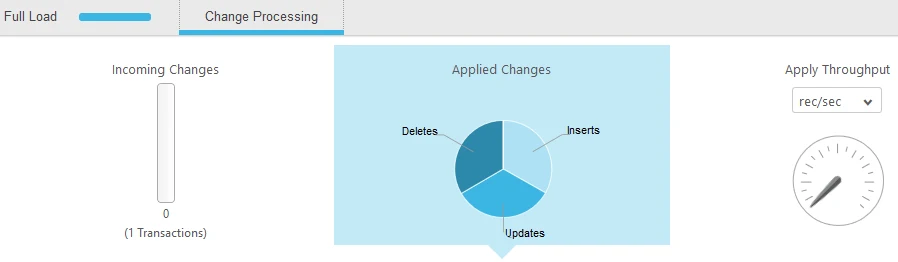
Qlik Replicate can move data from eligible SQL Server sources into a supported Microsoft Fabric Data Warehouse endpoint. Its task model can manage full load and changes where supported. It is useful when a team wants a Fabric Warehouse destination and already uses Qlik replication operations.
The Warehouse endpoint, staging and source capture setup determine what the task can deliver. A warehouse load and a Fabric mirrored database provide different data and ownership paths. Table and type compatibility, update behavior and monitoring still need to be checked.
Select the supported Replicate SQL Server endpoint in the installed release. Confirm whether the planned destination is supported directly or through an approved intermediary.
Compare source capture, downstream load and a real Fabric query. Record where failures are visible and whether delete state is reconciled at the final endpoint.
- Compatibility
- Qlik Replicate with supported SQL Server and Fabric Warehouse endpoints.
- License and trial
- Commercial Qlik and Fabric terms.
CData Sync
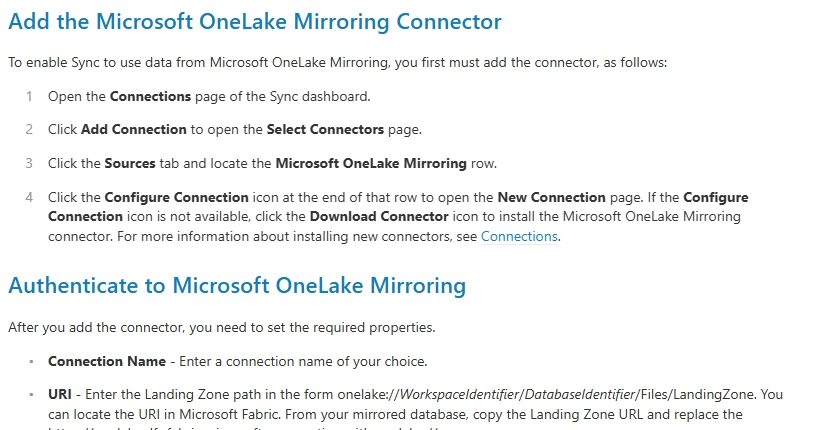
CData Sync supports SQL Server source connections, including documented change capture, and can deliver to eligible Microsoft Fabric destinations. It is useful when a team already uses CData Sync and wants a scheduled pipeline with explicit connection configuration.
The exact Fabric connector and write mode determine which asset receives data. SQL Server CDC tracks source activity, while the job must apply that activity in a useful way at the destination. Authentication, key mapping and resync behavior are parts of operating it.
Use the documented SQL Server source driver and check eligible destination and replication mode. Record connector and driver versions, source settings and access to the target.
After initial load, apply a known update and delete. Compare job state with actual Fabric results, and confirm how column or key changes would be handled in the installed version.
- Compatibility
- Compatible CData Sync SQL Server source and Microsoft Fabric destination connector.
- License and trial
- Commercial CData and Fabric terms.
Striim
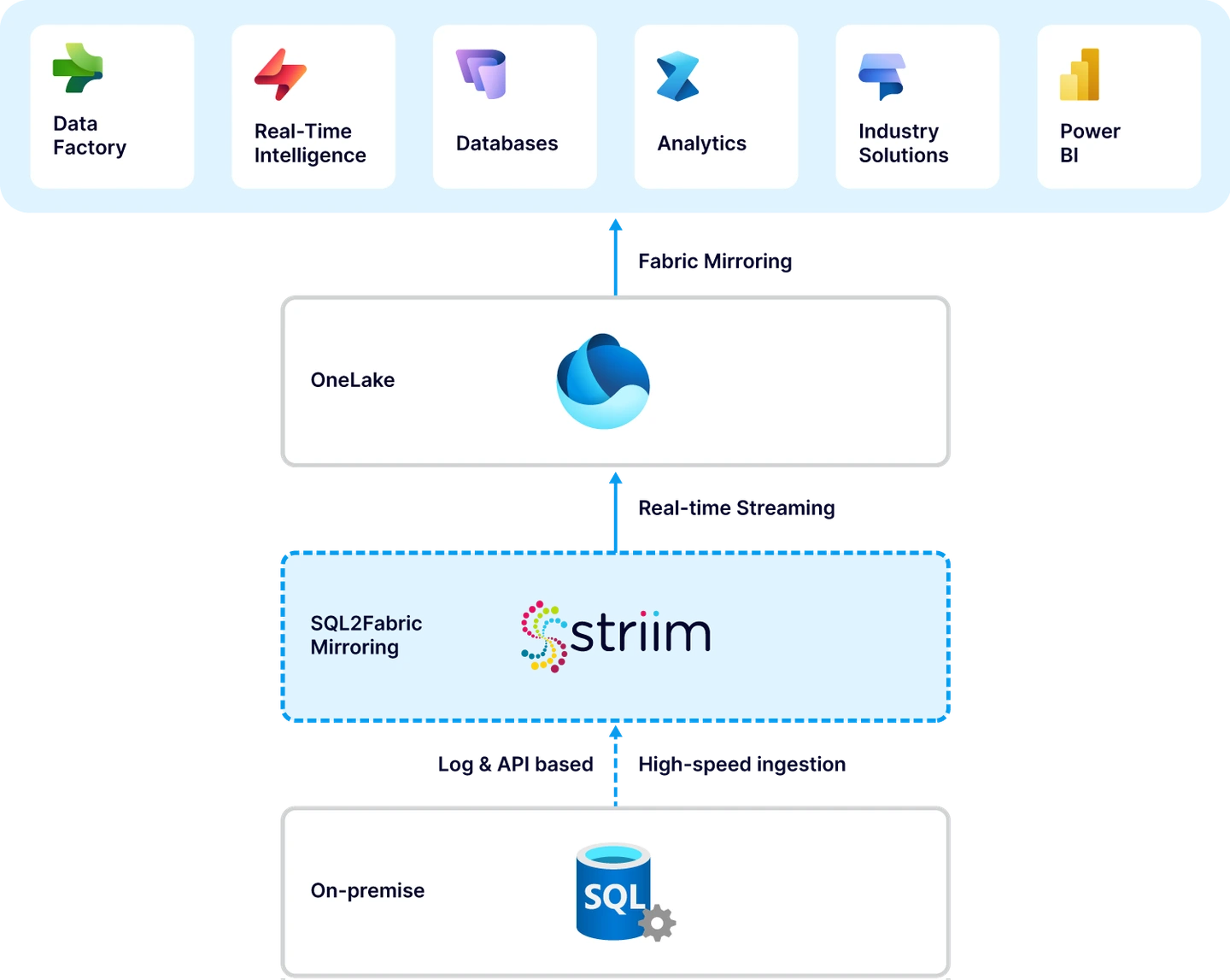
Striim can capture SQL Server changes through a supported source and use its Fabric Mirror Writer to deliver to an eligible Fabric mirrored item. It is useful when a team wants a mirroring destination while retaining a separate pipeline for capture and processing.
Its fit depends on the source reader, Fabric item and supported writer settings. Snapshot boundaries, keys and destination restrictions affect how the mirror is populated. The team maintains the Striim pipeline and observes source lag and the eventual Fabric result.
Use the documented SQL Server-to-Fabric architecture and record which destination reads the data. Confirm deployment-specific credentials and target options when mapping a new source.
Measure the time from source commit to visible result at the Fabric endpoint. Check how a target pause is reported and verify the expected current rows when it resumes.
- Compatibility
- Supported Striim SQL Server source and Fabric Mirror Writer configuration.
- License and trial
- Commercial Striim terms and Fabric usage charges.
Informatica Database Ingestion and Replication
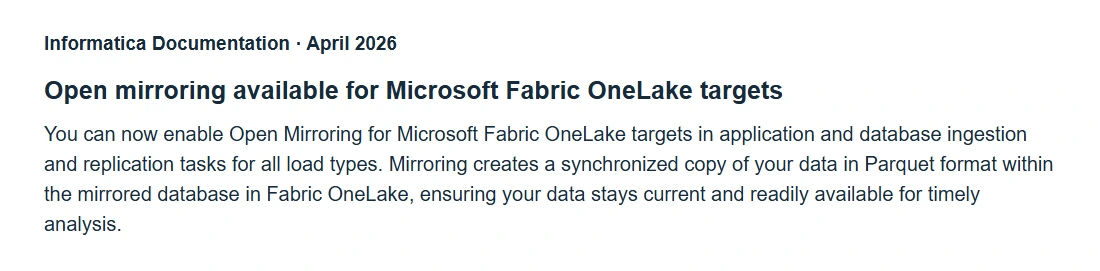
Informatica Database Ingestion and Replication lists supported integration with Microsoft Fabric OneLake through eligible connectors. It is useful when the organization already runs Informatica ingestion workloads and wants SQL Server data to arrive through its existing operations and governance workflow.
The source, destination and version determine which load types are supported. A OneLake target can have different table and write constraints from a Fabric Warehouse endpoint. The useful comparison includes the configured target resource and the permissions and latency needed to operate it.
Verify supported source and Fabric destination paths in the exact Database Ingestion and Replication version. Match permitted schema, apply settings and target credentials to the desired workspace.
Test both the bulk load and known changes. Inspect the job and the downstream query as separate observations and record what manual handling is required for unsupported objects.
- Compatibility
- Supported Informatica SQL Server and Microsoft Fabric OneLake connectors and deployment.
- License and trial
- Commercial Informatica and Fabric terms.
Oracle GoldenGate
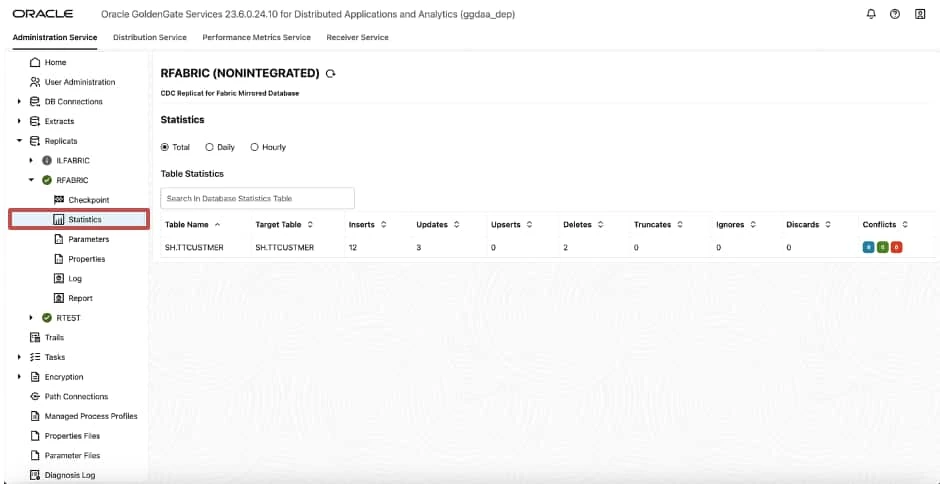
Oracle Cloud Infrastructure GoldenGate can connect to supported Microsoft SQL Server deployments and configure a Replicat for a Microsoft Fabric mirror. It is useful when the team already runs GoldenGate capture or wants the Fabric delivery to follow its existing replication setup.
Its value is keeping capture and delivery explicit. A supported SQL Server connection and Fabric target need their own permissions and configuration, and the initial load must align with the following trail. The target’s schema and delivery rules still determine what users can query.
Use the supported SQL Server connection and validate the separate downstream Fabric path. Check SQL Server capture privileges and target compatibility for the documented deployment.
Track change capture, delivery and materialization separately using a test marker. Verify target update and deletion evidence as well as the GoldenGate checkpoint.
- Compatibility
- Supported OCI GoldenGate SQL Server connection and Microsoft Fabric Mirror Replicat.
- License and trial
- Oracle GoldenGate and Fabric usage charges.
Fivetran Managed Data Lake Service
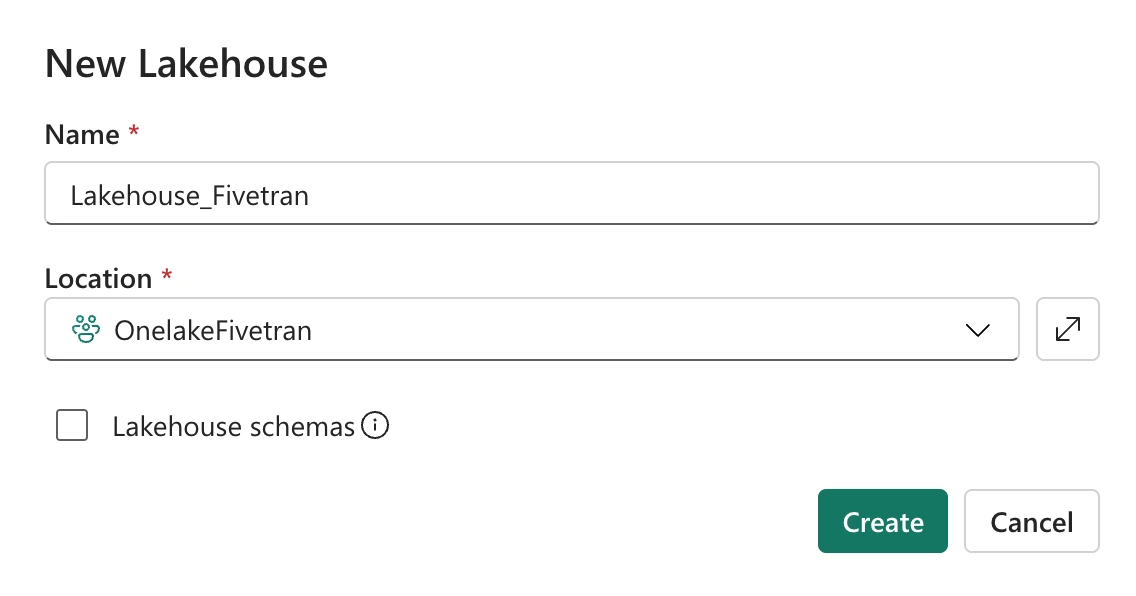
Fivetran Managed Data Lake Service can land SQL Server connector data in compatible external storage. Its documented Azure setup can automatically create OneLake shortcuts to Delta Lake metadata it manages. It is useful when the team wants centrally operated replication and a Fabric consumption path over the same data.
The shortcut exposes data that the Fivetran lake service manages in external storage. Storage permissions, table maintenance and shortcut configuration affect the experience. A Fabric-managed mirror or directly written Warehouse table is a different destination design.
Check the SQL Server connector and the chosen managed lake destination, then verify how Fabric accesses or exposes that data. Confirm the exact OneLake or sharing workflow supported by your plan.
Measure visible changes using the business query or semantic layer. Check deletion and history policies where the managed lake stores a raw representation that differs from the current projection.
- Compatibility
- Fivetran SQL Server connector, supported Azure data lake and optional Fabric shortcut setup.
- License and trial
- Fivetran, Azure Storage and Fabric charges depend on configuration.
Which SQL Server to Fabric setup fits?
| What you need | Tools to shortlist | What to verify |
|---|---|---|
| A mirrored database with a SQL analytics endpoint | Verify the version, gateway or capture runtime, destination keys and apply status at the endpoint. | |
| Managed CDC into a Fabric Lakehouse or Warehouse | Check the exact destination and write mode. Verify what the reporting query returns after a delete. | |
| An existing data integration platform writing into Fabric | Confirm the target item and table visibility. Document the merge and delete handling the chosen workflow needs. |
Check SQL Server version and target scope before choosing Fabric replication
Microsoft documents CDC requirements for native mirroring from SQL Server 2016 through 2022. SQL Server 2025 follows a different path and has deployment limitations. Microsoft documents that the 2025 path cannot mirror a database with CDC enabled and has restrictions for SQL Server 2025 on Azure VMs and Linux.
Use the current limitations for your engine, database and tables. Verify primary keys and unsupported types, and check how schema changes are handled. When using Copy Job or a third-party tool, verify its own result format and any intermediary delivery.
A supported native mirrored database
Trial Microsoft Fabric Mirroring
Check version, CDC requirements, eligible tables and observed endpoint freshness.
A managed job into a Fabric destination
Trial a documented Copy Job or pipeline
Verify CDC support and the deletion and retry semantics for the sink.
An existing platform supplies changes across sources
Validate its supported OneLake or Fabric path
Trace source capture, staging and the final query separately.
Measure when the SQL analytics endpoint returns the expected data
Create and load the synthetic FabricReplicateTrial records into the dedicated destination. Run Change after confirming both keys are visible. The current result should contain key 1 with CountValue 29, and key 2 should be absent from a configured current-state projection.
Use the analytics endpoint or target actually used by reporting. Compare source commit, replication status, target table visibility and end-user SQL query time. Record any different behavior for republishing or refreshing a semantic model separately.
| Observation | What to capture | Expected trial evidence |
|---|---|---|
| Source version and setup | SQL release, deployment and actual capture method | Supported mirroring or ingestion mode |
| Change recorded | UTC source commit observation | Known update and delete on disposable records |
| Landing or mirrored table | Target identity, replication state and actual values | Expected table mapping and change behavior |
| Reporting query | Endpoint, role and first correct result | Key 1 value 29 and no active key 2 |
How to compare these tools
Replicate the same source table into the required Fabric destination. Check refresh, an update and a delete, then verify what the end user sees through the intended query endpoint. Sources checked .
Check what Fabric shows after a SQL Server update and delete
Use an empty disposable FabricReplicateTrial database with the supported source setup. Run Setup once, configure the lab target and verify the initial records. Run Change and compare the resulting destination using the intended reporting identity.
Generate a known SQL Server update and delete for Fabric
T-SQL · 29 lines
- Record the exact Fabric workflow and source support. Set up a supported test input and query both seeds in the approved target before applying a change.
- Run Change and compare job status with actual first visible update and deletion. Measure endpoint or report refresh time separately from product processing.
- Check selected schema and role limitations and repeat the visible data test after an approved lab restart or resync. Record actual freshness and any differences in target behavior.
Conclusion
Use native Fabric Mirroring when the SQL Server version and destination fit the documented prerequisites. Choose Copy Job or a replication platform when you need another Fabric item, an existing runtime, or more control over apply. Compare the actual reporting result, lag and delete handling before deciding. Use the supported setup for your SQL Server version.
Frequently asked questions
Can I mirror on-premises SQL Server into Microsoft Fabric?
Yes, for supported versions, editions and topologies with the required Fabric capacity and source connectivity. SQL Server 2016–2022 mirroring uses CDC. SQL Server 2025 uses a different setup that requires Azure Arc and has separate restrictions.
Can native Fabric Mirroring and SQL Server CDC be used together on SQL Server 2025?
Microsoft's SQL Server mirroring limitations say that a SQL Server 2025 database with CDC enabled cannot use native Fabric Mirroring. The CDC requirement applies to native mirroring from SQL Server 2016–2022. Check the version-specific procedure before setting up either path.
Is Fabric Mirroring the same as feeding a Fabric Warehouse?
A mirrored database is a Fabric item with an autogenerated SQL analytics endpoint. A Warehouse is a different destination. Choose the item your reporting team needs and confirm the tool supports writing to that item.
Can a watermark copy apply source deletes?
A watermark query only sees rows returned by the source. A hard-deleted row is gone from that query. Use a CDC mode, an explicit delete signal or a reconciliation step when the destination must reflect source deletes.
How do I measure SQL Server-to-Fabric replication lag?
Record the source commit time and the first query through the reporting endpoint that shows the expected change. Read the replication status too, so you can see whether the time was spent capturing, applying or making changes visible to queries.
Does every SQL Server version use the same Fabric mirroring setup?
Use the Microsoft prerequisites for the actual version. SQL Server 2016 through 2022 use the documented CDC path. SQL Server 2025 has separate eligibility and source restrictions.
Does a healthy mirror report prove a Fabric dashboard uses current SQL data?
Check the query and any model refresh the dashboard relies on. Track the source commit, mirror status and first correct report result separately.