
SQL Server hosting and macOS client support
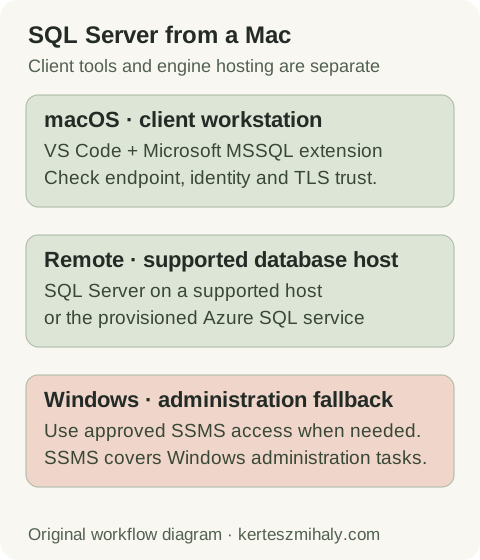
Microsoft does not provide a native macOS SQL Server Database Engine package. The supported client arrangement connects to an engine on a supported host. Local Docker setups using Apple Silicon translation may work for experiments but are outside Microsoft's supported container configurations.
The target can be an existing SQL Server instance, a development server or an appropriate Azure SQL service. Client installation and engine provisioning are separate tasks.
SSMS runs on supported Windows systems. Tasks requiring its interface use a Windows workstation or remote environment meeting the SSMS requirements. Mac clients can execute authorized T-SQL against the same server.
Apple Silicon, Docker and retired Azure SQL Edge images
Microsoft supports SQL Server containers on Linux hosts with Intel or AMD x86-64 processors. Rosetta, QEMU and other translation environments are not tested or supported, including deployments that successfully start on Apple Silicon. See the Microsoft container prerequisites.
Azure SQL Edge was retired on 30 September 2025, ending updates and technical support. Older Mac tutorials using that image therefore do not describe a currently supported deployment. See the Microsoft lifecycle notice.
A reproducible development engine requires a supported host with provisioning, persistence and reset procedures. Database copies remain subject to licensing and production-data restrictions.
| Need | Client or hosting option |
|---|---|
| T-SQL development on macOS | VS Code + MSSQL connected to an approved database host |
| Several database engines in one UI | DBeaver, with the edition and features required for the workload |
| SSMS-specific administration | Supported Windows environment with approved access |
| A reproducible SQL Server development engine | Supported host with documented reset and persistence settings |
Install VS Code and the MSSQL extension on macOS
- Get VS Code from its official download site and choose the macOS package appropriate to the machine.
- Install it using Microsoft's macOS setup instructions.
- Open Extensions with Cmd+Shift+X, search for
mssqland select SQL Server (mssql) published by Microsoft. - Install the extension and verify that its MSSQL/Connections view appears.
The MSSQL extension overview describes connection, query, object-browsing and plan features. Record the installed extension version when reporting an issue, because connection controls can change between releases.
Azure Data Studio was retired on 28 February 2026, ending servicing and security patches. Microsoft recommends VS Code with MSSQL. Existing scripts can be retained, while replacement workflows and extension dependencies require testing. See Microsoft's retirement and migration guidance.
Managed proxies may restrict package or extension downloads. Installation issues are handled through the workstation deployment process, with the error output and required network access. Official packages and TLS validation should remain part of that process.
VS Code tools can execute locally, through Remote SSH or inside a container workspace. Identify the extension context when comparing connections from different windows.
Connect a Mac to SQL Server with the correct endpoint and account
Obtain the server DNS name, TCP port, database and authentication method from the database owner. Add a connection through the MSSQL Connections view. Start with individual parameters when that makes the target clear; use an approved connection-string pattern when the environment needs additional settings.
tcp:sql01.example.com,51433The example port is illustrative. This SQL Server endpoint form uses a comma between host and port. An explicit endpoint avoids named-instance discovery. localhost refers to the Mac or its current runtime, rather than a remote engine.
SQL login, Windows/Kerberos and Microsoft Entra authentication have different prerequisites. The selected method must correspond to the provisioned database access; signing into a corporate account on macOS does not configure every SQL connection for that identity.
Azure connections use the endpoint and access policy of the provisioned service. Azure SQL Database and on-premises named instances have different discovery, network and authentication requirements.
Use the configured credential mechanism for password storage. SQL files, shared connection strings and screenshots should exclude secrets. Distinct development and production profile names aid orientation; server permissions enforce access.
The connection associated with the query editor determines the database used for execution. It may differ from Object Explorer after switching profiles. Check the editor connection before a write operation.
Verify the SQL Server database and login from the Mac
Select the intended connection in a SQL file or query editor and run the context query. It identifies the current session without modifying database objects or data.
Verify server, database and login context
T-SQL · 5 lines
Compare the returned instance, database and login with the intended environment. A session opened in master tests that context; access to application objects requires a test in the application database.
A small authorized query against a known development object checks schema access, returned types and basic export behavior. Larger exports require a separate test with appropriate result-size limits.
Microsoft's first-query quickstart creates sample objects and is suitable for a disposable test database. The context query above performs no object changes.
Save repeatable diagnostic SQL without credentials, and record the expected target in the runbook. Keep the engine version separate from the VS Code or extension version when reporting compatibility problems.
Fix SQL Server connection, certificate and login errors on Mac
| Failure | Next check |
|---|---|
| Host cannot be resolved or reached | DNS name, VPN/private route, observed port and allowed client source |
| Named instance fails; explicit port works | Discovery assumptions and approved endpoint configuration |
| Certificate chain or name error | Client trust, certificate chain and the DNS name used |
| Login failed 18456 | Server-side reason/state, account and requested database |
| Only one application or editor window fails | Effective runtime, driver, connection profile and credentials |
Network tests use the Mac and runtime in which the failure occurs. A server-local test checks a different route. Reporting-portal access also uses a different endpoint and port from database access.
The connection-stage guide describes endpoint and transport diagnosis. Error 18456 requires the server log reason and state. Credential changes apply to authentication failures after name resolution and transport have succeeded.
VS Code MSSQL, ODBC command-line tools and DBeaver JDBC use different client stacks. Their trust configuration may differ even on the same workstation. The certificate guide describes chain and endpoint-name checks.
Record the configured encryption and certificate-validation settings. Repair CA trust or endpoint-name mismatches and retest the normal profile. Any incident-specific validation bypass needs to be removed after that repair.
Use Mac SQL development tools with an SSMS administration fallback
The MSSQL extension provides object browsing, query results, execution-plan tools and documented database operations. Check feature availability in the installed extension and the required server permissions. Retain a supported Windows environment for Agent management and other runbooks that depend on SSMS-specific interfaces.
Estimated plans describe the planned execution strategy; actual plans execute the statement and include runtime information. Assess the operation's impact before collecting an actual plan. The Query Store guide covers retained historical comparisons.
Database backup paths belong to the engine host or configured storage destination. A client can initiate a server backup without storing its files on the Mac. The engine's execution account needs access to the destination.
The sqlcmd guide covers command-line implementations, authentication, encryption and exit handling. ODBC tools have their own requirements; the ODBC guide links to Microsoft's macOS installation instructions. An ODBC installation is separate from the MSSQL extension's connection setup.
For work across several database engines, use the DBeaver vs SSMS comparison to evaluate the required operations. Document the primary development client and the approved administration environment.
Document the macOS SQL Server client setup
Record macOS and processor architecture, client/extension version, endpoint convention, authentication method, network requirements and the administration route. Keep secret references separate from the setup document. Verify reconnection after the normal VPN and editor restart cycle.
For support, collect the sanitized error, client and runtime versions, intended server and database, and failing connection stage. Include the server reason and state for authentication failures.
A remote SQL Server health audit is available for inconsistent access configuration or undocumented server administration. Client setup records should identify the administrator responsible for the database host.
SQL Server on Mac questions
Can SSMS run natively on macOS?
SSMS targets supported Windows systems. Use VS Code with MSSQL for the Mac development workflow and retain an approved Windows environment for operations that require SSMS.
Is SQL Server in Docker on Apple Silicon supported by Microsoft?
Microsoft supports these containers on Linux hosts with Intel or AMD x86-64 processors. Rosetta and other emulation or translation environments are not tested or supported, even when the container starts successfully.
Do I need the ODBC driver for VS Code MSSQL?
The MSSQL extension does not universally require a separate ODBC installation. ODBC applications and ODBC sqlcmd have their own driver prerequisites. Installation requirements depend on the client implementation.